django-cacheops: Redis ORM caching keyed to model changes
A slick ORM cache with automatic granular event-driven invalidation.
At a glance
- What is it?
- Django cacheops stores ORM reads in Redis and drops them when the models behind them change, which answers stale querysets at the price of signal handling on your write paths. The configuration is short enough to read in one sitting, and it says more about what not to cache than most cache layers do.
- Who is it for?
- Pick django-cacheops when a few read paths dominate your latency and you can name the models feeding them, because event-driven invalidation is the whole reason to add Redis. Decline it when your caching need is per-view and static, or when mass deletes are routine, since signal binding is what buys the freshness.
- Can I use it commercially?
- Yes. BSD-3-Clause is a permissive licence: you can use, modify and sell software built on it, as long as you keep its copyright and licence notices.
- Is it still maintained?
- Activity is slowing. The repository last received commits 6 months ago.
- What is it written in?
- Mainly Python, according to GitHub's language statistics.
Answers come from the project's GitHub data, last synced on October 22, 2026, and from our analysis. They are not legal advice.
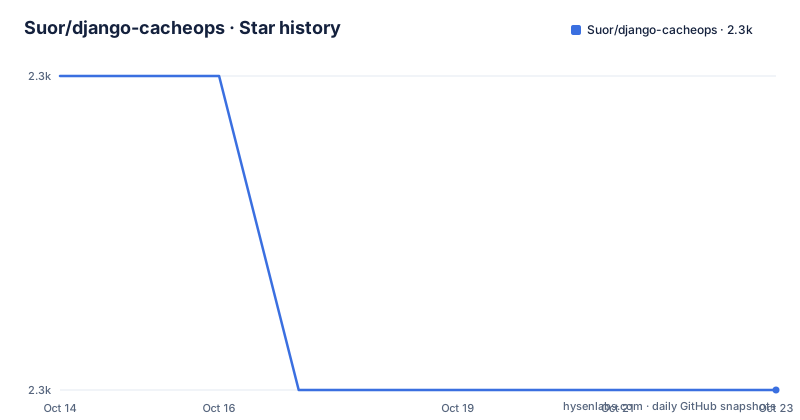
Star history
- Suor/django-cacheops2,270 ★ · -1
| Repository | 2026-10-14 | 2026-10-22 |
|---|---|---|
| Suor/django-cacheops | 2.3k | 2.3k |
-1 Stars in the last 8 days, measured from the daily GitHub snapshot. Compare with other projects
Editorial analysis
Five ORM operations and one config dict drive the whole cache
django-cacheops sits between a Django ORM call and Redis and keys cached values to the models behind them rather than to a clock alone. Its whole surface is one dict named `CACHEOPS`, where each key is a model pattern and each value names the operations to cache plus a timeout. Five operation names exist, `get`, `fetch`, `count`, `aggregate` and `exists`, and the README gives `'all'` as an alias for that complete set.
Model patterns are globs over app label and model name, which makes broad rules cheap to write and easy to leave in place too long. `'auth.user'` names a single model, `'auth.*'` covers every model in the auth app, `'*.*'` covers everything, and `'some_app.*': None` refuses even manual caching for a whole app. A model the dict never names still works through `.cache()` whenever a matching rule enables manual mode, so `'*.*': {'ops': (), 'timeout': 60*60}` opens caching everywhere without hiding a single automatic read.
That shape is where most projects begin, and widening it is exactly what the project warns against. Non-empty ops on `'*.*'` will cache things you never intended to touch, migration bookkeeping tables among them, so the documented approach is to restrict by app name with `'app_name.*'` instead. Nothing in the configuration stops you. The README gives no command that lists every model a broad rule already covers, which means the audit is manual.
Default profiles work the other way. `CACHEOPS_DEFAULTS` lets you write the shared timeout once, so a rule as short as `'*.*': {}` inherits an hour instead of repeating `60*60` on every line.
One pip line and one INSTALLED_APPS entry bring cacheops in
Installation is a single pip call against the PyPI name, or a direct reference to the master branch of the repository.
$ pip install django-cacheops

# Or from github directly
$ pip install git+https://github.com/Suor/django-cacheops.git@master
Neither command brings a Redis server with it. You supply the connection yourself, and you add `cacheops` to `INSTALLED_APPS`.
CACHEOPS_REDIS = {
    'host': 'localhost', # redis-server is on same machine
    'port': 6379,        # default redis port
    'db': 1,             # SELECT non-default redis database
                         # using separate redis db or redis instance
                         # is highly recommended

    'socket_timeout': 3,   # connection timeout in seconds, optional
    'password': '...',     # optional
    'unix_socket_path': '' # replaces host and port
}
Database 1 in that sample is a recommendation rather than an arbitrary pick, because the comments call a separate Redis database or a separate Redis instance highly recommended, and the ORM cache and the plain time-invalidated cache both land in the same server. The first cached call you can make is manual, on any queryset, as long as the `'*.*'` manual rule above is in place.
Article.objects.filter(tag=2).cache()Narrowing that to one operation is the move when a paginator is the real bottleneck, since only the count call is served from cache and the page fetch still reaches the database.
qs = Article.objects.filter(tag=2).cache(ops=['count'])
paginator = Paginator(objects, ipp)
articles = list(pager.page(page_num)) # hits database
Read that snippet literally and you find two slips in it: the queryset variable is never used, because the Paginator is handed a name called `objects`, and the object built as `paginator` is called as `pager`. The argument order and the trailing comment are the part to copy. An empty op list turns caching off, `.nocache()` does the same for one base queryset while each derived queryset hits the database on its own, and `.cache(timeout=...)` overrides the configured lifetime for a single call.
Three Redis connection shapes cover URL, socket and sentinel
`CACHEOPS_REDIS` takes the dict shown above, but the same key also accepts three URL forms, which is how you reach a unix socket or carry a password without a second setting.
CACHEOPS_REDIS = "redis://localhost:6379/1"
CACHEOPS_REDIS = "unix://path/to/socket?db=1"
CACHEOPS_REDIS = "redis://:password@localhost:6379/1"
Managed Redis goes through `CACHEOPS_SENTINEL` instead, where `locations` and `service_name` are both required and the database defaults to 0.
CACHEOPS_SENTINEL = {
    'locations': [('localhost', 26379)], # sentinel locations, required
    'service_name': 'mymaster',          # sentinel service name, required
    'socket_timeout': 0.1,               # connection timeout in seconds, optional
    'db': 0                              # redis database, default: 0
    ...                                  # everything else is passed to Sentinel()
}
Anything you leave out of that dict is handed to the client constructor unchanged, so transport options stay out of cacheops. A fourth key, `CACHEOPS_CLIENT_CLASS`, names your own client class, which the README requires to be compatible with or subclass `redis.Redis`. That setting is the only documented way to change how the package talks to Redis.
One asymmetry is worth noticing. The README says the same package also serves simple time-invalidated entries and that those can live on Redis or on the filesystem, yet every key in the setup section is a Redis key. The filesystem option is asserted in prose and never shown as a setting.
local_get stays in process memory and ignores every invalidation
Two per-model options sit beside the operation list and the timeout in the same dict. Setting `local_get: True` keeps simple gets for that model in process local memory, described as very fast, under one condition that deserves a decision instead of a skim: the entry is not invalidated in any way until the process restarts. No save, no delete, no related write reaches it. The README frames this as useful for extremely rarely changed things, which is a narrow category in a schema full of foreign keys.
The other option runs the opposite way. `cache_on_save=True | 'field_name'` writes an instance into the cache when it is saved, and a later `.get(field_name=...)` request can read it back, with `True` keying that write by primary key. No documented rule covers ordering between a save and an invalidation, so treat the two paths as independent mechanisms rather than one pipeline.
Two global settings change behaviour for everything. `CACHEOPS_DEGRADE_ON_FAILURE` tells cacheops to degrade gracefully when Redis fails, which is the difference between a cache outage and an application outage at the cost of every read reaching the database.
CACHEOPS_DEGRADE_ON_FAILURE = TrueAnd `CACHEOPS_ENABLED=False`, applied through Django's `override_settings`, turns every cacheops method and decorator into a no-op, which is the documented way to switch the package off inside a test.
from django.test import override_settings

@override_settings(CACHEOPS_ENABLED=False)
def test_something():
    # ...
    assert cond
Signal binding buys freshness and slows mass deletes
Invalidation is event-driven rather than time-driven, and the clearest example in the README decorates an ordinary function so that its cached result dies on any change, addition or deletion to one model.
from cacheops import cached_as

@cached_as(Article, timeout=120)
def article_stats():
Decorators reach further than that: they cache any user function or view the same way a queryset is cached, and the package ships template extensions for Django and jinja2 so the same invalidation rules reach rendering code.
The cost sits in the same sentence as the feature. The README notes that binding signals has overhead, specifically that it prevents fast mass deletes, and advises registering only what you cache along with its dependencies. That is an operational constraint rather than a footnote: the wider your `'auth.*'` or `'app_name.*'` patterns, the more of your write path runs through signal handlers, and queryset deletes are where the cost lands first.
Two smaller mechanisms belong on the same list. Transaction support is described as transparent, so a cache write inside an uncommitted transaction is not something you configure. A dog-pile prevention mechanism covers the case where concurrent misses on one key each rebuild it. The feature list also claims a couple of hacks to make Django faster, and the documentation never says what they are, so an evaluator has to read the package before treating that line as anything.
The README requirements and the packaging metadata disagree
Two floors for the same package appear in the same repository. The README states the requirements as Python 3.8+, Django 3.2+ and Redis 4.0+. setup.py says something different: `python_requires='>=3.7'`, and `install_requires` of `django>=3.2`, `redis>=3.0.0` and `funcy>=1.8`.
The gap is not cosmetic. A resolver reading the metadata will install this on Python 3.7 and against Redis 3.x, neither of which the documented requirements cover, and `funcy>=1.8` is a hard install dependency that the requirements line never names. The classifier list in the same file runs from Django 3.2 up to 5.2 and from Python 3.8 up to 3.13, which tracks the README rather than `python_requires`. setup.py declares version 7.2 under a BSD license, and the repository has no GitHub releases, so the changelog file at the top level is the only written record of what moved between those numbers. The last push was on 2026-04-15.
One packaging detail is deliberate rather than accidental: setup.py opens `README.rst` and strips the `|Build Status|` badge out of it before handing the text to setuptools as the long description, so the PyPI page loses that badge on purpose.
What a plain time-invalidated cache gives up to get here
The real alternative is the one this README names in its opening lines: a simple time-invalidated cache, on Redis or on the filesystem, with no model knowledge at all. The difference in approach is the entire reason the package exists. A timed entry expires on a schedule no matter what the database did, so its staleness is a function of the timeout you chose. A cacheops entry is dropped by writes to the models it was built from, so the decorator above ties a function's result to `Article` rather than to 120 seconds.
The trade is configuration surface for freshness. A plain entry needs a timeout and nothing else. cacheops needs `CACHEOPS_REDIS` or `CACHEOPS_SENTINEL`, a `CACHEOPS` dict naming what gets cached, and attention to which app patterns stay enabled, because a broad rule caches writes nobody planned for and installs signals nobody planned for either.
Adoption can still be incremental. `.nocache()` turns automatic caching off for one queryset, `.cache(ops=['count'])` restricts a call to named operations, and `CACHEOPS_ENABLED=False` disables every method and decorator for a whole test, so a project can start on the views that hurt most and widen the config only after the delete path is understood.
Editorial conclusion
Pick django-cacheops when a few read paths dominate your latency and you can name the models feeding them, because event-driven invalidation is the whole reason to add Redis. Decline it when your caching need is per-view and static, or when mass deletes are routine, since signal binding is what buys the freshness. Verify the Python floor first: the README asks for 3.8+ while setup.py allows 3.7, and settle whether Redis 4.0+ or the 3.0.0 floor is the one you actually run. Then switch on one app at a time.
Frequently asked questions
Does django-cacheops cache everything by default?
No. Caching is opt-in per model pattern through the `CACHEOPS` dict, and the README calls `'*.*'` with non-empty ops not recommended because it caches things you never intended to touch, such as migration tables.
Which Python, Django and Redis versions does django-cacheops need?
The README states Python 3.8+, Django 3.2+ and Redis 4.0+, while setup.py sets `python_requires='>=3.7'` and requires `redis>=3.0.0`, so the metadata admits versions the documented requirements do not cover.
How do I disable django-cacheops in a test?
Apply `CACHEOPS_ENABLED=False` with Django's `override_settings`, which the README describes as making every cacheops method and decorator a no-op.
What happens when Redis is unavailable with django-cacheops?
The README gives one switch, `CACHEOPS_DEGRADE_ON_FAILURE`, and says to set it to degrade gracefully on Redis fail. It does not describe the fallback behaviour beyond that word, so test it against your own failure mode.
Does django-cacheops work with Redis Sentinel?
Yes. `CACHEOPS_SENTINEL` requires `locations` and `service_name`, accepts an optional `socket_timeout`, defaults the database to 0, and passes everything else to `Sentinel()`.
Can django-cacheops cache the result of a plain function?
Yes. The `cached_as` decorator does it: `@cached_as(Article, timeout=120)` ties the cached result of the function to any change, addition or deletion on `Article`.
Official sources
Add this badge to your README
If you maintain this project, the badge below links readers to this analysis and shows its maintenance status from the daily GitHub snapshot. Paste the markdown into your README; add ?metric=license or ?metric=stars to the image URL for a different field.

[](https://hysenlabs.com/projects/suor-django-cacheops)Star history chart for your README
[](https://hysenlabs.com/projects/suor-django-cacheops)Was this useful?