Supabase Postgres: A Prebuilt PostgreSQL Distribution with Nix Extensions
Unmodified Postgres with some useful extensions
At a glance
- What is it?
- Supabase Postgres packages unmodified PostgreSQL with a curated extension set for developers who need capabilities such as geospatial processing, search, time-series support, and JSON validation. Nix supplies the build model, while Docker and Ansible definitions cover image and hosted deployment workflows.
- Who is it for?
- Supabase Postgres fits developers and self-hosters who want several compatible PostgreSQL extensions without assembling every package separately. It is a poor choice if unmodified upstream PostgreSQL must be built without added extensions or if the project cannot take on Nix-specific maintenance.
- Can I use it commercially?
- Yes. PostgreSQL is a permissive licence: you can use, modify and sell software built on it, as long as you keep its copyright and licence notices.
- Is it still maintained?
- Yes. The repository last received commits 1 day ago.
- What is it written in?
- Mainly Nix, according to GitHub's language statistics.
Answers come from the project's GitHub data, last synced on November 7, 2026, and from our analysis. They are not legal advice.
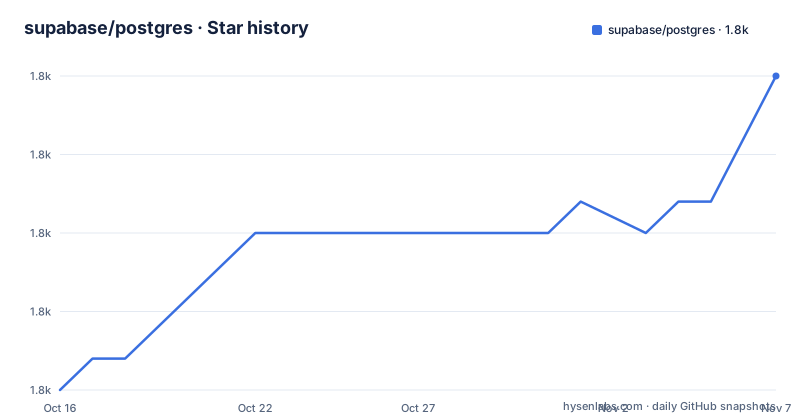
Star history
- supabase/postgres1,805 ★ · +10
| Repository | 2026-10-16 | 2026-11-07 |
|---|---|---|
| supabase/postgres | 1.8k | 1.8k |
10 Stars in the last 22 days, measured from the daily GitHub snapshot. Compare with other projects
Editorial analysis
Why Supabase Postgres Extends PostgreSQL Without Forking It
Supabase Postgres targets developers who want PostgreSQL features such as full-text search, geospatial data processing, time-series management, JSON validation, cryptography, and message queuing without locating, compiling, and configuring each extension independently. Its central design decision is that PostgreSQL itself remains unmodified. The distribution adds extensions around the standard server rather than changing the database engine.
That boundary matters when judging compatibility. Users retain the standard PostgreSQL codebase and add capabilities through its extension mechanism. Supabase Postgres says it includes curated, production-tested extensions, although it does not document a universal support policy for every extension in the repository. The README identifies examples including `pg_jsonschema`, `pg_hashids`, `pgroonga`, `rum`, `hypopg`, `PostGIS`, `pgrouting`, `TimescaleDB`, `pgsodium`, `vault`, `pgaudit`, `pgtap`, and `plpgsql_check`.
The distribution supports PostgreSQL 15, PostgreSQL 17, and OrioleDB-17. OrioleDB-17 is described as an experimental storage engine for PostgreSQL 17, so it should not be treated as equivalent to the two standard PostgreSQL lines. The repository also contains Dockerfiles for PostgreSQL 15 and 17, plus `Dockerfile-orioledb-17`, making the supported build choices visible outside the README.
This is aimed at developers, operators, and self-hosters who want a production-oriented package set. The repository does not claim to provide a complete Supabase application platform. Its scope is the PostgreSQL distribution and its extension ecosystem.
The Nix Layout Connects Versions, Extensions, Images, and Tests
The build system is organized around `flake.nix` and the `nix/` directory. Under `nix/postgresql/`, the repository defines PostgreSQL versions, patches, and base packages. `nix/ext/` contains individual extension package definitions and build configuration. Wrappers and utilities live under `nix/ext/wrappers/`, while extension-specific integration tests using `nixos-test` are under `nix/ext/tests/`.
That arrangement makes the package graph visible. A PostgreSQL version and its compatible extensions are defined in Nix, rather than being copied from an opaque installation script. The README says Nix provides reproducible builds, declarative configuration, dependency management, and support for Linux, macOS, and other platforms. Those are properties attributed to the project's use of Nix, not performance guarantees made by Supabase.
Testing is split across several layers. The `nix/tests/` directory contains PostgreSQL-specific validation, including `pg_regress`, smoke tests, migrations, expected output, and SQL scripts. Extension tests have their own location. The top-level `testinfra/` directory contains infrastructure tests implemented with `pytest`, while `tests/` contains general integration suites.
Deployment is also represented in the repository. `nix/docker/` holds Docker image definitions built with Nix. The `ansible/` directory manages the hosted AWS AMI setup and includes tasks for PostgreSQL, PostgREST, pgbouncer, and Auth server configuration. Database migrations are separated into `migrations/db/`, initialization scripts, and migration tests. This makes Supabase Postgres more than an extension list, but the breadth also means adopters must decide which layer they actually operate.
Building PostgreSQL 15, 17, and a Specific Extension
The README points developers who want downloaded packages rather than local builds to `nix/docs/binary-cache.md` and the Supabase Postgres Nix binary cache. No binary-cache setup command is given in the available documentation, so the exact cache configuration should be taken from that file rather than guessed.
With Nix available, a local build of PostgreSQL 15 and its extensions starts with the following repository target. The command requests the `bin` output for the `psql_15` package:
nix build .#psql_15/binFor PostgreSQL 17, use the corresponding target:
nix build .#psql_17/binThese commands build package outputs. A practical first use is to build a named extension target directly. This example selects `pg_graphql` under PostgreSQL 17:
nix build .#psql_17/exts/pg_graphqlThe direct extension target is useful during adoption because it checks whether a needed component is defined for the selected PostgreSQL version. It does not prove that every extension can coexist in one server instance, and the README does not document a compatibility matrix beyond stating that each PostgreSQL version has its own compatible extension definitions.
A developer should inspect `nix/ext/` when an extension matters to the application. If it lacks a definition for the chosen PostgreSQL line, this distribution will not remove that integration work. Adopting the curated package set does not mean every PostgreSQL extension is present.
Running Supabase Postgres Validation and Image Builds
The repository exposes several validation routes, but their scope differs. The README gives `nix flake check -L` as the command for all tests. The `-L` option requests full logging, which is relevant when package evaluation or extension builds fail:
nix flake check -LFor a specific suite, the documented example targets PostgreSQL 17 checks for macOS Apple Silicon:
nix build .#checks.aarch64-darwin.psql_17 -LThat command is an example for one platform, not a universal local test invocation. The expected test path depends on the system attribute and the check exposed by the flake. A Linux host should not assume that the `aarch64-darwin` attribute exists on its configuration.
Docker image construction is documented separately. The following command builds the PostgreSQL 15 image from the repository root:
docker build -f Dockerfile-15 -t supabase-postgres:15 .The Docker tag is local build metadata, not a claim about a published image. The README also documents the corresponding PostgreSQL 17 file as `Dockerfile-17`, although its shown command is truncated. Use only the complete PostgreSQL 15 command here rather than completing an absent command from assumption.
For AWS image production, the `Makefile` shows Packer, QEMU, and `nerdctl` steps. Its `init` target initializes `qemu-arm64-nix.pkr.hcl`, and its image target uses `Dockerfile-kubernetes`. These are release-infrastructure commands rather than a short local installation path. Most developers should begin with the Nix build or documented Dockerfile, then move to the image pipeline only if they need its cloud artifact.
Extension Choice Comes With Version and Upgrade Boundaries
Supabase Postgres offers a large extension surface, but every selection has a PostgreSQL-version boundary. PostgreSQL 15, PostgreSQL 17, and OrioleDB-17 are separate build lines with separate compatible extension definitions. Moving between them can therefore change which extension targets exist. The repository includes migration and upgrade tests, but the README does not promise a universal extension upgrade path or automatic migration between major package lines.
OrioleDB-17 adds a separate boundary. The README labels it experimental, so an application that only needs standard PostgreSQL with extensions has little reason to select that package. Its presence broadens the build matrix without making it the default choice.
The project also carries several release tracks. Recent release names include `17.11.0.005-test-2`, its `x86` variant, and `17.11.0.005-orioledb-test-2-x86`. The presence of `test-2` in these names is a concrete warning for production selection. The README does not explain the repository's release channel policy, so it would be wrong to treat those entries as stable production releases without checking their artifacts and purpose.
The last push was on 2026-10-16. That is the maintenance fact available here, and it is more recent than six months before 2026-10-16. Upgrade cost cannot be reduced to a version number: it also depends on changes to the curated extension set, Nix package definitions, database migrations, and the deployment layer being used. Projects consuming the AWS image must account for Ansible-managed services as well as PostgreSQL itself.
Supabase Postgres Versus Assembling an Upstream PostgreSQL Package Set
The real alternative is to use upstream PostgreSQL and manage the required extensions through the distribution, source builds, or an internal package system. This approach keeps the extension inventory under the adopting organization's direct control. It can produce a smaller package set, but the team must resolve source dependencies, PostgreSQL compatibility, wrapper behavior, tests, and image contents itself.
Supabase Postgres changes the build model. Nix definitions establish PostgreSQL package variants and extension targets, and the repository includes regression, smoke, migration, extension, and infrastructure tests. Docker definitions, Packer files, and Ansible tasks extend that model into image and cloud deployment workflows. The practical difference is integration work: Supabase Postgres supplies much of that structure, while an upstream assembly begins with fewer Supabase-specific components.
That convenience is not free. The project supports several PostgreSQL lines and includes additional infrastructure. A team that needs one extension on one architecture may find the complete Nix package graph more involved than installing PostgreSQL and one extension through its operating system. A team operating multiple extensions across PostgreSQL versions is the more natural fit because compatibility definitions and tests already occupy a central place in the repository.
The `PostgreSQL` license permits use and modification under its terms, but this review does not interpret license obligations. Operators should review `LICENSE` and the licenses of every bundled extension separately. An unmodified database engine does not make all extension components subject to a single licensing conclusion.
Editorial conclusion
Supabase Postgres fits developers and self-hosters who want several compatible PostgreSQL extensions without assembling every package separately. It is a poor choice if unmodified upstream PostgreSQL must be built without added extensions or if the project cannot take on Nix-specific maintenance. Before adopting it, verify the required PostgreSQL version, confirm that every needed extension has a compatible package definition, and compare the resulting image with the project's `Dockerfile-17` or `Dockerfile-15` for the intended deployment.
Frequently asked questions
Does Supabase Postgres modify the PostgreSQL database engine?
No. The README states that the project uses unmodified PostgreSQL and adds functionality through extensions rather than forking the database engine.
Which PostgreSQL versions does Supabase Postgres support?
The documented package lines are PostgreSQL 15, PostgreSQL 17, and OrioleDB-17. The README describes OrioleDB-17 as an experimental storage engine for PostgreSQL 17.
How do I build a specific extension with Supabase Postgres?
The README gives `nix build .#psql_17/exts/pg_graphql` as an example for the `pg_graphql` extension under PostgreSQL 17. Extension targets are defined in the Nix build system.
Official sources
Add this badge to your README
If you maintain this project, the badge below links readers to this analysis and shows its maintenance status from the daily GitHub snapshot. Paste the markdown into your README; add ?metric=license or ?metric=stars to the image URL for a different field.

[](https://hysenlabs.com/projects/supabase-postgres)Star history chart for your README
[](https://hysenlabs.com/projects/supabase-postgres)Was this useful?