shuru: a microVM sandbox where every run resets the root filesystem
A local-first microVM sandbox for running AI agents safely on macOS & Linux
At a glance
- What is it?
- A local-first sandbox that boots a small Linux virtual machine per agent run, with read-only directory mounts, vsock port forwarding and secrets that stay on the host. macOS is the supported path; the Linux build is an experimental ARM64 artefact with a warning attached.
- Who is it for?
- shuru fits an agent developer who wants a real disposable machine per run rather than a container or a permission prompt, and the mount defaults and secret substitution are the two decisions that make it usable for code-editing agents. Skip it on Linux, where the build is explicitly experimental, and on Intel Macs, which the requirements exclude.
- Can I use it commercially?
- Yes. Apache-2.0 is a permissive licence: you can use, modify and sell software built on it, as long as you keep its copyright and licence notices.
- Is it still maintained?
- Yes. The repository last received commits 7 days ago.
- What is it written in?
- Mainly Rust, according to GitHub's language statistics.
Answers come from the project's GitHub data, last synced on November 22, 2026, and from our analysis. They are not legal advice.
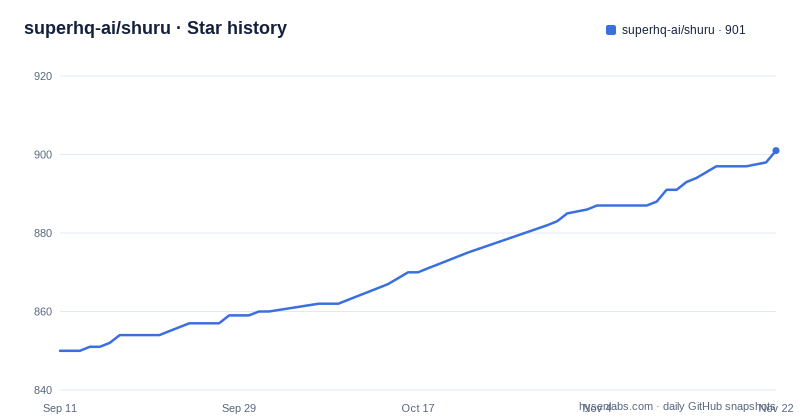
Star history
- superhq-ai/shuru901 ★ · +51
| Repository | 2026-09-11 | 2026-11-22 |
|---|---|---|
| superhq-ai/shuru | 850 | 901 |
51 Stars in the last 72 days, measured from the daily GitHub snapshot. Compare with other projects
Editorial analysis
Every run resets the root filesystem
The core promise is disposability. Each run boots a lightweight Linux virtual machine, and when that machine exits, the root filesystem is thrown away.
That is a stronger guarantee than a container gives you. An agent that installs packages, compiles something, writes a config and then deletes half of it leaves nothing behind, and the next run starts from the same known image. For agents that run code you did not write, this is the difference between a scratch directory and a clean machine.
The virtualisation backends differ by platform, which is why the requirements are specific. On macOS it uses Apple's Virtualization framework, and the requirement is macOS 14 Sonoma or later on Apple silicon. On Linux it uses a KVM backend, which needs ARM64 hardware and access to the kernel device, and that path is available as an experimental release build rather than a supported one.
So the honest summary is that shuru is a macOS tool with a Linux experiment attached. The project's own warning says the Linux builds are for testing and should be expected to have rough edges and compatibility gaps.
Homebrew covers macOS only, and Linux gets a tarball
There are two documented install routes and they are not equivalent.
The Homebrew route taps the project's own tap and installs the formula:
brew tap superhq-ai/tap && brew install shuruThe script route fetches the installer and runs it with a shell:
curl -fsSL https://raw.githubusercontent.com/superhq-ai/shuru/main/install.sh | shBoth support macOS on Apple silicon and the experimental Linux build. On Linux there is a third option, downloading the architecture-specific release tarball by hand from the releases page, which is what you want if you would rather not pipe a remote script into a shell.
The note that follows is the important one: Homebrew remains macOS-only, and Linux installs through the script are still experimental. That combination is why the Linux requirement is worded narrowly, ARM64 with kernel virtual machine access rather than any Linux machine with KVM.
For a tool that is going to run other people's code, an installer that pipes a script from a moving branch into a shell is a reasonable thing to be cautious about, and the tarball route is the cautious version.
Mounts are read-only by default and writing needs two separate flags
Directory sharing is the feature an agent actually touches, and its defaults are conservative in a way that is easy to get wrong.
Host directories are shared into the virtual machine over VirtioFS. By default the mount is read-only from the guest, and any write the guest performs lands in a memory-backed overlay layer that is discarded when the machine exits. That means an agent can read your source tree, edit files, run a test and leave without modifying anything on the host.
The read-only behaviour is demonstrated rather than asserted, by writing a file in the guest and then looking for it on the host and not finding it.
shuru run --mount ./src:/workspace -- touch /workspace/test.txtIf you want guest writes to reach the host, you need two things: a read-write suffix on the mount, and a separate permission flag on the command. The flag is the interesting part, because it is not implied by the suffix. A suffix alone would be a footgun; requiring the flag means the decision is made once, at the command line, in a place you can see.
Mounts can also be declared in the configuration file, and the feature note says directory mounts require checkpoints from a later version, with older checkpoints still fine for everything else.
Port forwarding runs over vsock, so the guest needs no network at all
This is the design decision that makes shuru different from a container with a network policy.
Host ports are forwarded to guest ports over vsock, which is the host-to-guest channel the virtual machine already has. Because forwarding rides on that channel, it works without the network being enabled at all: the guest needs no network device to receive a forwarded port.
The documented sequence is the pattern you will use most. Create a checkpoint with the runtime you need installed, then run from it with a port mapping.
shuru checkpoint create py --allow-net -- apt-get install -y python3
shuru run --from py -p 8080:8000 -- python3 -m http.server 8000
From another terminal on the host you then reach the guest through loopback. Multiple mappings are a matter of repeating the flag, so a web server on port 80 and a proxy on 443 is one command.
The security reading is important. A guest with no network device but a forwarded port is still reachable from the host, and reachable from anything else that can reach your loopback. Network isolation and port forwarding are orthogonal here, and turning off the network does not turn off the port.
Secrets stay on the host and the proxy substitutes them per host
The secret handling is the part of the design that has clearly been thought about, because it solves a problem most sandboxes hand-wave.
You never put the real value in the guest. You pass a specification of the form name equals host variable at host, where the name is the environment variable the guest will see, the host variable is where the real value lives on your machine, and the hosts are where substitution is allowed.
shuru run --allow-net --secret [email protected] -- curl https://api.openai.com/v1/modelsWhat the guest receives is a random placeholder token. The proxy holds the real value and substitutes it only on HTTPS requests to the listed hosts. So the agent can use the key, and the key itself never enters the virtual machine.
The constraints are worth noting because they are the boundary: substitution is HTTPS only, and it is scoped to the hosts you name. A guest that leaks the placeholder to another host gets the placeholder. That is the correct failure mode, and it is also why the host list should be as narrow as the task allows.
Everything in the command line has a configuration file equivalent, and the file also carries the network allow list, where omitting the list permits all hosts. Command-line flags take precedence over the file, which is the precedence you would want.
Checkpoints are the only state, and the SDK makes one a single call
Since the disk is thrown away, the only way to keep anything is a checkpoint, and the workflow is built around that.
You create a checkpoint by running a setup command inside a sandbox, list them, delete them, and branch from an existing one to add a layer. Running from a checkpoint is still ephemeral, so a checkpoint is a base image rather than a workspace.
The TypeScript SDK wraps the same three operations. Start a sandbox from a named environment, execute a command and read its output, then save a checkpoint from inside the run, which saves the disk state and stops the virtual machine.
const sb = await Sandbox.start({ from: "python-env" });
const result = await sb.exec("python3 -c 'print(1+1)'");
await sb.checkpoint("after-run");
Two integrations are worth calling out. The project ships as an agent skill, installable with a skills CLI or by copying a directory into a project's skills folder, so that an agent reaches for it automatically when it needs sandboxed execution. And there is a browser automation example that installs Chromium into a checkpoint once and then drives it from the host through the forwarded port, exposing only the browser's debugging port while the browser itself stays inside the virtual machine.
That second pattern is the strongest argument for the whole tool: a real browser, in a disposable machine, with a credential that never lands in it.
One guest architecture, one entitlement, and a rootfs built with Docker
The build configuration explains the platform story more precisely than the readme does.
The Rust workspace has nine crates: the command line, the SDK, the protocol definitions, the proxy, the virtual machine layer, the store, the guest image side, and two platform-specific crates for Darwin and Linux. The two platform crates are deliberately excluded from the default member list, with a comment saying it is so that a compile check does not fail on the wrong operating system.
The guest init binary is cross-compiled to a single target, a 64-bit ARM Linux with the musl C library. That one line explains the ARM64 requirement on Linux and the Apple silicon requirement on macOS: the guest binary does not exist for any other architecture, so there is nothing to boot.
On the macOS side the binary is codesigned with a virtualisation entitlement from a file at the repository root, which the framework requires. That is why the build recipe signs the debug binary as well as the release one.
The root filesystem, kernel and initramfs are prepared by a script that needs Docker, and the release recipe does nothing but create an annotated git tag and push it, leaving the rest to CI. The release profile optimises for size above everything else, with the smallest optimisation level, link-time optimisation, one codegen unit, aborting panics and stripped symbols, which is the right set of choices for something you download and run.
Editorial conclusion
shuru fits an agent developer who wants a real disposable machine per run rather than a container or a permission prompt, and the mount defaults and secret substitution are the two decisions that make it usable for code-editing agents. Skip it on Linux, where the build is explicitly experimental, and on Intel Macs, which the requirements exclude. Before you rely on it, read the mount flags carefully, because a read-write mount needs both a suffix and a separate permission, and check whether your agents can reach a vsock forward when you expected to deny them networking entirely.
Frequently asked questions
What is shuru?
A local-first microVM sandbox for running AI agents. It boots a lightweight Linux virtual machine per run, the root filesystem resets every time, and the agent can execute code, install packages and run tools without touching your host.
Does shuru work on Linux?
Experimentally. Linux builds need ARM64 hardware with access to /dev/kvm, are explicitly not ready for production, and are installed with the script or a linux-aarch64 release tarball, because Homebrew support is macOS-only.
Can a shuru agent write to my project files?
Not by default. Directory mounts use VirtioFS and are read-only, with guest writes going to an overlay layer that is discarded when the VM exits. A read-write mount needs both the :rw suffix and the --allow-host-writes flag.
How does shuru keep API keys out of the sandbox?
You pass a name, a host environment variable and a host list. The guest sees a random placeholder token, and the proxy substitutes the real value only on HTTPS requests to the listed hosts, so the real secret never enters the virtual machine.
What can shuru do without network access?
Port forwarding over vsock. A host port can be mapped to a guest port while the guest has no network device at all, which is why shuru run with a port mapping works without enabling networking.
Official sources
Add this badge to your README
If you maintain this project, the badge below links readers to this analysis and shows its maintenance status from the daily GitHub snapshot. Paste the markdown into your README; add ?metric=license or ?metric=stars to the image URL for a different field.

[](https://hysenlabs.com/projects/superhq-ai-shuru)Star history chart for your README
[](https://hysenlabs.com/projects/superhq-ai-shuru)Was this useful?