iClient-JavaScript: one GIS client, five mapping backends
Modern GIS Web Client for JavaScript, based on Leaflet\OpenLayers\MapboxGL-JS\Classic(iClient8C), enhanced with ECharts\D3\MapV etc. Contributed by SuperMap & community.
At a glance
- What is it?
- SuperMap iClient JavaScript is a WebGIS client development package that ships the same API surface on top of Leaflet, OpenLayers, Mapbox GL JS, MapLibre GL and the classic iClient8C stack, and adds ECharts, D3 and MapV for visualisation. It is aimed at teams building map applications that need to sit on SuperMap's cloud and online GIS services.
- Who is it for?
- Adopt iClient-JavaScript when you are building browser mapping on top of SuperMap's cloud GIS or online GIS services and you want one API that runs on Leaflet, OpenLayers, Mapbox GL JS or MapLibre GL rather than committing to a single backend.
- Can I use it commercially?
- Yes. Apache-2.0 is a permissive licence: you can use, modify and sell software built on it, as long as you keep its copyright and licence notices.
- Is it still maintained?
- Yes. The repository last received commits 2 days ago.
- What is it written in?
- Mainly JavaScript, according to GitHub's language statistics.
Answers come from the project's GitHub data, last synced on November 7, 2026, and from our analysis. They are not legal advice.
Star history
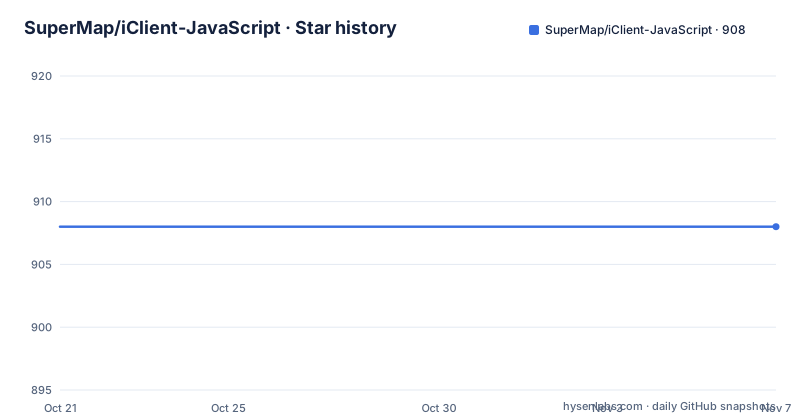
- SuperMap/iClient-JavaScript908 ★ · +0
| Repository | 2026-10-21 | 2026-11-07 |
|---|---|---|
| SuperMap/iClient-JavaScript | 908 | 908 |
0 Stars in the last 17 days, measured from the daily GitHub snapshot. Compare with other projects
Editorial analysis
The same API over five different map engines
SuperMap iClient JavaScript is described as a modern GIS web client for JavaScript, built on Leaflet, OpenLayers, Mapbox GL JS and Classic (iClient8C), and enhanced with ECharts, D3 and MapV. The README's Chinese summary adds that it integrates leading open source mapping and visualisation libraries, supports multi source data and map services, supports multiple terminals and cross browser, and provides GIS big data visualisation and real time stream data visualisation.
The multi backend idea is the core of the project. Rather than wrapping one mapping library, it wraps several and keeps the API surface aligned across them. That is a substantial engineering commitment, and it is the reason the release scripts look the way they do.
The repository layout confirms the shape. There are `src/` for the source, `libs/` for the vendored mapping libraries, `dist/` for the built bundles, `build/` with a `server.js` that the `dev` script runs, `test/` and `examples-test/` for testing, and `webpack.config.js` for the bundling. The `examples/` directory has a folder per backend, `leaflet`, `openlayers`, `mapboxgl`, `maplibregl`, `classic`, plus `3dwebgl`, `component` and `template`, along with `locales/`, `data/`, `css/`, `fonts/`, `img/` and `js/`.
The `classic` folder is the one to note. That is the iClient8C stack, SuperMap's own long standing client, and keeping it working alongside the open source backends is the compatibility work most of the release pipeline exists for.
The topics list adds Cesium alongside Leaflet, OpenLayers and Mapbox GL JS, which is consistent with a `3dwebgl` example folder for three dimensional scenes.
Every backend ships an ES5 and an ES6 bundle
The release scripts in package.json are the clearest description of how the package is put together, and they show the same pattern repeated for each backend.
The top level release target runs five chains in sequence, one per backend, each of which fans out into an ES5 and an ES6 build:
"release": "npm run release-leaflet && npm run release-openlayers && npm run release-mapboxgl  && npm run release-classic && npm run release-maplibregl",
"release-leaflet": "npm run release-leaflet-es5 && npm run release-leaflet-es6",
"release-openlayers": "npm run release-openlayers-es5 && npm run release-openlayers-es6 && npm run release-ol-es5 && npm run release-ol-es6",
OpenLayers gets four variants rather than two, because there is a separate `ol` build alongside the `openlayers` one.
The per target script shows what each build does. It sets the module version with `cross-env moduleVersion=es5`, deploys, then runs `uglifyjs` over the output to produce `./dist/leaflet/iclient-leaflet.min.js`, and `cleancss` to produce the minified stylesheet. The ES6 targets skip the uglify and clean-css step.
So the published package is a set of per backend, per module version bundles with minified and unminified JavaScript and CSS. That is a deliberate accommodation of the browser support matrix, and the cost of it is visible: the release pipeline is long, the scripts are repetitive, and every backend and every module version has to be tested.
The `dev` script is `node ./build/server.js` and `lint` is `eslint src`, so local development is a small dev server rather than a full build.
Examples per backend, and what they are for
The `examples/` directory is the fastest way to understand the scope of the library, since each backend folder is a working application rather than a snippet.
There are `leaflet/`, `openlayers/`, `mapboxgl/`, `maplibregl/` and `classic/`, which map one to one onto the backends the library wraps. `3dwebgl/` is the three dimensional equivalent, `component/` is the component oriented set, and `template/` is presumably the starting point for a new project. `data/`, `locales/`, `css/`, `fonts/`, `img/` and `js/` hold the shared assets, and `examples/README.md` is the entry point.
Two of these deserve comment. `maplibregl/` is a separate folder from `mapboxgl/`, which tells you the MapLibre GL build is maintained as a first class backend rather than an alias. That matters because MapLibre is the open source fork of Mapbox GL JS, and an organisation that cannot use Mapbox GL for licensing reasons can still use the same iClient API. `locales/` tells you the interface is internationalised rather than English only, which for a mapping client used across markets is a baseline expectation.
The `component/` folder connects to the WebComponents part of the project. The README's WebComponents section points at a separate repository, `SuperMap/vue-iclient`, described as a UI component library for iClient based on Vue 2.x, with a quick start guide. Keeping the Vue layer in its own repository means the core client stays framework independent, and a team on React or plain JavaScript is not forced into Vue.
The `examples-test/` directory, separate from `examples/`, suggests the examples are also exercised by the test suite, which is what makes per backend testing practical.
Licensing, third party statements and the FOSSA badge
The project is under the Apache License 2.0, with the LICENSE file linked from the README and the Chinese and English READMEs both pointing at the same terms. The README also carries a FOSSA badge, and FOSSA is the service that runs automated licence and dependency compliance scans, so the badge reflects a licence compliance pipeline rather than decoration.
The repository makes the third party side explicit. There is a `THIRD-PARTY SOFTWARE OR TECHNOLOGY STATEMENT.md` at the top level, with a Chinese counterpart file of the same name, alongside `libs/` holding the vendored mapping libraries. For a client that bundles Leaflet, OpenLayers, Mapbox GL JS and Cesium derivatives, having a written statement about the bundled third party code is not optional; it is the thing a legal review will ask for first.
The house tooling is conventional and worth noting for contributors. There is an `.eslintrc.js` with an `.eslintignore`, a `.prettierrc` with a `.prettierignore`, an `.editorconfig`, a `sonar-project.properties` file for the SonarQube analysis, a `CODE_OF_CONDUCT.md`, a `CHANGELOG.md`, and a `skills/` directory.
The `skills/` directory is a newer idea than the rest of the tree, and it is worth knowing what it is for: it is a machine readable description of the library's capabilities for AI coding assistants, so that a tool asked to write iClient code is working from the project's own documentation rather than guessing at an API from memory. That is a small feature with a real effect on how usable the library is with an assistant in the loop, and it is the kind of thing that is easy to miss in a README written mostly for human readers.
The npm packages are published under the `@supermap` scope, with `@supermap/iclient-common` shown in the version badge, and the project maintains an English homepage at iclient.supermap.io alongside the Chinese one.
Versioning and what the numbers tell you
The release history and the manifest disagree slightly, and the difference is a useful signal.
The tagged releases are 12.0.1-r on 2025-10-09, 12.1.0-r on 2026-07-01 and 12.1.1 on 2026-09-20, while the package.json in the repository reads `"version": "12.1.2"`. So the manifest is one patch ahead of the newest tag, which is a common pattern for a repository where the version is bumped as part of the release commit rather than at tag time.
The `-r` suffix on two of the three tags is also worth decoding by inference rather than assumption. It appears on 12.0.1-r and 12.1.0-r but not on 12.1.1, which suggests the two earlier releases were a specific line of the product and the final one was the general release of that work. The README does not define the suffix, so treat that as a pattern rather than a documented meaning.
The last push was on 2026-10-20, so development continues after the 12.1.1 tag. For an adopter on a 12.x line, that means the tag is the thing to pin rather than the branch.
The compatibility picture is visible in the release scripts too. The ES5 variants exist because the product supports browsers and legacy deployment contexts that a modern bundle would not reach, and the `ol` alongside `openlayers` suggests two generations of the OpenLayers API are both supported. Both of those are reasonable for a commercial GIS client with a long support history, and both are reasons to check which bundle you load rather than assuming the newest one fits.
The package name in package.json is `SuperMapiClient`, and the distribution is organised per backend, so a consumer takes the bundle for the backend it uses rather than the whole set.
Editorial conclusion
Adopt iClient-JavaScript when you are building browser mapping on top of SuperMap's cloud GIS or online GIS services and you want one API that runs on Leaflet, OpenLayers, Mapbox GL JS or MapLibre GL rather than committing to a single backend. Skip it if your map application is self contained and only needs a plain map library, since the value here is the SuperMap service integration and the multi backend packaging, and be aware that the ES5 bundles and the plugin architecture reflect a long lived product. Verify first which backend bundle you need and whether the documentation page for your chosen backend covers the service types you use. The licence field on the repository says Apache-2.0, the last push was on 2026-10-20, and the newest release is 12.1.1.
Frequently asked questions
What is SuperMap iClient JavaScript?
It is an open source WebGIS client development package for JavaScript, built on modern web technologies and integrating open source mapping and visualisation libraries. It supports multi source data and map services, multiple terminals and cross browser use, and adds GIS big data visualisation and real time stream data visualisation.
Which mapping backends does iClient-JavaScript support?
The project description names Leaflet, OpenLayers, Mapbox GL JS and Classic (iClient8C), with MapLibre GL shipped as its own build, and the topics list also includes Cesium. The `examples/` directory has a folder per backend, including `leaflet`, `openlayers`, `mapboxgl`, `maplibregl` and `classic`.
How is the iClient-JavaScript package released?
The `release` script chains five per backend targets, each of which builds an ES5 and an ES6 variant, with OpenLayers also producing separate `openlayers` and `ol` builds. The ES5 targets run `uglifyjs` and `cleancss` to produce the minified JavaScript and CSS under `dist/`.
Is there a Vue component library for iClient?
Yes, in a separate repository. The README's WebComponents section links `SuperMap/vue-iclient`, described as a UI component library for iClient based on Vue 2.x, with a quick start guide.
What licence does iClient-JavaScript use?
It is under the Apache License 2.0, with the LICENSE file linked from the README. The repository also carries a third party software or technology statement and a `libs/` directory holding the vendored mapping libraries, and the README shows a FOSSA licence compliance badge.
How current is iClient-JavaScript?
The releases are 12.0.1-r on 2025-10-09, 12.1.0-r on 2026-07-01 and 12.1.1 on 2026-09-20, with the last push on 2026-10-20. The package.json in the repository reads version 12.1.2, one patch ahead of the newest tag.
Official sources
Add this badge to your README
If you maintain this project, the badge below links readers to this analysis and shows its maintenance status from the daily GitHub snapshot. Paste the markdown into your README; add ?metric=license or ?metric=stars to the image URL for a different field.

[](https://hysenlabs.com/projects/supermap-iclient-javascript)Star history chart for your README
[](https://hysenlabs.com/projects/supermap-iclient-javascript)Was this useful?