Sodalite: one native Jellyfin and Seerr client across Apple TV, iPhone and iPad
Native Jellyfin client for Apple TV, iPhone and iPad with built-in Seerr requests. Direct Play for movies, shows, music and live TV with DVR, real HDR10 / HDR10+ / Dolby Vision and Dolby Atmos. AirPlay and Picture in Picture on iOS. Powered by AetherEngine.
At a glance
- What is it?
- A SwiftUI universal app that puts your Jellyfin library and Seerr requests in one interface on every Apple screen, with Direct Play and a custom video stack underneath, internal and external addresses that are probed rather than guessed, and a GPL-3.0 licence carrying an Apple Store exception so TestFlight distribution stays legal.
- Who is it for?
- Sodalite suits a self-hosted Jellyfin household with mixed Apple hardware, since one build covers the television, the phone and the tablet and Seerr requests never leave the app. It is a poor fit if you need an Android or web client, or if you want a stable store release rather than a TestFlight build.
- Can I use it commercially?
- Check first. The repository uses a licence we do not classify automatically, so read its LICENSE file before any commercial use.
- Is it still maintained?
- Yes. The repository received new commits within the last day.
- What is it written in?
- Mainly Swift, according to GitHub's language statistics.
Answers come from the project's GitHub data, last synced on October 23, 2026, and from our analysis. They are not legal advice.
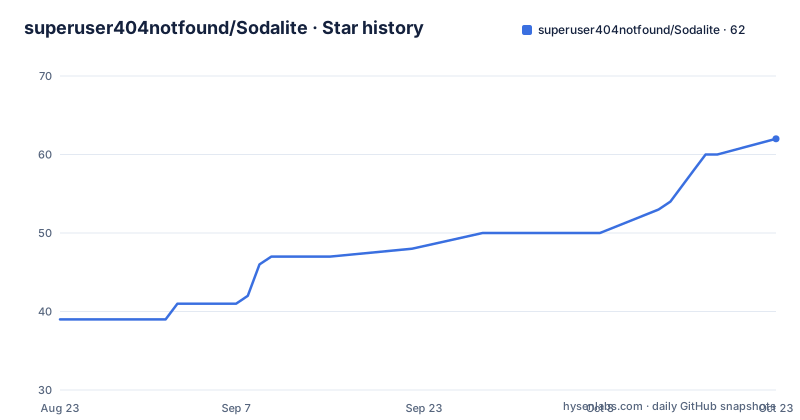
Star history
- superuser404notfound/Sodalite62 ★ · +23
| Repository | 2026-08-23 | 2026-10-23 |
|---|---|---|
| superuser404notfound/Sodalite | 39 | 62 |
23 Stars in the last 61 days, measured from the daily GitHub snapshot. Compare with other projects
Editorial analysis
One universal build, one sign-in per server
Sodalite is positioned as a single universal app rather than three ports of one idea. The same library, the same Seerr request loop and the same custom video stack run on the Apple TV in the living room, the iPhone on a train and the iPad in bed, and you sign in once per server so the experience follows whichever device you pick up. Underneath it is SwiftUI with a custom video engine rather than a wrapper, following the platform's own patterns: the focus engine and Siri Remote gestures on tvOS, touch and rotation on iPhone and iPad. Playback is Direct Play in almost every case with no transcoding, and live channels stream straight from their source where the source allows it.
Seerr requests live inside the library, not in a web view
The pairing with Seerr is described as a first-class part of the app rather than a link out to a browser. Browse rows, the request flow and status tracking sit right next to your library, so spotting something on a trending row that you do not own means requesting it in place rather than switching apps, messaging whoever runs your server, or leaving the client you are already using. That is the whole argument for the pairing: the request loop is part of the same navigation as the library, with its own rows rather than a modal bolted on. Multiple servers are supported too, and you can move between them from above the profile list without logging out, with the full list managed under Settings then Servers.
The capability table is explicit about what each device cannot do
Almost everything is shared, and the exceptions are listed rather than discovered at runtime. Full library browsing, Direct Play, HDR, Dolby Atmos, every subtitle format, Seerr browse and request with single sign-on, live TV with DVR, the music library, watch stats, parental controls and 26 languages all work on both sides, and Picture in Picture works everywhere. Four capabilities are iPhone and iPad only: AirPlay to another display, full-screen video out over a wired HDMI adapter, the rotation lock and portrait player, and the child lock in the player. Two are Apple TV only: separate profiles per Apple TV user, and Top Shelf with the Siri Remote focus experience.
Internal and external addresses are probed, not guessed
A server can be given both a local address and a remote one, and this is where the app does something unusual: instead of inferring which to use from the network type, it probes each and switches to whichever actually answers, keeping the connection working over a VPN without the user toggling anything. The active route is shown as a badge. On iPhone and iPad both addresses are editable per server, for Jellyfin and for Seerr separately, while Apple TV resolves the choice once when a session starts, which is the right trade for a device that is usually on a stable network. Server discovery also finds Jellyfin on the local network automatically, with manual entry available when that fails.
Latest means arrival on your server; Recently Released means release date
The home screen carries Continue Watching, Next Up, Latest Movies and Latest Shows, plus a My Media row that jumps into any library directly. Every row can be toggled and reordered, Continue Watching and Next Up can optionally merge into one row, and with several movie or series libraries each can also get its own Latest row. The subtle part is what Latest means. Those rows order by when a title reached your server, matching Jellyfin's own behaviour, while Customize Home offers two Recently Released rows that order by release date instead, and ranks a show by its newest aired episode rather than by the year it started. Both orderings are available, and they answer different questions.
Library sort order is remembered per library and synced
Movies, Series and Collections appear as poster grids with instant filtering and an All, Unwatched or Watched watch-status filter on every grid. Any library or genre grid can be sorted by title, release date, date added, rating or runtime, in either direction, and the choice is remembered per library and synced across your devices, so the phone does not reset the order you set on the tablet. A grid also follows your server's setting for grouping movies into collections, so a collection appears as a single tile, and that behaviour can be overridden per profile under Settings then Customize Home. Series views add a season picker, an episode list and Up Next highlighting, while collections and playlists open straight onto their film list and play through in order.
GPL-3.0 with an Apple Store exception, and a separate engine licence
The licensing is set up so the distribution channel works while the code stays open. Sodalite is GPL-3.0 with an Apple Store and DRM exception: fork it, study it, build your own version, but it cannot be taken private, and modifications must stay open. The exception clause exists to keep the App Store and TestFlight paths legally clean. The video stack underneath, AetherEngine, is LGPL-3.0 with the same Apple exception, which means the engine can be reused in other apps while improvements to it flow back. On the credential side, secrets live in the device Keychain and sync between your devices only through your private iCloud, end-to-end encrypted, with iCloud Sync switchable off so they never leave the device. There is no telemetry, no analytics and no third-party SDK phoning home.
Release 1.0.0 says out of beta, the install path is still TestFlight
Worth noticing how distribution is described. Tag 1.0.0 is titled as out of beta, on every Apple screen, and it landed on July 14, 2026, after 0.13.0 with subtitles in Picture in Picture, instant subtitles and smoother seeking on July 2, and 0.12.0 with parental controls, subtitle search and watch stats on June 17. Yet the README still announces an open public beta and points at a single TestFlight link that installs on Apple TV, iPhone and iPad, with BETA.md naming what to focus on and how to report bugs. So the version number says stable while the delivery route says beta. The tree matches a native Xcode project with an .xcodeproj alongside a project.yml, a dedicated top shelf target, tests, scripts and tools; the last push was September 28, 2026.
Editorial conclusion
Sodalite suits a self-hosted Jellyfin household with mixed Apple hardware, since one build covers the television, the phone and the tablet and Seerr requests never leave the app. It is a poor fit if you need an Android or web client, or if you want a stable store release rather than a TestFlight build. Before joining the beta, read BETA.md for where the rough edges are, confirm your server exposes the formats you want to Direct Play, and check the Apple TV only rows in the capability table, since profiles per user and Top Shelf work there and nowhere else.
Frequently asked questions
What is Sodalite in this repository?
A native Jellyfin client for Apple TV, iPhone and iPad, written in Swift on SwiftUI, with Seerr requests built into the same interface. It plays movies, shows, music and live TV with DVR, supports HDR10, HDR10+ and Dolby Vision, and runs on a custom video engine called AetherEngine.
How do I install Sodalite on my Apple devices?
The public beta is open and one TestFlight link installs on Apple TV, iPhone and iPad. BETA.md lists what to focus on and how to report bugs, and the project site is sodalite.superuser404.de.
Does Sodalite support AirPlay and Picture in Picture everywhere?
Picture in Picture works on all three device types, but AirPlay to another display, wired HDMI full-screen video out, the rotation lock with portrait player, and the child lock are iPhone and iPad only. Separate profiles per Apple TV user and Top Shelf with Siri Remote focus are Apple TV only.
What licence is Sodalite under, and where do my credentials go?
GPL-3.0 with an Apple Store and DRM exception, so modifications must stay open while the App Store and TestFlight paths stay legal. The AetherEngine video stack is LGPL-3.0 with the same exception. Credentials stay in the Keychain and sync only through your private iCloud, end to end encrypted.
Official sources
Add this badge to your README
If you maintain this project, the badge below links readers to this analysis and shows its maintenance status from the daily GitHub snapshot. Paste the markdown into your README; add ?metric=license or ?metric=stars to the image URL for a different field.

[](https://hysenlabs.com/projects/superuser404notfound-sodalite)Star history chart for your README
[](https://hysenlabs.com/projects/superuser404notfound-sodalite)Was this useful?