Astroship: an Astro starter for SaaS marketing sites
Astroship is a starter template for startups, marketing websites, landing pages & blog. Built with Astro & TailwindCSS
At a glance
- What is it?
- Astroship is an Astro and Tailwind CSS starter for SaaS companies, startups, landing pages, and blogs. It offers a focused free edition, while pagination, view transitions, extra pages, and support are reserved for the commercial Pro edition.
- Who is it for?
- Astroship fits small teams that want a structured Astro foundation and are prepared to replace the template content, Tailwind styles, and contact behavior themselves. It is a poor fit for a team requiring the Pro-only layouts, paginated blog, view transitions, features and integrations pages, or six months of support without buying the commercial edition.
- Can I use it commercially?
- Yes, with conditions. GPL-3.0 is a copyleft licence: if you distribute software that includes it, you must release that software's source code under the same licence. Running it internally without distributing it does not trigger that obligation.
- Is it still maintained?
- Yes. The repository last received commits 18 days ago.
- What is it written in?
- Mainly Astro, according to GitHub's language statistics.
Answers come from the project's GitHub data, last synced on October 23, 2026, and from our analysis. They are not legal advice.
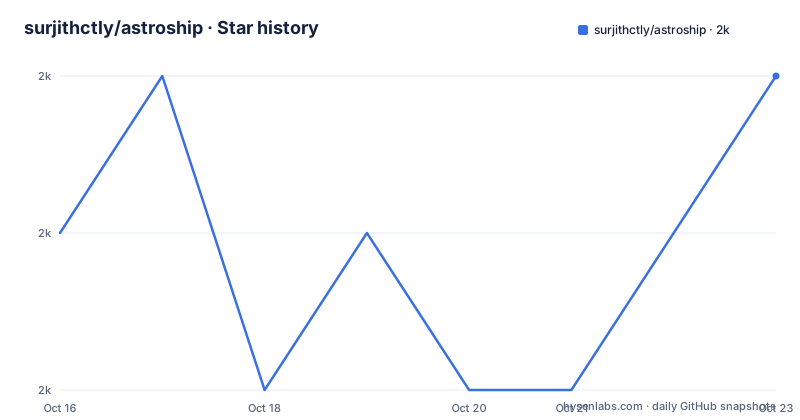
Star history
- surjithctly/astroship1,990 ★ · +1
| Repository | 2026-10-16 | 2026-10-23 |
|---|---|---|
| surjithctly/astroship | 2k | 2k |
1 Stars in the last 7 days, measured from the daily GitHub snapshot. Compare with other projects
Editorial analysis
Astroship's scope for startup and SaaS sites
Astroship addresses the front-end work required to publish a startup or SaaS marketing presence without beginning every site from an empty Astro project. Its intended users are teams and developers building product landing pages, company websites, and blogs with Astro. The free edition is positioned as a starter rather than a complete content system, and its feature table places Astro v3, content collections, Tailwind CSS, responsive layouts, and a working contact page in that edition.
The distinction between a starter template and a finished company site matters here. Astroship supplies an existing visual structure, but adopting it still requires replacing demo copy, imagery, navigation, and brand-specific details. The README identifies a hero illustration credit and presents a live demonstration, yet it does not document a theme editor, CMS workflow, analytics setup, or a defined component inventory. That makes the repository more useful as source code to adapt than as a no-code site builder.
The feature comparison also establishes a hard boundary around the free project. Pro layouts and features, a blog with pagination, view transitions, an advanced homepage design, a features page, an integrations page, and an elegant 404 page are all marked as unavailable in the free version. Six months of support is also Pro-only, while free updates are listed for both versions. A team whose acceptance criteria include any of those capabilities is evaluating a paid product rather than only this repository.
Astro routes, components, layouts, and Tailwind styling
Astroship follows Astro's file-based routing model. The documented project structure places components in `src/components/`, layouts in `src/layouts/`, and pages in `src/pages/`. Astro exposes `.astro` and `.md` files found under `src/pages/` as routes based on their filenames. This means adding a page requires creating or modifying a file in that directory, then editing any layout, component, content, or styling referenced by it.
Static assets belong in `public/`, according to the README. The template also declares MDX and content-related dependencies including `@astrojs/mdx`, `@astrojs/sitemap`, and Astro content collections in its feature comparison. The repository root contains `astro.config.mjs`, `package.json`, `tsconfig.json`, `public/`, and `src/`, which fits a conventional Astro project with configuration kept outside the source tree.
Tailwind CSS is already configured. The current `package.json` identifies Tailwind CSS 4.3.3 and `@tailwindcss/vite` 4.3.3 as dependencies, alongside `@tailwindcss/typography`. No additional Tailwind installation step is required for this repository. Icon packages are declared through `@iconify-json/bx`, `@iconify-json/simple-icons`, and `@iconify-json/uil`, while `astro-icon`, `astro-navbar`, and `astro-seo` support common presentation concerns.
The dependency list does not establish a complete production architecture. It does not reveal the service used by the contact form, whether forms have server endpoints, how content schemas validate MDX, or whether SEO output covers every route. Those details must be checked in `src/` and `astro.config.mjs` before assuming that marketing, publishing, and form-processing requirements are already handled.
Installing Astroship and starting the first local preview
The README gives two acquisition paths: create a repository with GitHub's "Use this template" button, or clone the source directly. For a direct local copy, clone it into a named directory. The `.` alternative clones into the current directory, which requires entering the intended project folder first.
git clone https://github.com/surjithctly/astroship.git myProjectName
# or
git clone https://github.com/surjithctly/astroship.git .
The current `package.json` requires Node.js 22.12.0 or later. The README recommends pnpm and also documents npm and yarn, so package-manager choice can follow the reader's existing setup.
npm install
# or
yarn install
# or (recommended)
pnpm install
After dependencies are installed, the development script runs `astro dev`. The reader should see the local development address printed by Astro, then open that address to inspect the starter pages before replacing content.
npm run dev
# or
yarn dev
# or (recommended)
pnpm dev
A production build and local preview are available through the documented scripts. The build should complete without errors before previewing the generated site with `astro preview`.
npm run preview
npm run build
# or
yarn preview
yarn build
# or (recommended)
pnpm preview
pnpm build
For the first real use, start from `src/pages/`, identify the route that serves the page being replaced, and follow its imports into `src/components/` and `src/layouts/`. Replace the visible copy and assets while preserving the route structure. The README does not document environment variables, database services, or a required CMS configuration, so no such setup should be invented before the relevant source files are inspected.
Deployment paths and Node.js version constraints
Astroship documents one-click deployment to Vercel and Netlify through provider links in the README. It also links to a Vercel deployment flow for the free template. These hosted paths are convenient for creating a repository and deployment from the template, but the README does not explain custom domains, environment configuration, preview deployments, or provider-specific Astro settings.
The declared Node.js requirement is a more immediate technical constraint. `package.json` specifies `>=22.12.0`, even though the feature table still labels the template with Astro v3. The dependency list instead contains `astro` `^7.3.5`, so the README's comparison label should not be treated as the exact current framework version. Deployment environments must be configured to satisfy the Node.js requirement in `package.json`.
The project is an ES module package because `package.json` sets `"type": "module"`. It is marked `private`, which prevents accidental publication under the package name in a normal npm workflow but does not itself define the website's content license. The dependency versions are declared with caret ranges, while `pnpm-lock.yaml` provides a lockfile for reproducible pnpm installations. The README recommends pnpm, partly because it says this can save disk space.
Free Astroship limits and the Pro feature boundary
The largest limitation is not a missing command or an uncertain installation path. It is the deliberately reduced free design. Astroship's table says the free version does not include the advanced homepage design, Pro layouts and features, paginated blog, view transitions, features page, integrations page, or elegant 404 page. That narrows the template for SaaS companies whose marketing information architecture depends on dedicated pages for product capabilities and integrations.
The version boundary also affects iteration. Support is listed as six months for Pro and absent for the free edition, although free updates are available. The last push was on 2026-10-05, while the listed releases are v3.0.0 from 2025-02-26, v2.2.0 from 2024-05-23, and v2.1.0 from 2023-08-02. These dates show recent repository activity, but they do not define how long either edition will receive support or what an individual update may change.
A working contact page does not tell the whole form story. The README confirms that the free version includes a working contact page, but it does not identify the delivery service, validation rules, spam controls, success state, or storage destination. Teams requiring inquiries to enter a CRM or ticketing system must inspect the implementation before selecting the template.
Astroship against a bare Astro project or the Pro edition
The clearest alternative is to start with a bare Astro project and add only the dependencies and components a product actually needs. That approach avoids inheriting unused layouts, illustrations, demo content, and branding from Astroship. It also requires the team to construct its own navigation, page hierarchy, reusable components, responsive rules, and initial design.
Astroship changes that calculation by providing an existing startup-oriented presentation and Tailwind CSS configuration. Its documented content collections, responsive layout, contact page, and Astro structure can reduce early assembly work. The trade-off is that the starter also carries assumptions that must be found and removed. The README does not enumerate every component, so unused interface elements may only become apparent through source inspection.
The Pro edition is the other relevant choice for teams staying within this product family. According to the feature table, it retains Astro, content collections, Tailwind CSS, responsiveness, and a working contact page while adding the omitted layouts and pages, blog pagination, view transitions, and six months of support. It uses a commercial license and is listed at $49. That makes Pro the more direct option when the missing design work is central, while the free repository is better suited to a smaller site that can be built from the supplied foundation. This comparison does not evaluate unrelated Astro themes or commercial page builders.
Editorial conclusion
Astroship fits small teams that want a structured Astro foundation and are prepared to replace the template content, Tailwind styles, and contact behavior themselves. It is a poor fit for a team requiring the Pro-only layouts, paginated blog, view transitions, features and integrations pages, or six months of support without buying the commercial edition. Before adoption, verify that the existing components match the required pages, inspect how the working contact page handles submissions, and confirm which license applies to the downloaded source because the repository metadata and README identify different GPL versions.
Frequently asked questions
What are the Node.js and package-manager requirements for Astroship?
Astroship's `package.json` requires Node.js `>=22.12.0`. The README documents npm, yarn, and pnpm, and specifically recommends pnpm.
Does the free Astroship template include a paginated blog and view transitions?
No. The feature table marks "Blog with Pagination" and "View Transitions" as unavailable in the free version and available in Pro.
How do I run an Astroship site locally?
Install the dependencies with npm, yarn, or pnpm, then run `npm run dev`, `yarn dev`, or `pnpm dev`. Each documented script starts the Astro development server.
Official sources
Add this badge to your README
If you maintain this project, the badge below links readers to this analysis and shows its maintenance status from the daily GitHub snapshot. Paste the markdown into your README; add ?metric=license or ?metric=stars to the image URL for a different field.

[](https://hysenlabs.com/projects/surjithctly-astroship)Star history chart for your README
[](https://hysenlabs.com/projects/surjithctly-astroship)Was this useful?