Svelte Language Tools for LSP-based editor integration
The Svelte Language Server, and official extensions which use it
At a glance
- What is it?
- Svelte Language Tools is the TypeScript repository behind the Svelte Language Server and the official Svelte extension for VS Code. It targets Svelte developers who need editor support based on the Language Server Protocol, although the README provides no command-line installation procedure.
- Who is it for?
- Svelte developers using VS Code should evaluate the official extension first, while teams standardizing on another LSP-capable IDE should inspect that editor's plugin path. Projects requiring documented command-line installation or rollback guidance should verify the linked documentation first, because this README supplies neither.
- Can I use it commercially?
- Yes. MIT is a permissive licence: you can use, modify and sell software built on it, as long as you keep its copyright and licence notices.
- Is it still maintained?
- Yes. The repository last received commits 2 days ago.
- What is it written in?
- Mainly TypeScript, according to GitHub's language statistics.
Answers come from the project's GitHub data, last synced on November 7, 2026, and from our analysis. They are not legal advice.
Star history
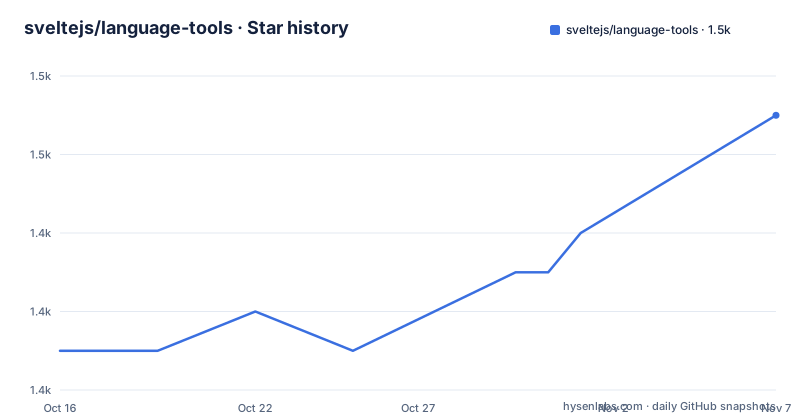
- sveltejs/language-tools1,451 ★ · +6
| Repository | 2026-10-16 | 2026-11-07 |
|---|---|---|
| sveltejs/language-tools | 1.4k | 1.5k |
6 Stars in the last 22 days, measured from the daily GitHub snapshot. Compare with other projects
Editorial analysis
What Svelte Language Tools solves for Svelte editors
Svelte Language Tools addresses the gap between Svelte's component syntax and editors built primarily around TypeScript and ordinary HTML tooling. The repository describes a library that implements the Language Server Protocol, or LSP, together with official editor extensions that use it. Its immediate audience is Svelte developers working in VS Code, while the protocol-based library also has a broader audience: developers of plugins for other LSP-capable IDEs.
The problem is especially relevant to `.svelte` files because a component combines markup with JavaScript and receives additional runtime behavior from the Svelte compiler. The README's example includes reactive declarations, event handling, interpolation, and computed values in one file. An editor that treats such a file only as generic HTML would not necessarily understand the surrounding language structure as one Svelte component.
The repository is therefore a tooling layer rather than the Svelte application framework itself. Svelte remains responsible for compiling component behavior. Svelte Language Tools is responsible for supplying editor integration through an LSP implementation and extensions. That separation matters when comparing it with a general-purpose HTML extension or with Vetur, which the README identifies as the Vue language server that strongly inspired this project.
The LSP layer and the VS Code extension boundary
The documented architecture has two principal layers: a library implementing LSP and a VS Code extension hosted in the same repository. The extension obtains its editor capabilities from the language server rather than implementing every Svelte-aware behavior only as VS Code commands. This makes the language server reusable by editors that can communicate through LSP, although the README does not enumerate every editor or claim that a usable plugin exists for each one.
The repository is a pnpm workspace with package directories under `packages/`, a root TypeScript configuration, and build scripts. Published package names visible in the release history include `svelte-language-server`, `svelte2tsx`, and `svelte-check`. This indicates that the project is split into distributable components rather than existing only as a monolithic VS Code extension. The short README does not document the internal request flow or specify which language features each package owns, so those details should not be inferred from the package names alone.
For maintainers, the split increases release coordination compared with a single editor extension. The release history shows `[email protected]`, `[email protected]`, and `[email protected]` published on 2026-08-13. Consumers may therefore need to consider package-level versions rather than treating every component as one release unit.
Installing the editor support and opening a Svelte file
The README does not provide a `pnpm`, npm, or command-line installation procedure for end users. For VS Code, it points readers to the official Svelte extension through the linked Visual Studio Marketplace listing. For setup and troubleshooting, it directs readers to the repository's `docs` directory. The README also includes no documented editor settings.
A first use starts in the editor rather than in a terminal. After obtaining the official extension through the marketplace listing and following any setup instructions in `docs`, open a project containing a `.svelte` file. The README identifies `.svelte` as the relevant component format and shows that such a file can contain a `<script>` block, Svelte state and derived declarations, a click handler, and interpolated values in markup.
The expected first check is whether the editor recognizes that mixed file as Svelte rather than plain HTML. The documentation shown here does not define diagnostics, completion menus, hover output, formatting behavior, or a status indicator, so it would be misleading to promise a specific visual result. If editor behavior is missing, the README's direct route is its `[IDE docs and troubleshooting](docs)` reference. That link is the documented source for operational setup, not a feature claim in the main README.
Building the TypeScript workspace for repository contributors
Contributors have documented repository commands, but these are package-development operations rather than end-user installation instructions. The root `package.json` declares `[email protected]` as the package manager and TypeScript `^6.0.3` as a dependency. Its bootstrap script builds selected packages and prepares the extension grammar.
The documented bootstrap sequence is:
pnpm bootstrapThis runs the repository's `bootstrap` script, which builds `packages/svelte2tsx`, changes into `packages/load-config` and builds it, then builds the VS Code grammar in `packages/svelte-vscode`. It does not describe how dependencies are installed first, and the README does not present this command as required for using the extension.
For a full TypeScript build after bootstrap, the root package supports:
pnpm buildThat invokes `tsc -b`. During development, `pnpm watch` invokes `tsc -b -watch`, while `pnpm lint` runs `prettier --check .` and `pnpm format` runs `prettier --write .`. The repository also uses Changesets for versioning and publishing. Contributors should regard these as maintainer workflows, not substitute them for the editor extension's installation path.
Where the repository documentation leaves editor behavior undefined
The main limitation is documentation depth. The README explains the purpose of the LSP library and names the official VS Code extension, but it does not enumerate concrete editor capabilities, supported IDE versions, configuration keys, troubleshooting steps, or platform requirements. A developer deciding whether to adopt it may understand the integration model while still lacking the evidence needed to verify compatibility with a particular setup.
The example component demonstrates why Svelte-specific handling matters, but it does not show the language server analyzing that component. There are no documented examples of diagnostics, symbols, completion, hover data, imports, formatting, or error recovery. Nor does the README explain how configuration files are loaded, how the server starts within an editor process, or what happens when the TypeScript and Svelte versions installed in a project differ from those used to build the tooling.
This makes the project the wrong first reference for anyone requiring a fully documented, command-driven editor installation from the root README alone. It is not evidence that those features are absent. It is evidence that the short README does not establish them. The linked `docs` directory and the marketplace listing are the first places to verify operational behavior.
Svelte Language Tools compared with Vetur's Vue language server
The clearest project-specific alternative named by the README is Vetur. The documentation calls Vetur the Vue language server and says it heavily inspired Svelte Language Tools. The practical difference is the target component ecosystem: Vetur is associated with Vue, while this repository implements language tooling for Svelte and hosts the official Svelte extension for VS Code.
This is not merely a branding comparison. Svelte Language Tools is structured around reusable LSP infrastructure, as shown by its language server package and its stated ability to support plugins for other LSP-capable IDEs. The README does not give an equivalent architectural description of Vetur, so a stronger protocol-level comparison cannot be supported from this material. It does, however, establish that Vetur is the historical design reference for Svelte's server.
For an editor user, framework compatibility should determine the choice. A Vue project should use tooling designed for Vue, while a Svelte project should use the Svelte extension or an Svelte plugin that implements the required LSP behavior. For a tool author, the relevant distinction is whether an LSP-capable client integration exists for the target editor. The README points to the LSP implementors directory but does not identify a tested alternative Svelte plugin.
MIT licensing, release upkeep, and upgrade work
The repository and its root package are licensed under MIT. The README also identifies Svelte itself as an MIT-licensed project. This makes the licensing information explicit, although organizations still need to review the actual `LICENSE` file and dependency terms for their own compliance process. No additional paid tier or proprietary license requirement is stated.
The repository is not archived, and its last push was on 2026-10-16. Releases for `svelte2tsx`, `svelte-language-server`, and `svelte-check` were published on 2026-08-13. Those facts indicate continued repository activity, but they do not establish a fixed support window for older editor or TypeScript versions.
Upgrade work appears more involved than copying a single binary. The repository uses a pnpm workspace, several named packages, TypeScript project builds, Changesets, and separate release versions. Users of the VS Code extension may receive packaged editor updates, but the README does not document how those releases are coordinated with individual npm packages. Contributors should therefore check package-level compatibility and the `CONTRIBUTING.md` workflow before assuming that every component advances in lockstep.
Editorial conclusion
Svelte developers using VS Code should evaluate the official extension first, while teams standardizing on another LSP-capable IDE should inspect that editor's plugin path. Projects requiring documented command-line installation or rollback guidance should verify the linked documentation first, because this README supplies neither. The main adoption boundary is the absence of user installation and troubleshooting instructions in the repository README.
Frequently asked questions
What is Svelte Language Tools used for?
It provides an LSP implementation and official editor extensions for working with Svelte files. The repository includes the language server used by the Svelte extension for VS Code.
Does Svelte Language Tools support IDEs other than VS Code?
The README says the LSP implementation can power plugins for other IDEs and links to the LSP implementors list. It does not identify specific third-party Svelte plugins.
How do I install Svelte Language Tools from the command line?
The README does not document an end-user command-line installation procedure. It points VS Code users to the marketplace listing and directs setup questions to the repository's `docs` directory.
What license does Svelte Language Tools use?
The repository and root package are identified as MIT licensed. The project documentation links to the repository's `LICENSE` file.
Official sources
Add this badge to your README
If you maintain this project, the badge below links readers to this analysis and shows its maintenance status from the daily GitHub snapshot. Paste the markdown into your README; add ?metric=license or ?metric=stars to the image URL for a different field.

[](https://hysenlabs.com/projects/sveltejs-language-tools)Star history chart for your README
[](https://hysenlabs.com/projects/sveltejs-language-tools)Was this useful?