Novanova Studio keeps the canvas and the agent on the same context
NovaNova Studio is an agent-driven AI creation workbench combining image generation, video generation, an infinite canvas, and multiple model APIs with motion-comic/short-drama generation, built for independent creators and visual teams to create more efficiently.
At a glance
- What is it?
- Swayingleaves/novanova-studio is a Java and Next.js creation workbench where an infinite canvas holds the context, an AgentScope agent picks tools, and long image and video generations run through Redis Stream tasks pushed back over SSE. Eight channel adapters cover the models, and one of them is only half wired.
- Who is it for?
- Fit for a studio that wants one conversation, one canvas and one place where a video render is visible as progress instead of a spinner, and for teams already on Java who want the server side to be a Spring Boot service they can put behind their own reverse proxy. Not a fit if you need per model chat support everywhere or you cannot run PostgreSQL and Redis yourself.
- Can I use it commercially?
- Yes, with conditions. GPL-3.0 is a copyleft licence: if you distribute software that includes it, you must release that software's source code under the same licence. Running it internally without distributing it does not trigger that obligation.
- Is it still maintained?
- Yes. The repository last received commits 2 days ago.
- What is it written in?
- Mainly Java, according to GitHub's language statistics.
Answers come from the project's GitHub data, last synced on October 21, 2026, and from our analysis. They are not legal advice.
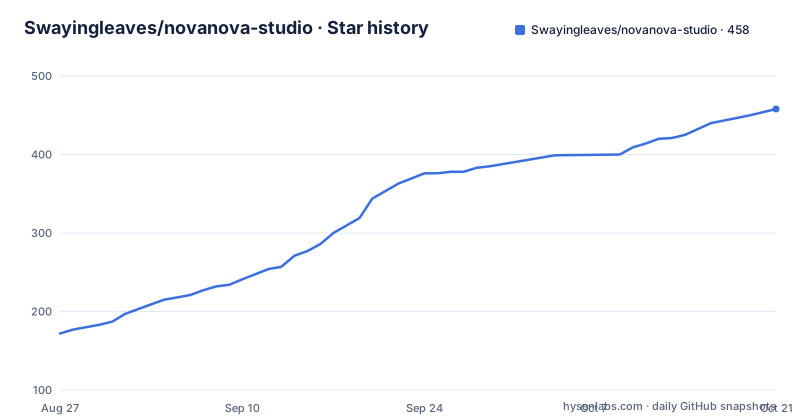
Star history
- Swayingleaves/novanova-studio458 ★ · +286
| Repository | 2026-08-27 | 2026-10-21 |
|---|---|---|
| Swayingleaves/novanova-studio | 172 | 458 |
286 Stars in the last 55 days, measured from the daily GitHub snapshot. Compare with other projects
Editorial analysis
One canvas and one agent instead of five separate tools
The stated premise is that images, videos, prompts and generation records should not be scattered across separate tools. So the infinite canvas is the context, and the agent is the piece that understands intent, chooses a tool and pushes the task forward. A creator starts from a sentence or a set of reference assets and then keeps talking, generating, editing, comparing and reusing results in the image, video and canvas scenarios. Everything produced along the way stays on the same creation chain: records, assets, prompts and canvas nodes.
That is the whole argument for the product, and it explains the rest of the structure. The canvas agent can read node state and act on it, creating, updating, moving, zooming, deleting and connecting nodes, and starting text, image or video generation flows from a node. Prompt optimisation is a separate capability with its own strategy per media type, and it only writes back into the input once optimisation succeeds, so a failed attempt does not overwrite the prompt you typed.
Five stages carry a job from sentence to canvas node
The agent path is written out as five stages, and the request never blocks the interface:
1. Input. Natural language, or an image or video reference, arrives and an Agent Profile is chosen for the image, video or canvas scenario. 2. Tool selection. The agent calls image generation, image editing, video generation, video editing, history query or canvas operation tools from context rather than from a menu. 3. Task creation. Model capability and credit cost are validated, a task snapshot is written to PostgreSQL, and the job is published to a Redis Stream consumer group. 4. Execution and feedback. A consumer calls the configured AI channel, and status, tool calls and results stream back to the front end over SSE. 5. Context. Results land in generation records, stay referenceable on the canvas, and can be added to the asset library.
Real time collaboration closes the loop: after a canvas tool runs in the browser, the tool result is sent back to the server agent, which continues from the actual execution result rather than from the intent it started with.
PostgreSQL snapshots, Redis Stream work, SSE progress
Long generations are the reason the infrastructure looks the way it does. A task snapshot goes into PostgreSQL before any provider is called, the actual execution goes onto a Redis Stream, and a consumer group picks it up. Around that sit task locks, failure recovery, cancellation and a status polling interval that can be set centrally in configuration rather than per task. The payoff is that progress, failure and cancel states are visible in the conversation and on the canvas instead of appearing when a render finally finishes.
Video generation is the case this is built for, and the documentation says so directly. The billing side is tiered per model by resolution and duration, and a workflow displays the quote for each stage rather than one price for the whole job. The first frame and last frame workflow shows this structure most clearly: its default stages are generate the first frame, generate the last frame, then composite the video, and the workflow only displays an available quote after model capability and credit price are configured for every stage.
Eight channel adapters, and Agnes chat is half wired
Models are reached through channel adapters chosen by a channel `apiFormat`, and the project deliberately keeps no fixed full model whitelist. What matters is that the adapter implements the channel protocol, and even then the models your account has actually enabled decide what you can use.
The capability split is uneven. OpenAI compatible is the only format marked for images, video and chat, at `https://api.openai.com/v1`. Gemini does images and chat but not video, through its native generateContent interface. Anthropic does chat only, on `/v1/messages`. Evolink, Seedance at `https://ark.cn-beijing.volces.com/api/v3`, and MiniMax at `https://api.minimaxi.com` do video only. Custom does images and video with administrator supplied request and response templates, async polling for video and a hand configured model list. Agnes is the one to read closely: images and video are supported, chat is marked with a warning, because the text task adapter speaks Agnes Chat Completions while the main agent's AgentScope model factory has not been connected to Agnes. Its base URL is filled in by an administrator.
A pullable model list is not a capability list
There is a warning attached to the whole channel system: being able to pull a model from a channel does not mean that model can do the thing you want. An administrator still has to mark every model as text, image or video, declare its specific capabilities, and set the default model per type. So the channel tells you what exists and the per model configuration tells you what works.
The same split applies to display and to self hosted models. Administrators can set a display name and an icon per model, the Evolink channel can pull its model list, and anything else has to be entered by hand, MiniMax included. For a private endpoint the shape is a request and response template per model, an async query path for providers that only accept a job, and placeholders that fill the model specific values. In other words the adapter is generic and the per model template is where a self built service gets adapted.
Reference media limits are set per channel, not globally
The limits that decide whether a multi reference idea is even possible are channel specific, and they differ more than the summaries suggest.
For images, OpenAI compatible endpoints use `/images/generations` for text to image and `/images/edits` when a reference image is involved. Gemini requests either TEXT or IMAGE response modality. Agnes has a named model, `agnes-image-2.1-flash`, with text to image, image to image and multi reference generation.
For video, OpenAI compatible models take up to 7 reference images and no reference video at all. Agnes is pinned to `agnes-video-v2.0`, and Seedance covers the Doubao Seedance 2.0 series, 1.5 Pro, 1.0 Pro and 1.0 Pro Fast, with the 2.0 series taking up to 9 reference images and 3 reference videos. MiniMax is pinned to `MiniMax-H3` with the same 9 images and 3 videos, at `768P` or `2K`, and a duration of 4 to 15 seconds. Evolink reaches Seedance 2.0 models through its own async `/v1/videos/generations` call with results read back from `/v1/tasks/{task_id}`.
The compose file starts Postgres with a default password
Deployment is Docker Compose, and the file in the repository is explicit about its defaults:
  postgres:
    image: postgres:17
    container_name: novanovastudio-postgres
    environment:
      POSTGRES_USER: ${POSTGRES_USERNAME:-postgres}
      POSTGRES_PASSWORD: ${POSTGRES_PASSWORD:-123456}
      POSTGRES_DB: ${POSTGRES_DATABASE:-novanova_studio}
    ports:
      - "${POSTGRES_PORT:-5432}:5432"
The password fallback of `123456` is a development convenience and travels into production unless the environment variable is set. The rest of the service definition is careful: a custom entrypoint fixes ownership of the PostgreSQL log directory before handing off to the stock entrypoint, `logging_collector` is switched on with daily rotation, a 50MB size limit and truncation, data lives in a bind mounted volume, and a `pg_isready` healthcheck runs every 10 seconds with 30 seconds of start period. Redis 8.6 sits beside it with `appendonly yes`, its log on disk and a `redis-cli ping` healthcheck. Both services are marked `restart: unless-stopped`.
The example environment trusts port 5555 while the frontend runs on 5550
The example environment file contains a mismatch worth catching before the first run. The local compose setup exposes the frontend on `WEB_PORT=5550` and the browser facing root is `FRONTEND_BASE_URL=http://localhost:5550`, but `CORS_ALLOWED_ORIGIN_PATTERNS` lists `http://localhost:5555` and `http://127.0.0.1:5555`. Left as shipped, the local front end talks to the API from an origin the server does not accept.
Three other settings decide how safe the deployment is. `APP_SECRET_KEY` is empty in the example and has to be at least 32 bytes of high entropy random data in production, because it signs the bearer tokens; `TOKEN_EXPIRE_HOURS` is 24. And `TRUSTED_PROXY_ADDRESSES` is empty, which means `X-Forwarded-For` is not trusted at all, so interface logs and login rate limiting see only the proxy address. The file also explains why a literal `127.0.0.1` is the wrong value inside a container: port mapping is NATed, so the proxy source address is the Docker bridge gateway, usually `172.18.0.1`, and a CIDR such as `172.18.0.0/16` is suggested so the setting survives a gateway move.
Smaller operational knobs follow the same shape. Tencent COS uploads get `TENCENT_COS_MAX_ERROR_RETRY=3`, where the SDK attempt count is that value plus one and zero means no retry, and a socket timeout of 120000 milliseconds with a note that cross region uploads should not go lower. System prompt overrides are optional: Docker reads them from a read only mount at `/app/config/prompts`, a local run reads `server/config/prompts`. Timezone defaults to `Asia/Shanghai`, and the file also carries an ICP record number for the site footer.
Editorial conclusion
Fit for a studio that wants one conversation, one canvas and one place where a video render is visible as progress instead of a spinner, and for teams already on Java who want the server side to be a Spring Boot service they can put behind their own reverse proxy. Not a fit if you need per model chat support everywhere or you cannot run PostgreSQL and Redis yourself. Before deploying, change the default database password in the compose file, generate an APP_SECRET_KEY of at least 32 bytes, fix the CORS port so it matches WEB_PORT, and set TRUSTED_PROXY_ADDRESSES, since leaving it empty means login rate limiting only ever sees the proxy address.
Frequently asked questions
What is Novanova Studio built on?
The web layer is Next.js 16, React 19 and TypeScript with Ant Design 6, Tailwind CSS, Zustand and React Flow. The server is Java 21 with Spring Boot 3.5, Spring WebFlux, AgentScope Java and Fastjson2, with PostgreSQL and Redis behind it, and the whole thing ships as a Docker Compose deployment with an nginx configuration directory mounted read only.
Which AI channels does Novanova Studio reach?
Eight channel formats are supported: OpenAI compatible, Evolink, Gemini, Agnes, Anthropic, Seedance, MiniMax and custom. Capability is uneven across them, with OpenAI compatible the only one marked for images, video and chat, Anthropic chat only, Evolink, Seedance and MiniMax video only, and Agnes chat marked as a warning because the text task adapter speaks Agnes Chat Completions but the main Agent's AgentScope model factory has not been connected to it.
Can I deploy Novanova Studio on my own server?
Yes, with Docker Compose, which runs postgres:17 and redis:8.6 with healthchecks and restart unless-stopped. The example environment expects an APP_SECRET_KEY of at least 32 bytes for production, a TRUSTED_PROXY_ADDRESSES list so X-Forwarded-For is honoured, NGINX_CONFIG_DIRECTORY for the reverse proxy mount, and a database password set explicitly because the compose fallback is 123456.
Official sources
Add this badge to your README
If you maintain this project, the badge below links readers to this analysis and shows its maintenance status from the daily GitHub snapshot. Paste the markdown into your README; add ?metric=license or ?metric=stars to the image URL for a different field.

[](https://hysenlabs.com/projects/swayingleaves-novanova-studio)Star history chart for your README
[](https://hysenlabs.com/projects/swayingleaves-novanova-studio)