swc-node runs TypeScript through a prebuilt binding, and its benchmarks are one file on a 2018 laptop
Faster ts-node without typecheck. Detail: @swc-node/core Benchmark transform RxJS AjaxObservable.ts to ES2015 & CommonJS JavaScript.
At a glance
- What is it?
- Three packages that drop SWC into Node as a require hook, a Jest transformer and a library, with no node-gyp and no postinstall step. The performance tables are specific and worth reading closely, because they rank esbuild first synchronously and the parallel numbers move with a libuv thread pool variable.
- Who is it for?
- swc-node fits someone who runs TypeScript directly under Node in development or in a test suite and wants SWC's speed without a native build step. Four things to check first.
- Can I use it commercially?
- Yes. MIT is a permissive licence: you can use, modify and sell software built on it, as long as you keep its copyright and licence notices.
- Is it still maintained?
- Yes. The repository last received commits 1 day ago.
- What is it written in?
- Mainly TypeScript, according to GitHub's language statistics.
Answers come from the project's GitHub data, last synced on November 14, 2026, and from our analysis. They are not legal advice.
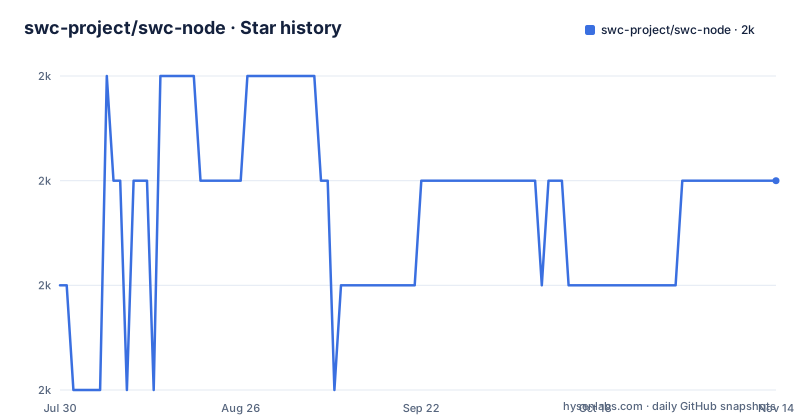
Star history
- swc-project/swc-node1,982 ★ · +1
| Repository | 2026-07-30 | 2026-11-14 |
|---|---|---|
| swc-project/swc-node | 2k | 2k |
1 Stars in the last 107 days, measured from the daily GitHub snapshot. Compare with other projects
Editorial analysis
The pitch is a prebuilt binding with no node-gyp and no postinstall
The tagline under the title is the whole sales pitch: a fast TypeScript and JavaScript transformer without node-gyp and a postinstall script. For anyone who has had a native module fail to compile on a new Node version, that sentence is the reason to look.
There are three published packages and each has a one line description. @swc-node/register is a faster alternative to ts-node/register/transpile-only. @swc-node/jest is a Jest transformer. @swc-node/core is described as the fastest TypeScript transformer, with the detail pushed to its own package directory.
Three claims, all of them superlatives, none of them defined. Fastest is asserted for core, for jest, and implicitly for register against ts-node. Only the core and jest packages have numbers behind them on the page.
The keyword list in the manifest is more informative than the prose. Alongside swc, babel, esbuild, ts-node and typescript it lists rust, n-api, node-rs, uglify, terser and webpack, which describes a native Rust binding reached through Node's N-API surface. That is the technical counterpart to the tagline: N-API bindings ship as prebuilt binaries, so there is nothing to compile on the user's machine and therefore nothing for a postinstall script to do.
The repository is a monorepo whose root package is marked private with a version of 0.0.0, which is why the release numbers you see are per package rather than for the repository. The root manifest names LongYilan as author and carries an MIT licence.
Three commands, because Node changed its ESM hooks twice
The usage section is one install line and then four ways to run a script, and the differences are all about which Node version you have.
npm i -D @swc-node/register
node -r @swc-node/register script.ts
node --import @swc-node/register/esm-register-next --enable-source-maps script.ts # for esm project with node>=22.15
node --import @swc-node/register/esm-register --enable-source-maps script.ts # for esm project with node>=20.6
node --loader @swc-node/register/esm script.ts # for esm project with node<=20.5, deprecated
Read as a compatibility ladder. CommonJS projects use the require flag and nothing else. ESM projects on Node 22.15 or newer use an import hook called esm-register-next. ESM projects between 20.6 and 22.14 use esm-register. Below 20.5 the documented command is a loader flag and the page marks it deprecated.
The threshold at 22.15 is the interesting one, because it implies the project had to add a second entry point when Node changed its module hooks rather than extend the existing one. A deprecated line that is still documented rather than removed is friendlier, and it also means three code paths are being maintained across the same registry.
Source maps are called out separately: pass --enable-source-maps to Node for ESM projects. Neither of the CommonJS lines carries it, which is consistent with how Node handles source maps for required modules.
The shebang form is documented too, for a file you want to execute directly:
#!/usr/bin/env -S node --import @swc-node/register/esm-registerand the page adds that if you want the file to ignore tsconfig.json, you prefix the interpreter with TS_NODE_PROJECT=null. That is a variable named after a different tool, set to the value null, doing the job of disabling a config file.
Four environment variables do the configuring, and one is a competitor's
A transformer has to find out how to compile your project, and this one mostly uses environment variables rather than a config file.
The first is SWCRC. Setting SWCRC=true is what makes the tool load a .swcrc file at all, so by default no SWC configuration is read. That is a deliberate difference from swc's usual behaviour and it is opt-in, one environment variable away.
The second is a project path. The manifest's own test scripts use SWC_NODE_PROJECT to point at a specific tsconfig.json, in the form cross-env SWC_NODE_PROJECT=packages/integrate-module/tsconfig.json, so the variable names a project file for the transformer. The README's shebang advice uses the older TS_NODE_PROJECT with a value of null to make the tool skip tsconfig entirely. Two variables for the same concept, one of them named after the tool this project positions itself against.
The third is SWC_NODE_ESM_LOADER, which the test:next and test:module:next scripts set to @swc-node/register/esm-register-next. That is how the project runs its own test matrix against both the current and the next loader without editing any source.
Configuration also happens at build time rather than run time, through the TypeScript compiler itself: the build script is tsc -b tsconfig.json, a project build with references, alongside a tsconfig.lint.json and a tsconfig.test.json. So a TypeScript project using this keeps its own tsc for types and gets swc for execution, which is the division of labour the whole design implies.
One more detail about how it runs: TypeScript is executed through tsx, which the image notes is a runtime dependency rather than a build tool, which is why the dependency install cannot be trimmed to development packages alone.
The synchronous table puts esbuild ahead, and the sample counts differ
The core benchmark transforms one file, RxJS's AjaxObservable.ts, to ES2015 and CommonJS, with the benchmark code in bench/index.ts. The hardware block that follows is specific enough to date the measurement: a MacBook Pro, model identifier MacBookPro15,1, with a six core Intel Core i7 at 2.6 GHz, 12 MB of L3 cache, hyperthreading on and 16 GB of memory. That is a 2018 machine.
The synchronous results:
esbuild x 510 ops/sec ±1.28% (88 runs sampled)
@swc-node/core x 438 ops/sec ±1.00% (88 runs sampled)
typescript x 28.83 ops/sec ±10.20% (52 runs sampled)
babel x 24.21 ops/sec ±10.66% (46 runs sampled)
esbuild wins, and the page says so: fastest is esbuild. This is the one table in the readme where the project is not first.
Two details in that block matter more than the ranking. The sample counts are not equal: esbuild and swc-node each ran 88 times, TypeScript 52 and Babel 46. Different sample counts mean different confidence, and it is noticeable that the two fastest tools also have the two smallest error bars, under 1.3 percent against 10 percent for the compilers. The second detail is the variance itself. A transformer that takes 28 milliseconds per operation will have noisy timing on a laptop that is also running the benchmark loop; the ±10 percent on TypeScript and Babel is the measurement telling you its own error is larger than the gap between those two.
The gap that does matter is an order of magnitude between the native tools and the two JavaScript compilers, and that is the claim the table actually supports. Whether swc-node is faster than esbuild is not settled by it, since one file, one target and one older laptop cannot settle it.
The parallel numbers move when UV_THREADPOOL_SIZE changes
The two parallel runs are the same benchmark with one difference, and comparing them is more informative than either headline.
The first is invoked with a thread pool variable set:
UV_THREADPOOL_SIZE=11 yarn benchand reports @swc-node/core at 1,253 operations per second against esbuild at 914, concluding that the fastest is @swc-node/core. The second is the bare yarn bench, and reports 1,123 against 847 with the same conclusion.
So the same benchmark on the same machine produces 1,253 with the variable and 1,123 without, an 11 percent difference for swc-node, and 914 versus 847 for esbuild, about 8 percent. The winning order does not change, but the headline number is a property of the environment as much as of the transformer.
UV_THREADPOOL_SIZE is a libuv setting, the size of the pool libuv uses for asynchronous work such as file system calls, and the machine has six physical cores with hyperthreading, so twelve hardware threads. Setting the pool to eleven is a deliberate choice rather than a default.
Whether that setting is what enables the native transform to use more threads is not explained, and the difference between the two runs is the honest measure of how much it matters: about a tenth. Anyone reading the 1,253 figure as the tool's speed should know it was measured with a variable the second run did not set.
One more thing about how these numbers are produced: the bench script in the manifest runs node with @swc-node/register as a require hook to load the benchmark file itself. The project benchmarks itself using the package under test, which is convenient and also means a regression in the register hook would change both sides of the comparison.
The Jest numbers compare against a transpile-only ts-jest on one run
The second benchmark is the transformer people are most likely to feel, and its setup is described more carefully than the core one.
The project is a pure TypeScript project with a compile target of ES2018, run with npx jest --no-cache, and the competing transformer, ts-jest, was configured with isolatedModules: true. That last setting matters: it is what puts ts-jest into its transpile-only mode, so the comparison is transformer against transformer rather than transformer against a type checking compiler. Given that this project exists to replace ts-node's transpile-only path, that is the fair framing, and stating it is to the author's credit.
The results, on an identical suite of 49 test suites, 254 tests and 53 snapshots:
Test Suites: 49 passed, 49 total
Tests:       254 passed, 254 total
Snapshots:   53 passed, 53 total
Time:        10.511 s
against 54.631 seconds for ts-jest, with total elapsed times of 14.34 and 62.71 seconds. That is roughly five times faster on the reported figure and just over four times on wall clock, including startup.
What is missing is repetition. There is one run per tool, no variance, no machine description for this test, and no mention of how many workers Jest used. A five times gap is large enough that noise is unlikely to explain it, but a benchmark on a project of this size, on hardware not identified, with a single sample, is an indication rather than a measurement.
Worth noting what the identical counts mean too. Same 49 suites, 254 tests, 53 snapshots passing on both sides means the transformers agreed on everything, which is the check that matters: speed is only interesting if the output is equivalent.
Two test runners, two monorepo tools, and a repository URL pointing elsewhere
The tree carries the residue of a long migration, and it is worth naming because it tells you what state the project is in.
There are two test runners. ava.config.mjs and the test script running ava are the project's own harness, while jest.config.js and a test:jest script exist to test the Jest transformer. Testing a Jest transformer with Jest would be circular, so the second runner is for the first.
There are also two monorepo tools. lerna.json sits at the root next to pnpm-workspace.yaml, and the manifest still carries an npm style workspaces array pointing at packages/*. Development instructions say to install with pnpm, and the lockfile is a pnpm one, so Lerna is the leftover.
The same pattern shows up in linting. There is an .eslintrc.yml and an .eslintignore, and the lint script runs oxlint instead. Releases are managed by the changesets directory, dependency updates by renovate.json, and commit hooks by husky, wired through a postinstall script on the root package.
The repository field is worth one line of its own: it is an SSH URL pointing at github.com:swc/swc-node.git, while the project lives under the swc-project organisation. A field that points at a repository path which no longer matches where the code sits is the kind of thing that quietly breaks a clone or a link.
On releases, the three most recent are @swc-node/[email protected] from 16 July 2026, then @swc-node/[email protected] and 1.10.8, both from July 2024. So core is what has been shipping, and the last commit on the default branch, which is master, is dated 25 September 2026. The sponsors section at the bottom of the readme is an empty placeholder, which after a banner asking for sponsorship at the top is an odd note to end on.
Editorial conclusion
swc-node fits someone who runs TypeScript directly under Node in development or in a test suite and wants SWC's speed without a native build step. Four things to check first. Which Node you are on, because the ESM path has three different entry points and the one you want depends on whether you are above 22.15, between 20.6 and 22.14, or below 20.5, where the documented command is already marked deprecated. Whether you want a config file at all, since a .swcrc is only loaded when you set SWCRC, and the default is to run without one. That it is a transformer and not a type checker, which is the entire premise and also the whole risk: nothing validates your types at runtime. And what the benchmarks do not tell you, since they transform one RxJS file on one older Intel laptop with differing sample counts per competitor, so treat them as an indication of the order of magnitude and not as a measurement of your project.
Frequently asked questions
What is swc-node?
It is a set of three TypeScript packages that put SWC inside Node: @swc-node/register as a faster alternative to ts-node's transpile-only mode, @swc-node/jest as a Jest transformer, and @swc-node/core as a standalone transform library. The point of the design is a prebuilt native binding, so there is no node-gyp compile step and no postinstall script.
How does swc-node compare with ts-node?
It is positioned as a faster alternative to ts-node/register/transpile-only and does no typechecking at all, which is the premise and also the risk: nothing validates types at run time. The install line is npm i -D @swc-node/register, and a TypeScript file is then run with node -r @swc-node/register script.ts.
How do I run a TypeScript file with swc-node on a recent Node?
For CommonJS, use node -r @swc-node/register script.ts. For ESM projects the entry point depends on your Node version: esm-register-next on Node 22.15 or newer, esm-register on Node 20.6 through 22.14, and the loader form for Node 20.5 and below, which the project marks deprecated. Source maps for ESM need --enable-source-maps passed to Node.
Does swc-node read a .swcrc configuration file?
Not unless you ask it to. The configuration is opt-in through the SWCRC environment variable, so a .swcrc is loaded when you set SWCRC=true. A project path can be pointed at with SWC_NODE_PROJECT, and the README also documents prefixing the interpreter with TS_NODE_PROJECT=null to skip tsconfig.json entirely.
How much faster is the swc-node Jest transformer than ts-jest?
The published run reports 10.511 seconds against 54.631 seconds on a pure TypeScript project with an ES2018 target, run with npx jest --no-cache and ts-jest configured with isolatedModules: true, which is its transpile-only mode. Both runs passed the same 49 suites, 254 tests and 53 snapshots. The figures come from a single run on each side, with no variance reported.
Official sources
Add this badge to your README
If you maintain this project, the badge below links readers to this analysis and shows its maintenance status from the daily GitHub snapshot. Paste the markdown into your README; add ?metric=license or ?metric=stars to the image URL for a different field.

[](https://hysenlabs.com/projects/swc-project-swc-node)Star history chart for your README
[](https://hysenlabs.com/projects/swc-project-swc-node)Was this useful?