Swing Music's one-line install pipes a remote script into your shell
Swing Music is a beautiful, self-hosted music player for your local audio files. Like a cooler Spotify ... but bring your own music.
At a glance
- What is it?
- A self-hosted music server for local files, licensed under the AGPL, with macOS listed as both supported and coming soon, a runtime dependency list that names a load tester and a compiler, and a Dockerfile that copies a directory the repository does not have.
- Who is it for?
- Swing Music is a good fit for someone who already has their library on disk and wants the album aware browsing, daily mixes and statistics that a file browser does not give, and the container path is the one to take for anything you care about. Three things to decide before you do.
- Can I use it commercially?
- Yes, with strict conditions. AGPL-3.0 is a network copyleft licence: if people use a modified version over a network, for example as a hosted service, you must offer them its source code under the same licence.
- Is it still maintained?
- Yes. The repository received new commits within the last day.
- What is it written in?
- Mainly Python, according to GitHub's language statistics.
Answers come from the project's GitHub data, last synced on November 24, 2026, and from our analysis. They are not legal advice.
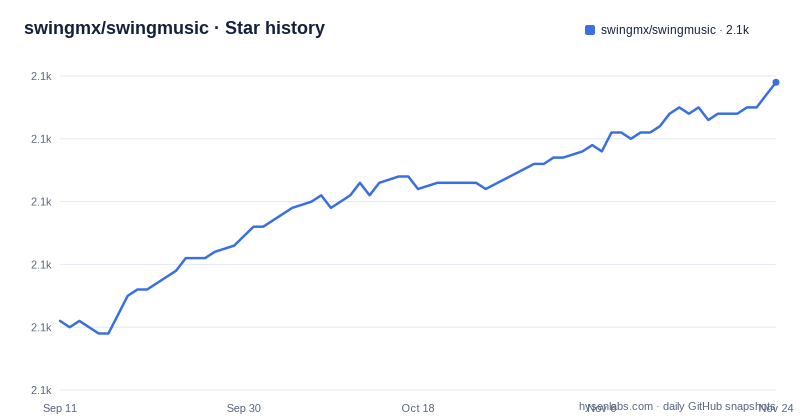
Star history
- swingmx/swingmusic2,099 ★ · +38
| Repository | 2026-09-11 | 2026-11-24 |
|---|---|---|
| swingmx/swingmusic | 2.1k | 2.1k |
38 Stars in the last 74 days, measured from the daily GitHub snapshot. Compare with other projects
Editorial analysis
The Linux install is a remote script handed to your shell
The whole Linux and macOS installation is one line:
curl -fsSL https://setup.swingmx.com | bashNothing is downloaded to disk for you to read, and nothing is hashed. The script that runs is not fetched from the code host: the repository is on one domain, the documentation on another, and this install host on a third. The repository does contain an install script, so you can read that file and compare it, but nothing in the readme tells you to.
Windows takes a different path entirely, a portable build downloaded from a downloads page and run as a file. There is no PowerShell one-liner and no container instruction on that branch, which is consistent with a project that treats Windows as the separate case it is.
Once it runs, the application starts on port 1970 on the local machine, and opening that address in a browser is how you configure it. There is no configuration file to write before first launch and no account to create before the interface appears.
For the container path the same rules apply with less magic: the image is pulled from the project's own registry namespace and the only two environment variables are the port and the name the server reports to connected clients. Read the compose sample and the run command in the readme before either, since both of them need the same two edits to move the port.
macOS is listed as coming soon and as the second supported platform
The feature list closes with a cross-platform line that reads Windows, Linux, macOS marked as coming soon, arm64 and x86. The installation section two paragraphs earlier says to run the install command on Linux or MacOS.
Both cannot be true, and the difference matters because they lead to different experiences. If macOS is supported, there is a script for it. If it is coming soon, a Mac user reading the install section will run a command for a platform the project has not shipped, and the failure will look like their machine rather than the project.
The architecture list is more generous than the OS list: two instruction sets named alongside three operating systems, with no note about which platforms have which. A Mac on Apple silicon and a Mac on Intel are different builds, and the readme does not say whether the coming soon applies to one or both.
Mobile is a separate repository entirely. The Android client lives under its own path in the same organisation, and the readme points at it twice, once in the top link row and once as a tip about streaming from a phone. The web interface is the only client the main project ships.
Changing the port takes two edits that have to agree
The container is configured with two environment variables. One sets the port the server listens on inside the container, and one sets the name the server reports to connected clients, which is what shows up in the interface rather than what resolves over the network.
The port is the trap. The readme says twice, once for the compose file and once for the run command, that to use a different port you must change both the variable and the published mapping to the same value. Two places, one meaning, no default that keeps them in step:
    environment:
      - SWINGMUSIC_PORT=1970
      - SWINGMUSIC_DEVICE_NAME=Host name here
Set the variable to 2001 and forget the mapping and the container starts cleanly, logs no error, and refuses connections from outside. That is the kind of failure that costs an evening, and the readme's own warning is the only thing standing between a reader and it.
Two other things about the container sample are worth knowing. The image tag is the floating one, so a pull can replace the binary under a mounted library with no changelog review step. And the sample mounts two host directories, one for the music and one for the configuration, which is the same pattern the run command uses and the reason the configuration survives a container replacement.
The runtime dependency list names a load tester and a compiler
The declared runtime dependencies number around thirty and read like a server's list until three entries appear that do not belong to one. A load testing framework is among them, along with a ahead-of-time compiler, and the compiler is listed a second time in a build extra.
There are also literal duplicates. One imaging library appears twice in the same array. A WSGI server appears twice, once unconditionally and once behind a Windows platform marker, which the unconditional entry makes redundant. Two different libraries read music file tags, and four different application servers are declared, so at least three of them can be removed without changing what runs.
The rest of the list is defensible and explains the feature list well. Two palette and blur-hash libraries are how album art gets its colours, an ffmpeg wrapper is the silence detection and cross-fade feature, a text search library at an exact version is the fuzzy album matching, an exact pin on the OpenAPI extension is the documented API, and a cryptography library is what protects whatever the multi-user support stores.
One entry has no explanation at all. The dependency metadata block under the package manager configuration hand-declares two packages with their python requirement, and the second of them is a web server that appears nowhere in the dependency list. Something is overriding it, and nothing in the visible files says why.
setup.py exists to make the build claim the wrong wheel type
The repository has both a project configuration file and a setup script, and the setup script's entire contents are a workaround with a comment explaining it. It subclasses the distribution class from the build backend and overrides one method to report that the package has extension modules, then calls setup with that class.
The comment above it is the interesting part. Without the override, the build backend sees only Python files and package data and emits a pure Python wheel tag for every platform. That is a false claim, because the package ships compiled extension modules, and the wheel building service rejects it for that reason. So the workaround makes the build emit a platform-tagged wheel even on a platform where nothing was compiled.
That is a fair price for a working release, and it is also a comment that will age badly: the moment the compiled modules become optional, the same override starts producing platform-tagged wheels for pure Python installs.
The version story in the same area is also unusual. The project configuration declares the version as dynamic rather than writing a number, so it comes from a version control tag, and the repository also carries a plain text version file at the root. Two sources for one number, with only one of them used at build time.
The image compiles one subtree and ships none of its source
The container build has three stages on a declared base python version of 3.11. The first is a compiler stage that installs a C toolchain, the binary patcher, and the compiler cache, then shadows the compiler on the path with the cache wrappers so nothing has to be configured. It installs the ahead-of-time compiler, copies exactly two things, a shell script and one source subtree, and runs the compilation with two cache mounts.
The comments make the intent explicit: the first stage is cached as long as that one subtree is unchanged, so an edit to anything else skips the slow compilation entirely, and the premium source never reaches the final image. The runtime stage carries only the media tools and the installed wheel.
So the application has two kinds of code. One subtree is compiled to native extensions, and everything else ships as source. The build caching is arranged around that boundary, which means a change to the compiled part costs a slow build and a change to the rest costs nothing.
And here is the flaw in the same file. The first stage copies a script from a directory that is not in the repository. The root of this project holds the source directory, the documentation, a container directory for AppImage builds, the contributing directory, the two build files, the two entry points and a handful of configuration files, and there is no scripts directory among them. A build following this file as written cannot get past that copy line.
Two organisations, three dependency lists and two binary toolchains
The project's identity is split across two accounts, and the split is visible in the readme rather than buried. The download links, the documentation links, the image registry path and the licence link all use one account. The image at the top of the document is loaded raw from a different account's copy of the repository, and the contributing section sends you to an issue on that same other account.
Whatever happened in the history, a reader following the contributing link lands on an issue tracker that is not the one whose repository they are reading.
Dependencies are declared three times. The project configuration is the source, a lock file in the package manager's format sits beside it, and a compiled requirements file is also committed, generated by compiling the first into a universal form with a comment recording the command. That last one is annotated per package with the reverse dependency chain, which is a genuinely useful artefact and also a third place to update.
Binary builds have two toolchains too. A PyInstaller specification file sits at the root next to a directory for AppImage output, and the optional build extra names both that packager and the compiler the container uses. Whatever produced the portable Windows build that the readme tells you to download is therefore not the same tool that produced the container image.
The readme closes with a contributors table naming eight handles and a call for contributors that routes through a Telegram group and a single issue. Neither of those is a code of conduct or a security policy, and a project serving music over your network has neither in the root.
Editorial conclusion
Swing Music is a good fit for someone who already has their library on disk and wants the album aware browsing, daily mixes and statistics that a file browser does not give, and the container path is the one to take for anything you care about. Three things to decide before you do. The install line executes a script fetched from a separate host over plain HTTPS, so read it or build from the image instead. The port is configured in two places that must agree, and getting one of them wrong gives you a server that appears to start and then refuses connections. And the AGPL covers the whole server, which matters if you ever expose it outside your house. For anything else, check the options flags first, since the readme names none of them and defers the list to the documentation site.
Frequently asked questions
How do I install Swing Music on Linux or macOS?
With a single command that downloads an install script over HTTPS and pipes it into bash. The application then starts on port 1970 on the local machine and is configured through the browser interface. Windows uses a portable build downloaded from the project's downloads page instead.
How do I change the port Swing Music runs on in Docker?
Set SWINGMUSIC_PORT and the published port mapping to the same value. The readme warns about this in both the compose sample and the run command, because changing only one leaves the server listening on a port that is not exposed.
What is SWINGMUSIC_DEVICE_NAME used for?
It sets the name the server reports to connected clients, which is what identifies the instance in the interface. It is separate from the port variable, which controls where the server listens inside the container.
Which platforms does Swing Music support?
The feature list names Windows and Linux and marks macOS as coming soon, while the installation section tells macOS users to run the same command as Linux. Two instruction sets are named, arm64 and x86, without saying which platforms have which.
What licence is Swing Music released under?
The GNU Affero General Public License version 3. The readme phrases it as version 3 or any later version, while the repository's licence field records AGPL-3.0, which as a package identifier does not itself state the later-versions allowance.
Official sources
Add this badge to your README
If you maintain this project, the badge below links readers to this analysis and shows its maintenance status from the daily GitHub snapshot. Paste the markdown into your README; add ?metric=license or ?metric=stars to the image URL for a different field.

[](https://hysenlabs.com/projects/swingmx-swingmusic)Star history chart for your README
[](https://hysenlabs.com/projects/swingmx-swingmusic)Was this useful?