Lemuroid puts a Libretro core library behind an Android front end
All in one emulator on Android!
At a glance
- What is it?
- Lemuroid wraps the Libretro core library in a single Android app for people who want to point at a ROM and press play, at the cost of configuration depth and a licensing picture it does not spell out.
- Who is it for?
- Adopt Lemuroid if you play on an Android phone or TV and would rather have every core bundled than assemble a Libretro set yourself, and skip it if you tune core options by hand, script the emulator from a desktop, or need a system outside the listed core set, since adding a core the project did not bundle is not a documented operation.
- Can I use it commercially?
- Yes, with conditions. GPL-3.0 is a copyleft licence: if you distribute software that includes it, you must release that software's source code under the same licence. Running it internally without distributing it does not trigger that obligation.
- Is it still maintained?
- Yes. The repository last received commits 30 days ago.
- What is it written in?
- Mainly Kotlin, according to GitHub's language statistics.
Answers come from the project's GitHub data, last synced on November 15, 2026, and from our analysis. They are not legal advice.
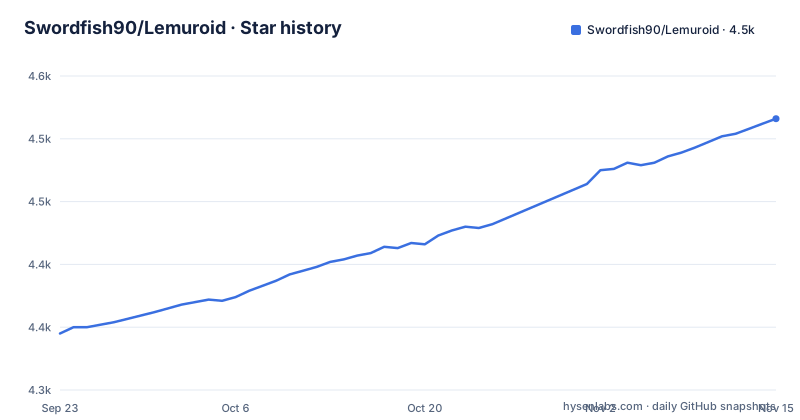
Star history
- Swordfish90/Lemuroid4,516 ★ · +171
| Repository | 2026-09-23 | 2026-11-15 |
|---|---|---|
| Swordfish90/Lemuroid | 4.3k | 4.5k |
171 Stars in the last 53 days, measured from the daily GitHub snapshot. Compare with other projects
Editorial analysis
The emulator is a Libretro shell, not a set of emulators
Lemuroid does not contain emulation code of its own. It calls the Libretro core library, the same C library that RetroArch and other front ends use, and the project's own description says so plainly: it is an open source emulation project based on Libretro, and it originated as a fork of Retrograde before standing alone and integrating LibretroDroid, the Android library that loads core binaries.
That single decision explains most of what you can and cannot do in the app. Anything a core exposes through the Libretro option interface is reachable, but the front end has to surface it, and Lemuroid's own feature list is short and consumer shaped: automatic save and restore of game state, ROM scanning and indexing, quick save and load, zipped ROM support, customizable touch controls with size and position, gamepad support, local multiplayer, tilt input, Android TV support, cloud save sync and an HD mode. There is no per core options screen described anywhere in the project documentation, which is the point where this design stops being simple.
The module layout in the repository matches that split. You get lemuroid-app, plus lemuroid-app-ext-play and lemuroid-app-ext-free for the two distribution flavours, lemuroid-touchinput for the on screen pad, lemuroid-cores for the binaries themselves, lemuroid-metadata-libretro-db for system metadata, and retrograde-app-shared and retrograde-util carried over from the ancestor project.
Two store badges are the whole route in, and no build command exists
There is no build command in the project documentation. The README opens with two download badges, one for F-Droid and one for Google Play, and nothing beyond that describes how to obtain or compile the app. Treat those two stores as the entire install path, and read the next sentence as the whole tutorial: install from F-Droid or from Google Play, then import your own legally obtained ROM files through the app.
The F-Droid variant is why the free flavour module exists in the tree.
What the documentation does not tell you is what happens after install. Where saves land, how the ROM scanner picks up a folder, what a game needs in terms of permissions, and how to point the app at a core: the README does not document any of it. The first run is therefore the discovery moment. Scan your library, open one ROM, and see whether the bundled core produces audio and video before you commit to moving your whole collection in.
Cores ship as bundled binaries, tracked through a submodule
The emulated machines are not written in Kotlin. The repository carries a .gitmodules file and a lemuroid-cores module, which means the core binaries are pulled in as a submodule rather than compiled by the app's Gradle build. A developer who decides to build from source inherits the step, and the project documentation does not spell out the submodule initialisation, which is a real gap for anyone who goes that route.
The core set spans Atari 2600, 7800 and Lynx; NES, SNES, Game Boy, Game Boy Color, Game Boy Advance; Sega Genesis, Sega CD, Master System and Game Gear; Nintendo 64; PlayStation and PSP; arcade hardware through FinalBurn Neo; PC Engine; Neo Geo Pocket and Color; WonderSwan and Color; and Nintendo 3DS. The PlayStation entry uses PCSX-ReARMed, and the arcade entry uses the fbneo core. Everything runs through the Libretro API, so a core update lands in the app when the app updates, not when you update anything yourself.
Nintendo DS lists two cores and leaves the choice unexplained
One line in the system list is worth slowing down on. Nintendo DS is the only entry with two core names against it: desmume and MelonDS. Every other machine resolves to exactly one library, and for Game Boy and Game Boy Color even the same core appears twice, which is correct since one library handles both. The DS line is the exception.
Nothing in the documentation says which core the app launches by default, whether it switches between them, or whether one is preferred for certain games. That matters, because DS emulation behaviour differs enough between cores that a title can run correctly under one and not the other. If a DS game misbehaves, you have no documented way to pick the other one.
There is a second silence nearby. Save states are automatic and cloud sync is offered, but the project documentation does not say which save formats move between devices, and the PlayStation and PSP entries ship a single core each with no stated recompilation path. Emulation accuracy is fixed when the app is built, by whichever core version ships inside it.
Cloud save sync covers game state, not the ROM library
Cloud save sync is listed among the features, and automatic save and restore of game state sits next to it. Read those two together and the scope becomes clear: what travels is state, not content. The app indexes ROMs that already exist on the device, and no feature in the list streams or downloads them.
This keeps the app on the right side of the law it needs to stay on. A store-front application cannot ship or fetch copyrighted games, so the ROM path is yours to provide and the sync path carries only what the emulator generated. The consequence for you is that a cloud backup does not rebuild a library on a new phone, and the documentation does not describe what happens to local saves when a cloud sync conflicts or when a core changes between app versions.
Also worth noting: the touch input, gamepad, tilt and local multiplayer options are front end work in lemuroid-touchinput and the app modules, so their behaviour is Lemuroid's own, not inherited from the core.
Every bundled core brings its own terms, and a debug keystore sits in the tree
The repository carries GPL-3.0, with COPYING at the top level. That is not the whole licensing picture: every Libretro library named in the system list carries its own terms, and nothing in the documentation explains how the two sets combine if you redistribute a build.
Two other repository details show up for anyone auditing the tree. A debug.keystore sits at the top level, which is normal for a sample project and would need replacing before any real distribution. And the languages line points at a Crowdin project, so translation happens outside the repository through that service.
For upkeep, the last push was on 2026-10-16 and release 1.17.0 shipped on 2026-04-21, following a long gap back to 1.16.2 in October 2024.
RetroArch builds the same core set, one core at a time
RetroArch is the natural comparison because it runs the same Libretro libraries. The difference is where the work sits. RetroArch is a general front end where you assemble the experience yourself: you fetch core files, you place them where the front end expects them, you manage which ones are installed. Lemuroid ships with the set already decided and packaged, so there is nothing to assemble.
That choice buys a shorter first run and a single coherent interface for Android TV, gamepad, tilt and touch, all with the same layout across every supported machine. It costs the configuration surface. Overrides, per core tuning and any command line style control of the Libretro options belong to the front end that exposes them, and Lemuroid exposes a curated set.
For a device that will only ever run Lemuroid, that trade is worth taking. For someone who wants to add a core the project did not bundle, or to script the emulator from a desktop, the other arrangement is the one that fits.
Editorial conclusion
Adopt Lemuroid if you play on an Android phone or TV and would rather have every core bundled than assemble a Libretro set yourself, and skip it if you tune core options by hand, script the emulator from a desktop, or need a system outside the listed core set, since adding a core the project did not bundle is not a documented operation. Check first which core the game you care about actually needs, because the Nintendo DS entry names both desmume and MelonDS without saying which one launches or how to switch, and because PSX and PSP ship one core each with no stated recompilation path. Then confirm where saves land on your device before you move a library across, a detail the documentation leaves out.
Frequently asked questions
What consoles does Lemuroid emulate?
It covers Atari 2600, 7800 and Lynx, NES, SNES, Game Boy, Game Boy Color, Game Boy Advance, Sega Genesis, Sega CD, Master System, Game Gear, Nintendo 64, PlayStation, PSP, FinalBurn Neo arcade, PC Engine, Neo Geo Pocket and Color, WonderSwan and Color, and Nintendo 3DS. Each system maps to a named Libretro core in the supported systems list.
Which is better, Lemuroid or RetroArch?
Both run the same Libretro cores. Lemuroid decides the core for each supported system for you inside one Android app with Android TV, gamepad and touch support, while RetroArch is a general front end where you fetch and place core files yourself and configure them.
How do you install Lemuroid?
The project documentation gives two download badges only, one pointing to F-Droid and one to Google Play. No build command or source install path is written down, so the two stores are the install route and you supply your own ROM files after installing.
How do you use Lemuroid on Android TV?
Android TV support is one of the listed features, and gamepad support and local multiplayer are listed alongside it, so the app is built to be driven from a TV with a controller. The documentation does not describe the setup steps for a TV device.
How do you access Lemuroid save files?
The documented behaviour is automatic: the feature list states that game states are saved and restored automatically, with a quick save and load option and a cloud save sync option. The specific file paths on the device are not documented in the project README.
Official sources
Add this badge to your README
If you maintain this project, the badge below links readers to this analysis and shows its maintenance status from the daily GitHub snapshot. Paste the markdown into your README; add ?metric=license or ?metric=stars to the image URL for a different field.

[](https://hysenlabs.com/projects/swordfish90-lemuroid)Star history chart for your README
[](https://hysenlabs.com/projects/swordfish90-lemuroid)Was this useful?