lsp-mode: an Emacs LSP client with per-language client definitions
Emacs client/library for the Language Server Protocol
At a glance
- What is it?
- lsp-mode is a fuller alternative to eglot, the minimal LSP client built in to Emacs. It ships per-server client definitions, a non-blocking JSON-RPC layer, and optional integrations with company, flycheck, treemacs and dap-mode.
- Who is it for?
- Adopt lsp-mode if you want one Emacs configuration to cover several languages and you are willing to let the package pull in optional integrations such as company, flycheck and lsp-ui. Do not adopt it if a single built-in client and a minimal package footprint matter more to you; eglot ships with Emacs and is the comparison the project itself links to.
- Can I use it commercially?
- Yes, with conditions. GPL-3.0 is a copyleft licence: if you distribute software that includes it, you must release that software's source code under the same licence. Running it internally without distributing it does not trigger that obligation.
- Is it still maintained?
- Yes. The repository last received commits 6 days ago.
- What is it written in?
- Mainly Emacs Lisp, according to GitHub's language statistics.
Answers come from the project's GitHub data, last synced on November 14, 2026, and from our analysis. They are not legal advice.
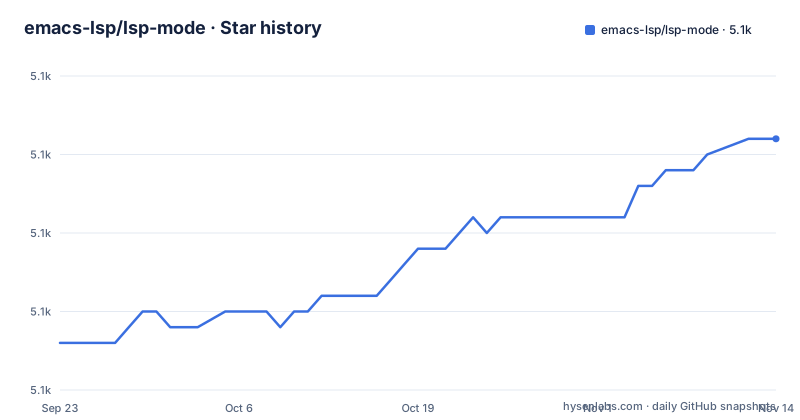
Star history
- emacs-lsp/lsp-mode5,136 ★ · +13
| Repository | 2026-09-23 | 2026-11-14 |
|---|---|---|
| emacs-lsp/lsp-mode | 5.1k | 5.1k |
13 Stars in the last 52 days, measured from the daily GitHub snapshot. Compare with other projects
Editorial analysis
The problem lsp-mode solves for Emacs users
Emacs has completion, xref navigation, imenu outlines and flymake diagnostics built in, but none of those know how to talk to a language server. lsp-mode is the adapter. It implements the client half of the Language Server Protocol at version 3.14, so a server written by a language's own tooling team can answer definition, reference, hover, rename, formatting and code action requests for a buffer. The audience is people who already live in Emacs and want IDE behaviour without leaving it: the README lists integrations with company, flycheck, projectile, helm, ivy, consult, treemacs and dap-mode, plus built-in xref and imenu. It is not an editor and not a language server. Nothing in the package parses your C++ or your TypeScript; it starts a server process, speaks JSON-RPC to it, and routes the answers into whatever Emacs front end you have configured.
How the client, the server and the buffer fit together
The repository is split by concern. lsp-mode.el holds the core client and session management, lsp-protocol.el defines the protocol types, and lsp-completion.el, lsp-diagnostics.el, lsp-headerline.el, lsp-lens.el, lsp-iedit.el, lsp-dired.el, lsp-ido.el, lsp-inline-completion.el, lsp-modeline.el and lsp-semantic-tokens.el each attach one feature area to a session. A clients/ directory holds the per-language definitions that say which binary to launch, with which arguments, for which major mode. The README notes that client documentation is generated from doc comments inside those client files plus metadata in docs/lsp-clients.json, which tells you where a correction belongs if a server's arguments are wrong. Calls are asynchronous, so a slow server does not block editing. Diagnostics reach you through flycheck, or through flymake when Emacs is newer than 26, with flymake 1.0.5 or newer. Completion goes through company-capf or completion-at-point; the README states that company-lsp is no longer supported, so older configurations that name it need rewriting rather than patching. Semantic tokens, an LSP 3.17 feature, are supported for servers the README describes as recent development builds of clangd and rust-analyzer, which is a narrower claim than the v3.14 support statement above it.
Installing lsp-mode and getting a first server running
lsp-mode is distributed through MELPA and MELPA Stable, and the README's own installation page is the canonical source rather than the README body. lsp-mode talks to an external language server, so the first real use means having a server available for the client to launch. The project's own test setup is a concrete model for that: the Makefile prepares a sample C++ project with CMake and clangd before running the test suite, which is roughly the shape of a working clangd setup, where the server needs a compile database to index.
cd test/fixtures/SampleCppProject/ && mkdir -p build && cd build/ && cmake ..That target is what the repository runs in CI, not a user-facing installer; it shows what the server expects to find in the project directory. For client-side configuration, the README points to the installation and troubleshooting pages on the project homepage. Optional packages are picked up automatically: the project describes lsp-mode as working out of the box and upgrading itself when additional packages such as lsp-ui, lsp-treemacs, helm-lsp, lsp-ivy or consult-lsp are present. If you want the full IDE surface, install lsp-ui for hovers and sideline code actions and lsp-treemacs for tree views. If you want none of it, the README explicitly offers the minimal, distraction-free configuration as a supported choice.
Where lsp-mode is the wrong tool
The package is GPL-3.0 and Emacs Lisp, so it is not something you embed in a non-GPL product; it is an editor extension and should be treated as one. The heavier constraint is operational. Every feature depends on an external server binary that lsp-mode does not ship, so a broken setup is usually a missing or misconfigured server, not a bug in the client, and the README routes those cases to a troubleshooting page rather than promising automatic recovery. The client definitions are maintained per language, which means support quality varies by server: semantic tokens list recent development builds of clangd and rust-analyzer as example compatible servers, and a server that lags behind the protocol will produce partial results. The integration surface is also a maintenance surface. If you enable lsp-ui, lsp-treemacs, helm-lsp, lsp-ivy, consult-lsp and dap-mode together, you are running a stack of packages that must stay compatible with each other and with your Emacs version, and the README's note that company-lsp is no longer supported is a concrete example of what happens when one link in that chain is abandoned. On a machine where you edit one language occasionally, the configuration cost can exceed the benefit.
lsp-mode vs eglot, and the other neighbours
The README's See also section lists eglot as a minimal LSP implementation built into Emacs. That is the real alternative and the difference is scope, not protocol. eglot aims to be small and to use Emacs's own facilities where they exist; lsp-mode aims to cover the protocol broadly and to layer optional UI packages on top, which is why it has separate files for lenses, headerline breadcrumbs, modeline diagnostics, dired, ido and iedit. Choosing eglot is choosing fewer moving parts and less configuration; choosing lsp-mode is choosing more features and more packages to keep aligned. Two other entries in that list are not competitors. lsp-docker provides a Docker image with preconfigured language servers and matching Emacs configuration, which addresses the server-installation problem rather than the client problem. dap-mode is the debugger integration for lsp-mode, so it extends the same session rather than replacing it. emacs-tree-sitter and gccemacs appear in the same list but solve different problems: syntax highlighting and native compilation of Emacs Lisp respectively.
Maintenance, releases and upgrade cost
The repository is not archived, and the last push was on 2026-10-20. Releases are infrequent and large: 10.0.0 landed on 2026-04-03, 9.0.0 on 2024-04-06 and 8.0.0 on 2021-09-04. That cadence matters if you install from MELPA Stable, because a major version can carry two years of accumulated change; installing from MELPA gives you the master branch and a different kind of upgrade risk. The CHANGELOG.org file at the repository root is where release notes live, and it is the file to read before moving between majors. The licence is GPL-3.0, which is consistent with the package being Emacs Lisp distributed through Emacs package archives; if you redistribute a modified copy, the usual copyleft obligations apply. Nothing here is legal advice, and the LICENSE file is the authoritative text. The project also states that the emacs-lsp organization has more than 20,000 lines of code and asks for sponsorship, which is a fair signal about the maintenance load behind a client that has to track many servers.
Editorial conclusion
Adopt lsp-mode if you want one Emacs configuration to cover several languages and you are willing to let the package pull in optional integrations such as company, flycheck and lsp-ui. Do not adopt it if a single built-in client and a minimal package footprint matter more to you; eglot ships with Emacs and is the comparison the project itself links to. Before committing, check that a client definition exists for each language server you actually run, and make sure that server is installed.
Frequently asked questions
Which is better, Eglot or lsp-mode?
The README lists eglot as a minimal LSP implementation built into Emacs, and describes lsp-mode as supporting all features in Language Server Protocol v3.14 with optional integrations for company, flycheck, treemacs and dap-mode. The difference is scope and configuration weight rather than the protocol itself.
What is lsp-mode in Emacs?
It is an Emacs client for the Language Server Protocol, aimed at giving an IDE-like experience through optional integration with packages such as company, flycheck and projectile. It handles non-blocking asynchronous calls, diagnostics, completion, navigation, code actions and formatting.
How do I install lsp-mode in Emacs?
The README links to a dedicated installation page on the project homepage rather than giving steps inline, and the package is published on MELPA and MELPA Stable.
What does lsp-mode vs eglot come down to?
The README describes eglot as a minimal LSP implementation built into Emacs, while lsp-mode is presented as fully featured with support for all features in Language Server Protocol v3.14 and optional UI integrations. The trade-off is between a small built-in client and a larger client with more layers.
Official sources
Add this badge to your README
If you maintain this project, the badge below links readers to this analysis and shows its maintenance status from the daily GitHub snapshot. Paste the markdown into your README; add ?metric=license or ?metric=stars to the image URL for a different field.

[](https://hysenlabs.com/projects/emacs-lsp-lsp-mode)Star history chart for your README
[](https://hysenlabs.com/projects/emacs-lsp-lsp-mode)Was this useful?