Syncfusion Flutter examples: one pinned SDK behind nineteen widget samples
This repository contains the Syncfusion Flutter UI widgets examples and the guide to use them.
At a glance
- What is it?
- A single Dart project holds sample code for nineteen Syncfusion Flutter widgets, barcodes and spreadsheets included, and it runs against one pinned stable channel. The pin is the part to read first: the only SDK build named is a Windows archive, and the only fenced command fetches dependencies.
- Who is it for?
- Take this repository when you want Syncfusion Flutter sample code open in your own editor and nothing more: it is a reference, not a dependency, and the nineteen catalog rows give you no package names to copy from. Leave it alone if you need an evaluation of the widgets themselves, because the gallery apps cover that ground on a device.
- Can I use it commercially?
- Check first. The repository uses a licence we do not classify automatically, so read its LICENSE file before any commercial use.
- Is it still maintained?
- Yes. The repository last received commits 2 days ago.
- What is it written in?
- Mainly Dart, according to GitHub's language statistics.
Answers come from the project's GitHub data, last synced on October 23, 2026, and from our analysis. They are not legal advice.
Star history
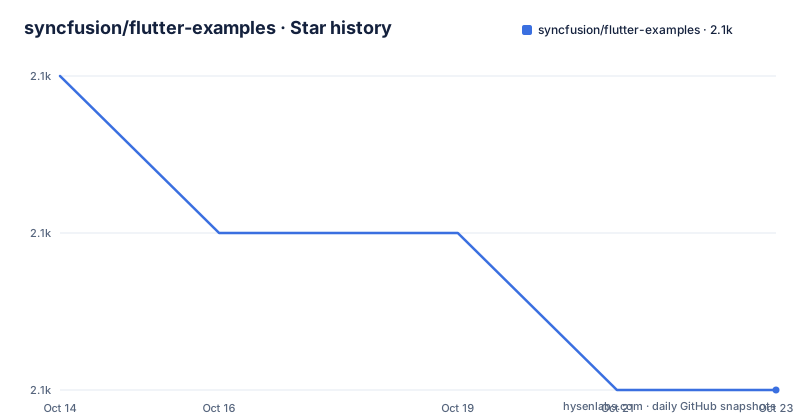
- syncfusion/flutter-examples2,065 ★ · -2
| Repository | 2026-10-14 | 2026-10-23 |
|---|---|---|
| syncfusion/flutter-examples | 2.1k | 2.1k |
-2 Stars in the last 9 days, measured from the daily GitHub snapshot. Compare with other projects
Editorial analysis
Nineteen catalog rows share one dependency file
This is a reading aid for a developer who already has the Syncfusion widget package and needs to see an API used in a file that actually runs. It is not a package you add to an application. Every sample sits side by side under `lib/samples`, one directory per widget family: `lib/samples/chart`, `lib/samples/datagrid`, `lib/samples/calendar`, `lib/samples/maps`, `lib/samples/treemap`, `lib/samples/xlsio`. The nineteen rows of the widgets catalog map onto those folders, and a row points at a directory in the tree rather than at an API page, so the file behind a screen is one click away instead of described in words.
The root listing shows how little is shared between them. Alongside `lib/` come `android/`, `ios/`, `linux/`, `macos/`, `web/` and `windows/`, six platform folders matching the six deploy targets named in the structure note, plus `snap/` for the desktop gallery package, `assets/`, `images/`, `pubspec.yaml`, `analysis_options.yaml`, `.github/`, and both `README.md` and `ReadMe.txt`. One `pubspec.yaml` holds the dependency set for all nineteen samples, so there is no per-sample pinning to read, and the tree does not say which of the two readme files is the authoritative one.
One channel, one build number, and a download that only serves Windows
Running any of this starts from a single hard requirement: the Flutter SDK, channel Stable, number 3.24.0. The requirements table has exactly one row. There is no second row for a newer channel, no note on what happens when the pinned build falls behind a sample, and no Dart SDK constraint stated on the page, even though the Dart and Flutter add-ons are named as part of the editor setup. The Dart constraint the project does carry lives in `pubspec.yaml`, which the README does not reproduce.
The only link attached to that number is a Windows archive, `flutter_windows_3.24.0-stable.zip`, and it resolves into a Windows channel directory. A few lines later the same page names six deploy targets: Android, Web, Windows, iOS, Mac and Linux. A developer on macOS or Linux receives a build number and no matching artifact, and has to work out for themselves which download corresponds to the Stable label. Visual Studio Code and Android Studio are both offered as IDE tools, with the add-ons installed as an extension in the first and through plugin preferences in the second.
Step four is keybindings, and step three is the only command
Using the samples is four steps, and just one of them is a command. Step 1 is to unzip the downloaded flutter example archive, with a note attached saying that cloning the repository means ignoring that step, so the documented path assumes a zip rather than a clone. Step 2 is to open the folder in an IDE. Step 3 fetches packages, and it is the one line in the entire document that sits in a fenced block:
$ flutter pub getStep 4 then covers three run targets, and every line inside it is a keybinding. No terminal invocation appears anywhere on the page, so nothing shows how to pick a device, pass a build flag, or name a platform target from a shell. If your workflow is headless, or your editor is not one of the two named above, the run path stops at the dependency fetch and the rest is left to you.
The browser block keeps two shortcuts that the desktop blocks extend to four
Step 4 is split by operating system, and the splits are not parallel. Windows and Linux get four lines: run code with `Ctrl + F5`, start debugging with F5 or Run > Start Debugging, stop with `Shift + F5`, restart with `Ctrl + Shift + F5`. macOS moves the modifier on the run-code line to `Cmd + F5` and then leaves a bare F5 for Start Debugging, so on a Mac keyboard the unmodified key starts the debugger while the modified one starts a plain run.
The block headed VS Code in the Browser keeps only the first two of those lines. Stop and restart have no documented shortcut for the web target, so a browser session that needs a restart falls back to whatever the editor menu offers. Nothing explains why the desktop blocks carry four lines and the browser block carries two, and nothing explains what should happen when a sample has no web implementation at all.
Five destinations for one gallery binary
Not running the project is the other route. The samples also ship as gallery apps you install and read on a device, and the prose names two of them: the Google Play Store build carrying the package id `com.syncfusion.flutter.examples` and the App Store listing at `id1475231341`. A row of store badges underneath adds three destinations the prose never mentions, a Microsoft Store listing, `snapcraft.io/syncfusion-flutter-gallery`, and a web sample browser at `flutter.syncfusion.com`. Add the GitHub samples badge and six links sit in that block, only one of which leads to the tree described here.
The two approaches differ in what each one costs you. The repository needs an editor, one dependency fetch and a per-OS keybinding, and it hands over the file that produced the screen. The gallery apps hand over the rendered result and the sample source inside the app, on a phone or in a browser, with no Flutter toolchain on the machine at all. Neither route tells you which widget build a given screen came from.
The root waiver names damage, not reuse rights
The LICENSE file at the root is a waiver rather than a permission: it states that Syncfusion has no liability for damage arising from the use or viewing of the examples, calls them demonstrative, has the reader agree not to hold Syncfusion liable in any form, bars injunctive relief for any claim tied to a sample, and names no identifier that GitHub's own classifier can place beyond Other.
That text sets out what Syncfusion will not pay for and stays silent on what you may copy. It never distinguishes the sample file from the widget package the file imports, so a team lifting a chart sample into a product has no stated basis in this tree for doing it. Two questions follow, and neither has an answer here: what terms the widget package carries on its own, and whether the file you want is glue written for the demo or widget code that ended up inside it. Nothing on the page points to either answer.
Five minutes separate the newest tag from the final commit
The last push is dated 2026-07-07 and reads 09:22:52, while the newest tag v34.1.29 carries 09:17:07 on that same date, so the final commit in the history landed five minutes after the version bump and travelled with it. The tree on `master` has not moved since, and the page states no support window for the samples and no schedule for refreshing them, which leaves the age of that commit as the only freshness signal on offer.
The upgrade path is where the pin bites. The requirements table binds every run to Flutter Stable 3.24.0 and offers no second build to move to, so a reader who bumps the SDK anyway inherits whatever API drift the gap holds. Pin what the table names while you learn from the files, then compare against the API reference at `help.syncfusion.com/flutter/introduction/api-reference` before moving any sample into an application.
Where the catalog stops short of a dependency list
Nineteen rows is a wide surface, and each one gives a directory and nothing beyond it: no package name, no build tag, no pub.dev link, no minimum SDK, no per-platform note. A row can tell you a Linear Gauge sample exists under `lib/samples/linear_gauge` without telling you which widget package supplies it, or whether it still compiles against the pinned channel. The PDF, PDF Viewer, Barcode Generator and XlsIO rows push the range past screen controls into document and spreadsheet handling, while the table still labels the whole set as widgets.
Two entries in the root listing sharpen the gap. A `.github/` directory is present, and the page never says which workflows run there or whether any sample is checked on commit, so the repository does not tell you whether those nineteen folders are exercised automatically. `analysis_options.yaml` sits beside it, so lint configuration exists, yet the requirements list only editor add-ons and never mentions running an analyzer. Without a documented check, every file you lift stays unverified until your own build runs.
Editorial conclusion
Take this repository when you want Syncfusion Flutter sample code open in your own editor and nothing more: it is a reference, not a dependency, and the nineteen catalog rows give you no package names to copy from. Leave it alone if you need an evaluation of the widgets themselves, because the gallery apps cover that ground on a device. First check whether Flutter Stable 3.24.0 matches your project, then confirm the file you want lives under lib/samples rather than only inside the store build, because no row in the tree carries a dependency list.
Frequently asked questions
Which Flutter version do the syncfusion/flutter-examples samples need?
The requirements table names one value: the Stable channel at 3.24.0, with a single row and no alternative build. No Dart SDK constraint is stated on the page; that value sits in the root pubspec.yaml, which is not reproduced.
Does syncfusion/flutter-examples build for Android, iOS, web and desktop?
The structure note names Android, Web, Windows, iOS, Mac and Linux as deploy targets, and the root carries a folder for each of those six. The run instructions then cover only Windows and Linux, macOS, and a VS Code in the Browser session.
Can I copy code from syncfusion/flutter-examples into a commercial app?
Nothing on the page grants reuse. The LICENSE file at the root is a liability waiver that names no identifier beyond GitHub's Other classification, and it does not separate sample files from the widget packages they import. Check the terms of the widget package you depend on before copying a file.
How do I run a syncfusion/flutter-examples sample without Visual Studio Code?
The documented run path is the IDE path: open the folder in Visual Studio Code or Android Studio, fetch packages with `flutter pub get`, then use the per-OS keybindings. No terminal launch command is given anywhere on the page, and no editor other than those two is listed.
Do I need a Syncfusion account to use the syncfusion/flutter-examples samples?
The page mentions no account, no licence key and no sign-in step. The only prerequisites it lists are the Flutter SDK on the Stable channel at 3.24.0, plus Visual Studio Code or Android Studio with the Dart and Flutter add-ons installed.
Official sources
Add this badge to your README
If you maintain this project, the badge below links readers to this analysis and shows its maintenance status from the daily GitHub snapshot. Paste the markdown into your README; add ?metric=license or ?metric=stars to the image URL for a different field.

[](https://hysenlabs.com/projects/syncfusion-flutter-examples)Star history chart for your README
[](https://hysenlabs.com/projects/syncfusion-flutter-examples)Was this useful?