Flutter Responsive Admin Panel or Dashboard: a template you clone, not a package you install
Responsive Admin Panel or Dashboard using Flutter
At a glance
- What is it?
- abuanwar072's Flutter dashboard template is MIT-licensed Dart source for a responsive admin UI, built on flutter_svg, google_fonts and provider. It is a starting point for your own codebase, and the README points to a YouTube walkthrough rather than a pub.dev package.
- Who is it for?
- Adopt this template if you want a Flutter web or desktop admin shell and are willing to treat the repository as source you own and edit, and if the three dependencies flutter_svg, google_fonts and provider already fit your pubspec. Do not adopt it if you expected a versioned package with a changelog, or if you need authentication, routing, state persistence or a backend contract, none of which the README describes.
- Can I use it commercially?
- Yes. MIT is a permissive licence: you can use, modify and sell software built on it, as long as you keep its copyright and licence notices.
- Is it still maintained?
- Yes. The repository last received commits 110 days ago.
- What is it written in?
- Mainly Dart, according to GitHub's language statistics.
Answers come from the project's GitHub data, last synced on November 15, 2026, and from our analysis. They are not legal advice.
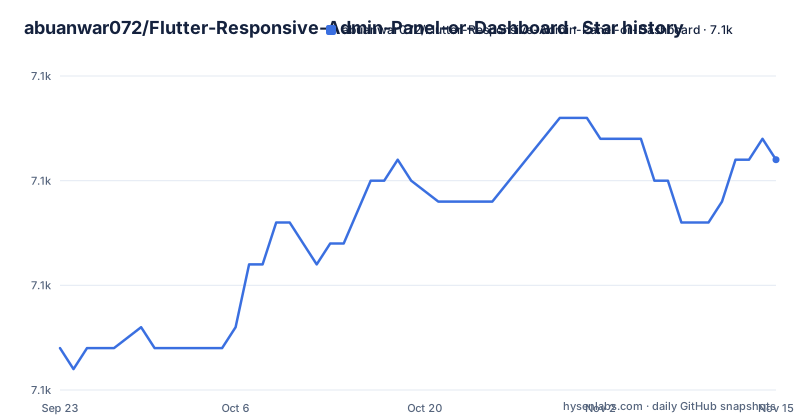
Star history
- abuanwar072/Flutter-Responsive-Admin-Panel-or-Dashboard7,121 ★ · +9
| Repository | 2026-09-23 | 2026-11-15 |
|---|---|---|
| abuanwar072/Flutter-Responsive-Admin-Panel-or-Dashboard | 7.1k | 7.1k |
9 Stars in the last 53 days, measured from the daily GitHub snapshot. Compare with other projects
Editorial analysis
What this repository actually is, and who it is for
This is a UI template, not a library. There is no package on pub.dev to depend on, no version to pin, and no changelog. The README describes it as a "Flutter-based Admin panel, often referred to as a dashboard UI" and calls it "a comprehensive solution for your app's backend needs" with charts, tables and info cards. That framing is generous. What the repository contains is Dart source under lib/, platform folders for android, ios, linux, macos, web and windows, an assets/ directory, a test/ directory, and a pubspec.yaml. You adopt it by copying or forking the code and editing it until it is yours.
The audience is narrow and specific. It suits a Flutter developer who needs a web or desktop admin shell and would rather start from a working responsive layout than build the grid from scratch. The README states the UI is "tailored to work seamlessly on the Web, macOS app, tablets, and both Android and iOS phones", and the platform folders in the repository match that claim. It does not suit someone looking for a backend, an authentication layer, or a drop-in dependency. The README's own pitch for backend work points outward to Serverpod, which tells you where the template stops.
How the responsive layout is put together
The dependency list is short and it is the clearest signal of the architecture. flutter_svg handles the icon and illustration assets, google_fonts pulls in Poppins, and provider supplies state management. Nothing else is listed in the README, so the responsiveness is not coming from a layout package. It is coming from Flutter's own layout primitives, which is the normal way this is done: width-driven decisions in the widget tree, with the dashboard rearranging rather than scaling.
That choice has consequences worth naming. Because provider is the only state mechanism the README mentions, expect cross-widget state in the template to go through provider. If your application already standardises on Riverpod, Bloc or something else, you are either porting the template's providers or running two state systems side by side. The template does not offer a neutral seam here. The google_fonts dependency is the other one to think about: it fetches fonts at runtime by default, and the README does not discuss bundling Poppins as an asset instead. For an admin panel behind a login wall on a corporate network, that is a detail you will want to settle before shipping.
The repository layout reinforces the reading. There is a single lib/ tree, one analysis_options.yaml, one pubspec.yaml, and no monorepo structure or shared package. It is one application, written to be read and modified.
Getting a first screen running
There is no install command in the README because there is nothing to install. You obtain the code from the GitHub repository, either by cloning it or by downloading it, and then you run it as a Flutter application. The README gives a live preview at abuanwar072.github.io/Flutter-Responsive-Admin-Panel-or-Dashboard and a YouTube walkthrough, which is the closest thing to setup documentation the project offers.
The README names flutter_svg, google_fonts and provider as the packages in use, and the repository carries a pubspec.yaml at the top level, so dependencies resolve from there.
What you should see, once the project is running, is the dashboard UI shown in the repository's gif.gif and ui.png: a shell with charts, tables and info cards that reflows as the window narrows. The README describes the template as working across web, macOS, tablets, Android and iOS, and the android, ios, linux, macos, web and windows folders in the repository are the platform targets behind that claim.
Where the template stops and your work begins
The honest limitation is scope. The README promises "a comprehensive solution for your app's backend needs", but a UI template cannot be that. There is no API client, no authentication flow, no route guard and no data layer described anywhere in the README. Wiring them to a real endpoint is your job.
The second limitation is version drift. With no published releases and no package version to pin, the code you copy is the code you maintain. Flutter's layout and web behaviour change between stable releases, and a template that was written against Flutter V2.* will need attention as your SDK moves. The README does not document a migration path, and there is no changelog to consult. If your team needs a dependency with a support contract or a published upgrade guide, this is the wrong shape of project.
A third point is the video. The README's primary guidance is a YouTube tutorial. That is effective for a walkthrough and poor as a reference. When you need to know why a breakpoint was chosen, the answer is in a video, not in a document.
What to compare it against before you commit
The obvious alternative is to build the shell yourself with Flutter's own layout widgets and skip the template. That sounds like more work, and for a single screen it is. For a dashboard where you already know your breakpoints, your design tokens and your state library, writing the layout directly avoids inheriting provider, google_fonts and flutter_svg decisions you did not make. The difference is ownership: with the template you start from a running UI and edit downward; building it yourself you start from an empty main.dart and add upward.
The second comparison is against the wider pool of Flutter dashboard templates. The meaningful axis is not features, since none of these templates ship a backend, but how much of the stack they decide for you. This template decides three things: SVG rendering, font loading and state management. A template that decides fewer things is easier to fold into an existing application; one that decides more is faster to demo. Read the pubspec.yaml before you read the screenshots, because that file tells you what you are agreeing to.
Maintenance, licence and what you are taking on
The repository is MIT licensed and the LICENSE file sits at the top level. MIT is permissive: it allows commercial use and modification, and it requires that the copyright notice and permission notice be preserved in copies or substantial portions of the software. That last clause matters for a template, because you will be copying the source into your own repository. Keep the licence text with the copied code. This is a description of the licence terms, not legal advice, and if the notice placement matters to your organisation you should have someone qualified read the LICENSE file.
The last push to the repository was on 2026-07-28. That is recent enough that the code has not been abandoned, but nothing in the README describes a release process, a versioning scheme or a support commitment. Treat the upgrade cost as the cost of tracking Flutter itself: when your SDK moves, you re-read the widget tree and fix what broke. There is no upstream to wait for, because there is no upstream package. The maintenance question is entirely internal to your fork.
Editorial conclusion
Adopt this template if you want a Flutter web or desktop admin shell and are willing to treat the repository as source you own and edit, and if the three dependencies flutter_svg, google_fonts and provider already fit your pubspec. Do not adopt it if you expected a versioned package with a changelog, or if you need authentication, routing, state persistence or a backend contract, none of which the README describes. Verify first that the template's Flutter and Dart SDK constraints in pubspec.yaml match your installed SDK, then run the project on the web target and confirm the layout behaves at the widths you actually ship. The repository is MIT-licensed, so the licence question is settled; the open question is how much of the dashboard you will rewrite.
Frequently asked questions
How can I create a dashboard in Flutter using this template?
Clone or download the repository and run it as a Flutter application. The README also links a live preview and a step-by-step YouTube tutorial, which is the project's main guidance for working through the code.
How can I create a responsive UI in Flutter with this admin panel?
The README does not name a layout package, so the responsiveness comes from Flutter's own layout primitives inside the widget tree. The README states the UI is tailored for web, macOS, tablets, Android and iOS, and the repository carries platform folders for each.
Is Flutter used for UI in this admin panel?
Yes. The project is written in Dart and the README describes it as a Flutter-based admin panel or dashboard UI, with flutter_svg, google_fonts and provider as the packages in use.
Official sources
Add this badge to your README
If you maintain this project, the badge below links readers to this analysis and shows its maintenance status from the daily GitHub snapshot. Paste the markdown into your README; add ?metric=license or ?metric=stars to the image URL for a different field.

[](https://hysenlabs.com/projects/abuanwar072-flutter-responsive-admin-panel-or-dashboard)Star history chart for your README
[](https://hysenlabs.com/projects/abuanwar072-flutter-responsive-admin-panel-or-dashboard)Was this useful?