Synfig Studio: a C++ 2D animation tool that tweens vector and bitmap art, installed through two external guides
This is the Official source code repository of Synfig Studio animation software
At a glance
- What is it?
- Synfig Studio is a GPL-3.0 2D animation application for Windows, Linux and macOS. Its repository holds the engine, the editor, the docs and a ladder of numbered build scripts, but no install commands of its own.
- Who is it for?
- Choose Synfig Studio if you want a free, GPL-3.0 2D animation program that works with vector and bitmap art on a desktop machine and you accept learning it from its separate documentation site. Skip it if you need Android or a phone app, since only Windows, Linux and macOS are listed.
- Can I use it commercially?
- Yes, with conditions. GPL-3.0 is a copyleft licence: if you distribute software that includes it, you must release that software's source code under the same licence. Running it internally without distributing it does not trigger that obligation.
- Is it still maintained?
- Yes. The repository last received commits 6 days ago.
- What is it written in?
- Mainly C++, according to GitHub's language statistics.
Answers come from the project's GitHub data, last synced on November 7, 2026, and from our analysis. They are not legal advice.
Star history
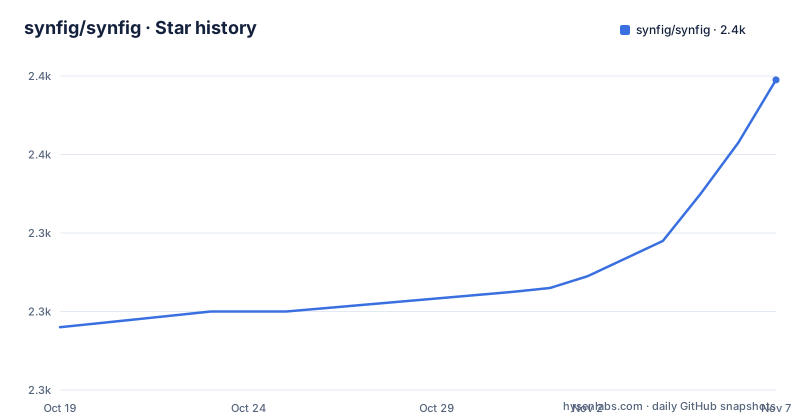
- synfig/synfig2,379 ★ · +63
| Repository | 2026-10-19 | 2026-11-07 |
|---|---|---|
| synfig/synfig | 2.3k | 2.4k |
63 Stars in the last 19 days, measured from the daily GitHub snapshot. Compare with other projects
Editorial analysis
Vector and bitmap layers do the in-betweening so you skip frame-by-frame drawing
Synfig Studio's pitch is narrow and specific. You build a scene from vector and bitmap artwork, set the poses you care about, and the program produces the frames between them. The repository description calls it the official source code of Synfig Studio animation software, and the project text says it removes the need to create animation frame by frame so that fewer people and fewer resources can produce 2D work of higher quality.
That claim defines who the tool is for. A team drawing every frame by hand in a raster painting program is solving a different problem from one rigging shapes and letting software interpolate. Synfig sits on the second side. The artwork can be vector, bitmap or both, as the project text states.
Only Windows, Linux and macOS are named, so the Android searches have no answer here
People searching for Synfig also type "synfig studio for android". Nothing in the repository supports that. The project text names three platforms: Windows, Linux and MacOS. There is no mobile package, no Android build script and no Android directory among the top-level entries.
The practical consequence is that a tablet-only workflow cannot be built on this project as published. The nearest thing to platform variety is on the desktop side: the repository carries a snap/ directory for Linux packaging, a synfig-osx/ directory and a 3-package-osx-dmg.sh script for the Mac disk image, and vcpkg-ports/ plus vcpkg.json for vcpkg dependencies. If your target device is not a Windows, Linux or macOS machine, stop here.
Installing is delegated to two documentation sites, not to a command in the repository
The project text contains no install command. It points to two places instead. The first is the installation instructions for Windows, Linux and MacOS packages at synfig.readthedocs.io/en/latest/installation.html. The second is the guide for building and installing from source, hosted on synfig-docs-dev.readthedocs.io under the page named Building Synfig.
That split matters for anyone asking how to install Synfig Studio on Ubuntu. The Ubuntu steps are not on this page, and they are not in the repository text either. The route is the package instructions on the first site. A person who wants the newest code instead of a packaged release takes the second site. Neither guide is reproduced here, so no command is quoted in this article. Read the guide for your platform before you trust any third-party snippet you find in a forum.
Numbered setup and build scripts at the repository root map out a three-step source build
Building from source is organised by filename. The root holds 1-setup-linux-native.sh, 1-setup-nix.sh, 1-setup-osx-brew.sh and 1-setup-windows-msys2.sh, plus 1-install-vcpkg.bat. Those are the first step, one per environment: native Linux, Nix, Homebrew on macOS, MSYS2 on Windows, and vcpkg.
The second step is 2-build-cmake.sh, 2-build-debug.sh and 2-build-production.sh. Debug and production builds are separate scripts. The third step, 3-package-osx-dmg.sh, exists only for the macOS disk image. A CMakeLists.txt sits at the root, with a cmake/ directory beside it, and a build.conf.sample file is included. What each script actually runs is not described in the project text, so open the script before executing it.
Core engine, Studio front end and docs share one tree, which makes the checkout wide
The top-level layout shows how the program is divided. synfig-core/ and synfig-studio/ are separate directories, and synfig-docs/ holds the documentation, so the animation engine, the editor and the manual are versioned together. Add synfig-osx/ for Mac packaging, snap/ and packaging/ for distribution, perf/ for performance work, bugs/ for bug material, autobuild/ for automated builds and vcpkg-ports/ for dependency ports.
The language is C++, and the license is GPL-3.0. The cost of one wide tree is that a contributor who only wants to touch the documentation still clones the full engine and editor. The upside is that a change to a file format in the core and the matching change in the editor can land in the same commit. Contribution rules live in CONTRIBUTING.md and CODE_OF_CONDUCT.md at the root, and the project text links a separate contribution guidelines page on the developer docs site.
Release v1.5.3 to v1.5.4 spans seventeen months, and master has moved since v1.5.5
The project is not archived, and the last push landed on 2026-10-25. The recent release history is uneven. v1.5.3 was built on 2024-08-23, v1.5.4 on 2026-01-18 and v1.5.5 on 2026-03-16. The gap between the first two is roughly seventeen months; the gap between the second and third is under two.
Two facts follow. First, a push on 2026-10-25 is more than seven months after v1.5.5, so the master branch carries work that no release contains. Anyone who needs it builds from source with the numbered scripts. Second, waiting for a fix to appear in a tagged build can take a long time if the cadence of 2024 returns. The release titles are all of the form Release build followed by the version, with no release notes quoted here, so the changes between versions have to be read in ChangeLog.md.
Spline, mirror and time loop tool tutorials are not in the repository text
Many of the questions people type about Synfig are how-to questions: how to use the spline tool, the mirror tool, a time loop, or the program in general for beginners. The repository text answers none of them. It contains no tool reference, no tutorial and no screenshot of the interface.
What it offers instead is the documentation tree. synfig-docs/ is in the repository, and the project text points to synfig.readthedocs.io and a developer docs site. A beginner who lands on the GitHub page should treat it as a download and contribution hub, then go to those docs for the actual workflow. Claims about how easy Synfig is for a first project cannot be checked from here, and neither can a comparison with OpenToonz, because the repository text makes none.
Safety rests on public GPL-3.0 source and a PVS-Studio entry under SAST Tools
The question of whether Synfig is safe has two checkable pieces. The code is public under the GNU General Public License v3.0, with the full text in the LICENSE file, so anyone can read what they build. The project text also lists PVS-Studio, a static analyzer for C, C++, C# and Java code, in a section headed SAST Tools.
That is where the evidence stops. The repository text does not describe a security audit, a signing policy for the Windows and macOS installers or a checksum scheme for downloads. Download pages and search results for terms like "synfig studio free download" are not the project's own channel. Take the installer from the links the repository itself gives, or build from the source you can read. Funding runs through OpenCollective, which the project text names for individuals and organizations.
Editorial conclusion
Choose Synfig Studio if you want a free, GPL-3.0 2D animation program that works with vector and bitmap art on a desktop machine and you accept learning it from its separate documentation site. Skip it if you need Android or a phone app, since only Windows, Linux and macOS are listed. Before committing a project to it, open the installation guide for your platform and confirm that the v1.5.5 package from 2026-03-16 is what that guide installs.
Frequently asked questions
What is Synfig Studio used for?
Synfig Studio is free, open-source 2D animation software that works with vector and bitmap artwork. It aims to remove frame-by-frame drawing so fewer people and resources can produce 2D animation.
How do you install Synfig Studio?
The project points to the installation instructions for Windows, Linux and MacOS packages on synfig.readthedocs.io, and to a separate source-build guide on synfig-docs-dev.readthedocs.io.
Is Synfig safe to use?
The source is public under GPL-3.0 and the project lists PVS-Studio as a static analysis tool. The repository text does not describe a security audit or an installer signing policy.
How do you use the spline tool in Synfig?
The repository text has no tool reference for the spline tool. Its documentation lives under synfig-docs/ and on the project's readthedocs sites.
Is Synfig good for beginners?
The repository text makes no claim about beginners and ships no tutorial. The usage guidance is on the separate documentation site that the project links.
Official sources
Add this badge to your README
If you maintain this project, the badge below links readers to this analysis and shows its maintenance status from the daily GitHub snapshot. Paste the markdown into your README; add ?metric=license or ?metric=stars to the image URL for a different field.

[](https://hysenlabs.com/projects/synfig-synfig)Star history chart for your README
[](https://hysenlabs.com/projects/synfig-synfig)Was this useful?