ReaLTaiizor: a WinForms control library whose last NuGet release is from 2023 while develop keeps moving
ReaLTaiizor is a .NET WinForms control library that offers a wide range of components and is user-friendly and design-focused.
At a glance
- What is it?
- Taiizor/ReaLTaiizor is an MIT-licensed C# control library for .NET WinForms, with theme options and customizable user controls. Its README is short, so the repository layout and the release dates carry most of the evidence.
- Who is it for?
- Use ReaLTaiizor if you maintain a .NET WinForms application and want themed, designer-style controls from a single NuGet package under the MIT license. Skip it if you need documented control lists, supported .NET versions or a recent tagged release, because the README gives none of those and the newest release is v3.7.9.5 from 2023-08-28.
- Can I use it commercially?
- Yes. MIT is a permissive licence: you can use, modify and sell software built on it, as long as you keep its copyright and licence notices.
- Is it still maintained?
- Yes. The repository last received commits 33 days ago.
- What is it written in?
- Mainly C#, according to GitHub's language statistics.
Answers come from the project's GitHub data, last synced on November 7, 2026, and from our analysis. They are not legal advice.
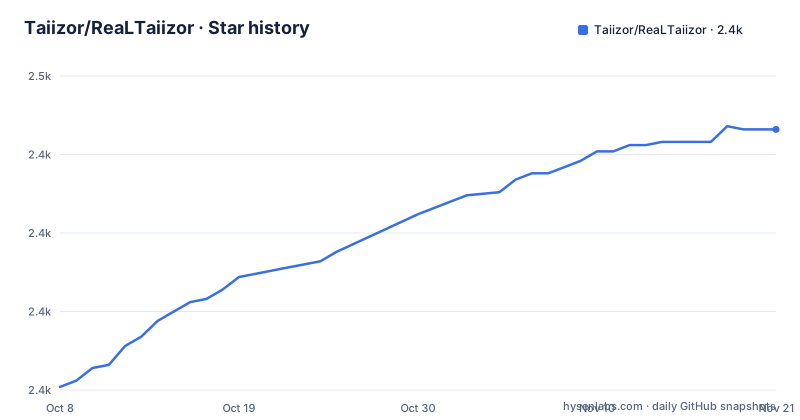
Star history
- Taiizor/ReaLTaiizor2,419 ★ · +68
| Repository | 2026-10-08 | 2026-11-07 |
|---|---|---|
| Taiizor/ReaLTaiizor | 2.4k | 2.4k |
68 Stars in the last 30 days, measured from the daily GitHub snapshot. Compare with other projects
Editorial analysis
A WinForms-only library: themes and customizable user controls, nothing for WPF or web
ReaLTaiizor describes itself as a user-friendly and design-focused control library for .NET WinForms projects that contains a wide range of components. The pitch in the README is that you can personalize a project with different theme options and customize user controls so the application looks more professional. Theme options and user controls are the two levers it names, and it does not say how a theme is applied: per control, per form or application-wide.
The scope is narrow on purpose. The target is Windows Forms, the primary language is C#, and the license is MIT. A team on WPF, MAUI or a web front end gets nothing from it, since the description mentions only WinForms.
The README does not list the components. It says a wide range exists and stops there, with no table of controls, no theme names and no screenshots inline in the text beyond images in the repository folders .images/ and .screenshots/. A buyer of the library has to judge the control set by running the demo projects, not by reading a feature list. For a library whose entire value is the visual quality of its controls, that is a real gap, because a developer cannot rule it out before downloading.
The NuGet package is ReaLTaiizor, and the README gives no install command
Two badges link to nuget.org: one to the package page at nuget.org/packages/ReaLTaiizor and one to the API v2 package download for the same name. A third badge links to the Visual Studio downloads page. That is as close as the README gets to installation guidance.
There is no `dotnet add package` line, no Package Manager Console command and no version to pin, so this article writes no install code block. The package name on the badges is the only fact available to you, and the package page on NuGet is the place to read the current version and its target frameworks.
The repository also carries NuGet.Config, global.json, ReaLTaiizor.sln and ReaLTaiizor.slnx. The README does not say which .NET SDK version global.json asks for, nor which target frameworks the package supports, so check both before you add it to an older project. A WinForms application stuck on an older runtime is the case where that question decides whether the package installs at all. Building from source means opening one of the two solution files in Visual Studio, and the README does not explain the choice between the classic .sln and the newer .slnx format.
The demo folders hold two projects named UI and UX, and the README never explains the difference
The best evidence of what the library contains sits in demo/. Two example folders exist: demo/ReaLTaiizor.UI/ and demo/ReaLTaiizor.UX/. The repository also has sample/, ready/ and tutorial/ at the top level, next to src/ for the library code itself.
None of these folders is described in the README. It is not stated what the UI demo shows compared with the UX demo, whether ready/ contains finished window templates, or whether tutorial/ is written text or a project. Names are a weak guide, and a reader should open each folder before assuming anything.
The practical advice is to treat demo/ as the real catalog. If a control you need does not appear in either demo project, there is no other place in the repository where the README promises it. That also means the demo projects are the closest thing to documentation for properties and theme switching, and they will only be accurate for the version of the code they ship with, which is develop, not the 2023 NuGet release.
The default branch is develop, so cloning gets code that postdates the last release
The default branch of the repository is develop, not main. Cloning it returns the work in progress, and the last push to the repository was on 2026-10-05.
The release list tells a different story. The newest GitHub releases are v3.7.9.5 on 2023-08-28, v3.7.9.4 on 2023-07-06 and v3.7.9.3 on 2023-06-01. Those three came within three months of each other, and the list ends at the third entry shown. The most recent tagged release is more than three years old, while commits continue on develop.
The README does not explain how the NuGet package relates to develop. If you add the package from nuget.org you get whatever version is published there, and if you build from the sources you get the newer code. The two can differ in controls and behavior, and nothing in the README promises they match. Pick one source for a project and keep it, so the demos you inspected and the binaries you ship come from the same place.
Three CI workflows build and scan the library, but none of them is a test report
Three workflow badges sit at the top of the README. They link to dotnet.yml, codeql-analysis.yml and dotnet-desktop.yml under .github/workflows. One is a .NET build, one is CodeQL analysis, and the third is a .NET desktop build.
That confirms the project compiles in CI and goes through CodeQL code scanning. It does not show that the controls are tested. The README makes no mention of unit tests, visual regression checks or a designer-time test, and the top-level listing has no tests/ directory. For a library made of visual controls, behavior in the Visual Studio designer and at high DPI is where bugs usually appear, and the README gives no information about either. The CodeQL badge also covers only static analysis of the C# code, so it cannot tell you whether a control paints correctly on a second monitor with different scaling.
An adopter should therefore plan for their own verification. Drop the controls into a form, run at the screen scaling your users have, and check that theme changes redraw correctly, before committing a product to the package.
Documentation exists in English, Spanish and Turkish, but only as README and conduct files
The repository ships README.md, README.ES.md and README.TR.md, plus CODE_OF_CONDUCT.md, CODE_OF_CONDUCT.ES.md and CODE_OF_CONDUCT.TR.md. So the landing text is available in English, Spanish and Turkish, and the code of conduct is available in the same three.
A Discord link sits among the badges, and the homepage field points to https://www.vegalya.com. The README's contributor table credits Taiizor with code and with ideas and planning, with the vegalya.com address attached to the ideas entry. A Backers table lists Vegalya and Soferity for content, and IgnaceMaes, donaldsteele, leocb, N-a-r-w-i-n and peters for code.
What is absent is API documentation. The only documentation text is the short welcome paragraph. A developer who wants property names, events or theme classes has to read the source under src/ or the demos. A Spanish or Turkish speaker gets the welcome text and the code of conduct in their language, and then lands on the same source folders as everyone else. The demo applications and the NuGet package page remain the places to look for what the controls do, and neither is reachable from a translated sentence in the repository root.
Contributions are credited by emoji key, and most listed contributors reviewed pull requests
The README follows the all contributors specification and invites contributions of any kind. In the contributor table, Taiizor is credited for code and for ideas, planning and feedback. JTOne123, HideakiAtsuyo, LandarXT, edoardopirovano, Oxara, toolgood, gmono, Hgnim and fengye1003 are each credited for reviewed pull requests.
That shape matters for risk. The table shows one person credited with code among the contributors listed, and the rest in a review role. Backers credited for code, such as IgnaceMaes, donaldsteele, leocb, N-a-r-w-i-n and peters, appear in a separate Backers table.
The README gives no contributing guide, no list of supported .NET versions, and no support policy or response time for issues. With a single credited code author and a release list that stops in 2023, a team adopting ReaLTaiizor for a long-lived product should plan to carry a fork or pin a version, since the README makes no commitment about the next release. The all contributors table records who helped; it is not a maintenance schedule, and the dates in the release list are the better guide to how often a package version appears.
Editorial conclusion
Use ReaLTaiizor if you maintain a .NET WinForms application and want themed, designer-style controls from a single NuGet package under the MIT license. Skip it if you need documented control lists, supported .NET versions or a recent tagged release, because the README gives none of those and the newest release is v3.7.9.5 from 2023-08-28. Before you adopt it, open the demo/ReaLTaiizor.UI and demo/ReaLTaiizor.UX projects, check which controls you need, and confirm the NuGet package version that you install matches what you saw in the demos.
Frequently asked questions
What is ReaLTaiizor?
ReaLTaiizor is a user-friendly, design-focused control library for .NET WinForms projects, with a wide range of components, theme options and customizable user controls. It is written in C# and licensed under MIT.
How do I install ReaLTaiizor?
The README links the NuGet package named ReaLTaiizor at nuget.org/packages/ReaLTaiizor and does not give an install command. You can also open ReaLTaiizor.sln or ReaLTaiizor.slnx in Visual Studio to build from source.
Is ReaLTaiizor still maintained?
The last GitHub release is v3.7.9.5 from 2023-08-28, while the last push to the develop branch was on 2026-10-05. The repository is not archived.
Official sources
Add this badge to your README
If you maintain this project, the badge below links readers to this analysis and shows its maintenance status from the daily GitHub snapshot. Paste the markdown into your README; add ?metric=license or ?metric=stars to the image URL for a different field.

[](https://hysenlabs.com/projects/taiizor-realtaiizor)Star history chart for your README
[](https://hysenlabs.com/projects/taiizor-realtaiizor)Was this useful?