forgecode's sandbox mode creates a git worktree before it starts
AI enabled pair programmer for Claude, GPT, O Series, Grok, Deepseek, Gemini and 300+ models
At a glance
- What is it?
- An Apache-2.0 Rust coding agent that runs in the terminal in three modes, supports several model providers, and restricts filesystem access through a shell mode. The flags are worth reading closely, because one of them creates an isolated worktree and branch for the session rather than touching your working tree.
- Who is it for?
- forgecode fits a developer who wants an agent in the terminal rather than in an editor panel, and who wants the option of running a session against an isolated worktree instead of a dirty working tree. It does not fit a team that has standardised on a different agent runtime, or one that needs a documented stable configuration surface.
- Can I use it commercially?
- Yes. Apache-2.0 is a permissive licence: you can use, modify and sell software built on it, as long as you keep its copyright and licence notices.
- Is it still maintained?
- Yes. The repository last received commits 1 day ago.
- What is it written in?
- Mainly Rust, according to GitHub's language statistics.
Answers come from the project's GitHub data, last synced on November 14, 2026, and from our analysis. They are not legal advice.
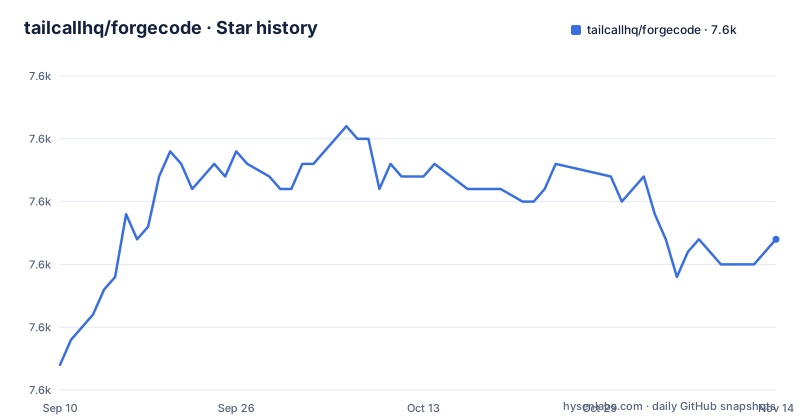
Star history
- tailcallhq/forgecode7,632 ★ · +10
| Repository | 2026-09-10 | 2026-11-14 |
|---|---|---|
| tailcallhq/forgecode | 7.6k | 7.6k |
10 Stars in the last 65 days, measured from the daily GitHub snapshot. Compare with other projects
Editorial analysis
Three modes, and one flag that changes your git state
Forge has three distinct entry modes and the readme says understanding the difference up front avoids confusion. Running forge with no arguments starts the interactive terminal interface, which is a persistent session where you type prompts and the model responds in a loop, and the readme calls that the primary way to do multi-step work.
The flags on that command are the interesting part:
forge                              # Start a new interactive session
forge conversation resume <id>     # Resume a specific saved conversation in interactive mode
forge --conversation-id <id>       # Same: resume conversation by ID
forge --agent <agent-id>           # Start interactive session with a specific agent
forge -C /path/to/project          # Start in a specific directory
forge --sandbox experiment-name    # Create an isolated git worktree + branch, then start there
The last one is a filesystem and git operation rather than a UI mode, and it is the one flag that changes state outside the process. Passing a sandbox name creates an isolated worktree and a branch and starts the session there, which means an agent making changes touches a throwaway checkout rather than the tree you have uncommitted work in.
Credentials are configured on the first run
Installation is one command, and the first thing it does is not start a session:
curl -fsSL https://forgecode.dev/cli | shOn first run, Forge guides you through setting up your AI provider credentials using the interactive login flow. The readme offers a second route for people who would rather do it beforehand, a provider login subcommand followed by starting Forge:
# Configure your provider credentials interactively
forge provider login

# Then start Forge
forge
The design intent behind that flow is stated in the reasons section, where the first claim is zero configuration: add your API key and you are ready to go. Multi-provider support is another claim, naming OpenAI and Anthropic or other providers, and the Rust dependency list backs it up with AWS SDK crates for Bedrock.
The zsh plugin turns the shell into a `:` command surface
The third mode is a shell plugin, and its interface is a colon prefix rather than a subcommand. The readme devotes a full section to what that prefix system covers: agents, sending prompts, attaching files, conversation management, git integration, shell command tools, session and configuration, skills, customizing agent behaviour, and semantic search across the workspace. It closes with a quick reference listing every colon command.
Semantic search being in that list is the item worth pausing on. It means the agent has an index of the workspace available as a command in your shell, rather than search being something it only does while answering a prompt.
The plugin directory in the repository matches that description, sitting alongside commands, templates and a .forge directory. The practical difference from the interactive mode is where the prompts come from: you are already in a terminal, so the agent is a prefix away rather than a process you enter and leave.
forge.yaml has a schema, and environment variables are deprecated
The advanced configuration section is organised by layer, and the ordering suggests a preference. Provider configuration comes first, split into managing provider credentials and a subsection explicitly titled as deprecated for environment variables.
Then come the options for a forge.yaml configuration file, followed by a section on environment variables, and then MCP configuration. So credentials and MCP servers are first-class configuration concepts, and environment variables for provider credentials are marked deprecated, while a separate Environment Variables section remains.
The repository reinforces that: a forge.schema.json sits at the root, which is a JSON schema for the configuration file. Having a schema means your editor can validate and autocomplete a forge.yaml, and it means the project has committed to a machine-readable shape for the configuration rather than treating it as free-form YAML.
Restricted shell mode is the security claim
Of the reasons the readme gives, the security one is the most concrete. Secure by design is described as a restricted shell mode that limits file system access and prevents unintended changes.
That is a narrower claim than most tools make and a more useful one, because it names the mechanism. Rather than asserting the agent is safe, it says there is a mode where the agent's filesystem reach is bounded.
The rest of the reasons are about shape rather than mechanism: it works in the terminal where you already work, it supports several providers, and it is open source and community driven. The readme also has a section on use cases in multi-agent workflows, which is the clearest signal that the intended scale of use is more than one agent at a time.
The workspace version is 0.1.0 while the product is 2.14
The published releases are versioned in the 2.13 and 2.14 range, with v2.14.0 on 1 October 2026, v2.13.21 on 31 July and v2.13.20 on 30 July. The Cargo workspace declares its own package version as 0.1.0.
So the version you install and the version inside the crate manifest are not the same number, and the workspace version is not tracking the release line at all. That is a deliberate pattern for a workspace where no single crate is the product, but it does mean you cannot infer your Forge version from a dependency entry.
For consumers the practical consequence is narrow: read the release tag to know what you are running, and do not look for the product version in the manifest.
Rust 1.94, edition 2024, and a stripped release profile
The build requirements are strict enough to state plainly. The workspace requires Rust 1.94 and edition 2024, with the release profile enabling link time optimisation, one codegen unit, optimisation level three and symbol stripping.
The dependency list describes the shape of the application more than a library's would. There are AWS SDK crates for Bedrock with SSO behaviour and TLS through rustls, clap with derive plus clap_complete for completions, a terminal line editor, a parser combinator library, and crates for machine identification and directory locations.
Two entries are worth noting for what they imply. An HTML to Markdown converter is pinned to an exact version rather than a range, which suggests a compatibility constraint with whatever the agent emits. And a PostHog client is a workspace dependency, which is how usage telemetry would be implemented if it is enabled.
The evaluation harness is a separate TypeScript package
Alongside the Rust workspace there is a second, unrelated JavaScript package. It is named for the evaluations, marked private, licensed ISC, and its scripts are an eval entry point running a benchmarks CLI through tsx, plus a set of bounty scripts that sync issues and pull requests.
Its dependency list is a different toolchain from the Rust one: an AI SDK, the Google Vertex provider, handlebars templating, a concurrency limiter, a JSON schema validator, a YAML parser, structured logging with a pretty printer for development, and a test runner loader.
So benchmarking and bounty automation are TypeScript while the product is Rust. The repository also holds a benchmarks directory, a plans directory, snapshot testing configuration, a Diesel ORM configuration file, a Vertex configuration file, cross-compilation settings, and dependency update automation.
Editorial conclusion
forgecode fits a developer who wants an agent in the terminal rather than in an editor panel, and who wants the option of running a session against an isolated worktree instead of a dirty working tree. It does not fit a team that has standardised on a different agent runtime, or one that needs a documented stable configuration surface. Before adopting, read the provider credential flow because it happens on first run, note that environment variables for provider credentials are marked deprecated, and check the sandbox flag before your first agent-driven change.
Frequently asked questions
How do I install forgecode?
Run curl -fsSL https://forgecode.dev/cli | sh. On the first run it walks you through an interactive login flow for your AI provider credentials, and you can do that beforehand with the forge provider login subcommand and then start Forge with forge.
What is forgecode?
It is Forge, an AI-enhanced terminal development environment and coding agent written in Rust under the Apache 2.0 licence. The repository description calls it a pair programmer for Claude, GPT, the O Series, Grok, Deepseek, Gemini and more than 300 other models, and the Rust dependency list includes AWS SDK crates for Bedrock.
How do you use Forge in the terminal?
Run forge with no arguments for the interactive TUI, where you type prompts in a persistent loop. Sessions can be resumed by id, started in a given directory with -C, bound to a specific agent, or isolated with the sandbox flag, which creates a git worktree and branch and starts the session there. A zsh plugin adds a colon-prefixed command surface for agents, files, git and workspace search.
Is forgecode open source?
The repository is released under the Apache 2.0 licence, and the readme lists being open source among its reasons, describing the project as transparent, extensible and community driven. The separately packaged evaluation harness in the same repository is licensed ISC and is marked private.
Is forgecode safe to run on a real repository?
The readme names the mechanism rather than asserting safety: a restricted shell mode limits file system access and prevents unintended changes, and a sandbox flag creates an isolated git worktree and branch before the session starts. Those are the two controls the project itself points at for keeping changes contained.
Official sources
Add this badge to your README
If you maintain this project, the badge below links readers to this analysis and shows its maintenance status from the daily GitHub snapshot. Paste the markdown into your README; add ?metric=license or ?metric=stars to the image URL for a different field.

[](https://hysenlabs.com/projects/tailcallhq-forgecode)Star history chart for your README
[](https://hysenlabs.com/projects/tailcallhq-forgecode)Was this useful?