tsidp: an OIDC identity provider that lives inside your tailnet
A simple OIDC / OAuth Identity Provider (IdP) server for your tailnet.
At a glance
- What is it?
- tsidp is Tailscale's community OIDC and OAuth identity provider server, written in Go, that turns Tailscale identities into logins for OpenID Connect applications and authenticated MCP connections. The admin UI and dynamic client registration stay refused until an Application capability grant opens them.
- Who is it for?
- tsidp fits teams whose users are already Tailscale identities and whose applications speak OIDC, especially where an authenticated MCP connection is the goal. It fits badly if you need a frozen contract, since the line is still 0.0.x and the project warns that breaking changes can arrive at any time.
- Can I use it commercially?
- Yes. BSD-3-Clause is a permissive licence: you can use, modify and sell software built on it, as long as you keep its copyright and licence notices.
- Is it still maintained?
- Yes. The repository last received commits 1 day ago.
- What is it written in?
- Mainly Go, according to GitHub's language statistics.
Answers come from the project's GitHub data, last synced on November 13, 2026, and from our analysis. They are not legal advice.
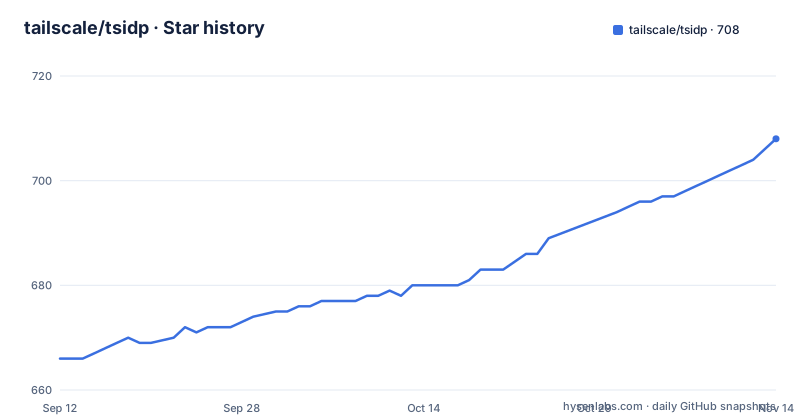
Star history
- tailscale/tsidp706 ★ · +40
| Repository | 2026-09-12 | 2026-11-13 |
|---|---|---|
| tailscale/tsidp | 666 | 706 |
40 Stars in the last 62 days, measured from the daily GitHub snapshot. Compare with other projects
Editorial analysis
The admin UI and dynamic client registration are denied by default
Access to the tsidp admin UI and to the dynamic client registration endpoints is refused until you say otherwise, and the switch is an Application capability grant configured on the Access controls page of the Tailscale admin console. Two fields in that grant do the work: `allow_admin_ui` opens the UI and `allow_dcr` opens dynamic client registration. The same block carries `users` and `resources` patterns for the Secure Token Service and an `extraClaims` object that is injected into the id_token, with a recommendation to keep that object small.
Two properties make this workable. Grants are evaluated per request, so a change applies immediately and nothing needs a restart. And the grant targets one named capability, `tailscale.com/cap/tsidp`, so a policy can open it for a single source without opening the whole IdP. The schema is flagged as still in development and liable to change at any time. The example grant in the repository also stops mid object inside `extraClaims`, which means you finish that snippet yourself.
The compose file sets four variables the flag table never names
Everything the container needs arrives through environment variables, and three of them do not share a name with the flag that controls the same thing. `TS_HOSTNAME` maps to the `-hostname` flag, `TSIDP_ENABLE_STS` to `-enable-sts`, and `TS_STATE_DIR` to `-dir`, which the table calls the directory for tsnet and tsidp state. The fourth, `TAILSCALE_USE_WIP_CODE=1`, has no flag counterpart at all; the comment beside it says it is needed while the version is below 1.0.0.
services:
  tsidp:
    container_name: tsidp
    image: ghcr.io/tailscale/tsidp:latest
    volumes:
      - tsidp-data:/data
    environment:
      - TAILSCALE_USE_WIP_CODE=1 # tsidp is experimental - needed while version <1.0.0
      - TS_STATE_DIR=/data # store persistent tsnet and tsidp state
      - TS_HOSTNAME=idp # Hostname on tailnet (becomes idp.your-tailnet.ts.net)
      - TSIDP_ENABLE_STS=1 # Enable OAuth token exchange
      # Optional: Tailscale auth key for automatic node registration
      # - TS_AUTHKEY=tskey-auth-xxxxx
volumes:
  tsidp-data:
Start it with `docker compose up -d` and follow it with `docker compose logs -f`. On a first run the TLS certificate may need a few minutes to generate, so the hostname can refuse connections until it is ready.
Three ways to hand tsidp a key, and the one that leaks
Node registration needs a key, and three shapes are accepted. A plain Tailscale auth key goes into `TS_AUTHKEY` as `tskey-auth-...`. An OAuth client secret, `tskey-client-...`, works as an alternative, but it needs a client created with the Auth Keys write scope, and it registers a node only when `TS_ADVERTISE_TAGS` (or `--advertise-tags`) names a tag already declared in the ACL `tagOwners`, for example `tag:tsidp`.
The plain environment variable is the weak option, because a key passed that way turns up in `docker inspect` output and in the container process environment. The supported fix is a Docker secret plus `TS_AUTHKEY_FILE`:
services:
  tsidp:
    image: ghcr.io/tailscale/tsidp:latest
    environment:
      - TAILSCALE_USE_WIP_CODE=1
      - TS_STATE_DIR=/data
      - TS_AUTHKEY_FILE=/run/secrets/ts_authkey
    volumes:
      - tsidp-data:/data
    secrets:
      - ts_authkey
secrets:
  ts_authkey:
    file: ./ts_authkey.txt
volumes:
  tsidp-data:
The key is then read from a mounted file and never appears in the environment at all.
Reachability comes down to -local-port, -port and -funnel
The flag table is short, and most of it decides who can reach the server. `-port` defaults to `443` and `-hostname` defaults to `idp`, which is why the service lands at `https://idp.yourtailnet.ts.net` rather than a name you picked. `-dir` defaults to an empty string and is marked as recommended to set, which leaves the state location to your own command line.
Two flags change the audience instead of the storage. `-local-port` listens on `localhost:<port>` for testing and is disabled by default. `-funnel` publishes the IdP through Tailscale Funnel on the public internet so SaaS products can reach it, also disabled by default. `-use-local-tailscaled` is `false`, so tsnet runs the node unless you point the server at a local tailscaled.
One inconsistency is worth catching before you copy a command line from anywhere: the table writes every flag with a single dash, while the OAuth note names `--advertise-tags` with two.
Running without a container is a clone and one go run command
The image is a shortcut, not a requirement. Building from a checkout takes a clone and one command:
# Clone the Tailscale repository
$ git clone https://github.com/tailscale/tsidp.git
$ cd tsidp

# run with default values for flags
$ TAILSCALE_USE_WIP_CODE=1 TS_AUTHKEY={YOUR_TAILSCALE_AUTHKEY} TSNET_FORCE_LOGIN=1 go run .
`TSNET_FORCE_LOGIN=1` is what makes that first run interactive instead of waiting on an unattended login, and the command passes no flags at all, so every default in the table above applies. The Makefile covers the rest: `make docker-image` for a container tagged `tsidp:latest`, `make test` running `go test -count 1 . ./server`, and a `build` target that cross compiles a darwin arm64 binary and a linux amd64 binary into `build/`, each filename stamped with the build date and a short git hash so two builds never collide. Note the tag mismatch: that target builds `tsidp:latest` while the compose file pulls `ghcr.io/tailscale/tsidp:latest`, so a local image is not used until you edit the image line.
A plain docker build on an arm64 machine still produces amd64
The Dockerfile resolves its target from BuildKit arguments rather than from the host: `ARG TARGETOS` and `ARG TARGETARCH`, then `GOOS=${TARGETOS:-linux}` and `GOARCH=${TARGETARCH:-amd64}`. Pass `--platform linux/amd64` to buildx and both arguments arrive, so you get what you asked for. Run a plain `docker build` instead and the defaults decide, which means an arm64 host compiles a linux amd64 binary that needs emulation to run. The header comment in the file spells out both a local build tagged `tsidp-server:local` and a buildx build for linux amd64, which is the fastest way to avoid that surprise.
The rest of the file is careful in ways worth copying: a golang 1.26 alpine builder stage, an alpine 3.22 final image with ca-certificates installed, an ldflags stamp that writes a build version into `server.version` from an `ARG VERSION` that defaults to `dev`, a `/data` directory created and chowned to a non root user with uid and gid 1001, and `USER app:app` ahead of the entrypoint.
go.mod asks for 1.26.6 and three direct dependencies
The dependency surface is small and pinned tightly. `go.mod` declares `go 1.26.6`, a patch level rather than the usual minor, so a toolchain older than that will not build the module. Only three requirements are direct: `filippo.io/csrf` at v0.2.1, `gopkg.in/square/go-jose.v2` at v2.6.0, and `tailscale.com` at v1.102.3, which is the bulk of the tree. The long indirect list runs to dozens of entries, and the ones from the Tailscale side worth reading are `github.com/coder/websocket` and `github.com/tailscale/web-client-prebuilt`.
The root directory carries supply chain tooling to match: `go.mod.sri` beside `go.sum`, a `flake.nix` and `flake.lock` pair with an `update-flake.sh` script, `.goreleaser.yaml` behind the tagged releases, and a `license_test.go` that runs alongside the other tests. A single binary with three direct dependencies is a good sign for an identity server that has to sit in front of a tailnet.
main sits three weeks past the newest v0.0.15 tag
tsidp is versioned at zero. The three newest tags are v0.0.15 from 2026-08-20, v0.0.14 from 2026-05-25 at 20:35 UTC, and v0.0.13 from that same day at 16:07 UTC. Two releases four and a half hours apart is what a pre 1.0 line looks like. The last push is 2026-09-08, so the branch already carries commits that no release covers.
The repository says so at the top in a caution block: this is an experimental update of tsidp, under active development, and it may experience breaking changes. That is why the compose file sets `TAILSCALE_USE_WIP_CODE=1`, and why a pinned tag matters more here than a changelog would suggest.
The second half of the purpose sits in `examples/`, with an `mcp-gateway` directory and an `mcp-server` directory, matching the stated support for authenticated MCP client and server connections next to the OIDC logins. The repository is not archived and carries a BSD-3-Clause license.
Editorial conclusion
tsidp fits teams whose users are already Tailscale identities and whose applications speak OIDC, especially where an authenticated MCP connection is the goal. It fits badly if you need a frozen contract, since the line is still 0.0.x and the project warns that breaking changes can arrive at any time. Before relying on it, write a narrow capability grant instead of copying the wildcard example, decide how the auth key reaches the container, and pin a tag rather than tracking main.
Frequently asked questions
What does tsidp do inside a Tailscale network?
It runs an OIDC and OAuth Identity Provider server on your tailnet, so Tailscale identities can authenticate into applications that support OpenID Connect, and it also supports authenticated MCP client and server connections.
How do I reach the tsidp admin UI?
Access to the admin UI and the dynamic client registration endpoints is denied by default. You set an Application capability grant on the Access controls page of the Tailscale admin console, and grants are applied per request and take effect immediately with no restart.
What does TAILSCALE_USE_WIP_CODE=1 do in the compose file?
The compose file comments call it needed while the version is below 1.0.0, which matches the caution block at the top of the repository saying tsidp is an experimental update that may experience breaking changes.
How do I keep the Tailscale auth key out of the container?
Mount it as a Docker secret and point tsidp at the mounted file with TS_AUTHKEY_FILE=/run/secrets/ts_authkey, because a plain TS_AUTHKEY environment variable shows up in docker inspect output and in the container process environment.
Official sources
Add this badge to your README
If you maintain this project, the badge below links readers to this analysis and shows its maintenance status from the daily GitHub snapshot. Paste the markdown into your README; add ?metric=license or ?metric=stars to the image URL for a different field.

[](https://hysenlabs.com/projects/tailscale-tsidp)Star history chart for your README
[](https://hysenlabs.com/projects/tailscale-tsidp)Was this useful?