Wardrobe puts your model key in a file the bundler ships to the browser
Your clothes, extracted and organized with gpt-image.
At a glance
- What is it?
- tandpfun/wardrobe extracts garments from photos with two image APIs and keeps everything in a local folder. It has no server component, its only check script runs a build, and its instructions tell you to put your own key in the file the front-end bundler substitutes into client code.
- Who is it for?
- This suits someone who wants a searchable, visual catalogue of their own clothes and is happy for detection and image generation to happen through a hosted model service. Two things to know before you put anything in it.
- Can I use it commercially?
- Yes. MIT is a permissive licence: you can use, modify and sell software built on it, as long as you keep its copyright and licence notices.
- Is it still maintained?
- Yes. The repository last received commits 130 days ago.
- What is it written in?
- Mainly JavaScript, according to GitHub's language statistics.
Answers come from the project's GitHub data, last synced on November 22, 2026, and from our analysis. They are not legal advice.
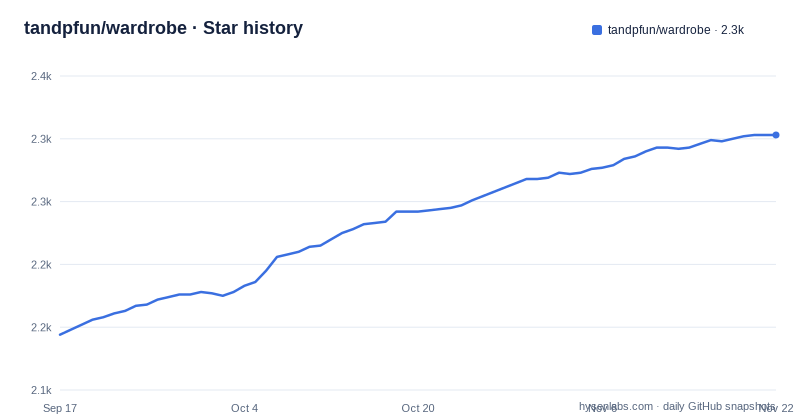
Star history
- tandpfun/wardrobe2,303 ★ · +159
| Repository | 2026-09-17 | 2026-11-22 |
|---|---|---|
| tandpfun/wardrobe | 2.1k | 2.3k |
159 Stars in the last 66 days, measured from the daily GitHub snapshot. Compare with other projects
Editorial analysis
The key is client-side by construction, not by accident
There is no backend anywhere in this project. The manifest has four scripts and all four are front-end bundler commands: a development server, a production build, a preview of that build, and a check that simply runs the build again. There is no server framework in the dependency list and no vendor SDK either, which means the API calls are made from the page itself. Put together with the instruction to copy the example environment file, fill in your key, and run the development server, and the conclusion is unavoidable: the bundler substitutes that key into client code, and your key ships to every browser that loads the app. The project may well intend this, since it is a personal local tool and the page elsewhere insists the user configure their own key rather than borrowing someone else's, but it is worth being explicit about before you use a key you care about.
Two gates before the importer will do anything
The quick start is four commands:
git clone https://github.com/tandpfun/wardrobe.git
cd wardrobe
npm install
cp .env.example .env
npm run dev
And then one warning that determines whether the application is usable at all. The importer stays disabled until two things exist: a key in the environment file, and a photograph of yourself saved at a specific path inside the project as a PNG. Both are hard requirements rather than preferences, and the second one is the interesting one, because it means the modelled previews are generated against a reference of your own appearance rather than from a generic model. The path is configurable and defaults to a file inside the data directory, so you can point it somewhere else instead. Until both are in place, opening the page gives you the interface and none of the generation.
Two bundled skills, and the import one reviews before it writes
The repository ships two agent skills, each with its own file, and the page shows the two prompts that invoke them. The first imports clothes from a folder and creates modelled photographs for each piece; the second takes the resulting wardrobe and generates a set of complete outfits as a lookbook. What is documented about the first is the order of operations: it asks for the reference photograph if it does not have one, then reviews every cutout and every modelled photograph before writing anything, and the results land in a JSON library file and a separate imported-images folder. The second asks how many looks to make, then curates, generates, verifies and saves the finished collection under the data directory. Both describe a review step between generation and persistence, which is the difference between a scraper and a tool you would keep.
The setup instructions hand the key back to the user
There is a short section addressed to agents rather than to users, and it is the most revealing paragraph on the page. If an agent is setting the application up on someone's behalf, it is told to ask how that person wants their clothes imported. On the agent route, it asks for a folder or camera-roll location and the reference photograph, then follows the bundled skill files. On the web route, it is told to help the user configure their own key and their own reference photograph, and then let them import through the interface themselves. So the document explicitly draws a line: an agent may do the work, but the credential belongs to the person. That is a small piece of privacy design stated in the documentation rather than assumed.
The check command is a build, and there are no tests
The manifest's script list is four entries long, and the fourth is named check while running the build command. There is no lint script, no test script and no type-check script, so the word check here means that the project still compiles. That is a thin quality gate for an application whose hardest part is image generation, where a wrong output is more likely than a wrong build. The repository does contain a tests-adjacent convention rather than a suite: a directory of agent skills with their own instruction files, a scripts directory, and documentation, so the human guidance is more developed than the automated checking. For a project that invites agents to write into its data folder, that is an understandable trade and still the one to be aware of.
One documented setting is missing from the template it points at
The configuration section is a small table of six rows. Five of them appear in the example environment file, and one does not: the variable that chooses where the data directory lives is documented in the table with a default but is absent from the template, which contains only the four model-related variables and the reference photograph path with a comment. So copying the example as instructed gives you a working configuration, but anyone who wants to relocate the data directory has to discover the variable name from the readme rather than from the file they were told to copy. It is the kind of gap that survives because the default is correct and nobody has needed the override yet.
A single-page app with an image pipeline and a folder of files
The dependency list describes the shape of the project precisely. It is a current React release on a recent bundler, with a component library for image display, an icon set, a variable font, an image processing package and a native image library. Storage is files: the documentation names a JSON library, an imported-images folder, and a data directory holding originals, jobs and generated images. Two model surfaces are named rather than one, with a responses-style API for detecting garments in a photograph and an images-style API for producing the clean cutouts, plus an optional modelled editorial preview and a quality setting on the image calls. The user interface is described as supporting drag, drop, paste, editing, review, regeneration and approval, which is the manual loop the skill performs for you when you let an agent drive it.
Editorial conclusion
This suits someone who wants a searchable, visual catalogue of their own clothes and is happy for detection and image generation to happen through a hosted model service. Two things to know before you put anything in it. The application is a browser-only application with no server component, and the key you are asked to supply ends up inside the client bundle, so treat it as a key you would be willing to expose in a page. And the data lives as plain files in a folder, which is good for portability and bad for concurrency, so do not run two imports against the same directory.
Frequently asked questions
What is tandpfun/wardrobe?
It is an MIT-licensed local-first application that turns photographs of your clothes into an organised, searchable wardrobe. It detects each garment in a photo with a responses-style API, extracts clean product cutouts with an images-style API, can generate an optional modelled editorial preview, and keeps originals, jobs, generated images and a JSON database in a local data folder.
How do I run Wardrobe?
Clone the repository, install dependencies, copy the example environment file to a local one, and start the development server, then open the local port it prints. The manifest has four scripts in total: the development server, a production build, a preview of that build, and a check command that runs the build again. There is no test, lint or type-check script.
What does Wardrobe need before the importer works?
Two things, and the page states that the importer stays disabled without both. A model API key in the environment file, and a PNG reference photograph of yourself saved at a configured path, defaulting to a file inside the data directory. The reference is what the modelled previews are generated against rather than a generic model.
What are the two bundled agent skills?
One imports clothes from a folder and creates modelled photographs for each piece, asking for the reference image if needed, reviewing every cutout and every generated photograph, and writing the results to the JSON library and a separate imported folder. The other generates complete outfits as a modelled lookbook, asking how many looks to make, then curating, generating, verifying and saving the collection under the data directory.
Where does Wardrobe store my data?
As files under a local data directory: a JSON library, a folder of imported images, plus the originals, job records and generated images. The directory location is configurable through a documented variable that defaults to a folder named data, although that variable is the one documented setting missing from the example environment file.
Official sources
Add this badge to your README
If you maintain this project, the badge below links readers to this analysis and shows its maintenance status from the daily GitHub snapshot. Paste the markdown into your README; add ?metric=license or ?metric=stars to the image URL for a different field.

[](https://hysenlabs.com/projects/tandpfun-wardrobe)Star history chart for your README
[](https://hysenlabs.com/projects/tandpfun-wardrobe)Was this useful?