NetPad runs C# snippets in a desktop shell or a browser
A cross-platform C# editor and playground.
At a glance
- What is it?
- NetPad is an open-source, cross-platform alternative to LINQPad that runs C# scripts without a project, ships as an Electron or Tauri desktop app, and adds a terminal runner called npad. It is a good fit for ad-hoc scripting and database queries, and the wrong shape of tool for anything that must ship or run unattended.
- Who is it for?
- NetPad earns its place for C# developers who want to run a snippet, push a database through LINQ or SQL, or keep a personal script library without creating projects, and the Tauri vNext package is the one to install today. Skip it when scripts must ship, run unattended or live in version control.
- Can I use it commercially?
- Yes. MIT is a permissive licence: you can use, modify and sell software built on it, as long as you keep its copyright and licence notices.
- Is it still maintained?
- Yes. The repository last received commits 8 days ago.
- What is it written in?
- Mainly C#, according to GitHub's language statistics.
Answers come from the project's GitHub data, last synced on October 23, 2026, and from our analysis. They are not legal advice.
Star history
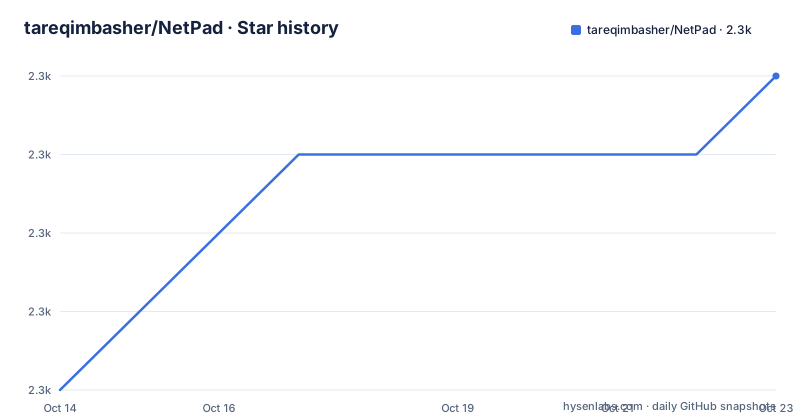
- tareqimbasher/NetPad2,283 ★ · +4
| Repository | 2026-10-14 | 2026-10-23 |
|---|---|---|
| tareqimbasher/NetPad | 2.3k | 2.3k |
4 Stars in the last 9 days, measured from the daily GitHub snapshot. Compare with other projects
Editorial analysis
The open-source LINQPad replacement runs scripts, not solutions
NetPad's premise is that running a C# snippet should not require a project. Open the app, write code, press Run, read the output, with no csproj to create and no solution to maintain. Its stated motivation is to be an open-source, cross-platform alternative to LINQPad that covers the features people already use while adding ones of its own, and it runs either as a native desktop app or in a web browser.
That premise decides who it is for. A developer checking an idea before it goes into a real project. Someone who wants to query a database with LINQ or SQL without leaving the same window. Someone keeping a personal library of utility and administration scripts for repeated use. And a learner who wants a C# environment without assembling a toolchain first.
Everything else follows from a script-first model. Scripts can be written, saved and run, namespaces are managed inside the app, an SDK version is picked per script, and unsaved scripts from the previous session reopen automatically on launch. NuGet packages can be attached to a script, and assemblies can be referenced straight from disk. What is missing is any feature-by-feature comparison against LINQPad, so anyone switching has to read the wiki page by page to work out which gaps exist.
Installing the Electron build, the Tauri build and the npad CLI
Two prerequisites come first. The .NET SDK (v6 or later) has to be installed on the machine, and creating or using database connections also needs EF Core tools (v6 or later). Then the installer itself. Two variants ship with the same feature set: Electron is the current stable package and its installers start with `netpad`, while Native (vNext) swaps the Electron shell for Tauri, which is presented as a lighter package using fewer system resources, with installers starting with `netpad_vnext`. Both are stated to be equally maintained, and vNext is planned to become the main package, at which point the Electron build may be deprecated.
Linux and Windows users are not forced through a manual download. Community packages cover both channels:
yay -S netpad-bin
yay -S netpad-vnext-bin
winget install --id=TareqImbasher.NetPad -e
winget install --id=TareqImbasher.NetPad.vNext -e
The first two lines install the AUR packages, the last two the WinGet packages, and `-e` pins the exact identifier so a fuzzy match cannot pick a different one. macOS has no package manager entry in that table, and users who cannot open NetPad there are pointed at a troubleshooting entry instead.
On first launch, write a snippet and press Run. Complex objects can be dumped to the results console, styled by hand, and exported to Excel or HTML. From there both packages pick up new versions the same way: the app checks on startup and tells you when something newer exists, rather than updating itself.
The CLI is documented under two different package names
A terminal runner arrived in v0.11.0 and it handles scripts, standalone C# files and inline code. Installing it takes one command:
dotnet tool install -g netpad.cliRead the spelling in that line, then look at the version badge sitting in the project header: it queries the NuGet package `NetPad.CLI`, while the CLI's own project directory is `src/Apps/NetPad.Apps.Cli`. One tool, three renderings of its name in three different files, and the README does not explain why. NuGet package identifiers are case-insensitive by design, so the install command is not the part that breaks; what the split naming costs is searching. Automation that looks for `netpad.cli`, a CI image or a shell completion script will find different text in each place, and a reviewer reading the badge URL will not land on the same string the install line asks for.
The bigger gap is that no example invocation appears anywhere on the project page. There is no sample `npad` command to copy for a first run, so the argument syntax, the working directory it resolves paths against and the exit code it returns all live on the CLI wiki page. Anyone who wants scripting in a pipeline has to leave the README behind.
Per-script SDK selection next to a v6 floor and .NET 10
Three statements about the .NET version sit next to each other, and they do not line up neatly. The install requirement is the .NET SDK at v6 or later. v0.11.0 added support for the .NET 10 SDK. And the scripting feature list includes per-script .NET SDK version selection, which means the version a script compiles against is chosen inside the app rather than inherited from whatever the machine happens to have.
What is missing is the part in between. Which versions the picker offers is unstated, whether it lists every SDK found on disk or a fixed set is unstated, and what a script does when the selected version is not installed is unstated as well. No error text is documented for that case either, so a mismatch between the app's floor and a script's target would be met with no searchable symptom. The same silence covers script isolation: nothing describes how two open scripts with different targets share a runtime.
The repository's own build story is separate and visible in the file list. A `global.json` sits beside `Directory.Build.props` at the top level, which is how the SDK used to compile NetPad itself gets pinned, yet neither file is explained in the project description. Contributors reading a contribution guide would find out which SDK is required from the CI logs rather than from the documentation.
OmniSharp language service inside a script runner, not a solution
Most of the feature list is language-service plumbing: code completion, semantic highlighting, CodeLens, inlay hints, hover documentation, go-to implementation, find references, find symbol, rename symbol, action suggestions, diagnostics, document highlighting, contextual code folding and format on type. OmniSharp is named as the source of all of it, which is not a generic label, since it marks completion and analysis as delegated to an external language server rather than implemented in the app.
Pointed at a script set rather than a solution, that list raises questions the documentation leaves open. Find references and go-to implementation need a defined scope: saved scripts, files from the current session, or every assembly a script references. Nothing on the project page says which. Rename symbol is the sharpest case, because a rename that reaches assemblies sitting on disk behaves differently from one confined to text you typed, and the difference is invisible until it goes wrong.
Two smaller entries are worth singling out. User Secrets management keeps credentials out of script text, which matters once a saved script holds a connection string. Code analysis ships a Syntax Tree Visualizer and an IL Viewer, and only the IL Viewer appears among the v0.11.0 additions, so the arrival version of the tree visualizer and of User Secrets management is simply not stated.
The justfile splits one codebase across Electron, Tauri and Rust
The build file describes a repository with several front doors. The solution lives under a src directory, `src/Apps/NetPad.Apps.App` is the API host, `src/Apps/NetPad.Apps.App/App` is the single-page front end, `src/Apps/NetPad.Apps.Cli` is the command line app, and `src/Apps/NetPad.Apps.Shells.Tauri/TauriApp` is the Tauri shell, with its Rust side under `src-tauri`. The `paths` recipe prints all of that, plus the Electron manifest `electron.manifest.js`, its `electron.manifest.dev.js` sibling and the `ElectronHostHook` directory.
Version numbers live in one csproj and the justfile edits them in place:
just bump-version 0.13.0That recipe rewrites AssemblyVersion, FileVersion and InformationalVersion, while `version` reads one of them back out of `NetPad.Apps.App.csproj`:
@grep -oP '(?<=<InformationalVersion>).*(?=</InformationalVersion>)' "{{ var_api }}/NetPad.Apps.App.csproj"One detail in that file is easy to skim past. The runtime identifier mapping special-cases three platforms only: `windows` becomes win, `macos` becomes osx, and every other name is passed through untouched, with `x86_64` becoming x64 and `aarch64` becoming `arm64`. A platform outside that list, or an architecture outside those two, yields an identifier the build never anticipated.
Elsewhere at the top level, `.nvmrc` and `.editorconfig` sit next to `Directory.Build.props`, so the front end carries its own toolchain and a contributor's first build is a Node setup plus a .NET setup.
Upgrade cost, deprecation risk and the gap to a shippable project
NetPad is MIT licensed and the last push to the repository was on 2026-08-18, close to four months after the v0.12.0 build dated 2026-04-23, so commits on the main branch sit ahead of the newest packaged version. Two prerelease builds came first, v0.12.0-beta.1 on 2026-03-29 and v0.12.0-beta.2 on 2026-04-01. A project on a cadence rather than continuous deployment works this way, but it also means the code you read is not always the code you installed.
The larger gap is what a script cannot become. Nothing in the documentation covers compiling a saved script into something deployable, scheduling saved scripts on a server, running them from CI, or pinning the app version across a managed fleet. Auto-reopening unsaved scripts from the previous session points the opposite way, since working state lives inside a running app rather than in files you version. For prototyping, evaluation, a personal query box or a teaching tool, that is exactly right. For anything that has to survive a reboot on someone else's machine, the shape is wrong.
Two operational details are worth knowing before a rollout. Updates are checked on startup and announced, never applied silently, which suits a desktop app and gives an administrator nothing to enforce. And the Electron build is called equally maintained today while also being a candidate for deprecation once vNext becomes the main package, so automation keyed to the `netpad` installer prefix has a dated shelf life. Finally, the browser mode appears in the motivation paragraph and nowhere else: no startup command, no port, no hosting notes, just a wiki link.
Editorial conclusion
NetPad earns its place for C# developers who want to run a snippet, push a database through LINQ or SQL, or keep a personal script library without creating projects, and the Tauri vNext package is the one to install today. Skip it when scripts must ship, run unattended or live in version control. Before committing, check which SDK versions the per-script picker offers against what your scripts target, and treat the `netpad` Electron installer prefix as dated, because the project says it may be deprecated.
Frequently asked questions
Do I need the .NET SDK installed to use NetPad?
Yes. The stated requirement is the .NET SDK at v6 or later, and EF Core tools (v6 or later) are needed in addition if you plan to create and use database connections. Inside the app, each script can also select its own SDK version.
What is the difference between the Electron and vNext packages of NetPad?
Electron is the current stable package and its installers start with `netpad`. Native (vNext) uses a Tauri desktop shell instead, described as lighter and using fewer system resources, and its installers start with `netpad_vnext`. Both carry the same features, and vNext is planned to become the main package.
How do I run a C# script from the terminal with NetPad?
Install the `npad` tool with `dotnet tool install -g netpad.cli`, which can run scripts, standalone C# files and inline code. The project page gives no example invocation, so the argument syntax is documented on the CLI wiki page instead.
Can NetPad query a database, and what does that require?
Yes. You can add database connections and servers and query them with LINQ or SQL, and that path requires EF Core tools (v6 or later) on top of the .NET SDK.
Does NetPad work on macOS, and what if it will not open?
macOS is covered by both desktop variants, and users on that platform who cannot open the app are pointed to a troubleshooting page with an entry titled "NetPad is damaged and can't be opened". There is no macOS package manager entry in the community package table.
Official sources
Add this badge to your README
If you maintain this project, the badge below links readers to this analysis and shows its maintenance status from the daily GitHub snapshot. Paste the markdown into your README; add ?metric=license or ?metric=stars to the image URL for a different field.

[](https://hysenlabs.com/projects/tareqimbasher-netpad)Star history chart for your README
[](https://hysenlabs.com/projects/tareqimbasher-netpad)Was this useful?