google_workspace_mcp: the stateless claim, the disk extra it installs, and seven distribution manifests
Control Gmail, Google Calendar, Docs, Sheets, Slides, Chat, Forms, Tasks, Search & Drive with AI - Comprehensive Google Workspace MCP Server & CLI Tool
At a glance
- What is it?
- This is an MCP server and CLI covering the Google Workspace APIs, published on PyPI as workspace-mcp and also shipped as a container, a Helm chart, a Claude plugin and an Apps Script project. Its security table advertises stateless operation while the image it builds installs a disk extra and writes OAuth credentials to a mounted volume.
- Who is it for?
- Read this project as an integration surface with real reach, one that holds OAuth tokens for a mailbox, a calendar and a drive, and decide accordingly what may connect to it. Two things to settle before the first run.
- Can I use it commercially?
- Yes. MIT is a permissive licence: you can use, modify and sell software built on it, as long as you keep its copyright and licence notices.
- Is it still maintained?
- Yes. The repository received new commits within the last day.
- What is it written in?
- Mainly Python, according to GitHub's language statistics.
Answers come from the project's GitHub data, last synced on November 14, 2026, and from our analysis. They are not legal advice.
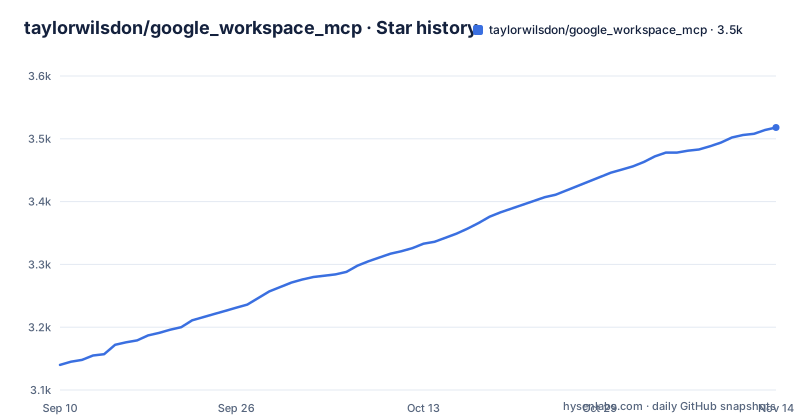
Star history
- taylorwilsdon/google_workspace_mcp3,518 ★ · +378
| Repository | 2026-09-10 | 2026-11-14 |
|---|---|---|
| taylorwilsdon/google_workspace_mcp | 3.1k | 3.5k |
378 Stars in the last 65 days, measured from the daily GitHub snapshot. Compare with other projects
Editorial analysis
Stateless mode is advertised next to a writable credential volume
The security table in the README states stateless mode with zero disk writes for locked-down container environments. The container this repository builds does not run that way. `docker-compose.yml` reads:
services:
  gws_mcp:
    build: .
    container_name: gws_mcp
    ports:
      - "8000:8000"
    environment:
      - GOOGLE_MCP_CREDENTIALS_DIR=/app/store_creds
    volumes:
      - ./client_secret.json:/app/client_secret.json:ro
      - store_creds:/app/store_creds:rw
    env_file:
      - .env
A named volume is mounted read-write where credentials are stored, the OAuth client secret is bind-mounted from the host, and an `.env` file is expected on disk. The Dockerfile installs the `disk` extra during `uv sync`, so disk-backed credential storage is present in the image rather than added by you. Stateless deployment is a supported mode; it is not the configuration the compose file describes.
uv sync --frozen lets a stale lockfile build quietly
The dependency layer is pinned in `uv.lock`, and the security section makes a point of the dependency tree being in `pyproject.toml` and pinned in that lock. The image build runs `uv sync --frozen --no-dev --extra disk --extra otel`. Frozen installs from the lock as it stands without asserting that the lock matches the manifest, so a commit that changes `pyproject.toml` without refreshing `uv.lock` still produces an image, built from the older resolution. The two extras are worth reading separately. The Dockerfile comment explains the `otel` one: it ships the OpenTelemetry SDK and exporter so tracing can be switched on at runtime through `OTEL_*` variables, and it stays a no-op unless an OTLP endpoint is set. So the image carries an exporter most deployments never turn on, which is the price of making it optional at the package level and unconditional in the image.
Python 3.10 is permitted, 3.11 and 3.12 are claimed, the image is 3.11
The manifest sets `requires-python = ">=3.10"` with no upper bound, and the classifier list names `Programming Language :: Python :: 3.11` and `3.12` only. No 3.10 classifier appears even though 3.10 is allowed, and nothing covers 3.13 or newer. The Dockerfile settles on `python:3.11-slim`, the floor of the claimed range, and a `.python-version` file sits at the repository root to say which interpreter the project itself develops against, though the image ignores it in favour of its own base tag. Eighteen runtime dependencies are named, from `fastapi` and `fastmcp` through the Google API client libraries, `pyjwt`, `cryptography`, `defusedxml`, `email-validator` and `pypdf`. Nothing in the manifest records a license per dependency, which matters for the procurement claim further down.
Two environment variables decide the tool set, and one expansion is unquoted
The container does not take tool flags on the command line. It declares them empty and expands them at start:
ENTRYPOINT ["/bin/sh", "-c"]
ENV TOOL_TIER=""
ENV TOOLS=""
The final command execs `main.py` with `--transport streamable-http` written in, then appends `--tool-tier` only when `TOOL_TIER` is non-empty and `--tools` only when `TOOLS` is non-empty, using the shell's `${VAR:+word}` form. Because the entry point is `sh -c`, that expansion happens; because `--tools $TOOLS` is not quoted, a space-separated value arrives as separate arguments. Two `EXPOSE` instructions cover the same port, one literal 8000 and one `EXPOSE ${PORT:-8000}`, and a health check curls `/health` on the same port every 30 seconds. Selecting a transport other than streamable HTTP, which the README says is available locally over stdio, means replacing the command.
One repository carrying seven ways to be distributed
The tree is arranged less like an application and more like a distribution centre. At the root sit `fastmcp.json`, `glama.json`, `manifest.json`, `server.json` and `smithery.yaml`, five separate descriptions of the same server for five different hosts, alongside `.mcpbignore` for a bundle build and a `.claude-plugin/` directory. Then there is `helm-chart/` for Kubernetes and `gappsscript/` for a Google Apps Script deployment, which is a different execution environment from a Python container. A `skills/` directory sits beside them as well. None of this is explained in the README, which routes readers to a documentation website instead. The practical consequence for anyone reading the repository rather than the site is that the entry point you care about is `main.py`, and the surface area you inherit is much larger than the code that serves Gmail and Calendar.
Eleven service packages behind a twelve-service claim
The README says the server connects AI assistants to all twelve major Google Workspace services with more than 120 tools. The tree holds eleven service packages: `gcalendar`, `gchat`, `gcontacts`, `gdocs`, `gdrive`, `gforms`, `gmail`, `gsearch`, `gsheets`, `gslides` and `gtasks`, next to `auth` and `core`. So one of the twelve is not a directory of its own, and the services table in the README is cut off in the middle of its fourth cell. What is visible gives per-service tool counts: Gmail 15 covering search, send, draft, labels, filters and attachments, Drive 16 covering search, create, share and importing Office files, Calendar 7 covering events, free/busy, Out of Office and Focus Time. The opening sentence names ten services and leaves Search out of that list, though `gsearch` exists. Three services account for 38 of the tools, so the remaining eight carry the rest.
The file path guard keeps a denylist when the allowlist widens
Local file reads are the interesting attack surface in a server that also holds Gmail and Drive access, and the README describes how it is narrowed. Reads default to a managed attachment directory, and `validate_file_path()` keeps blocking `.env*` files along with common home-directory credential stores such as `~/.ssh/` and `~/.aws/` even when `ALLOWED_FILE_DIRS` is broadened. The repository is consistent with that rule: a `.env.oauth21` template is checked in at the root while `.env` is expected on disk for the compose file and listed in `.gitignore`. The point to take from it is that widening the allowlist does not widen the denylist, which is the ordering you want, though the README gives no way to see the list itself short of reading the function.
MIT code, no CLA, and a paid hosted instance in the same file
The README addresses legal and procurement teams in a table of its own: MIT licensed, not open core, no dual licensing, no commercial tier gating features, no contributor license agreement, and no built-in telemetry to disclose. In the same document, a managed cloud instance is offered starting at $5 per month. Both things are true at once, MIT code that anyone may host and a service the maintainer runs. The dependency claim in that same table says MIT, Apache 2.0 and BSD throughout with no copyleft and no AGPL, which cannot be checked from the manifest because no dependency carries license metadata in `pyproject.toml`. The release history is worth a glance too: v1.30.1 on 2026-10-01, v2.0.0 on 2026-10-03 and v2.0.1 on 2026-10-04, three tags in three days across a major boundary, with the last commit on `main` dated 2026-10-03.
Editorial conclusion
Read this project as an integration surface with real reach, one that holds OAuth tokens for a mailbox, a calendar and a drive, and decide accordingly what may connect to it. Two things to settle before the first run. First, statelessness is a mode you choose, not what the shipped container does: the Dockerfile installs the disk extra and the compose file mounts a writable credential store, so if zero disk writes matter to you, check which extra and which volume your deployment uses. Second, the container hard-codes the streamable HTTP transport and takes its tool selection from two environment variables, so a stdio setup or a narrower tool set means replacing the command rather than passing a flag. Anyone expecting Google Ads, or an official Google server, will not find either here; the services covered are the Workspace ones, and this is a third-party project.
Frequently asked questions
what is google workspace mcp
A third-party MCP server and CLI for the Google Workspace APIs, MIT licensed and published on PyPI as `workspace-mcp`. It exposes more than 120 tools across Gmail, Drive, Calendar, Docs, Sheets, Slides, Forms, Tasks, Chat, Contacts and Search, over stdio for local clients or streamable HTTP for remote ones, and the manifest requires Python 3.10 or newer.
how to install google workspace mcp
The README carries no pip command; the package name comes from `pyproject.toml` and the PyPI badge, which is `workspace-mcp` rather than the repository name. The repository also ships a `Dockerfile` and `docker-compose.yml` that publish port 8000, bind-mount `./client_secret.json` read-only and mount a named `store_creds` volume read-write with `GOOGLE_MCP_CREDENTIALS_DIR` pointing at it.
Does this google_workspace_mcp server cover Google Ads?
No. The service packages in the repository are for Calendar, Chat, Contacts, Docs, Drive, Forms, Gmail, Search, Sheets, Slides and Tasks, and there is no ads package anywhere in the tree. An Ads question has to be answered from another project.
Is the google_workspace_mcp container stateless?
Not the one it ships. The README's security table advertises stateless mode with zero disk writes, while the Dockerfile installs the `disk` extra and `docker-compose.yml` mounts a `store_creds` volume read-write where credentials are kept. Stateless operation is a mode you select rather than the default configuration.
Can google_workspace_mcp run over stdio inside a container?
Not with the shipped command. The image's `CMD` execs `main.py` with `--transport streamable-http` already written in, and the entry point is `sh -c` so that `${VAR:+word}` expansions append `--tool-tier` and `--tools` from environment variables. Choosing stdio means replacing the command yourself.
Which Python versions does google_workspace_mcp support?
The manifest requires `>=3.10`, the classifiers name only 3.11 and 3.12, and the Dockerfile builds on `python:3.11-slim`. Nothing in the metadata claims 3.10 support even though it is permitted, and nothing covers 3.13 or newer.
Official sources
Add this badge to your README
If you maintain this project, the badge below links readers to this analysis and shows its maintenance status from the daily GitHub snapshot. Paste the markdown into your README; add ?metric=license or ?metric=stars to the image URL for a different field.

[](https://hysenlabs.com/projects/taylorwilsdon-google-workspace-mcp)Star history chart for your README
[](https://hysenlabs.com/projects/taylorwilsdon-google-workspace-mcp)Was this useful?