Contained puts a Mac interface in front of Apple's container CLI, and shows you the argv before it runs
A native macOS app for Apple's Container CLI
At a glance
- What is it?
- A SwiftUI control surface for Apple's container command, built as three local packages with disjoint namespaces and a command preview instead of a hidden call. Its default branch is nightly, a fresh install lands on the nightly channel, and the licence is source-available and non-commercial rather than open source.
- Who is it for?
- Contained is worth a look if you already run Apple's container CLI and want a Mac interface over it without giving up the command line, and the design decision that earns it that is the command preview paired with a CLI-only integration boundary. Three things to check first.
- Can I use it commercially?
- Check first. The repository uses a licence we do not classify automatically, so read its LICENSE file before any commercial use.
- Is it still maintained?
- Yes. The repository last received commits 13 days ago.
- What is it written in?
- Mainly Swift, according to GitHub's language statistics.
Answers come from the project's GitHub data, last synced on November 15, 2026, and from our analysis. They are not legal advice.
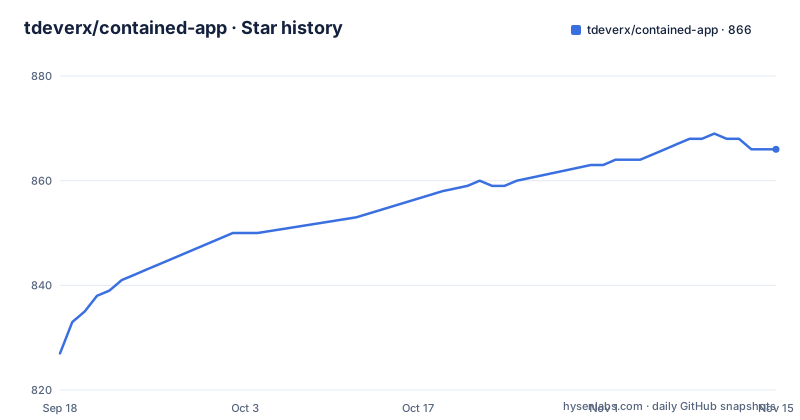
Star history
- tdeverx/contained-app866 ★ · +39
| Repository | 2026-09-18 | 2026-11-15 |
|---|---|---|
| tdeverx/contained-app | 827 | 866 |
39 Stars in the last 58 days, measured from the daily GitHub snapshot. Compare with other projects
Editorial analysis
The default branch is nightly, and a fresh install lands on the nightly channel
The three most recent releases are `v1.0.0-nightly.232+59a03dc` on 2026-09-30, `v1.0.0-nightly.229+2e03cb6` on 2026-09-24, and `v1.0.0-nightly.227+f6c5706` on 2026-09-24. Every one is a nightly build, the counter moves in the hundreds, and the suffix is the short commit hash. The default branch is named `nightly` for the same reason.
The install section says the same thing from the other end. Sparkle updates are built in, and during pre-1.0 development fresh installs default to the Nightly channel so they can receive current builds, with Stable, Beta and Nightly switchable afterwards under Settings then Updates. So a new user following the install instructions downloads a DMG and lands on the nightly track, and the three channels exist but none of them is the default.
The page's own subtitle says `Pre-1.0 and actively polishing`, which matches what the version numbers show. The last commit is dated 2026-09-30, so the project is moving, and the nightly counter says it is moving often.
The version format is the part worth keeping. Because the tag carries the commit hash, a bug report or a crash log can name the exact build rather than a marketing version, which is more useful than it sounds when the thing you installed changed three days ago.
Installation itself is one sentence: download the latest `.dmg` from Releases. There is no package manager entry, no Homebrew cask, and no other documented route.
The licence is source-available and non-commercial, not open source
The licence section is short and specific. Contained is described as source-available and free for non-commercial use under the PolyForm Noncommercial License 1.0.0, with the Contained name and branding reserved, and a `NOTICE` file in the root alongside the licence. The tree has both files.
That distinction matters more than the word free. A non-commercial licence lets you read the code, build it and run it, and stops you using it for commercial work. It is not one of the licences the Open Source Initiative approves, so if your organisation has a policy about what may be compiled into a shipped product, this one does not clear it by default. The reserved branding clause is separate again: you can use the code and you cannot call your fork Contained.
There is also an inconsistency worth naming rather than resolving. The page states the licence in plain terms, and the repository root contains the licence file and the notice, while the licence field recorded for the repository itself is left unasserted, which is the value used when nothing could be determined. That is a weaker statement than the one the page makes, and a reader relying on the recorded field alone would not learn that the terms are non-commercial.
Everything else about the project's posture is open in the usual way. There is a contributing guide to read before opening a larger pull request, a code of conduct, a security policy, a support file, a codeowners file, and separate routes for setup questions, for actionable bugs, and for private vulnerability reporting.
The app previews the exact command before running anything privileged
The most distinctive thing in this project is a decision not to hide anything. One of the listed capabilities is previewing the exact `container` command before privileged run and edit operations, and the architecture section repeats the principle in a different vocabulary: integration is CLI-based rather than private-framework based, the app talks to `Core.Orchestrator`, and Core owns the adapter-specific argv and process details.
So there is no hidden framework doing what a private API would allow. Every container operation is a subprocess with arguments the app knows how to show you first. The command preview is not a debug affordance, it is the visible form of the integration boundary.
The same instinct shows in where state lives. App-managed health, restart behaviour, activity history and card personalization are all described as staying local to Contained, specifically so the user's container resources remain clean when the same resources are used directly from the terminal. The Liquid Glass cards carry local-only tint, icon, nickname and graph personalization, which is the visual version of the same rule: your container namespace does not acquire labels because you prettified a card.
That constraint has a cost worth naming. Anything the app can do, a user can do from a terminal, and nothing the app tracks survives outside its own storage. For a container manager that is usually the right trade, and it is the reason the project can claim a CLI integration model without apologising for it.
Compose import produces an editable form instead of a running stack
One capability is stated as a refusal rather than a feature: Compose files are imported into editable run forms instead of launching opaque stacks. Most tools that accept a Compose file will bring the whole thing up and hand you a container list. Contained parses it into a form you can read and change, and you run it from there.
That is the same philosophy as the command preview, applied to input rather than output. A Compose file is a description of something you have not seen yet, and importing it into a form means you find out what it was going to do before it did it.
The rest of the surface is the ordinary container manager set, listed in full: run, edit, stop, restart, inspect and delete containers, plus images, tags, updates, archives, volumes, networks, registry credentials, templates, logs, activity history and system resources. What sits on top of that is explicitly experimental and reachable from Settings: toolbar panels, morph surfaces, a command palette, Docker Hub search, an image build workspace, keyboard shortcuts, and Compose import.
So the split is deliberate. Everything a container CLI can do is the product, and the new visual surfaces are behind a label. Given the default channel is nightly, that label is doing real work.
Two build entry points over one package graph
Development is documented through two entry points that sit over the same package graph, and the page is explicit about which to use for what:
| Path | Use it for |
| --- | --- |
| `Contained.xcworkspace` | Native Xcode build/run, SwiftUI previews, and manual UI iteration |
| `Package.swift` | CI, tests, bundle generation, signing, notarization, release notes, and appcasts |
The workspace is for the interactive work, where SwiftUI previews and manual iteration matter. `Package.swift` is for everything mechanical, from tests through to notarization. The build block then lists all of it, including both `swift` commands and the equivalent `xcodebuild` invocations:
open Contained.xcworkspace
swift build
swift test
xcodebuild -workspace Contained.xcworkspace -scheme Contained -configuration Debug build
xcodebuild -workspace Contained.xcworkspace -scheme Contained -configuration Debug test
./Scripts/package.sh app debug
open Contained.app
Releases are a script with two modes rather than a manual procedure. Maintainers use `Scripts/package.sh notarized` and `Scripts/appcast.sh generate`, covering signing, notarization, DMG creation, GitHub release notes, and Sparkle appcasts. The `app debug` mode in the block above is the local counterpart, which is why a fresh clone can produce an `Contained.app` you can open without touching a signing identity.
Two checked-in files support that pipeline: `VERSION` at the root, and `appcast.xml`, which is the Sparkle feed the in-app updater reads.
Three local packages with disjoint namespace prefixes, and a fixtures target kept out of the app
The package layout is a convention you can check rather than a convention you have to trust. The root package holds a small SwiftPM launcher and the shared app implementation, then consumes three standalone local packages, each with its own prefix:
| [ContainedCore](Packages/ContainedCore/README.md) | Backend orchestration through `Core.*`: runtime descriptors, canonical container models, command previews, Compose import/export, Apple `container` adapter internals, metrics, typed errors, and migration planning |
| [ContainedUI](Packages/ContainedUI/README.md) | Visual system through `UI.*`: tokens, materials, cards, panels, controls, state views, and charts |
| [ContainedUX](Packages/ContainedUX/README.md) | Interaction infrastructure through `UX.*`: safe areas, morphing, source measurement, and panel placement |
`Core.`, `UI.` and `UX.` do not overlap, so a symbol's prefix tells you which package owns it without opening anything. Core carries the adapter internals for Apple's `container`, which is where the argv that the preview renders actually comes from. The remaining two owners are the SwiftUI shell, which holds navigation, stores, history, settings, Sparkle, localization and app policy, and a bare executable launcher used by command-line builds and bundle scripts.
The detail worth pausing on is the fixtures. Core exposes a separate `ContainedCoreFixtures` product holding deterministic test and preview data under `Core.Fixtures.*`, and the page states plainly that normal app and distributable bundle targets do not link it. Making fixtures a separate SwiftPM product is what makes that guarantee structural rather than a review instruction, and it is the kind of thing a project gets right cheaply while it is still small.
macOS 26 on Apple silicon, installed from a DMG
The requirements list is three lines and they are floors, not suggestions: macOS 26 or later on Apple silicon, Apple's `container` CLI at 1.4.1 or newer on `PATH`, and Xcode 26 with Swift 6.2 or newer for local development.
The Apple silicon line means there is no Intel build. The macOS 26 line is a single major version ahead of what most machines are running at the time of writing, so the practical installed base is narrower than the platform name suggests. The container CLI floor is the one that will actually stop you, because the app is a front end for that binary and a 1.4.0 install will not be driven by it.
The documentation arrangement is worth one note. The repository carries a large `Documentation/` tree, organised into App, Features, Architecture, Development and Release, with a page per feature and a README beside each of the three local packages. The declared homepage is not any of that: it is a separate GitHub wiki repository, and the tree contains a checked-in wiki map that explains how the maintained docs correspond to it. So there are two documentation locations and a file whose job is to reconcile them, which is a reasonable answer to having a wiki people actually use, and one more thing to keep in sync.
Editorial conclusion
Contained is worth a look if you already run Apple's container CLI and want a Mac interface over it without giving up the command line, and the design decision that earns it that is the command preview paired with a CLI-only integration boundary. Three things to check first. It is not open source: the page states the PolyForm Noncommercial License 1.0.0, free for non-commercial use with the name and branding reserved, so commercial use is a different conversation. The default branch is nightly and a fresh install defaults to the nightly channel, so what you get on day one is a moving target with a commit hash in its version string. And the platform floor is narrow, macOS 26 or later on Apple silicon, with installation being a DMG you download rather than something a package manager installs for you.
Frequently asked questions
What is Contained, and what does it wrap?
A native macOS SwiftUI control surface for Apple's `container` CLI. It manages containers, images, volumes, networks, registries, logs and templates, and the integration is CLI-based rather than private-framework based, so the app talks to `Core.Orchestrator` and Core owns the adapter-specific argv and process details.
Can I use Contained commercially?
Not under the terms the page states. Contained is source-available and free for non-commercial use under the PolyForm Noncommercial License 1.0.0, with the Contained name and branding reserved. The licence field recorded for the repository is left unasserted, so read the licence file rather than relying on the recorded field.
What are the system requirements for Contained?
macOS 26 or later on Apple silicon, Apple's `container` CLI at version 1.4.1 or newer on `PATH`, and Xcode 26 with Swift 6.2 or newer if you want to build it yourself. Installation is by downloading the latest `.dmg` from Releases, with updates handled by Sparkle.
Which update channel does Contained install by default?
The Nightly channel, during pre-1.0 development, so fresh installs receive current builds. Stable, Beta and Nightly can be changed afterwards under Settings then Updates. The default branch is also named `nightly`, and recent tags look like `v1.0.0-nightly.232+59a03dc`, carrying the commit hash in the version.
How does Contained import a Compose file?
It imports Compose files into editable run forms rather than launching opaque stacks, so you see what the file was going to do before anything starts. Related to that, the app can preview the exact `container` command before privileged run and edit operations.
Official sources
Add this badge to your README
If you maintain this project, the badge below links readers to this analysis and shows its maintenance status from the daily GitHub snapshot. Paste the markdown into your README; add ?metric=license or ?metric=stars to the image URL for a different field.

[](https://hysenlabs.com/projects/tdeverx-contained-app)Star history chart for your README
[](https://hysenlabs.com/projects/tdeverx-contained-app)Was this useful?