Davit drives Apple's container stack over XPC, and the compose story stops mid-sentence
A native macOS UI for Apple's platform
At a glance
- What is it?
- Davit is a SwiftUI front end for Apple's container platform that never invokes the container CLI, plus a headless surface that borrows docker's vocabulary. The window side is thorough; the compose documentation ends partway through the rules for service discovery.
- Who is it for?
- Davit earns its place if you want Apple's container stack under a native window and a headless surface that mirrors docker's vocabulary, and you are willing to read the compose rules as partial, because service discovery is the part the README does not finish.
- Can I use it commercially?
- Yes. MIT is a permissive licence: you can use, modify and sell software built on it, as long as you keep its copyright and licence notices.
- Is it still maintained?
- Yes. The repository last received commits 1 day ago.
- What is it written in?
- Mainly Swift, according to GitHub's language statistics.
Answers come from the project's GitHub data, last synced on November 14, 2026, and from our analysis. They are not legal advice.
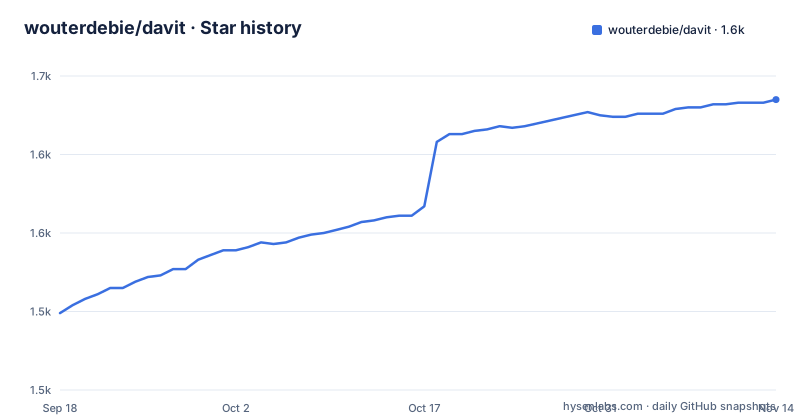
Star history
- wouterdebie/davit1,635 ★ · +136
| Repository | 2026-09-18 | 2026-11-14 |
|---|---|---|
| wouterdebie/davit | 1.5k | 1.6k |
136 Stars in the last 57 days, measured from the daily GitHub snapshot. Compare with other projects
Editorial analysis
No shell out: every feature goes through Apple's XPC API
The project links Apple's `ContainerAPIClient` and reaches `container-apiserver` directly over XPC, the same wire path the `container` CLI takes, and it says plainly that the CLI binary is never invoked. Everything the README advertises travels that channel: container lists, lifecycle calls, live stats, log streaming, image pulls, volume and network management, the in-terminal shell, and launchd service bootstrap. The choice shows up in the repository layout. `Package.swift` and `Package.resolved` are both checked in at the top level, so Apple's client sits there as a pinned SwiftPM dependency rather than something the app discovers at run time, and the pinned version is something a reader can read instead of guess. What the page does not state anywhere is a minimum macOS version or an SDK requirement, so the floor for building from source has to be inferred from the resolved package rather than read off a requirements line. The README also draws a line against two things by name, no Electron and no web views, which is the shortest available statement of what kind of program this is.
Containers are immutable, so Edit & Recreate is a replace
Apple's platform treats containers as immutable, and Davit builds its edit feature around that fact instead of hiding it. Edit & Recreate opens the Run sheet prefilled with the container's ports, environment, mounts, resource limits and network selection, and it subtracts the image's own entrypoint, CMD and environment values first, so the form shows only what the person who created the container actually customized. Confirming the sheet replaces the container. The subtraction is the interesting half of that design: it is the difference between a prefilled form you can trust and one that makes you retype what the image already gave you, and it is the reason the feature reads as a diff even though it never shows a diff. Two things are left unspecified. Nothing in that description says what becomes of the writable layer of the container being replaced, and the confirmation is a summary of the form you just filled in rather than a side-by-side comparison against the running container. Replacement also means the original container's identity, its published ports and its log history do not carry over.
Browsing files runs commands in the container and copies bytes
The container Files tab is documented as working over `exec` plus copy in and out, and the Volumes tab takes a different route: Browse Files mounts the volume into a throwaway helper and then reuses the same file browser. Two mechanisms behind one interface, and both are worth knowing about before you rely on them. The Files tab means transferring a file is implemented as commands run inside the container followed by byte copying, the same channel the Terminal tab opens for an interactive shell, so whatever an image cannot execute is also something that file browser cannot reach. The volume route has a second effect that is easy to miss: looking at a volume's contents creates a container in the process, with whatever lifetime the helper is given. The page does not say how long that helper lives, which image it runs from, or whether it shows up in your container list while a browse window is open, so the cost of inspecting a volume is not stated in the same terms as the cost of creating one by hand.
amd64 detection is automatic in the window and absent from the headless flags
The Run sheet detects amd64-only images on its own. With Rosetta installed, Davit adds `--arch amd64` for you and attaches a performance note; without Rosetta the run is blocked and the sheet hands you the exact install command to copy. The headless path documents a smaller vocabulary:
Davit run [flags] IMAGE [COMMAND…]
Davit build -t <tag> <context-dir>
Davit machine list|create|boot|stop|delete|exec|set
`Davit run` is described as docker-style, with `-d`, `--rm` and `--pull missing|always|never` and the same docker-ish flag vocabulary as compose. An architecture flag is not in that list, and nothing says whether the automatic `--arch amd64` also applies to the command line or is confined to the sheet. So the one place where the app changes the platform a container runs on without being asked is also the place where the scripting path leaves the behavior open, and a script that assumes the window's behavior gets no confirmation either way. The performance note attached to the Rosetta path has the same gap: a script has no equivalent warning to read.
The headless surface borrows docker's vocabulary down to the scoping rules
Davit is not only a window. The command line covers run, build, the machine lifecycle and a full compose lifecycle, written the way docker writes it, with the escaped pipes the page itself uses:
Davit compose plan | up [-d] [--down-on-failure] | down [-v] | ps | logs [-f\|--follow] [--tail <n>] | stop | start | restart | pull | exec <service> <command…>
[-f <file>] [--env-file <path>] [--profile <p>]… [--verbose\|-q\|--quiet] [service…]
Naming services scopes each command: `plan` and `up` add the dependency closure, while `stop`, `start`, `restart`, `pull`, `ps` and `down` apply to exactly the services you name. `--down-on-failure` tears down only the containers that invocation created, leaving already-running services it merely reused alone, and `--verbose`, `-q` and `--quiet` are mutually exclusive. File discovery copies docker too, walking up parent directories for `compose.yaml`, `compose.yml`, `docker-compose.yml` and `docker-compose.yaml`, with `COMPOSE_FILE` taking precedence. Even the departures from compose-go are deliberate and named: a backslash escape such as `\$` is not processed, so `$$` is how you write a literal dollar, and a nested default like `${A:-${B}}` keeps its default literal. One inconsistency sits inside all of it: the same document spells the executable `Davit` in these command lines and `davit exec` in the feature list.
Compose service names are faked with managed hosts file entries
The compose import is the one place the page admits to working around the platform. Davit states that the platform's DNS cannot resolve compose service names, so `up`, `start` and `restart` write managed `/etc/hosts` entries, suffixed `# davit-compose`, into every running container of the project. That is a mechanism with consequences you can trace: name resolution inside a stack depends on entries pushed into each container's filesystem, those entries are scoped to a project, and only three named operations write them rather than a blanket rule covering every compose command. It also sits next to the app's own DNS feature, which creates host DNS domains through `container system dns` after a single admin prompt and lets containers resolve at `name.<domain>` from your Mac. Compose service names fall outside that feature, which is the reason the workaround exists at all. What the page does not say is when the entries come back out. The sentence introducing the mechanism ends at the word mapping, and the rest of the compose section, including any account of teardown, is not there to read.
Three patch releases in eighty minutes and a description that names no containers
The three most recent releases, v0.1.34, v0.1.35 and v0.1.36, were all published on September 17, 2026, the last one about five minutes after the repository's most recent push the same evening. Patch numbers that move three steps in an afternoon tell you how the project is versioned but say nothing about how settled any single build is, and the tree has no changelog to explain what separated them. The repository description is the other thin spot: it reads A native macOS UI for Apple's platform and does not contain the word container, so anyone searching for a macOS UI for containers has no summary to match against, while the README's first line names Apple's container platform properly. Meanwhile the top level holds `docs/`, `site/`, `scripts/` and `ROADMAP.md`, and the page as it stands links to none of them, so what the roadmap says and what the documentation covers both sit outside the one page a reader lands on.
Editorial conclusion
Davit earns its place if you want Apple's container stack under a native window and a headless surface that mirrors docker's vocabulary, and you are willing to read the compose rules as partial, because service discovery is the part the README does not finish. Check three things first: which architecture your images end up on when you use `Davit run` instead of the window, what a throwaway volume-browsing helper does to your container list, and whether the Edit & Recreate confirmation shows you anything beyond the form you just filled in. As of September 17, 2026 the app sits at v0.1.36, so read its feature list as a snapshot of that day rather than a settled interface.
Frequently asked questions
Does Davit use the container CLI or Apple's API?
Neither shell nor CLI binary. Davit links Apple's `ContainerAPIClient` and talks to `container-apiserver` directly over XPC, and lists, lifecycle calls, live stats, log streaming, image pulls, volume and network management, `davit exec` and launchd bootstrap all travel that path.
Can Davit edit an existing container in place?
Not in place, because containers on Apple's platform are immutable. Edit & Recreate opens the Run sheet prefilled with the container's ports, environment, mounts, resources and network, subtracts the image's entrypoint, CMD and environment values so only your own settings show, and replaces the container when you confirm.
Does Davit need Rosetta installed to run amd64 images?
The Run sheet detects amd64-only images automatically: with Rosetta it adds `--arch amd64` and shows a performance note, and without it the run is blocked with the install command offered for copying. The headless `Davit run` list covers `-d`, `--rm` and `--pull` and does not mention architecture.
How does Davit handle a Docker Compose file?
It parses the file and previews services in `depends_on` order with named volumes, networks, a `container run` equivalent per service and warnings for anything unsupported, then creates the stack honoring `healthcheck`s, `profiles`, `depends_on` conditions and `${VAR}` interpolation from a sibling `.env`. Files are discovered like docker, walking up parent directories, and `COMPOSE_FILE` wins.
Is Davit a native macOS app and what does it need to build?
It is built entirely in SwiftUI with no Electron and no web views, packaged as a SwiftPM project with `Package.swift` and `Package.resolved` at the top level under an MIT license. The page states no minimum macOS version or SDK requirement.
Official sources
Add this badge to your README
If you maintain this project, the badge below links readers to this analysis and shows its maintenance status from the daily GitHub snapshot. Paste the markdown into your README; add ?metric=license or ?metric=stars to the image URL for a different field.

[](https://hysenlabs.com/projects/wouterdebie-davit)Star history chart for your README
[](https://hysenlabs.com/projects/wouterdebie-davit)Was this useful?