tl bootstraps itself through a precompiler that builds its own standard library
The compiler for Teal, a typed dialect of Lua
At a glance
- What is it?
- tl is the compiler for Teal, a typed dialect of Lua, and its core is a single dependency free file you can load into a project. The build is self hosted: the stable compiler compiles a precompiler, that precompiler generates the precompiled standard library, and the whole thing is written in the language it compiles.
- Who is it for?
- tl suits a Lua project that wants types without leaving the Lua runtime, and the fact that the core compiler is one file with no dependencies makes it easy to embed rather than only to install. Three things to check first.
- Can I use it commercially?
- Yes. MIT is a permissive licence: you can use, modify and sell software built on it, as long as you keep its copyright and licence notices.
- Is it still maintained?
- Yes. The repository last received commits 29 days ago.
- What is it written in?
- Mainly Lua, according to GitHub's language statistics.
Answers come from the project's GitHub data, last synced on November 24, 2026, and from our analysis. They are not legal advice.
Star history
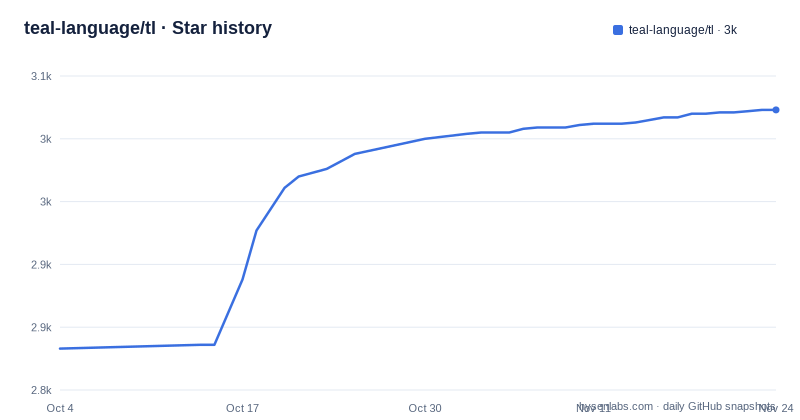
- teal-language/tl3,023 ★ · +190
| Repository | 2026-10-04 | 2026-11-24 |
|---|---|---|
| teal-language/tl | 2.8k | 3k |
190 Stars in the last 51 days, measured from the daily GitHub snapshot. Compare with other projects
Editorial analysis
The core compiler is one file with no dependencies
The compiler ships as a single Lua file, tl.lua, with no dependencies, and the page says you can load it into your projects. Activation is two lines:
local tl = require("tl")
tl.loader()
What that does is described precisely: running tl.loader() adds Teal support to your package loader, meaning that require() is able to run .tl files. After that your require calls load and compile Teal sources on the fly.
So there are two ways to use the language from a host program. You can pre-compile your .tl files into .lua, or you can carry the single compiler file and let the loader do the work at require time. The second option is what makes a single-file dependency free compiler interesting, because the cost of adding type checking to an existing Lua project is one file and one loader call rather than a build step.
The browser playground takes the same idea further. It compiles Teal into Lua using Fengari, described as a Lua VM implemented in JavaScript, so everything runs on the client.
Four subcommands, and gen is described as a syntax check
Once tl is on your path there are four subcommands, and each one is described in a single sentence. tl run script.tl runs a Teal script. tl check module.tl type checks a module, reports any errors and quits. tl gen module.tl checks for syntax errors and generates a module.lua file in plain Lua with all type annotations stripped. tl warnings lists all warnings the compiler can generate.
The division of labour in those sentences is worth reading carefully. Type checking is what check is for, and the exit-then-quit description is what makes it usable in a pre-commit hook or a continuous integration step. gen is described in terms of syntax errors only, and its job is output: a .lua file with the annotations gone, which is the artefact you ship if you do not want the loader in production.
The source tree does not match that list exactly. The build file names six command modules under the command directory, adding dump_blocks and types alongside run, warnings, check and gen, so two commands exist in the code that the getting started section does not mention.
The build is self hosted in two stages, and both stages delete on failure
The build file carries a comment describing a multi-stage bootstrap process, and the two rules below it show how the compiler is built by itself.
The first stage generates precompiler.lua from precompiler.tl using the stable compiler, where STABLE_TL is defined as the Lua interpreter running the tl script in the repository root. The second stage generates teal/precompiled/default_env.lua by running that precompiler, and its inputs are three declaration files: the default prelude, the default standard library definitions and tl.tl itself.
Both recipes end the same way, with a failure handler that removes the target and exits non-zero, so a half-written artefact never survives to be picked up by a later stage. The default target is all, which depends on selfbuild and suite, and the suite is run through busted with a flag that suppresses pending tests.
The source list under that machinery names forty-nine .tl files, from the lexer, parser and AST modules through eight modules under the check directory, three code generators, the package loader and the two API versions, and up to the command line layer.
Generated Lua targets 5.1 while the runtime range reaches 5.4
The build passes a generation flag with a target attached to it, set to check plus a target of 5.1, and that value is used wherever the compiler generates Lua in the build.
Meanwhile the compatibility statement in the installation section is much wider: Teal works with Lua 5.1 through 5.4, including LuaJIT. Those two facts are consistent but they answer different questions. The generation target decides which Lua you get in the output files, and it is pinned to the oldest version in the supported range. The compatibility statement decides which interpreters can run what you wrote.
The practical effect is that a Teal program compiled by the build produces Lua aimed at the oldest supported interpreter, so it will run on the newest one as well. The corollary is that if you want output using syntax from a newer Lua, the generation target is where you change that, and the default will not do it for you.
Three ways to install, and the binaries cover two platforms
The first route is LuaRocks. Install Lua and LuaRocks, then run luarocks install tl. The page adds a practical detail about what happens next: this should put a tl command in your PATH, and if the LuaRocks-installed binaries are not in your PATH you should run eval $(luarocks path).
The second route is pre-compiled binaries from the releases page, for Linux x86_64 and Windows x86_64 and nothing else stated. Those packages contain a stand-alone executable that can run Teal programs without the need of a separate Lua installation, and it can also compile them to Lua. So on those two platforms you can avoid installing Lua at all, and on anything else you cannot.
The third route is the browser playground, which needs nothing installed.
The repository side of installation is visible too. There is a rockspec for development with a doubled suffix in its name, a committed luarocks.lock, and both precompiler.lua and precompiler.tl at the root next to tl.lua, teal.lua, the tl launcher and the tl.tl source.
Whole projects are Cyan's job, not the compiler's
For building a project rather than a file, the page draws a line and then points across it. To build whole projects, it says, you probably will not want to run tl on each file individually, and the recommendation is Cyan, described as the build tool designed for Teal.
That is an unusual division of responsibility for a language toolchain, and a useful one to know before you start. The compiler is deliberately a single file that handles one module at a time, with run, check and gen all taking a module path. Directory walking, dependency order and incremental builds are somebody else's problem, and the project points at a separate repository for it.
Configuration follows the same shape. Compiler options can be specified on the command line or inside a tlconfig.lua file at the root of your project, so per-project settings live in one file rather than being spread across a build script, while the project-wide orchestration lives in Cyan.
Third-party types are declaration files kept in a separate repository
Teal gets types for code it did not write through declaration files, and there is a collaborative repository for them at the teal-language project, with an invitation to contribute.
The mechanism is visible in this repository as well. Two declaration files sit at the root, argparse.d.tl and lfs.d.tl, which are types for third-party libraries rather than for Teal itself. And the bootstrap recipe shows the language's own types in the same format: the default prelude and the default standard library definitions are declaration files that the precompiler turns into the precompiled default environment.
So a .d.tl file is not a convenience for third-party code, it is how the standard library itself is described.
The rest of the tooling follows the same pattern of small pieces kept elsewhere. Editor support comes as separate projects for Vim and Visual Studio Code, plus a lite plugin with linter support and Helix with language server support. Documentation is read online and can be generated locally from the docs folder. The chat is on Gitter with a Matrix bridge, the project was started by Hisham Muhammad, and the page notes that Teal is written using Teal itself.
Editorial conclusion
tl suits a Lua project that wants types without leaving the Lua runtime, and the fact that the core compiler is one file with no dependencies makes it easy to embed rather than only to install. Three things to check first. Decide how you consume it, because there are three answers: pre-compile to Lua, activate the package loader so require can compile on the fly, or run the stand-alone binaries, which exist for Linux and Windows on x86_64 only. Decide how projects get built, since the page is explicit that you probably do not want to run the compiler file by file and points you at Cyan for that. And decide where your third-party types come from, since those are declaration files and the shared ones live in a separate repository you are expected to contribute to.
Frequently asked questions
What is Teal and what is tl?
Teal is a typed dialect of Lua, and tl is its compiler. The core compiler has no dependencies and is a single tl.lua file you can load into your own project, and the licence is MIT, the same as Lua's.
How do I run Teal code from a Lua program?
Either pre-compile your .tl files into .lua, or add the tl.lua module and call tl.loader(), which adds Teal support to the package loader so require() can load and compile .tl files on the fly.
Which Lua versions does Teal support?
Lua 5.1 through 5.4, including LuaJIT. Pre-compiled binaries are offered for Linux x86_64 and Windows x86_64, and those packages include a stand-alone executable that runs Teal programs without a separate Lua installation.
How do I type check Teal without generating Lua?
Use tl check module.tl, which type checks a module, reports any errors and quits. Generating a module.lua file with the type annotations stripped is the job of tl gen, and tl warnings lists every warning the compiler can produce.
How do I build a whole Teal project?
The page says you probably do not want to run tl on each file individually and recommends Cyan, the build tool designed for Teal. Compiler options themselves can go on the command line or in a tlconfig.lua file at the root of the project.
How do I get types for a third-party Lua library in Teal?
Through declaration files, .d.tl. There is a collaborative repository of them at the teal-language project that you can contribute to, and this repository ships two of its own, argparse.d.tl and lfs.d.tl, alongside the prelude and standard library declarations used by the precompiler.
Official sources
Add this badge to your README
If you maintain this project, the badge below links readers to this analysis and shows its maintenance status from the daily GitHub snapshot. Paste the markdown into your README; add ?metric=license or ?metric=stars to the image URL for a different field.

[](https://hysenlabs.com/projects/teal-language-tl)Star history chart for your README
[](https://hysenlabs.com/projects/teal-language-tl)Was this useful?