tealdeer: the offline-first tldr client written in Rust
A very fast implementation of tldr in Rust.
At a glance
- What is it?
- A Rust rewrite of tldr that caches its pages on disk, needs the network only to update them, ships under a dual Apache and MIT license, and publishes static binaries on its GitHub releases page.
- Who is it for?
- tealdeer is a small program with unusually clear rules about its own boundaries. It states a minimum Rust version as a policy rather than an accident, and it asks contributors using AI to mark their work and leave the easy issues alone.
- Can I use it commercially?
- Yes. Apache-2.0 is a permissive licence: you can use, modify and sell software built on it, as long as you keep its copyright and licence notices.
- Is it still maintained?
- Yes. The repository last received commits 14 days ago.
- What is it written in?
- Mainly Rust, according to GitHub's language statistics.
Answers come from the project's GitHub data, last synced on November 7, 2026, and from our analysis. They are not legal advice.
Star history
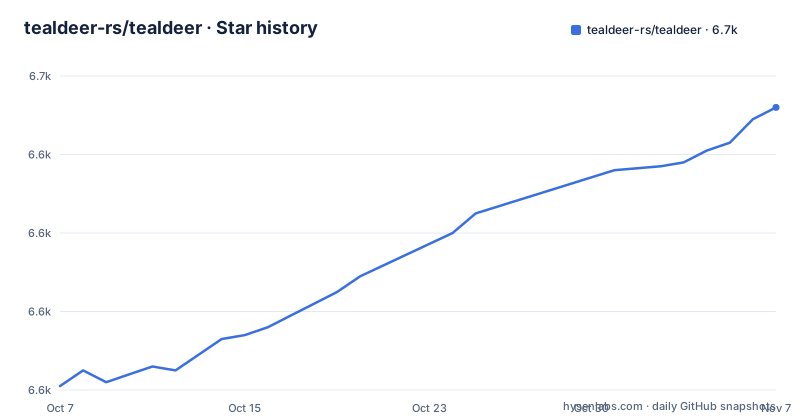
- tealdeer-rs/tealdeer6,652 ★ · +71
| Repository | 2026-10-07 | 2026-11-07 |
|---|---|---|
| tealdeer-rs/tealdeer | 6.6k | 6.7k |
71 Stars in the last 31 days, measured from the daily GitHub snapshot. Compare with other projects
Editorial analysis
Five goals, all of them checked off
The README states its high level goals as a checklist, and every box is ticked. Download and cache pages. Do not require a network connection for anything besides updating the cache. Comply with the tldr client specification. Advanced highlighting and configuration. Be fast.
That list is short enough to hold in your head, and it is worth holding in your head because each item implies a design decision. Caching pages means a cache directory has to exist somewhere on disk. Not needing the network means page rendering is a local file read, not a request. Complying with the client specification means the pages themselves are interchangeable with any other tldr client, so nothing is lost by switching.
The fifth goal is the only one that is not a feature, and it is the reason for the language choice. A tool that exists to save you thirty seconds of reading a man page is judged on latency, and a compiled Rust binary is about as close to that goal as the ecosystem offers.
The name is a joke the README explains plainly: say tldr out loud in English and it sounds somewhat like tealdeer. The credit line at the bottom names the person who came up with it.
Building from source is a two-line affair, and the docs are a separate repository concern
There is no install section in the README, which is unusual for a project with this many users. Instead there is a link to the documentation site and a note that the docs are generated with mdbook from the markdown files in the docs/src directory. The site also handles installation, so the README's contribution is limited to pointing at it.
What the README does cover is the development loop, and it is worth reading because the commands reveal how the program is put together. A debug build with logging compiled in, a release build without it, and an environment variable that switches the log output on:
cargo build --features logging
cargo build --release
export RUST_LOG=tldr=debug
Note the crate name in the log target is tldr, not tealdeer, because that is the name of the compiled binary. Anything you write against tealdeer's own log output has to use tldr as the target.
Tests and lints are the other half:
cargo test
rustup component add clippy
cargo clean && cargo clippy
The binary is called tldr, the crate is called tealdeer
Cargo.toml declares the package name tealdeer and then overrides the executable with an explicit bin section. Everything a user types, every shell completion, and every log target is tldr; only the crate on crates.io and the repository are tealdeer.
The same file pins the rest of the build contract. The edition is 2024, which places the project on a recent Rust. The MSRV field reads 1.88, and the README turns that number into a policy rather than a fact: when a release is published, the Rust version needed to build it should have been stable for at least a month. In other words the floor moves deliberately and slowly, and Cargo.toml is the single place to look for the current value.
Dependencies are chosen for build portability as much as for function. The HTTP client is ureq 3 with gzip and socks-proxy enabled, page archives are read with the zip crate using deflate only, argument parsing is clap 4, configuration is TOML through the toml crate, colour output is yansi, and the pager is only a dependency on non-Windows targets.
TLS is where the portability thinking shows most clearly. The default feature set is two rustls variants, one using WebPKI roots and one using native roots, and the native-tls feature exists but is off by default with a comment explaining that it is difficult to build for musl. Someone took a static Linux build on an Alpine-adjacent target seriously enough to shape the default features around it.
Dual licensing, stated twice and reported once
The README licenses the project under either the Apache License 2.0 or the MIT license, at your option, and points at LICENSE-APACHE and LICENSE-MIT in the repository root. Cargo.toml says the same thing in the SPDX form MIT OR Apache-2.0. The contribution note adds that unless you say otherwise, a contribution is dual licensed under the same terms with no additional conditions.
The repository's own metadata reports a single license, Apache-2.0. That is the more restrictive of the two, so nothing breaks, but any tooling that reads the license field rather than the license files will give you a narrower answer than the project intends. If you are scanning dependencies for compliance, this is a case where the API field and the repository disagree and the repository is the authority.
The include list in Cargo.toml is also worth a look if you want to know what you actually get when you depend on the crate. It is explicit: the src and tests directories, Cargo.toml, the README, the LICENSE files, the completion directory and the pages directory. So shell completions and whatever the pages directory holds ship inside the package itself rather than being generated at install time.
The release notes tell you to distrust the releases
The README points anyone in a hurry to static binaries on the GitHub releases page.
The release history also has an odd shape. The three most recent releases are v1.9.1 on 2026-10-24, v1.9.0 on 2026-08-24 and v1.7.3 on 2026-01-25, with no 1.8 release in that list.
The AI policy is the strictest contribution rule in the README
One section of the README is worth reading on its own, because it is unusual to find rules this specific. Using AI is generally discouraged. However, if it is used as part of a contribution, the contributor must mark which parts were produced with AI tools, including in issue and pull request comments, check the output before sharing it, not post slop or spam, leave small or easy tasks to new contributors who want to learn, and be respectful of everyone's time.
Two of those five rules are about project health rather than about the code. Leaving easy tasks for newcomers is an explicit commitment to keeping the good-first-issue tag meaningful, which means an automated sweep of easy issues is treated as a cost rather than a contribution. And requiring AI-assisted comments to be labelled means review load does not silently increase, since the reviewer knows what to expect before opening the pull request.
The repository is not archived, its default branch is main, and the last push was on 2026-10-24. With 19 open issues and a dependency list this small, the pace looks like maintenance rather than expansion, which matches a project whose stated goals are already complete.
Where the homepage setting and the manifest disagree
A small inconsistency is worth flagging because it affects how you find documentation. The homepage field in the repository's metadata is docs.tealdeer.org, which is the mdbook site and the right destination for installation and configuration. Cargo.toml gives its homepage as the GitHub repository URL instead, with documentation pointing at the same docs site.
Nothing breaks from this, but it means a tool that reads Cargo.toml to display where to get help sends you to the README, and the README sends you to the site. The path is one hop longer than it needs to be.
For anyone evaluating this project, the practical question is not the homepage field but the client specification. The README states compliance with it as a checked goal, and that specification is what makes tealdeer's pages interchangeable with any other tldr client. If your requirement is a tldr client you can drop in without changing behaviour for anyone else on the machine, that link is the thing to read, and it lives outside this repository entirely.
Editorial conclusion
tealdeer is a small program with unusually clear rules about its own boundaries. It states a minimum Rust version as a policy rather than an accident, and it asks contributors using AI to mark their work and leave the easy issues alone. What it does not tell you is where its pages come from or how the cache behaves under partial updates, because that documentation lives at docs.tealdeer.org rather than in the README. If you only read one file before installing, make it the client specification link the README carries, since compliance with it is stated as a checked goal and everything else in the project follows from taking that promise seriously.
Frequently asked questions
What are the differences between tealdeer and tldr?
They show the same pages. tealdeer is a Rust client that caches them on disk and needs a network connection only to update that cache, and it complies with the tldr client specification, so the pages are interchangeable with other clients.
Why is the tealdeer binary called tldr?
Cargo.toml sets the package name to tealdeer but declares an explicit binary target named tldr. That is the name you type, the name shell completions are generated for, and the name used in the RUST_LOG target tldr=debug.
Can I trust the prebuilt tealdeer binaries?
The README offers static binaries on the GitHub releases page for anyone who wants to try tealdeer quickly; building from source with cargo build --release is the alternative it documents.
What Rust version do I need to build tealdeer?
The rust-version field in Cargo.toml is 1.88, and the README states that this value should have been stable for at least a month at the time of a release. The crate also uses Rust edition 2024.
Official sources
Add this badge to your README
If you maintain this project, the badge below links readers to this analysis and shows its maintenance status from the daily GitHub snapshot. Paste the markdown into your README; add ?metric=license or ?metric=stars to the image URL for a different field.

[](https://hysenlabs.com/projects/tealdeer-rs-tealdeer)Star history chart for your README
[](https://hysenlabs.com/projects/tealdeer-rs-tealdeer)Was this useful?