TEAMMATES runs peer evaluation for university courses
TEAMMATES is a feedback management tool for education
At a glance
- What is it?
- TEAMMATES is a free online tool for managing peer evaluations and other feedback paths between students, deployed by universities that want the data and the workflow under their own control. This repository is the developer side of that product, a Java backend with an Angular front end, and it is one of the more substantial student-contributed codebases in education.
- Who is it for?
- TEAMMATES is worth adopting if your institution teaches with peer review and you want the evaluation workflow and the data in your own infrastructure rather than in a vendor's, because the peer evaluation model, the session concept and the feedback paths are all implemented and the code is open under GPL-2.0.
- Can I use it commercially?
- Yes, with conditions. GPL-2.0 is a copyleft licence: if you distribute software that includes it, you must release that software's source code under the same licence. Running it internally without distributing it does not trigger that obligation.
- Is it still maintained?
- Yes. The repository last received commits 86 days ago.
- What is it written in?
- Mainly Java, according to GitHub's language statistics.
Answers come from the project's GitHub data, last synced on October 23, 2026, and from our analysis. They are not legal advice.
Star history
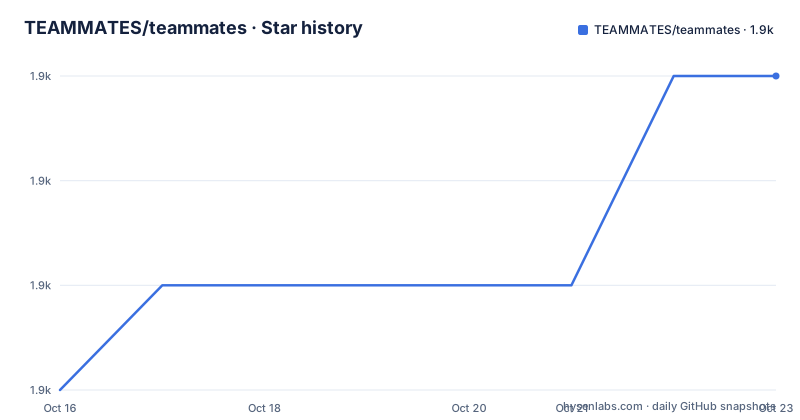
- TEAMMATES/teammates1,858 ★ · +3
| Repository | 2026-10-16 | 2026-10-23 |
|---|---|---|
| TEAMMATES/teammates | 1.9k | 1.9k |
3 Stars in the last 7 days, measured from the daily GitHub snapshot. Compare with other projects
Editorial analysis
Feedback between students, run by the university
TEAMMATES is a free online tool for managing peer evaluations and other feedback paths of your students. It is provided as a cloud-based service for educators and students, and the readme says it is currently used by hundreds of universities across the world.
The phrase that carries the design is feedback paths. A peer evaluation system is usually described in terms of the evaluation itself, students rating students on a rubric, but the generalisation is the interesting part. The same machinery can carry a teacher reviewing a student, a course coordinator surveying a class, or a peer review between two teams, and the tool treats the reviewer and the reviewee as roles rather than as the only possible pair.
The software is hosted, and the readme is careful about who this repository is for. It says this is the TEAMMATES GitHub code repository for contributors and developers, and that educators or students looking to use TEAMMATES should visit the product website, which is at teammatesv4.appspot.com. The version naming carries the history of that, the site is still the v4 address while the code is on the 9.0 line.
The audience for the software itself is a university that wants to run peer evaluation itself, with the data on its own servers, and the audience for the repository is the people who build and extend it. That distinction matters when you read the rest of the readme, because everything in it is aimed at the second group.
The repository is aimed at contributors, and says so
The readme spends a paragraph on documentation and a paragraph on getting involved, and both are written for a developer rather than a user.
The developer documentation lives at teammates.github.io/teammates, and the version history is on the releases page, with project statistics on OpenHub. The invitation is explicit: contributions are welcomed from developers of all backgrounds, especially students, with the developer documentation as the way in.
The contact section is also carefully split. For a bug or a feature request, the instruction is to open an issue on GitHub. For a question, the instruction is to start a GitHub Discussion, which is marked as preferred, or to email [email protected] for confidential enquiries.
That last distinction is the one to notice. A peer evaluation tool handles data about students and about the comments their peers write about each other, and the project routes anything that might concern a person to a private channel rather than a public issue or discussion.
For a prospective adopter, the practical consequence is that this repository is the upstream, and the deployment story for a university is something you build from it, with the developer documentation as the guide, rather than something you install. The project ships a docker-compose file for the database, but the application itself is the repository.
A Java backend, an Angular front end, one repository
The stack is a modern one and it is visible in the file list at the root of the repository.
The server side is Java and Gradle, with build.gradle, a gradle directory, the gradlew wrappers for Unix and Windows, and gradle.template.properties. The client side is Angular and TypeScript, with angular.json, a tsconfig for the app, the spec files and a separate tsconfig.node.json. There is an eslint.config.js, a stylelint.config.mjs, a .prettierrc and a .prettierignore, plus a static-analysis directory and a scripts directory. The docs directory holds the documentation, and there is a wait-for-server.sh script at the root.
The client dependencies describe the feature set more than the readme does. Angular 21.2.13 is the framework, with the CDK, the forms package, the router and the localize package. Handsontable at 17 with its Angular wrapper is the grid, and TinyMCE at 8.5.1 with its Angular wrapper is the rich text editor, which is what you would expect for a tool that renders feedback comments and session instructions. Bootstrap 5.3.8 and ng-bootstrap supply the general UI, d3 7.8.5 is there for visualisation, ngx-captcha is the captcha integration, moment-timezone handles time zones, and rxjs 7.8.2 with zone.js 0.16.2 are the reactive core.
Two details are worth calling out. The Angular localize package means the application is built for internationalisation from the start, which matters for a tool used across hundreds of universities. And the presence of a captcha library, alongside the peer review model, points at the abuse problem: a system where students rate each other needs a way to keep scripted ratings out.
Three build systems in one project, and a compose file for one of them
The build story is the part that tells you what deploying this actually involves, and the root of the repository has a Gradle wrapper, an Angular CLI configuration and a package.json, so there are two toolchains and a database to run.
The client scripts are conventional Angular CLI ones. ng serve starts the development server, ng build --configuration production produces the frontend, and ng test runs the tests, with a separate coverage script that clears the coverage directory first and runs the tests with coverage. There are separate lint steps, one for eslint with cache, one for stylelint over the CSS and SCSS under src/web, and a format check that runs a node script, and the aggregate lint command runs all three.
For the database, the compose file is short and gives you the Postgres version the project expects:
version: '3.9'
services:
  postgres:
    image: postgres:15.1-alpine
    restart: always
    volumes:
      - ./postgres-data:/var/lib/postgresql/data
    ports:
      - 5432:5432
    environment:
      POSTGRES_USER: teammates
      POSTGRES_PASSWORD: teammates
      POSTGRES_DB: teammates
Two things about that file. The credentials are the default pair, teammates over teammates, which is exactly what you would expect in a development compose file and exactly what must not survive into a deployment. And the data lives in a bind mounted directory, ./postgres-data, rather than in a named volume, which is convenient for inspection and for backup scripts and means the database directory is owned by your user on the host.
There is a wait-for-server.sh script at the root, which is the sort of small piece of glue that a two-language project with a database needs and that a single language project does not.
Component tests, end to end tests and coverage badges
The readme's badges are a good proxy for what a project takes seriously, and there are three of them for continuous integration. There is a GitHub Actions build status badge for component tests and another for end to end tests, plus a Codecov coverage status badge.
The distinction between component and end to end tests in this project is the interesting one, because a peer evaluation workflow has two quite different halves. The component tests cover the server and the domain logic, the sessions, the feedback, the accounts. The end to end tests cover the path a real user takes through the browser, and for this project that path is long and stateful: an instructor sets up a course and a session, students receive an evaluation task, a student reads the instructions, submits a review, and the instructor reads it and the feedback goes back.
That end to end layer is expensive, and the acknowledgements section explains part of how it is paid for. SauceLabs provided a free Open Sauce account for cross-browser testing, which is the standard answer for a project whose end to end suite has to pass on several browsers, and the YourKit Java Profiler licences are the kind of donation that a large Java backend project needs to chase down memory issues.
The JetBrains acknowledgement is in the same list, for IntelliJ IDEA licences, and Google Summer of Code appears in a row of editions from 2014 to 2018 as a mentor organisation, with Facebook Open Academy in 2016.
So the testing investment here is real, and the browser coverage is provided by someone else's free tier. The caveat for an adopter is that the end to end suite is tuned to the project's own environments, and your deployment will differ in at least the database and the mail settings, so expect to fix the first test run rather than inherit a green build.
GPL-2.0, university infrastructure and grant funding
The licence is GPL-2.0, with a badge in the readme and a LICENSE file at the root of the repository. For a system that holds student names, peer feedback and instructor accounts, a copyleft licence is a reasonable default, because a modified version that is run as a service also has to offer its source.
The acknowledgements describe who pays for it, and the list is more informative than a sponsorship page usually is. The School of Computing at the National University of Singapore provides the infrastructure support to run the project. The Centre for Development of Teaching and Learning supports it with several Teaching Enhancement Grants over the years, and the Learning Innovation Fund-Technology initiative funded the 2015 to 2018 period. Google Summer of Code covered five editions from 2014 to 2018, and Facebook Open Academy covered one in 2016.
That gives a fair picture of the economics. A research group at a university runs the reference deployment, the public instance, and the code, and the grants and the summer of code placements pay for the development cycles in between. The readme says the tool is free and is provided as a cloud-based service, and the deployed instance at teammatesv4.appspot.com is the public face of that arrangement.
The consequence for a university considering self hosting is that the software is free and the code is open, but the surrounding support, the documentation site and the community are the NUS group's work, and the people who know the system best are there. A university that has in-house developers can contribute upstream, and the project says it especially wants student contributors, which is a genuine route into the codebase.
The 9.0 line is still beta, and that is the first thing to check
The release history is the last thing to look at, and it needs reading carefully.
The releases listed are V9.0.0-beta.5 on 2024-04-19, V9.0.0-beta.6 on 2024-04-23, and V9.00-beta.7 on 2026-05-03, where the tag naming is inconsistent between the two spellings of the version. The repository is not archived and the last push was on 2026-07-29, so work is continuing even though the newest published artefact is a beta.
There is a gap of more than two years between beta.6 and beta.7, and the readme does not explain it, and the version history link points at the releases page rather than summarising anything. So the honest statement is that the current line is a 9.0 beta whose last tagged build is from May 2026, with development continuing in the repository since.
For a university that wants to run this, the checks are concrete. Read the developer documentation at teammates.github.io/teammates rather than the readme, which is explicitly for contributors. Look at the releases page for the actual state of the 9.0 line and what changed from the 8.x line, since a major version on a system with stored session data implies a data migration. And plan for the fact that you are deploying a beta of a large system, which means the first thing to build is a rehearsal with a copy of a real course's data rather than a fresh empty instance.
The judgement is that the project is worth adopting and worth contributing to, and that the 9.0 beta is the thing to weigh rather than the idea of peer evaluation tooling in general.
Editorial conclusion
TEAMMATES is worth adopting if your institution teaches with peer review and you want the evaluation workflow and the data in your own infrastructure rather than in a vendor's, because the peer evaluation model, the session concept and the feedback paths are all implemented and the code is open under GPL-2.0. It is the wrong choice if you are an individual instructor looking for a hosted service, since the readme sends educators and students to the product website and keeps this repository for contributors. Before you deploy it, read the developer documentation and check the release line, because the current version is a 9.0.0 beta, V9.00-beta.7 from 2026-05-03, and the last push was on 2026-07-29.
Frequently asked questions
What is TEAMMATES and who uses it?
It is a free online tool for managing peer evaluations and other feedback paths of your students, provided as a cloud-based service for educators and students. The readme states that it is currently used by hundreds of universities across the world.
Who is the TEAMMATES GitHub repository for?
The readme states that it is the code repository for contributors and developers, and that educators or students looking to use TEAMMATES should visit the product website instead. Developer documentation is at teammates.github.io/teammates.
What is the tech stack of TEAMMATES?
A Java backend built with Gradle and an Angular 21 front end with TypeScript, using Bootstrap, Handsontable for grids, TinyMCE for rich text, d3 for visualisation and a Postgres 15 database. The client scripts are the standard Angular CLI ones, with ng serve, ng build, ng test and separate eslint, stylelint and prettier checks.
How do I report a bug or ask a question about TEAMMATES?
Bugs and feature requests go on the GitHub issue tracker. Questions go in a GitHub Discussion, which the readme marks as preferred, or by email to [email protected] for confidential enquiries.
What licence is TEAMMATES released under and what is its release state?
The repository is licensed GPL-2.0. The newest listed release is V9.00-beta.7 from 2026-05-03, after V9.0.0-beta.6 from 2024-04-23, so the current line is a 9.0 beta, and the repository was pushed to on 2026-07-29.
Official sources
Add this badge to your README
If you maintain this project, the badge below links readers to this analysis and shows its maintenance status from the daily GitHub snapshot. Paste the markdown into your README; add ?metric=license or ?metric=stars to the image URL for a different field.

[](https://hysenlabs.com/projects/teammates-teammates)Star history chart for your README
[](https://hysenlabs.com/projects/teammates-teammates)Was this useful?