Tencent BrowserSkill: the bsk CLI and a Chrome or Edge extension that let shell agents drive your logged-in browser
Let AI agents use your real, logged-in browser without interrupting your work. CLI + extension for browser automation across any shell-capable AI agent.
At a glance
- What is it?
- BrowserSkill pairs a Rust CLI and daemon called bsk with a browser extension so that Codex, Claude Code, Cursor and other shell-capable agents can read, click and fill pages in your own Chrome or Edge session. The design keeps the agent in a separate window you can take over, but it also hands the agent everything your logins can reach.
- Who is it for?
- BrowserSkill fits developers who already work with a shell-capable agent and want it to act inside sites they are signed in to, debug a failing web flow with request and console evidence, or export tables, without setting up a separate automated browser. It is the wrong tool for Firefox or Safari users, and for anyone unwilling to let an agent act with their real sessions.
- Can I use it commercially?
- Yes. MIT is a permissive licence: you can use, modify and sell software built on it, as long as you keep its copyright and licence notices.
- Is it still maintained?
- Yes. The repository received new commits within the last day.
- What is it written in?
- Mainly TypeScript, according to GitHub's language statistics.
Answers come from the project's GitHub data, last synced on November 14, 2026, and from our analysis. They are not legal advice.
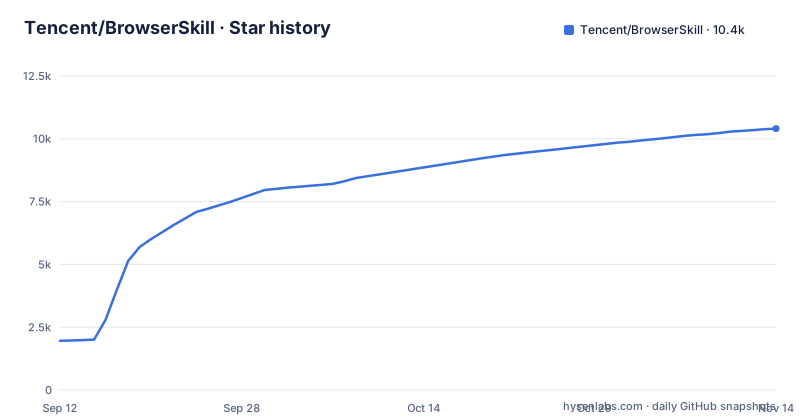
Star history
- Tencent/BrowserSkill10,407 ★ · +8,449
| Repository | 2026-09-12 | 2026-11-14 |
|---|---|---|
| Tencent/BrowserSkill | 2k | 10.4k |
8,449 Stars in the last 63 days, measured from the daily GitHub snapshot. Compare with other projects
Editorial analysis
One bsk binary, a background daemon and an extension do the work together
Local automation needs three parts: an AI agent, the bsk CLI, and the browser extension. The CLI includes the background daemon, and a skill file teaches the agent which bsk commands to run. Any agent that can run shell commands uses the same CLI; named examples include Codex, Claude Code, Cursor, OpenClaw, CodeBuddy, WorkBuddy, Pi and Hermes Agent. DeepSeek Harness is the exception, with a dedicated plugin that exposes native browser tools and task previews. The CLI is written in Rust in a Cargo workspace with bsk-cli and bsk-protocol crates at version 0.4.1, requiring Rust 1.85, while the extension and plugins live in a pnpm workspace. The CLI and extension are released separately, as cli-v0.4.1 and ext-v0.4.1 on 2026-11-01.
Only Chrome and Edge on Chromium 125 or later are supported
The extension supports Chrome and Microsoft Edge based on Chromium 125 or later. Other Chromium browsers may work, but compatibility is not guaranteed, and Firefox and Safari are not on the list at all. The CLI and daemon run on macOS for Apple Silicon and Intel, on Linux for x64 and ARM64, and on Windows for x64 only, so Windows on ARM is outside the supported set. The extension installs from the Chrome Web Store or Edge Add-ons. For someone whose daily browser is Firefox, the consequence is that BrowserSkill cannot use the logins they already have, which removes the main reason to use it.
The agent acts with your real logins, inside a separate Agent Window
BrowserSkill works through the browser's existing login state, so the agent can read documents, search internal sites and complete web workflows as you. Its actions include reading page text and controls, clicking, typing, filling forms, dragging, selecting ranges, managing tabs and taking viewport or full-page screenshots; file upload and download work in local mode only. Work happens in its own Agent Window rather than in your current tabs. Existing tabs are used only when explicitly borrowed, and they are returned when the task ends. You can share control, pause the agent while you edit, and let it reconcile your changes before it continues. The trade-off is plain: anything your accounts can do, the agent can do. Name browser instances or bind a task to a specific profile to limit which sessions it sees, and enable the separate operation audit if you want a record of task activity, since that audit has to be switched on.
Setup can be handed to the agent, but the extension is still manual
The shortest route is to send the agent one instruction:
Set up browser-skill on this machine by following https://raw.githubusercontent.com/Tencent/BrowserSkill/main/AGENT_INSTALL.mdThat guide covers installing the CLI, choosing the right skill or DSH plugin, connection checks and a first browser task. The agent cannot install the browser extension for you; that step stays with the user. Manual installation uses a shell script on macOS and Linux:
curl -fsSL https://raw.githubusercontent.com/Tencent/BrowserSkill/main/install.sh | sh
export PATH="${BSK_INSTALL_DIR:-$HOME/.local/bin}:$PATH"
and a PowerShell script on Windows:
irm https://raw.githubusercontent.com/Tencent/BrowserSkill/main/install.ps1 | iexBoth pipe a remote script straight into the shell, so read install.sh or install.ps1 first if your environment requires review. After installing, open the extension popup, enable the local connection and check its status once the CLI is running.
An agent that was already running will not find bsk until it restarts
The binary goes into ~/.local/bin by default, or into BSK_INSTALL_DIR when that is set. Verify it from the same terminal or agent environment that will call it:
bsk --versionOne failure case is spelled out: an agent session that started before installation keeps its old PATH, so it cannot find bsk even though the terminal can. Either restart the agent so it picks up the new PATH, or configure the installed binary's absolute path in the agent.
Debugging evidence ties each action to requests, responses and console output
Beyond automation, BrowserSkill records evidence. It connects actions to network requests, response bodies, console messages and page changes, and inspects performance, slow APIs and suspected duplicate requests. A hypothesis can be tested with explicit HTTP rules or request replay. Debugging history stays local to the browser and can be reopened or exported as JSON. One authorized task tab can be recorded as a silent MP4 and previewed, saved or deleted from the extension. Loaded tables and lists export to JSON or CSV with column names, page and frame sources, merged-cell metadata and explicit coverage. Element waits take an explicit timeout, and the step command runs one chosen action and synchronizes, while view searches a saved observation without capturing the browser again.
Editorial conclusion
BrowserSkill fits developers who already work with a shell-capable agent and want it to act inside sites they are signed in to, debug a failing web flow with request and console evidence, or export tables, without setting up a separate automated browser. It is the wrong tool for Firefox or Safari users, and for anyone unwilling to let an agent act with their real sessions. Before installing, decide which browser profile the agent may use, turn on the operation audit if you need a record, and check that the agent process can see bsk on its PATH.
Frequently asked questions
How do you install BrowserSkill?
Install the bsk CLI with the install.sh script on macOS or Linux or install.ps1 on Windows, then add the BrowserSkill extension from the Chrome Web Store or Edge Add-ons and enable its local connection. You can also ask your agent to follow AGENT_INSTALL.md.
How do you use BrowserSkill with an AI agent?
Give a shell-capable agent with the BrowserSkill skill a task to read, click, fill or investigate. It runs bsk commands, and the work appears in a separate Agent Window you can take over.
What browser automation does BrowserSkill provide?
BrowserSkill lets an agent read page text and controls, click, type, fill forms, drag, manage tabs, take screenshots, wait for elements and export tables as JSON or CSV in your logged-in Chrome or Edge.
Official sources
Where developers are discussing it
Posts on Hacker News, dev.to and Lobsters that link to this repository, found by our scan of those communities. 0 in the last 30 days; newest first.
- Browser Automation Skill from TencentHacker News · Sep 16, 2026 · 2 points · 0 comments
Add this badge to your README
If you maintain this project, the badge below links readers to this analysis and shows its maintenance status from the daily GitHub snapshot. Paste the markdown into your README; add ?metric=license or ?metric=stars to the image URL for a different field.

[](https://hysenlabs.com/projects/tencent-browserskill)
[](https://hysenlabs.com/projects/tencent-browserskill)Star history chart for your README
[](https://hysenlabs.com/projects/tencent-browserskill)Was this useful?