Kuikly UI: Tencent's Kotlin Multiplatform framework, with three of six platforms still labelled Beta or Alpha
A Kotlin Multiplatform UI framework from Tencent TDS — high-performance, one codebase for six platforms, with dynamic delivery.
At a glance
- What is it?
- Kuikly is a Kotlin Multiplatform UI and logic framework from Tencent that targets Android, iOS and HarmonyOS in its stable tier, and Web, Mini Programs and macOS in Beta or Alpha. Building it from source means juggling JDK 17, CocoaPods, DevEco Studio and a custom Kotlin version for HarmonyOS.
- Who is it for?
- Kuikly fits teams that want one Kotlin codebase with native rendering on Android, iOS and HarmonyOS and that can follow a toolchain with several pinned versions. It is a weaker choice if you depend on the Web, Mini Programs or macOS targets, which are Beta or Alpha, or if you need a standard license identifier.
- Can I use it commercially?
- Check first. The repository uses a licence we do not classify automatically, so read its LICENSE file before any commercial use.
- Is it still maintained?
- Yes. The repository last received commits 3 days ago.
- What is it written in?
- Mainly Kotlin, according to GitHub's language statistics.
Answers come from the project's GitHub data, last synced on November 22, 2026, and from our analysis. They are not legal advice.
Star history
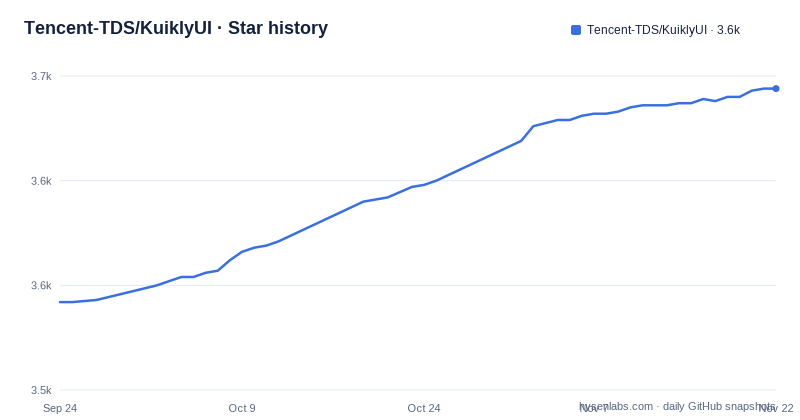
- Tencent-TDS/KuiklyUI3,644 ★ · +102
| Repository | 2026-09-24 | 2026-11-22 |
|---|---|---|
| Tencent-TDS/KuiklyUI | 3.5k | 3.6k |
102 Stars in the last 59 days, measured from the daily GitHub snapshot. Compare with other projects
Editorial analysis
Three platforms are stable and three carry Beta or Alpha labels
Kuikly is described as a cross-platform solution for UI and logic built on Kotlin Multiplatform, launched by a company-level Oteam at Tencent. The platform list is where its claim of one codebase for six platforms needs reading carefully. Android, iOS and HarmonyOS are listed without a qualifier. Web and Mini Programs are marked Beta, and macOS is marked Alpha.
The consequence is simple: a plan that depends on Web, Mini Programs or macOS is built on parts the project itself does not call finished. The README adds that Kuikly has been used by many products including QQ, QQ Music, QQ Browser, Tencent News, Sogou Input Method, WeSing and ima.copilot. That is the project's own statement of adoption, and it does not say which platforms those products use.
In practice, start with Android or iOS if you are evaluating the framework, because those are the targets with the longest build instructions and the least qualification. Treat the Beta labels as a signal to test your own screens on Web and Mini Programs before promising them to anyone.
It produces native binaries and ships a modified copy of Compose
The key features claim native performance, with platform-native binaries in the form of .aar, .framework and .so files, native UI rendering and native toolchain support. It is described as lightweight: about 300 KB for Android and about 1.2 MB for iOS in AOT mode. It supports declarative and reactive programming with a self-developed DSL and also with a Compose DSL, and it can compile into dynamic deliverables.
The Compose part has a caveat in the README. The Compose directory contains cross-platform source code based on Jetpack Compose 1.7.3, with necessary modifications and adaptations to support Kuikly's rendering, and some unneeded features commented out to ease future upgrades. This is a modified copy, not upstream Compose, so Compose features and behaviours may differ from the version you know. The Quick Start, Integration Guide and Component Features pages on the project site cover how those pieces fit together in an app.
Source sets map to the output format of each platform
The project structure puts the core capabilities, such as responsive UI, layout algorithms and bridge communication, in a core module. Inside it, commonMain holds the shared cross-platform code and defines the cross-platform interfaces. androidMain outputs an aar, jvmMain holds generic JVM code without Android APIs and outputs a jar, appleMain covers iOS and macOS and outputs a framework, and ohosArm64Main covers HarmonyOS and outputs a so file.
That layout explains why one codebase reaches several targets: platform behaviour sits behind interfaces declared in commonMain, and each platform source set implements them. If you plan to extend the framework, expect to touch both the interface and every platform implementation. The repository also includes Swift package files and a podspec for the iOS renderer.
Minimum OS versions are listed, with Kotlin 1.3.10 as the lower bound
The system requirements are iOS 12.0 or newer, macOS 10.13 or newer, Android 5.0 or newer, HarmonyOS Next 5.0.0 (API 12) or newer, and Kotlin 1.3.10 or newer. The repository carries several Gradle build files named for Kotlin versions, including 1.3.10 and 1.4.20, which is how older Kotlin versions are supported.
The Kotlin lower bound refers to the consuming project's toolchain, and the multiple build scripts hint that supporting old Kotlin versions takes extra effort. HarmonyOS demands more: the build uses a separate Gradle settings file for version 2.0 of the HarmonyOS build, and a specific Kotlin version string, 2.0.21-KBA-010. Check which Kotlin version your own app uses before choosing a Kuikly release.
Building from source needs JDK 17 even when Android Studio defaults to 21
The environment setup lists Android Studio, Xcode with CocoaPods, DevEco Studio 5.1.0 or newer with an API version of 18 or higher, and JDK 17. A specific warning concerns Android Studio 2024.2.1 or newer: its default Gradle JDK is 21, which is incompatible with the project's configuration, so you must switch the Gradle JDK to 17 in the Gradle settings.
If you skip that step, the sync fails with a toolchain error that does not mention the project. To run the Android app, open the root directory, sync, select androidApp and run. For iOS, go to the iosApp directory first and run pod install with the repo update flag:
pod install --repo-updateThen select iOSApp in Android Studio, or open the iosApp folder in Xcode and run. Xcode and CocoaPods are required for the Apple targets, and DevEco Studio is required for HarmonyOS, so a full six-platform build machine needs all three IDEs installed.
Xcode's script sandbox blocks the Kotlin build step
The iosApp and macApp projects execute a Kotlin Multiplatform script when they compile. If that script fails on reading or writing files, the cause is Xcode's script sandboxing, and the fix is to set User Script Sandboxing to No in Xcode's build settings.
The same note appears for macOS. The macOS app follows the same steps as iOS: go to the macApp directory, run pod install, sync the root project in Android Studio, then select macOSApp. Because macOS support is labelled Alpha, treat this path as an experiment. Turning off the sandbox setting is a trade of build safety for convenience on a developer machine, which is acceptable for a demo but worth remembering.
The HarmonyOS demo build pins an unusual Kotlin build and a Windows drive rule
On a Mac, you run the project's HarmonyOS build script, open ohosApp in DevEco Studio, connect a phone or start the emulator and set up signing under the project structure settings. On Windows you set two environment variables first, OHOS_SDK_HOME and TOOL_HOME, and the README notes that the install can be on any drive except C.
The manual Windows build sets two variables and calls Gradle with a dedicated settings file:
set KUIKLY_AGP_VERSION=7.4.2
set KUIKLY_KOTLIN_VERSION=2.0.21-KBA-010
gradlew.bat -c settings.2.0.ohos.gradle.kts :demo:linkSharedDebugSharedOhosArm64
The build then copies libshared.so and libshared_api.h into the ohosApp project, which the batch script does for you. The HarmonyOS target therefore uses its own Android Gradle Plugin and Kotlin versions, separate from the rest of the project.
Weekly 2.x releases, and a license that GitHub cannot identify
Recent releases are 2.30.0 on 2026-10-26, 2.29.2 on 2026-10-19 and 2.29.1 on 2026-10-14, and the last push was on 2026-11-02. That is roughly one release a week. GitHub reports the license as NOASSERTION, and a LICENSE file is present.
Because the identifier is unclear, read the LICENSE file yourself before using Kuikly in a product. The repository also contains a contributing guide and a code of conduct, and the documentation lives on a separate site with a quick start, an integration guide and a component reference. With releases this frequent, pin the exact version in your build and read the changes before moving.
Editorial conclusion
Kuikly fits teams that want one Kotlin codebase with native rendering on Android, iOS and HarmonyOS and that can follow a toolchain with several pinned versions. It is a weaker choice if you depend on the Web, Mini Programs or macOS targets, which are Beta or Alpha, or if you need a standard license identifier. Before committing, confirm your minimum OS versions against the requirements list and check the LICENSE file.
Frequently asked questions
What is Kuikly UI?
Kuikly is a Kotlin Multiplatform framework from Tencent for building UI and logic once and running it on Android, iOS and HarmonyOS, with Web, Mini Programs and macOS in Beta or Alpha.
Which JDK does Kuikly need to build from source?
JDK 17. Android Studio 2024.2.1 or newer defaults to JDK 21, which is incompatible, so switch the Gradle JDK to 17 in the Gradle settings.
What are the minimum OS versions for Kuikly?
iOS 12.0, macOS 10.13, Android 5.0 and HarmonyOS Next 5.0.0 (API 12), with Kotlin 1.3.10 or newer.
Official sources
Add this badge to your README
If you maintain this project, the badge below links readers to this analysis and shows its maintenance status from the daily GitHub snapshot. Paste the markdown into your README; add ?metric=license or ?metric=stars to the image URL for a different field.

[](https://hysenlabs.com/projects/tencent-tds-kuiklyui)Star history chart for your README
[](https://hysenlabs.com/projects/tencent-tds-kuiklyui)Was this useful?