termux/termux.github.io: Running the Termux Jekyll Site Locally
The main termux site and help pages.
At a glance
- What is it?
- termux/termux.github.io contains the Jekyll source for termux.github.io and termux.dev, including localized help pages and posts. It suits contributors who need to preview or edit the site, but it is not the Termux Android application or a general command-line emulator.
- Who is it for?
- Contributors changing Termux help pages, localized posts, categories, or site configuration should adopt this repository because it contains the source for termux.github.io and termux.dev. Documentation readers and Android application users should use the hosted site instead.
- Can I use it commercially?
- Not without permission. GitHub finds no licence file in the repository, and without a licence all rights are reserved by default: you may read the code but not reuse it. Check the README, or ask the authors, before using it.
- Is it still maintained?
- Yes. The repository last received commits 116 days ago.
- What is it written in?
- Mainly HTML, according to GitHub's language statistics.
Answers come from the project's GitHub data, last synced on November 7, 2026, and from our analysis. They are not legal advice.
Star history
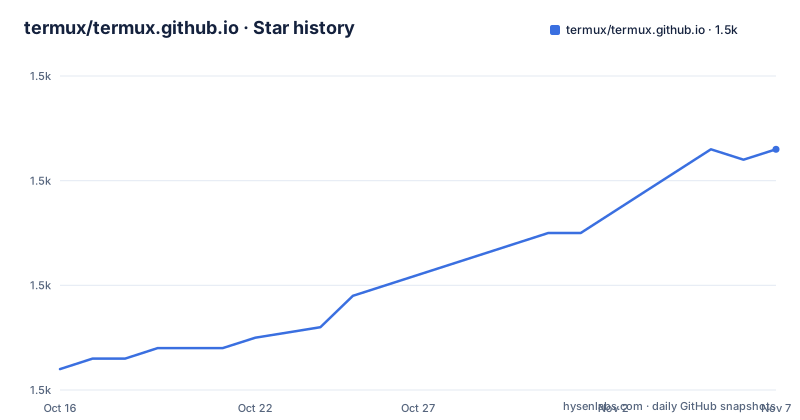
- termux/termux.github.io1,503 ★ · +21
| Repository | 2026-10-16 | 2026-11-07 |
|---|---|---|
| termux/termux.github.io | 1.5k | 1.5k |
21 Stars in the last 22 days, measured from the daily GitHub snapshot. Compare with other projects
Editorial analysis
Why termux/termux.github.io Exists
This repository is the content and site source for `termux.github.io` and the custom domain `termux.dev`. The README also states that `termux.org` redirects to `termux.dev`. Its primary audience is contributors who edit Termux documentation, help pages, translations, and posts. Someone looking for the Termux Android application should not treat this repository as application source: the README says that `termux.com`, which was previously mirrored from `termux/termux.com`, now redirects to a Google Play listing for `com.termux`.
The repository layout supports a larger documentation site rather than a single README. It contains language directories such as `en/` and `cn/`, shared Jekyll components under `_includes/` and `_layouts/`, site data under `_data/`, posts under `_posts/`, styles under `_sass/`, and assets under `assets/`. This organization makes the separation between shared templates, translated content, and post collections visible in the source tree.
The project has no GitHub releases, so there is no documented release package or versioned distribution channel in the repository metadata. Maintenance activity must be judged from the recorded repository status rather than release frequency. The repository is not archived, and its last push was on 2026-07-14.
How Jekyll Builds the Termux Site
The site uses Jekyll and has a `Gemfile` plus `Gemfile.lock` at the repository root. Git submodules are also part of the checkout, which is why the local workflow begins by initializing them. Once dependencies are available, Jekyll processes the layouts, includes, Markdown or HTML content, data files, and Sass configuration into the documentation site.
Posts do not follow one simple Jekyll directory pattern. English posts live under `_posts/en/<category_name>/`, while translations use `_posts/<language>/<category_name>/`. Front matter assigns a language-specific permalink such as `/<language>/:collection/:categories/:year/:month/:day/:title:output_ext`. The example post path `_posts/en/general/1970-01-01-post-title.md` therefore maps to `en/posts/general/1970/01/01/post-title.html`.
Categories require several connected registrations. A category page at `<language>/posts/<category_name>.html` loads content through `{% include posts/category.html %}`. `_layouts/posts/index.md` provides a translated navigation link, and `_data/posts/t/<language>/view.yml` stores the corresponding `index.<category_name>` text. `_config.yml` also assigns the category through a scoped default because posts are grouped by language beneath `_posts`, preventing Jekyll from assigning language as the category automatically.
The `page_ref` front matter value provides a language-neutral identity for a page. Every translation must use the same `page_ref`, such as `/posts/general/1970/01/01/post-title.html`, even when translated files have different language-specific names. This separates the public route for one language from the lookup key used to find alternate translations.
Running termux.dev on localhost:4000
The README points contributors to GitHub's `Using Jekyll with Pages` documentation for dependency installation. It does not provide a separate Termux-specific installation command for Ruby, Bundler, or individual gems, so those steps should be taken from that linked guide rather than inferred here.
After installing the documented dependencies, initialize the repository's submodules. This fetches the declared submodule contents rather than leaving linked repository components absent from the local checkout.
git submodule update --initStart the Jekyll development server with the repository's documented command. The `--future` option is required because the site includes posts dated in the future.
bundle exec jekyll serve --futureThe README says this starts a local server at `http://localhost:4000`. Open that address to preview the rendered site. Changes to `_config.yml` require stopping the server with `ctrl + c` and starting it again; Jekyll does not pick up all configuration changes during the running process.
For a real content check, locate or create a page below `en/` or `pages/`, then inspect its rendered route in the browser. For a post, follow the documented path under `_posts/en/<category_name>/`. The first paragraph matters because `_config.yml` enables `show_excerpts`, and the category listing uses that excerpt as the post description. If the new post belongs to a category that does not yet exist, the category registration steps must be completed first.
Adding a Termux Post Without Breaking Its Route
A post begins with language-specific front matter. The title is visible in the rendered page, while `page_ref` provides the common identifier used across translations. The README permits optional `last_modified_at` and `author` keys, but does not describe a separate publication-state mechanism.
---
title: "Post Title"
page_ref: /posts/<category_name>/YYYY/MM/DD/<post_basename>.html
---

Post Content
Place the English source at `_posts/en/<category_name>/YYYY-MM-DD-POST_TITLE.md`. Put assets either below `assets/posts/globals/<category_name>/YYYY-MM-DD-POST_TITLE` when they are shared, or below `assets/posts/<language>/<category_name>/YYYY-MM-DD-POST_TITLE` when they belong to one language. The README uses this asset-link form:
Translations belong at `_posts/<language>/<category_name>/YYYY-MM-DD-POST_TITLE.md`. Their filenames may be language-specific, but their `page_ref` values must remain identical to the English post. This is an explicit editorial invariant rather than a convention that Jekyll can infer.
The first paragraph should be a short description because `posts/category.html` uses excerpts for category listings. Long or non-descriptive opening paragraphs can therefore make the listing less useful even when the full article is correct. The repository does not document an automated validation command for this requirement, translation matching, category registration, or asset existence.
Configuration Trade-offs in termux.github.io
The site's language-first post structure introduces deliberate complexity. `_config.yml` must define a scoped `category` default and another scoped route that assigns `lang` and a language-aware `permalink`. Without the category default, the README warns that Jekyll will not place the post into the `site.categories` collection used by `category.html`. Without the language route, the required `page.lang` value and translated URL structure are also absent.
This design avoids using `<category_name>/_posts/`, which would let Jekyll infer the category from the directory name. The chosen `_posts/<language>` layout preserves language as the outer grouping and keeps it out of the post URL. The cost is that adding a category requires coordinated changes to a page, a layout link, translation data, and two configuration scopes. A partial change can produce a page that exists in source but does not appear in the intended category listing.
There is another editorial boundary. The repository documentation does not describe a preview deployment, content acceptance workflow, rollback procedure, or automated link checker. It also does not identify the license, so reuse or redistribution conditions cannot be established from the available repository metadata. Contributors should resolve those questions before treating site content as reusable outside its publishing context.
Jekyll Pages Compared with a Static HTML Handout
Jekyll is the relevant alternative to editing a standalone HTML handout for this repository, not a separate competitor. A single HTML file could publish one isolated page with fewer configuration rules, but it would not reproduce the repository's layouts, translation lookup, category aggregation, generated post routes, shared assets, and sitemap-oriented content structure. Adding those features manually would move work from Jekyll and the documented configuration into custom page logic.
The trade-off is that Jekyll introduces a local toolchain and a generated-site model. Contributors need `Gemfile` dependencies, initialized submodules, and knowledge of front matter scopes, Liquid includes, translation data, and permalink variables. A plain static page avoids those dependencies for a one-off document, but it would not be a meaningful contribution to the architecture used by `termux.github.io` and `termux.dev`.
Jekyll is therefore the appropriate mechanism for changes that belong to this shared site. It is the wrong choice for editing the behavior of the Android `com.termux` application, whose source is not identified in this repository. This site repository can change documentation and published pages; it does not, based on the documented layout, modify the installed Android package.
Editorial conclusion
Contributors changing Termux help pages, localized posts, categories, or site configuration should adopt this repository because it contains the source for termux.github.io and termux.dev. Documentation readers and Android application users should use the hosted site instead. Before submitting changes, verify that `git submodule update --init`, `bundle exec jekyll serve --future`, and a restart after editing `_config.yml` produce the expected local site at `http://localhost:4000`, while also checking the repository's missing license declaration with the maintainers.
Frequently asked questions
How do I run the termux/termux.github.io site locally?
Initialize the Git submodules, install dependencies using GitHub's linked `Using Jekyll with Pages` instructions, and run `bundle exec jekyll serve --future`. The site is then available at `http://localhost:4000`.
Why does the local Termux site command require `--future`?
The README states that `--future` is needed to display posts whose dates are in the future.
What must I do after changing `_config.yml` in termux/termux.github.io?
Stop the Jekyll server with `ctrl + c` and start it again. The README says this is required for configuration changes to take effect.
Official sources
Add this badge to your README
If you maintain this project, the badge below links readers to this analysis and shows its maintenance status from the daily GitHub snapshot. Paste the markdown into your README; add ?metric=license or ?metric=stars to the image URL for a different field.

[](https://hysenlabs.com/projects/termux-termux-github-io)Star history chart for your README
[](https://hysenlabs.com/projects/termux-termux-github-io)Was this useful?