TFLint is a plugin host, and the Terraform rules arrive separately
A Pluggable Terraform Linter
At a glance
- What is it?
- TFLint ships a single binary with almost no rules of its own: the Terraform language ruleset is bundled, while provider rules for AWS, Azure, and Google Cloud live in separate plugin repositories that have to be installed before a run. What the core binary contributes is the host, the config format, and the output formats.
- Who is it for?
- Adopt TFLint when you want Terraform checked in CI without writing custom rules, and budget for the separate provider ruleset installs, because the AWS, Azure, and Google plugins are not part of the binary. Do not adopt it expecting it to validate infrastructure state or replace terraform validate; it inspects source files under the working directory.
- Can I use it commercially?
- Yes, with conditions. MPL-2.0 is a weak copyleft licence: you can use it inside commercial and closed-source software, but if you distribute changes to its own files, you must publish those changes under the same licence.
- Is it still maintained?
- Yes. The repository last received commits 5 days ago.
- What is it written in?
- Mainly Go, according to GitHub's language statistics.
Answers come from the project's GitHub data, last synced on November 13, 2026, and from our analysis. They are not legal advice.
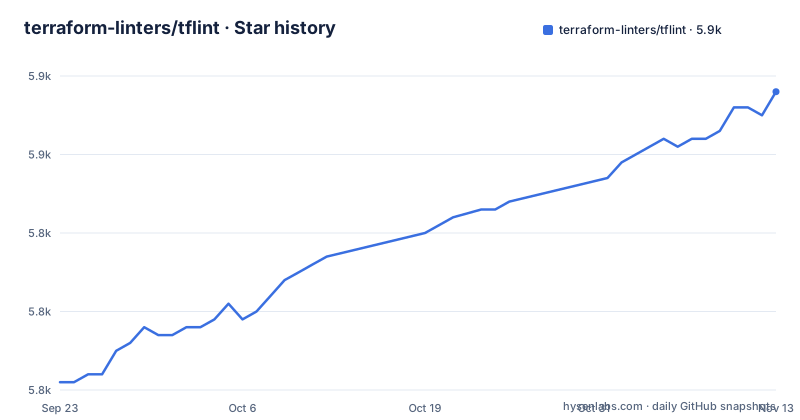
Star history
- terraform-linters/tflint5,858 ★ · +37
| Repository | 2026-09-23 | 2026-11-13 |
|---|---|---|
| terraform-linters/tflint | 5.8k | 5.9k |
37 Stars in the last 51 days, measured from the daily GitHub snapshot. Compare with other projects
Editorial analysis
The binary is a host; the rules are plugin repositories
TFLint's own framing is that it is a framework and each feature is provided by plugins. What the core project ships is the machinery: a CLI, a config file reader, a plugin loader, and output writers. The rules that produce findings mostly do not live here.
There is one exception. The TFLint Ruleset for Terraform Language is bundled with the binary, so the checks for deprecated syntax and unused declarations work without a separate install. Everything provider-specific sits outside: rulesets for Amazon Web Services, Microsoft Azure, and Google Cloud each have their own repository and their own version line. The dependency list in go.mod shows the shape of the host, including the plugin SDK at v0.25.0 and the bundled ruleset at v0.15.0, along with gRPC and a language server implementation.
That division has a direct effect on what a fresh install can tell you. On a repository of AWS modules with no config file, the binary starts with the bundled Terraform ruleset and the recommended preset, and knows nothing about instance types or naming conventions for that cloud until the AWS plugin is enabled and installed.
Four install paths, and only the archive path verifies anything
The documented install starts from the latest release archive, and the sequence shows the intended trust model:
curl -sSLO https://github.com/terraform-linters/tflint/releases/latest/download/tflint_linux_amd64.zip
curl -sSLO https://github.com/terraform-linters/tflint/releases/latest/download/checksums.txt
gh attestation verify checksums.txt -R terraform-linters/tflint
sha256sum --ignore-missing -c checksums.txt
unzip tflint_linux_amd64.zip
sudo install -c -v tflint /usr/local/bin/
The checksum file is fetched from the same release, so it is the attestation step that ties the two together. The project marks GitHub CLI verification as the recommended route and marks Cosign as deprecated. The other three paths are single commands:
brew install --cask terraform-linters/tap/tflint
winget install -e --id TerraformLinters.tflint
go install github.com/terraform-linters/tflint@latest
The Go path builds from source, which means the Go version in its go.mod, currently 1.26.10, is the floor for anyone installing that way. The Dockerfile pins a different pair again, building on golang:1.27.2-alpine3.23 and shipping from alpine:3.24.3.
The bundled plugin starts on the recommended preset and can be switched off
The configuration file is `.tflint.hcl`, and the plugin block is the only thing most projects need to write:
plugin "terraform" {
  enabled = true
  preset  = "recommended"
}
The bundled plugin enables the recommended preset by default, which means the language rules run even before anyone edits the file. You can disable the plugin or select a different preset, and the same block shape is what provider plugins use:
plugin "foo" {
  enabled = true
  version = "0.1.0"
  source  = "github.com/org/tflint-ruleset-foo"
}
Two details in that block matter. `version` pins the plugin, so a run is reproducible only if you keep it pinned, and `source` is a repository path rather than a registry entry. Plugins published by other organizations are discovered through the `tflint-ruleset` topic on GitHub, which is worth knowing before you look for a plugin that does not exist: the naming convention is the discovery mechanism.
One more path exists for rules nobody has written. Custom policy can be written in Rego and run through the OPA ruleset, which avoids building a Go plugin from scratch.
Plugins need an init step, which changes how a container run works
Declaring a plugin in the config file is not enough. The plugin has to be installed on the machine, and the command for that is `tflint --init`. This is the single biggest operational difference between TFLint and a linter with no plugins: a clean container has no provider rules until init has run.
The Docker image sets `/data` as its working directory and `tflint` as its entrypoint, so the normal invocation mounts the current directory:
docker run --rm -v $(pwd):/data -t ghcr.io/terraform-linters/tflintThat command runs the linter and throws the plugin cache away with the container. The documented workaround is to override the entrypoint to a shell and chain the two commands, so init and lint happen in the same run:
docker run --rm -v $(pwd):/data -t --entrypoint /bin/sh ghcr.io/terraform-linters/tflint -c "tflint --init && tflint"For GitHub Actions there is a separate action, setup-tflint, which handles the binary install so a workflow does not have to. Where you get the binary is therefore three decisions, not one: the host, the plugin set, and the cache.
Six output formats decide what your CI reporter can read
The flag list from `tflint --help` is short enough to read in full, and it tells you what the host is actually responsible for:
Usage:
  tflint --chdir=DIR/--recursive [OPTIONS]

Application Options:
  -v, --version                                                 Print TFLint version
      --init                                                    Install plugins
      --langserver                                              Start language server
  -f, --format=[default|json|checkstyle|junit|compact|sarif]    Output format
  -c, --config=FILE                                             Config file name (default: .tflint.hcl)
      --ignore-module=SOURCE                                    Ignore modu
The format list covers three audiences. `json` and `compact` suit a tool parsing results programmatically, `checkstyle` and `junit` suit report viewers that already read those schemas, and `sarif` suits code scanning services. If your pipeline renders findings in a pull request comment, that choice is the integration point, and picking it wrong means writing a converter.
The default behaviour is to inspect files under the current directory, with `--chdir` to move the root and `--recursive` to descend. `--ignore-module` takes a module source, so a team that vendors shared modules can silence findings from code they do not own. The `--langserver` flag starts a language server mode instead of a one-shot run, which is the entry point for editor integration rather than for CI.
Release binaries are covered by MPL 2.0 and BUSL 1.1 together
The license needs two sentences to state correctly. Most of the project is under MPL 2.0, but some files in the `terraform` package are under BUSL 1.1, and the executable forms, meaning the release binaries, are bound by both licenses. The repository keeps two license files side by side, LICENSE and LICENSE-BUSL, which is the practical confirmation that the split is real rather than a note in a readme.
Why this matters for adoption: a BUSL 1.1 grant has use restrictions that MPL 2.0 does not, and the compiled binary carries them. That is a question for whoever handles licensing in your organisation, not something to resolve from a paragraph in a readme, and the project's own note points to a discussion on the Hashicorp forum for the reasons behind this kind of change.
On the release side, the newest tags are v0.65.0 from 2026-10-22, then v0.64.0 from 2026-07-17 and v0.63.1 from 2026-06-03. The repository is versioned below 1.0, so treat the tag as an API surface that can still move. The last push landed on 2026-11-02, and the project publishes a changelog in the repository rather than only release notes.
Debugging is one environment variable, and there is no test runner
When a rule fires or does not fire and you cannot see why, the documented switch is the `TFLINT_LOG` variable:
$ TFLINT_LOG=debug tflintThat is the debugging switch the README documents; for the full set of options it points to the User Guide. If a finding comes from a plugin you did not write, the path to understanding it is that plugin's own documentation.
The repository layout explains where the host and the plugins actually meet. `cmd/` holds the CLI entry point, `plugin/` holds the plugin protocol side including a stub generator, `tflint/` holds the runner, `langserver/` holds editor mode, `formatter/` holds output writing, `versioncheck/` handles update checks, and `terraform/` is the part with the BUSL 1.1 files. The Makefile shows the build and test story: `make test` runs the Go tests excluding fixtures, stub generator, and integration tests, while `make e2e` and `make e2e-race` run the integration suite, the latter with the race detector. Contributors also need `make prepare`, which initialises submodules and regenerates stubs.
Editorial conclusion
Adopt TFLint when you want Terraform checked in CI without writing custom rules, and budget for the separate provider ruleset installs, because the AWS, Azure, and Google plugins are not part of the binary. Do not adopt it expecting it to validate infrastructure state or replace terraform validate; it inspects source files under the working directory. Before wiring it into a pipeline, confirm which provider ruleset your modules need, check the MPL 2.0 and BUSL 1.1 split that covers the release binaries, and decide which output format your reporter can parse.
Frequently asked questions
What is TFLint?
It is a pluggable Terraform linter, described as a framework where each feature is provided by plugins. It finds possible errors for major cloud providers, warns about deprecated syntax and unused declarations, and enforces naming conventions and best practices.
How do I install TFLint on Linux?
Download the archive and the checksums file from the latest release, verify the checksums with the GitHub CLI, then unzip and install the binary with `sudo install -c -v tflint /usr/local/bin/`. Homebrew, WinGet, and `go install github.com/terraform-linters/tflint@latest` are the other documented paths.
How do I install TFLint on Windows?
Use WinGet with `winget install -e --id TerraformLinters.tflint`. On GitHub Actions the project points at a separate setup-tflint action instead of installing the binary by hand.
What does TFLint do when it runs on a Terraform directory?
It inspects files under the current directory by default, which you can change with `--chdir` and `--recursive`. Each enabled plugin contributes rules, and results are written in one of six formats including json, checkstyle, junit, and sarif.
How do I use TFLint with Terraform in a project?
The bundled Terraform language ruleset runs on its recommended preset with no configuration, and you declare plugins in `.tflint.hcl` with `enabled`, `version`, and `source`. Then run `tflint --init` to install the declared plugins before the first lint.
Does TFLint work with an editor such as VS Code?
The binary has a `--langserver` flag that starts a language server instead of a one-shot run, which is the mode an editor integration would use. The project documentation does not describe a specific editor extension.
Official sources
Add this badge to your README
If you maintain this project, the badge below links readers to this analysis and shows its maintenance status from the daily GitHub snapshot. Paste the markdown into your README; add ?metric=license or ?metric=stars to the image URL for a different field.

[](https://hysenlabs.com/projects/terraform-linters-tflint)Star history chart for your README
[](https://hysenlabs.com/projects/terraform-linters-tflint)Was this useful?