eslint-plugin-testing-library turns Testing Library's advice into lint errors, one framework preset at a time
ESLint plugin to follow best practices and anticipate common mistakes when writing tests with Testing Library
At a glance
- What is it?
- An ESLint plugin that catches the common mistakes in Testing Library tests, such as querying with sync methods or importing the DOM directly, with separate recommended configurations for React, Angular, Vue, DOM, Svelte and Marko. It is a rules engine for a style guide, which makes the shape of the rules the thing worth understanding.
- Who is it for?
- Adopt eslint-plugin-testing-library if your team writes Testing Library tests and you want the common mistakes caught in review rather than in a failed test, and you are willing to tune the rule set because the recommended presets are opinionated. Do not adopt it expecting it to judge test quality, because it checks patterns and not behaviour.
- Can I use it commercially?
- Yes. MIT is a permissive licence: you can use, modify and sell software built on it, as long as you keep its copyright and licence notices.
- Is it still maintained?
- Yes. The repository last received commits 8 days ago.
- What is it written in?
- Mainly TypeScript, according to GitHub's language statistics.
Answers come from the project's GitHub data, last synced on November 7, 2026, and from our analysis. They are not legal advice.
Star history
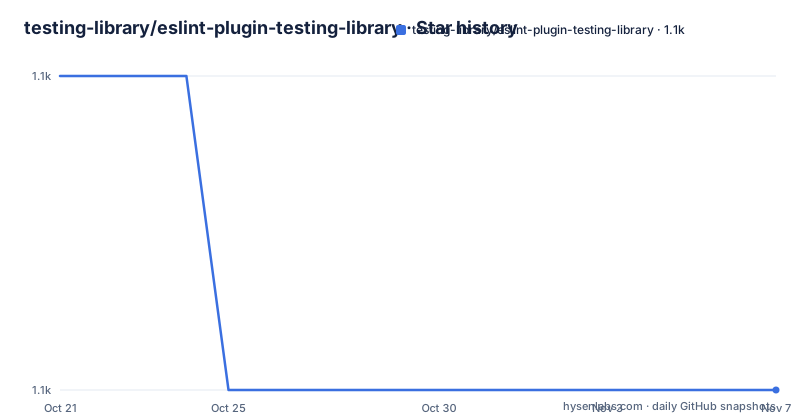
- testing-library/eslint-plugin-testing-library1,064 ★ · -1
| Repository | 2026-10-21 | 2026-11-07 |
|---|---|---|
| testing-library/eslint-plugin-testing-library | 1.1k | 1.1k |
-1 Stars in the last 17 days, measured from the daily GitHub snapshot. Compare with other projects
Editorial analysis
A lint plugin for a style guide, not a test runner
eslint-plugin-testing-library is an ESLint plugin to follow best practices and anticipate common mistakes when writing tests with Testing Library, and it is published by the Testing Library organisation itself.
The value of it is narrow and real. Testing Library's guidance is well known, and the guidance that is easiest to get wrong is the mechanical part: use the async queries rather than the sync ones, do not import the DOM directly, do not use the debugging utilities in committed code, do not query by test id. Those are all things a linter can check reliably and a code review will often miss, and a linter catches them on every save rather than at review time.
The rules visible in the README's example configuration are the shape of the thing. `testing-library/await-async-queries` is an error, `testing-library/no-await-sync-queries` is an error, `testing-library/no-debugging-utils` is a warning, and `testing-library/no-dom-import` is off.
That last one being off in the example is deliberate, because the rule only makes sense for the frameworks where a DOM import is a mistake in the first place. A rule that is always right is rare, and a plugin that lets you turn rules off is more honest than one that pretends otherwise.
The prerequisites are Node.js at `^18.18.0`, `^20.9.0` or `>=21.1.0`. The licence is MIT, the author is Mario Beltrán, and the recent releases are v7.16.2 from 2026-03-24, v7.16.1 from 2026-03-19 and v7.16.0 from 2026-02-17, with the last push to the repository on 2026-10-15.
Running it only against test files takes two different approaches
With the default setup the plugin runs against your whole codebase, which is usually what you do not want, because the rules are about test code and applying them to source files produces noise.
The first approach is ESLint `overrides`, which restrict the config by file pattern. Assuming the same pattern for your test files as Jest uses by default, the configuration runs the plugin only against your tests.
// .eslintrc.js
module.exports = {
	// 1) Here we have our usual config which applies to the whole project, so we don't put testing-library preset here.
	extends: ['airbnb', 'plugin:prettier/recommended'],

	// 2) We load other plugins than eslint-plugin-testing-library globally if we want to.
	plugins: ['react-hooks'],

	overrides: [
		{
			// 3) Now we enable eslint-plugin-testing-library rules or preset only for matching testing files!
			files: ['**/__tests__/**/*.[jt]s?(x)', '**/?(*.)+(spec|test).[jt]s?(x)'],
			extends: ['plugin:testing-library/react'],
		},
	],
};
The second approach is ESLint Cascading and Hierarchy, which is useful if all your tests are placed under the same folder. You place another `.eslintrc` there and enable the plugin for the files under that folder, rather than enabling it on the global config.
Both approaches are worth knowing because they solve the problem differently. The overrides approach is per pattern and works when your tests are spread around the tree, which is the common case. The cascading approach is per directory and is less noisy when your tests are already organised by folder.
The point of both is the same, and it is worth stating: the rules should apply where the tests are and nowhere else. A linter that fires on every source file is a linter people disable.
One preset per framework, and they do not combine
The plugin exports several recommended configurations, each enforcing good practices for a particular Testing Library package, and there is an important restriction on how you use them.
Since each configuration is aimed at a particular Testing Library package, they are not extendable between them, so you should use only one of them at once per `.eslintrc` file. The README shows the wrong way and the right way.
// ❌ Don't do this
module.exports = {
	extends: ['plugin:testing-library/dom', 'plugin:testing-library/react'],
};// ✅ Just do this instead
module.exports = {
extends: ['plugin:testing-library/react'],
};The reason is obvious once you know what the packages are. DOM Testing Library, React Testing Library, Angular Testing Library and the Vue and Svelte and Marko variants are different libraries with different query sets, so their rule sets overlap and conflict. A DOM rule that says use a container query and a React rule that says use the render result are not two halves of one policy, they are two policies.
The frameworks covered, judging from the topics list and the section structure, are React, Angular, DOM, Vue, Svelte and Marko, and the README has a section per framework with the same pattern in each.
module.exports = {
	extends: ['plugin:testing-library/dom'],
};
And for the flat config format, the same preset is reached through a different key.
const testingLibrary = require('eslint-plugin-testing-library');

module.exports = [
	{
		files: [
			/* glob matching your test files */
		],
		...testingLibrary.configs['flat/dom'],
	},
];
The note about the flat config versions says they are available prefixed with `flat/`, though most of the plugin documentation still currently uses the `.eslintrc` syntax, and it points at the ESLint documentation on the new configuration file format.
The documentation is generated, and the build validates its own output
The package scripts show a project that treats its documentation as a build artefact rather than as prose, and that is unusual enough to be worth describing.
There is a `generate:configs` script that runs a `tools/generate-configs` module, and a `generate:docs` script that builds the package and then runs `eslint-doc-generator`. The docs for each rule are therefore produced from the rule metadata, which is why the README can promise that the Supported Rules section has a Configurations column telling you which preset enables each rule.
Then there is the validation side, which is the part that makes the generation safe.
"validate-gen:configs": "pnpm run generate:configs && git diff --exit-code src/configs",
"validate-gen:docs": "pnpm run build && pnpm run eslint-doc-generator --check"
The config validation regenerates the configs and then fails if the working tree changed, which catches a case where someone edited a generated file by hand. The docs validation builds and runs the generator in check mode.
There is also a `bundle-check` script that builds the package and runs `publint`, which is the tool that verifies the published package's exports and entry points are correct. That is the check that catches a broken `exports` map, and it is exactly the kind of thing that breaks a plugin for every consumer at once.
The rest of the scripts are conventional. The lint is `eslint --max-warnings 0 .`, so a warning fails the lint, and the format is prettier with a cache. The build itself is `tsdown --format esm --format cjs`, which produces the dual output the package exports, and the package metadata confirms the shape with `main` at `./dist/index.cjs`, `module` at `./dist/index.mjs` and types at `./dist/index.d.cts`, with an exports map offering both `import` and `require` conditions.
The repository root carries the usual set of files for a project of this kind, with `eslint-remote-tester.config.ts` for testing the plugin against remote ESLint versions, `lint-staged.config.js`, `commitlint.config.js`, `release.config.js` for semantic-release, and a `vitest.config.ts` with a `vitest.setup.ts` for the plugin's own tests.
Editorial conclusion
Adopt eslint-plugin-testing-library if your team writes Testing Library tests and you want the common mistakes caught in review rather than in a failed test, and you are willing to tune the rule set because the recommended presets are opinionated. Do not adopt it expecting it to judge test quality, because it checks patterns and not behaviour. Verify first that your ESLint version and configuration format match what the plugin supports, since the documentation still mostly uses the .eslintrc syntax while the flat config versions are prefixed with flat/, and that the framework preset you pick matches the Testing Library package you actually use.
Frequently asked questions
What does eslint-plugin-testing-library actually check?
It is an ESLint plugin to follow best practices and anticipate common mistakes when writing tests with Testing Library. The rules visible in the README example include await-async-queries, no-await-sync-queries, no-debugging-utils and no-dom-import, and each can be set to error, warn or off.
How do I run the plugin only against my test files?
Either use ESLint overrides with the Jest default test pattern so the plugin only applies to matching files, or place a separate .eslintrc in the folder holding your tests and enable the plugin there through ESLint cascading and hierarchy.
Can I extend two Testing Library presets at once?
No. The README says each configuration is aimed at a particular Testing Library package and they are not extendable between them, so you should use only one per .eslintrc file rather than combining the DOM and React presets.
How do I use the plugin with a flat eslint.config.js?
The flat config compatible versions are available prefixed with flat/, so you spread testingLibrary.configs['flat/dom'] or the equivalent for your framework into an entry whose files glob matches your test files.
What Node.js version does eslint-plugin-testing-library require?
The prerequisites state Node.js at ^18.18.0, ^20.9.0, or >=21.1.0. The licence is MIT and the recent releases include v7.16.2 from 2026-03-24.
Official sources
Add this badge to your README
If you maintain this project, the badge below links readers to this analysis and shows its maintenance status from the daily GitHub snapshot. Paste the markdown into your README; add ?metric=license or ?metric=stars to the image URL for a different field.

[](https://hysenlabs.com/projects/testing-library-eslint-plugin-testing-library)Star history chart for your README
[](https://hysenlabs.com/projects/testing-library-eslint-plugin-testing-library)Was this useful?