jest-dom ships four entry points, and each runner needs the right one
:owl: Custom jest matchers to test the state of the DOM
At a glance
- What is it?
- A set of custom Jest matchers for asserting DOM state, installed as a devDependency and imported once in a setup file. The same package has to be imported differently for Vitest, for @jest/globals with injectGlobals off, and for any other runner that speaks the expect interface, and Node 22 is the floor.
- Who is it for?
- Use jest-dom when your team writes Jest or Vitest tests that assert on rendered DOM and you want readable assertions instead of attribute and class checks. Verify the entry point matches your runner before you write matchers into tests, and check that your CI images run Node 22 or newer.
- Can I use it commercially?
- Yes. MIT is a permissive licence: you can use, modify and sell software built on it, as long as you keep its copyright and licence notices.
- Is it still maintained?
- Yes. The repository last received commits 96 days ago.
- What is it written in?
- Mainly JavaScript, according to GitHub's language statistics.
Answers come from the project's GitHub data, last synced on November 13, 2026, and from our analysis. They are not legal advice.
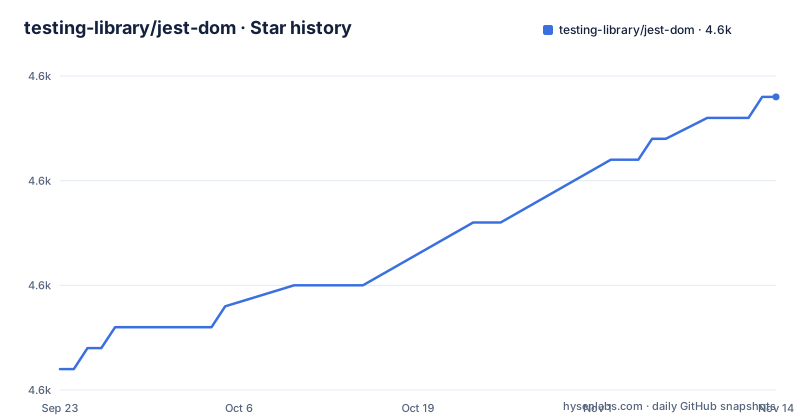
Star history
- testing-library/jest-dom4,609 ★ · +13
| Repository | 2026-09-23 | 2026-11-13 |
|---|---|---|
| testing-library/jest-dom | 4.6k | 4.6k |
13 Stars in the last 51 days, measured from the daily GitHub snapshot. Compare with other projects
Editorial analysis
Install as a devDependency, then choose your entry point
Installation is the familiar two lines:
npm install --save-dev @testing-library/jest-domyarn add --dev @testing-library/jest-domThe import is where it gets interesting. The package publishes four subpaths in its export map, and each one is a different entry for a different setup. The bare import is for ordinary Jest:
// In your own jest-setup.js (or any other name)
import '@testing-library/jest-dom'

// In jest.config.js add (if you haven't already)
setupFilesAfterEnv: ['<rootDir>/jest-setup.js']
The others exist because Jest and Vitest expose expect differently. If you use @jest/globals with injectGlobals set to false, the documented import changes to '@testing-library/jest-dom/jest-globals'. If you use Vitest, it changes to '@testing-library/jest-dom/vitest'. There is also '@testing-library/jest-dom/matchers' for hand wiring.
Vitest puts the setup file in a different array
Vitest support works, but it is not a drop-in because the config key is different. The module itself needs no changes; the import path and the config property both change:
// In your own vitest-setup.js (or any other name)
import '@testing-library/jest-dom/vitest'

// In vitest.config.js add (if you haven't already)
setupFiles: ['./vitest-setup.js']
Notice this is setupFiles rather than setupFilesAfterEnv.
TypeScript setups have a second step, because the setup file has to be in the compiler's include list and the global types have to be declared. Depending on your local setup you may need:
  // In tsconfig.json
  "compilerOptions": {
    ...
    "types": ["vitest/globals", "@testing-library/jest-dom"]
  },
  "include": [
    ...
    "./vitest-setup.ts"
  ],
A JavaScript setup file hides the types from TypeScript
If your project is TypeScript, the setup file has to be a .ts file rather than a .js file, because that is how the type declarations get pulled in. The README is explicit about it: make sure your setup file is a .ts and not a .js to include the necessary types.
Then the same file has to be listed in your tsconfig.json, or the compiler will not read it even though Jest runs it:
  // In tsconfig.json
  "include": [
    ...
    "./jest-setup.ts"
  ],
The consequence is a two step check after installation that has nothing to do with matchers. Run the suite to confirm the runtime side, then run the type checker to confirm the declaration side, because those two failures arrive separately and only one of them mentions jest-dom at all. An editor will show the same matcher as a type error even in a passing test file, and the fix is the file extension plus the include entry, not anything in your assertions.
Worth pairing with the runtime step above: the entry point has to be right for both.
Any runner with a Jest style expect can adopt the matchers by hand
The package is not tied to Jest as a runner. If you use a different test runner that is compatible with Jest's expect interface, the documented route is to import the matchers object and extend expect yourself:
import * as matchers from '@testing-library/jest-dom/matchers'
import {expect} from 'my-test-runner/expect'
expect.extend(matchers)
That is the whole integration contract: a matchers export and an expect with an extend method. It also means the setup file arrangement is yours to build for such a runner, since there is no config key to point at. If your runner calls its global something else, or loads setup files through a mechanism the four documented entry points do not know about, this manual path is the documented escape route rather than an undocumented hack.
One more property makes the library less coupled than it looks. It works with any library or framework that returns DOM elements from queries. The matcher examples are written with @testing-library style queries such as getByTestId, queryByTestId and getByText, but that is the example vocabulary, not a requirement of the matchers themselves.
The matcher list runs from visibility to validity to accessibility
The catalog is wide enough that planning a migration means choosing which groups you adopt first. Visibility and presence start with toBeDisabled, toBeEnabled, toBeVisible, toBeEmptyDOMElement and toBeInTheDocument. Form validity has toBeInvalid, toBeValid, toBeRequired, toHaveValue, toHaveDisplayValue, toHaveFormValues, toHaveErrorMessage, toHaveAccessibleErrorMessage and toHaveSelection. Content and attributes cover toHaveTextContent, toHaveAttribute, toHaveClass, toHaveStyle, toContainElement and toContainHTML.
The accessibility and interaction group covers toHaveRole, toHaveAccessibleName, toHaveAccessibleDescription, toHaveFocus, toBeChecked, toBePartiallyChecked, toBePressed and toBePartiallyPressed. Document order has toAppearBefore and toAppearAfter, and there is a paired form for queries that match several elements, toContainAnyBy* and toContainOneBy*.
The stated purpose of all of this is to remove the repetitive patterns of checking attributes, text content and CSS classes by hand. Worth noting the emphasis on from the user's perspective in toBeDisabled: the matcher checks whether an element is disabled from the user's perspective, following what the specification says about which elements can be disabled.
Three matcher names are documented and deprecated at the same time
The documentation keeps a Deprecated matchers section alongside the current list, and it contains three entries: toBeEmpty, toBeInTheDOM and toHaveDescription. All three are names people meet in older tutorials and older suites, so seeing them in the docs is not an endorsement, it is a migration path.
That matters when you are auditing a suite rather than writing one. A codebase can pass today with toBeInTheDOM and still be carrying an API the project has marked deprecated, and nothing in the test run will tell you. Search your tests for those three names rather than waiting for a future release to remove them.
The package also declares engines of node >=22 with npm >=6 and yarn >=1.
The repository version string is a placeholder and the floor is Node 22
Two facts about the build are worth reading from the manifest rather than from the badges. First, the version field in package.json is 0.0.0-semantically-released, a placeholder that the release process replaces, so the numbers you care about live in the tags: v7.0.1 on 2026-08-09, v7.0.0 on 2026-07-20 and v6.10.0 on the same day as 7.0.0. Second, engines requires Node 22 or newer, with npm 6 and yarn 1 as the floors for the package managers.
The Node 22 requirement is the one that produces work. An existing CI image on Node 18 or 20 is below that engines floor. Plan that before upgrading the major version, not after.
Around those, the layout is conventional for the project: sources in src/, tests in tests/, type tests in types/, a rollup.config.js driving the build, and thin shim files at the repository root for jest-globals, matchers and vitest that sit alongside the compiled output in dist/. The type tests are run as four separate configurations, jest, jest-globals, vitest and bun. Husky hooks and prettier configuration sit at the root as well.
Editorial conclusion
Use jest-dom when your team writes Jest or Vitest tests that assert on rendered DOM and you want readable assertions instead of attribute and class checks. Verify the entry point matches your runner before you write matchers into tests, and check that your CI images run Node 22 or newer. If your tests still call toBeEmpty, toBeInTheDOM or toHaveDescription, migrate those off the deprecated names while you are in the file.
Frequently asked questions
what is jest dom
It is a set of custom Jest matchers for asserting the state of the DOM, published as @testing-library/jest-dom and installed as a devDependency. Matchers such as toBeInTheDocument, toHaveTextContent and toHaveAttribute replace repetitive attribute, class and text checks with declarative assertions.
how to install testing library jest dom
Run npm install --save-dev @testing-library/jest-dom, or yarn add --dev @testing-library/jest-dom for yarn. Then import '@testing-library/jest-dom' once in a setup file and register that file with setupFilesAfterEnv: ['<rootDir>/jest-setup.js'] in jest.config.js. The project also recommends its eslint plugin for auto-fixable rules against false positive tests.
jest dom and vitest
It works with Vitest, but with a different import and a different config key. Use import '@testing-library/jest-dom/vitest' in a setup file and add it through the setupFiles property rather than setupFilesAfterEnv. TypeScript setups may also need @testing-library/jest-dom listed in the types array and the setup file added to tsconfig.json.
what is testing library jest dom
It is the matcher extension package @testing-library/jest-dom, not a test runner, and it works with any library or framework that returns DOM elements from queries. Its matcher examples are written with getByTestId and getByText style queries, but the matchers themselves are not bound to those query helpers.
Official sources
Add this badge to your README
If you maintain this project, the badge below links readers to this analysis and shows its maintenance status from the daily GitHub snapshot. Paste the markdown into your README; add ?metric=license or ?metric=stars to the image URL for a different field.

[](https://hysenlabs.com/projects/testing-library-jest-dom)Star history chart for your README
[](https://hysenlabs.com/projects/testing-library-jest-dom)Was this useful?