TeXstudio's page prints no build command and sends dev builds to a CI workflow
TeXstudio is a fully featured LaTeX editor. Our goal is to make writing LaTeX documents as easy and comfortable as possible.
At a glance
- What is it?
- TeXstudio is a GPL-3.0 LaTeX editor in C++ with an integrated PDF viewer, inline preview, citation completion and spellchecking. Everything about how to obtain or build it lives outside the page: a website anchor, a releases list, a CI workflow, a wiki and a manual on a separate site.
- Who is it for?
- TeXstudio suits someone who wants a native desktop LaTeX editor with the viewer built in, and the decision is cheap because the code is GPL-3.0 and the binaries come from the website or the releases list. It does not suit anyone who needs the build to be reproducible from what is written down, because the page contains no command and the source tree's build script is undocumented there.
- Can I use it commercially?
- Yes, with conditions. GPL-3.0 is a copyleft licence: if you distribute software that includes it, you must release that software's source code under the same licence. Running it internally without distributing it does not trigger that obligation.
- Is it still maintained?
- Yes. The repository received new commits within the last day.
- What is it written in?
- Mainly C++, according to GitHub's language statistics.
Answers come from the project's GitHub data, last synced on November 15, 2026, and from our analysis. They are not legal advice.
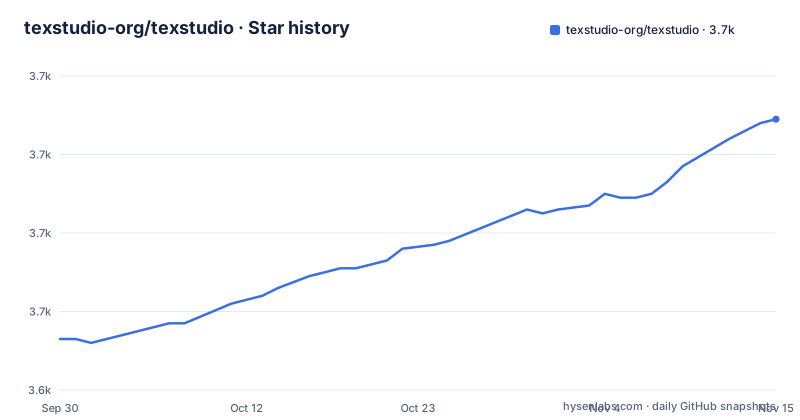
Star history
- texstudio-org/texstudio3,709 ★ · +56
| Repository | 2026-09-30 | 2026-11-15 |
|---|---|---|
| texstudio-org/texstudio | 3.7k | 3.7k |
56 Stars in the last 46 days, measured from the daily GitHub snapshot. Compare with other projects
Editorial analysis
The page prints no build command and points dev builds at a CI workflow
There is not one command in the whole page. Installation is a link to the website download anchor, binaries come from the releases list, and the Dev Builds entry points at a GitHub Actions workflow, /actions/workflows/cd.yml, which is where unreleased builds are produced. That is an unusual thing to offer a user as a download route: the artifact comes out of a continuous delivery pipeline rather than a tagged release.
The tree contradicts the absence of instructions rather than filling it. BUILD.sh, INSTALL, CMakeLists.txt, a cmake/ directory and a debian/ directory are all at the root, so a source build is possible and a Debian package is built from the same checkout. The page simply does not say how. One inconsistency worth noting: the repository's homepage field is http://www.texstudio.org/, with the scheme spelled out, while every link inside the page uses https.
Three scripts stamp the git revision, and one of them is named for qmake
Version stamping is done by shelling out. The root carries git_revision.sh, git_revision.bat and git_revision_qmake.sh, three scripts for one job, one per platform and one per build system.
CMakeLists.txt is the primary build description, and the qmake script is the leftover that says otherwise: qmake is not referenced anywhere else in the tree, so the revision script for it survives without a matching project file. Anyone building from source has to work out which of the three scripts the chosen toolchain is supposed to call, and nothing on the page tells them. BUILD.sh sits alongside them as a separate shell entry point.
The rest of the root is tool configuration rather than documentation: Doxyfile for generated API docs, .gitattributes, and a .gitignore. There is no docs/ directory, which is the first thing to notice when looking for a manual.
Two icon directories sit at the root and one images.qrc exists
The resource layout has a generation marker in it. There is images/ and images-ng/, symbols-ng/ alongside the other data directories, and four Qt resource collections: images.qrc, symbols.qrc, completion.qrc and texstudio.qrc.
The -ng suffix appears on two directories and not on the .qrc files, so the newer asset set and the older one sit side by side while the resource lists are not versioned in the same way. Qt resolves an icon path through the resource file, not through the directory name, so a contributor who replaces a file in the wrong directory gets no error and no icon. Which set is current is decided inside those resource files, and the page does not discuss them.
The data directories themselves are the editor's content: completion/ for command completion, tags/ for the tag database behind reference checking, and templates/ for document templates. That is where the features on the page are actually implemented.
The manual, the contribution guide and the news live on three different sites
Five outbound links carry the documentation. The website holds the download anchor and the news section. Contribute points at the GitHub wiki. The User Manual is a separate site at texstudio-org.github.io/getting_started.html, on the gh-pages pattern rather than the main domain. Releases and the CI workflow cover obtaining binaries.
So the knowledge a new user needs is split across a project site, a wiki and a pages site, and the repository keeps none of it. What the repository does hold is the machinery for generating reference material from the source, in the form of Doxyfile, and the translation/ directory for the interface languages, plus uiconfig.xml for the editor's own UI configuration.
That split is a maintenance question rather than a defect. It does mean a reader who wants to know what a menu item does has three places to look, and none of them is the file that implements it.
Static analysis runs three ways and formatting has two configs
The page carries two badges, one for the CI workflow and one for a Codacy grade, and the tree carries two style files for the same language: texstudio.astylerc for AStyle and qtcreator_code_style.xml for the Qt Creator convention, with a line length that both are expected to match.
Three mechanisms, then: hosted analysis through Codacy, whatever the CI workflow runs, and a local formatter whose configuration is committed. The Doxyfile adds a fourth kind of output, generated API documentation from the source comments.
For a C++ project of this shape, that is a normal set of arrangements. The part a reader should notice is that none of it is described on the page, which is a hundred and twenty words long and stops after the feature list. The features it does list are nine items, one line each.
Platform packaging metadata sits in the source tree, not in platform repositories
Info.plist describes the macOS bundle, texstudio.icns is the macOS icon, texstudio.ico and win.rc are the Windows icon and resource script. debian/ holds the Debian packaging. All of it is committed at the root of the same repository that holds src/.
That arrangement keeps every platform's identifiers in one place and in one review stream, which is why a change to the version number or the bundle metadata shows up as an ordinary commit. It also means the icons and the bundle description travel with the source rather than being regenerated from it, so they can drift from what the build produces, and nothing in the page or the tree checks that.
Alongside them, .gitattributes and the two style files are the only other root-level configuration, and _codeql_detected_source_root is a marker file left at the root by a code scanning tool, committed like an ordinary source file.
The newest tag is a beta while master has moved two weeks past it
Three releases are recent: 4.9.8rc2 on 2026-09-07, 4.9.8 on 2026-09-11 and 4.9.9beta2 on 2026-09-18. The last push to master is dated 2026-10-04, sixteen days after the beta. So the stable line is 4.9.8, the newest artefact is a beta of the next version, and the branch has moved on since both.
That gap is what makes the CI workflow in the download links worth understanding rather than avoiding. The tags give you a named, dated artefact; the workflow gives you whatever master currently is. For a user who wants the released editor, the releases list is the answer. For a user who wants the fixes that have landed since 2026-09-18, the workflow is the only route the page offers, and what it produces is not versioned by a tag at all.
Editorial conclusion
TeXstudio suits someone who wants a native desktop LaTeX editor with the viewer built in, and the decision is cheap because the code is GPL-3.0 and the binaries come from the website or the releases list. It does not suit anyone who needs the build to be reproducible from what is written down, because the page contains no command and the source tree's build script is undocumented there. Check two things before you rely on it. Which artefact you want, since the newest tag is the beta 4.9.9beta2 from 2026-09-18 while master took its last push on 2026-10-04. And which documentation you trust, since the manual, the contribution guide and the news all sit on three different sites rather than in the repository.
Frequently asked questions
What is TeXstudio used for?
It is a LaTeX editor. The page lists advanced syntax highlighting, live reference checking, an integrated PDF viewer, live inline preview, LaTeX command completion and syntax checking, live grammar checking, a local and global structure view, citation checking and completion, and spellchecking.
Is TeXstudio free?
The repository is licensed GPL-3.0 and carries a COPYING file at the root. The page says nothing about price, paid tiers or a commercial edition.
how to install texstudio
The page routes installation to the website download anchor and to the releases list, and points dev builds at the cd.yml workflow. The tree carries BUILD.sh, INSTALL, CMakeLists.txt and a debian/ directory, but the page prints no build or install command.
Why is TeXstudio deprecated?
Nothing on the page describes TeXstudio as deprecated, and the repository is not archived. The last push to master is dated 2026-10-04, and the three newest releases are 4.9.8rc2, 4.9.8 and 4.9.9beta2, all from September 2026.
Official sources
Add this badge to your README
If you maintain this project, the badge below links readers to this analysis and shows its maintenance status from the daily GitHub snapshot. Paste the markdown into your README; add ?metric=license or ?metric=stars to the image URL for a different field.

[](https://hysenlabs.com/projects/texstudio-org-texstudio)Star history chart for your README
[](https://hysenlabs.com/projects/texstudio-org-texstudio)Was this useful?