PVZF-Translation: a fan localisation for Plants vs Zombies Fusion, and the path rules that break it
A Repository for the translation
At a glance
- What is it?
- This repository holds the translation files and mod artefacts for a multi-language version of Plants vs Zombies Fusion, distributed as tagged releases for PC and Android, with the tooling and string identifiers in the tree. This looks at how the project is organised, how language coverage drifts, and what a user has to get right to install it.
- Who is it for?
- This repository fits a player of the modified Plants vs Zombies Fusion who wants the game in their language and is willing to install a community build, and it fits a translator who wants to contribute strings and see them shipped. It does not fit anyone who expects an official or supported build, since the project is explicitly a community translation with a pinned base game version, and it is the wrong choice if your platform has no build.
- Can I use it commercially?
- Check first. The repository uses a licence we do not classify automatically, so read its LICENSE file before any commercial use.
- Is it still maintained?
- Yes. The repository last received commits 4 days ago.
- What is it written in?
- Mainly Python, according to GitHub's language statistics.
Answers come from the project's GitHub data, last synced on November 6, 2026, and from our analysis. They are not legal advice.
Star history
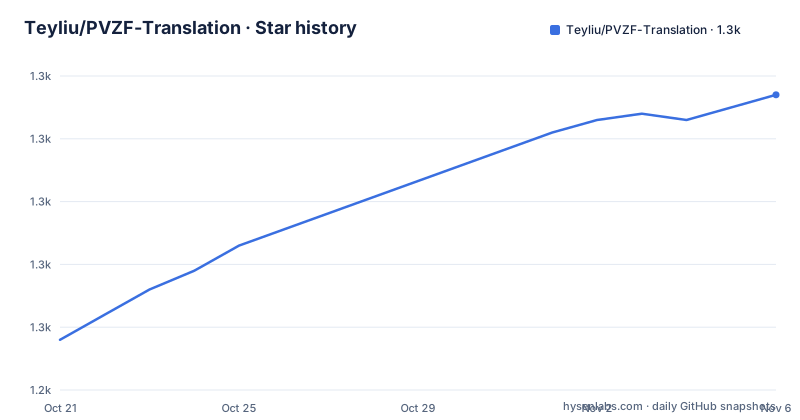
- Teyliu/PVZF-Translation1,287 ★ · +39
| Repository | 2026-10-21 | 2026-11-06 |
|---|---|---|
| Teyliu/PVZF-Translation | 1.2k | 1.3k |
39 Stars in the last 16 days, measured from the daily GitHub snapshot. Compare with other projects
Editorial analysis
Translation files and the mod artefact in one repository
The readme's first note to developers is the one that explains the repository. It says the codes contain the translation files and the associated mod artefacts, and that you should reach out by e-mail or on Discord if you need the source code for the Translator mod. It adds the line that you do not need to build from the source code if you are not a developer.
That single decision explains the shape of the whole project. This is a distribution repository first and a source repository second. The public tree is the shipped artefact plus the strings, and the actual patcher is available on request to contributors rather than published outright.
The subject is Plants vs Zombies Fusion, and the version in question is the multi-language mod for it, with the current supported base game version given as 3.9. The repository is named PVZRH-Multi-language-Mod-Translation files, and the primary language of the tree is Python, which is the tooling and the string handling rather than the game itself.
The community around it is a Discord server, described as mainly a community for the English translation of the game but also functioning as a hub for all users of all versions, with a channel for the FAQ and errors, and a video guide for installation. The readme points people with installation trouble at that FAQ explicitly.
It is worth being clear about the status of the project: this is an unofficial community translation of a modified commercial game, with no affiliation to the rights holders, and the artefacts are hosted wherever the community can find file space.
The download table, and how the versions are tagged
The readme's centrepiece is a table of versions, platforms and download links, and the pattern in it tells you how the project works.
The multi-language builds are on GitHub releases, one tag per version: `4.0.5_alpha` for Multi-Language 4.0.5.2 Alpha, `3.9_alpha` for 3.9, and `3.8.1_beta` for 3.8.1, all for PC. Alongside them sit the Chinese versions of the same releases, hosted on MEGA and Google Drive rather than on GitHub, for both PC and Android, going back through 4.0, 3.9, 3.8.1, 3.7, 3.6.1.
Two rows are worth calling out. The first is a Redist zip, described as the thing to install if you have problems launching the game, hosted on MEGA. The second is the Android English 3.9 build by silvershadow, which lives in a separate repository, `silvershadowkat/pvzf-android-translation`, with its own release tag.
The `_Redist` naming and the fact that the Chinese builds are mirrored off GitHub tell you something about the audience. The people who need this are on networks where GitHub is slow or blocked, so the project keeps mirrors on file hosts that work from more places, and the readme says other versions starting from 2.8.1 are on the Releases page.
There is also a Linux path, and it is the least documented: a Discord channel link for playing the Multi-Language on Linux, with a note that you have to join the server to read the guide. That is a deliberate choice to keep support in a place where the community already is, and it is a reminder that the distribution channel is part of the support model here.
The path rules are the part that actually matters
The installation instructions are seven steps, and two of them are about where the game may and may not live.
The rules are stated as a list of folders the game must not be extracted to:
* Downloads/Documents or any User folders
* OneDrive or MEGA
* Desktop
Alongside that, the game path must not contain special characters, with a pointer to the FAQ for what counts as one, and the game is launched through `Launch Game.bat` rather than by opening the executable directly. If the game will not start, the readme's advice is to install everything in the Redist zip, and step five is to read everything in the server's FAQ and Errors channel.
Those three rules together are the whole reason the project keeps a Discord server. The failure modes of a modded build are mostly environmental, a path that a sync client or the shell treats specially, a character the batch file cannot handle, a missing runtime, and each of those is much cheaper to fix in a support channel than in a bug tracker.
The Android instructions are shorter and carry a warning that is worth repeating. For Android, do not delete your previous installation or you will lose your progress forever, download the APK and update the game normally. On PC, you can safely uninstall previous installations and your progress will carry over. The asymmetry is because the Android package is an update of the existing app, while the PC build is a self-contained directory.
Ten languages, each on its own update schedule
The multi-language version supports English, Chinese Simplified, Indonesian, French, Spanish, Vietnamese, Japanese, Ukrainian, Romanian and Korean, and the readme is candid that other contained languages are empty for the moment.
More interesting is the per-language status, because it shows what a fan translation project actually looks like over time. Up to date at 3.8.1 are English and Korean. Last updated at 3.7 are Indonesian and Vietnamese, at 3.6.1 Spanish, at 3.4.2 Ukrainian. French and Japanese are marked as gradually updating, and Romanian was last updated at 3.3.1. Three languages have been removed due to a lack of updates, with Russian at 2.6.1 and Portuguese and Javanese at 2.5.1, and German and Italian at 2.1.6.
So the effective language set is smaller than the announced one, and the gap between a language's last update and the current base game version is a direct measure of how much of the game is untranslated in that language. Anyone picking a language to play in should read that list rather than the headline count.
The readme also invites new languages, with a pointer to the Discord for the process, and there is a further resource section for the Online English Almanac, which is a community reference work for the English text.
What is actually in the tree
The top level shows the mix of data, binaries and tooling that the project is.
There is `AudioImportLib.dll` and `Blooms_QOL.dll`, which are the shipped native libraries the mod needs, and `PvZ_Fusion_Translator.dll` alongside the `PvZ_Fusion_Translator/` directory that goes with it. `ConsolManager/` is another component, `PlantsAndZombiesIDs/` holds the identifiers the translation files refer to, and `Useful Scripts/` holds the Python helper scripts, which is where the primary language of the repository comes from. `Docs/` is the documentation, `CURRENT_GAME_VER` records the base version the tree is built against, and there is a `LICENSE` file.
The `CURRENT_GAME_VER` file is the mechanism that ties everything together. The mod is written against a specific base game build, the translation files refer to identifiers collected in `PlantsAndZombiesIDs/`, and when the base game updates, the identifiers shift and the translation has to be redone against the new version. That is why the supported base version is stated in the readme as 3.9 while the newest multi-language release is 4.0.5.2 alpha, and it is why the release tags track the base version rather than the mod's own version number.
The practical consequence for a user is that a multi-language build and a base game version have to match, and a new base game release means waiting for the translation to catch up rather than updating the game and hoping.
Where this repository is the wrong place to look
Three limits are clear.
The first is that this is not the game and not the mod's source. The base game is not here, the Translator mod's source is distributed on request, and the repository is a distribution point for artefacts and strings. A developer who wants to understand how the patch works, or a player who wants to build it themselves, needs to contact the maintainers, and the readme says as much.
The second is the version coupling. A pinned base game version and per-language update dates mean the tree is only useful against a specific build, and the whole model breaks when the upstream game updates. A user who updates the game through its own store will find the mod stale, and the readme's guidance for updates is to delete the old installation and reinstall the matching build.
The third is that the trust model is a Discord server and a file host. The links point to MEGA, Google Drive and GitHub releases, the Redist is a zip from a file host, and the primary support channel is a chat server where a pinned FAQ carries the troubleshooting knowledge. For a community project distributing a modified commercial game, that is a normal arrangement, and it is also an arrangement where a user is trusting the maintainers with a binary and with the contents of their save.
On maintenance, the last push was on 2026-10-15 and the releases are recent, with 4.0.5_alpha on 2026-10-01, 3.9_alpha on 2026-09-13 and 3.8.1_beta on 2026-07-27. The licence is listed as a custom one that GitHub cannot classify, with the terms in the `LICENSE` file at the repository root, and that file is worth reading before redistributing anything from it.
Editorial conclusion
This repository fits a player of the modified Plants vs Zombies Fusion who wants the game in their language and is willing to install a community build, and it fits a translator who wants to contribute strings and see them shipped. It does not fit anyone who expects an official or supported build, since the project is explicitly a community translation with a pinned base game version, and it is the wrong choice if your platform has no build. Before you install, read the path rules in the readme, because the game must not live under Downloads, Documents, OneDrive, MEGA or the Desktop, and the game path must not contain special characters, and on Android you must update over your existing installation rather than replacing it, or you lose your progress.
Frequently asked questions
What does the PVZF-Translation repository contain?
The translation files and the associated mod artefacts for a multi-language version of Plants vs Zombies Fusion, plus the tooling and the string identifiers the translations refer to. The source code for the Translator mod is not published and is shared on request by e-mail or Discord.
Where can I download the multi-language build?
The PC multi-language builds are on the GitHub releases page, one tag per version, with 4.0.5_alpha, 3.9_alpha and 3.8.1_beta published, and the Chinese versions are mirrored on MEGA and Google Drive for PC and Android. Other versions back to 2.8.1 are on the releases page.
Where must I install the game?
Not in Downloads or Documents or any user folder, not on OneDrive or MEGA, and not on the Desktop. The path must also contain no special characters, and the game is started through Launch Game.bat rather than by running the executable directly.
How do I update on Android without losing my progress?
Do not delete your previous installation. Download the APK and update the game normally. On PC the readme says you can safely uninstall previous installations and your progress will carry over.
Which languages are fully translated?
The multi-language version supports English, Chinese Simplified, Indonesian, French, Spanish, Vietnamese, Japanese, Ukrainian, Romanian and Korean, but the readme lists the last updated version per language, and Russian, Portuguese, Javanese, German and Italian have been removed for lack of updates.
Official sources
Add this badge to your README
If you maintain this project, the badge below links readers to this analysis and shows its maintenance status from the daily GitHub snapshot. Paste the markdown into your README; add ?metric=license or ?metric=stars to the image URL for a different field.

[](https://hysenlabs.com/projects/teyliu-pvzf-translation)Star history chart for your README
[](https://hysenlabs.com/projects/teyliu-pvzf-translation)Was this useful?