Watcher: one Django console for certificate transparency, CVE feeds and leak sites
Watcher - Open Source AI-powered Cyber Threat Intelligence & Hunting Platform. Developed with Django & React JS.
At a glance
- What is it?
- Watcher collects certificate transparency events, CERT advisories, CVE records and ransomware leak listings, then turns keyword matches into alerts, TheHive cases and MISP objects. It ships as a four-service Docker Compose stack you operate yourself, on fixed container addresses and with no documented sizing.
- Who is it for?
- Adopt Watcher when one analyst already watches a dozen feeds by hand and needs keyword rules plus automatic TheHive or MISP handoff; skip it if all you want is the certificate transparency firehose. Before deploying, read docker-compose.yml and check the fixed 10.10.10.3, 10.10.10.5 and 10.10.10.7 addresses against the host network, because Docker does not negotiate them for you.
- Can I use it commercially?
- Yes, with strict conditions. AGPL-3.0 is a network copyleft licence: if people use a modified version over a network, for example as a hosted service, you must offer them its source code under the same licence.
- Is it still maintained?
- Yes. The repository last received commits 4 days ago.
- What is it written in?
- Mainly JavaScript, according to GitHub's language statistics.
Answers come from the project's GitHub data, last synced on October 23, 2026, and from our analysis. They are not legal advice.
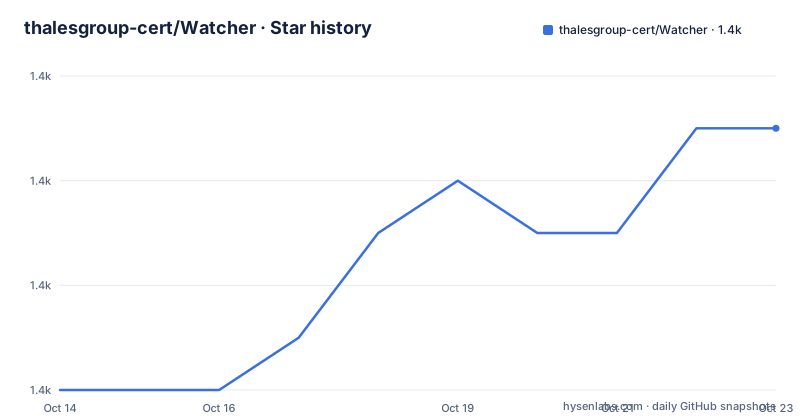
Star history
- thalesgroup-cert/Watcher1,435 ★ · +5
| Repository | 2026-10-14 | 2026-10-23 |
|---|---|---|
| thalesgroup-cert/Watcher | 1.4k | 1.4k |
5 Stars in the last 9 days, measured from the daily GitHub snapshot. Compare with other projects
Editorial analysis
One Django console over a dozen outside feeds
Watcher is a Django and React platform for a security operations team that would otherwise sit in a dozen browser tabs. It collects from sources defenders already know, applies keyword rules to what arrives, and pushes the matches into a case system or a sharing platform instead of leaving them in a feed reader.
The intake list is specific. Vulnerability records come from cve.circl.lu, ransomware victims and groups come from ransomware.live and ransomlook.io, and advisories arrive as RSS from CERT-FR, CERT-EU, US-CERT and the Australian Cyber Security Centre. Leak monitoring adds Pastebin, StackOverflow, GitHub, GitLab, Bitbucket, APKMirror and npm registries. Results land in MySQL 8.0.40 and come back through a React frontend served by the same Django process, which is why the repository is filed under JavaScript while the server side is Python.
Certificate transparency arrives through a sidecar certstream container
The certificate transparency path is the one feed that does not live inside the Django application. A separate container runs the Go stream server, publishes on port 8080, and the Python client certstream-python reads from it on the Watcher side. The repository ships certstream-config.yaml at the top level and mounts it read only into the stream container, so CT behaviour is edited outside the image rather than baked into Watcher.
  certstream:
    container_name: certstream
    image: 0rickyy0/certstream-server-go:latest
    volumes:
      - ./certstream-config.yaml:/app/config.yaml:ro
    ports:
      - "8080:8080"
    healthcheck:
      test: ["CMD", "pgrep", "certstream"]
After startup you should see that container on the Compose bridge at 10.10.10.7 with the port published on the host. Read the healthcheck closely, because `pgrep` only proves a process exists: a stream that cannot reach the CT log still reports healthy, and nothing in the file checks that certificates are arriving.
Watch Rules turn keyword matches into routed alerts
A fetch is not an alert. You define keyword-based Watch Rules that match CVE text, ransomware group names or leak content against your own context, and a match is what produces output. Outbound paths cover email, Slack and Citadel, full TheHive synchronization with automated alert creation, IOC enrichment and ready-made Cortex Analyzers and Responders, and MISP export with UUID tracking so an object is not recreated on every push.
The connectors page decides whether any of this is operable in practice. A superuser-only `/connectors` route lists SMTP, Slack, Citadel, TheHive, MISP and CyberWatch feeds with encrypted credential storage and per-connector health checks, so a feed that stopped answering shows up in the UI rather than in container logs.
TLSH hashes and RDAP checks watch domains already flagged
Domains Watcher already treats as malicious are tracked for change, not rescanned from scratch. For each one it records IP addresses, mail and MX records and page content, then runs TLSH fuzzy hashing from the tlsh project so an edited or re-registered domain yields a different hash instead of a clean result. RDAP and WHOIS lookups add registrar and expiry alerts on top of that comparison.
The inverse workflow lives in the same interface. Approved domains carry expiry, repurchase status, registrar info and contacts, a monitored malicious domain can be converted into a legitimate one, and UDRP cases are tracked automatically. That pairing is the part most of this feed list does not give you, since the same data that flags a name has to survive the moment you decide the name belongs to you.
Permutation hunting and leak scraping run as separate paths
Suspicious but not yet malicious names take two paths. dnstwist generates permutations to surface typosquats and homograph variants of a domain you supply, and certstream covers the gap between registration and first abuse. A third path is raw leak scraping across the code hosts and paste sites, looking for credentials, API keys and internal hostnames.
A search layer sits behind the enrichment work: the Compose file gives SearXNG a container of its own, binds it to a private address, derives its public URL from SEARX_HOSTNAME and strips every Linux capability before adding four back under `cap_drop`, so news and threat actor lookups do not have to leave your network. Summaries come from a Hugging Face Transformers model on the Django side. The README describes a weekly digest of the top 5 trending topics, real-time alerts when breaking threat news appears, and on-demand summaries for any keyword that pull in related CVE and threat actor detail. Treat that as a summariser over a collected corpus rather than a detector, since no scoring path turns a summary into a verdict and no route for reporting a false positive is given.
OIDC with Knox tokens guards the API and the admin panel
Access control has two layers. Authentication backends are LDAP, local accounts and federated login through any OpenID Connect provider such as Keycloak or Azure AD, using PKCE with Knox token issuance, and the choice is made per instance in `.env`. On top of that sit the Django admin panel and granular user permissions with group management, so a watchlist can be scoped rather than shared.
For anything scriptable the REST surface documents itself: Swagger UI at `/api/docs/` and the OpenAPI 3 schema at `/api/schema/`, both generated by drf-spectacular. That endpoint pair is the practical route for handing findings to an external ticketing system, and it is the closest thing to a contract for automation, since the README does not promise API stability between releases.
Fixed container addresses and a pinned MySQL shape the first run
The Compose file is the real interface. Four services start on a user-defined bridge with fixed addresses: SearXNG at 10.10.10.3, MySQL at 10.10.10.5 and certstream at 10.10.10.7, with Watcher itself pulled from ghcr.io/thalesgroup-cert/watcher. Nothing negotiates those addresses, so a host already using that range has a collision to solve before anything starts.
  db_watcher:
    container_name: db_watcher
    image: mysql:8.0.40
    command: mysqld --default-authentication-plugin=mysql_native_password
    healthcheck:
      test: mysqladmin --user=${DB_USER} --password=${DB_PASSWORD} status
Two details there matter more than their size. Handing the database password to `mysqladmin` as a command-line argument places it in the container process list on every probe, and pairing the pinned 8.0.40 tag with the `mysql_native_password` flag is what keeps the older authentication default working, so that image bump is not a neutral upgrade.
The dependency list is shorter than the feature list. Watcher, the service that consumes everything above, declares only db_watcher and searxng:
  watcher:
    container_name: watcher
    image: ghcr.io/thalesgroup-cert/watcher:latest
    depends_on:
      db_watcher:
        condition: service_healthy
      searxng:
        condition: service
Certificate transparency monitoring is advertised as a core capability, yet certstream is absent from that list, so the stream and its consumer may start in either order and the retry handling falls to the operator. Watcher ships under AGPL-3.0, and the README does not document a rollback or upgrade procedure.
Reading the feeds yourself keeps the data and loses the rules
The alternative is to write the glue: point scripts at cve.circl.lu, ransomware.live, ransomlook.io or the certstream socket and you get the same rows. What you then rebuild is the keyword Watch Rules, the TLSH comparison against a domain you already flagged, the lifecycle that moves a name from malicious to approved with UDRP tracking, and the connector health page that says which feed went quiet.
Against that, Watcher makes you operate SearXNG, MySQL and a Go certstream sidecar on a fixed address plan before you see a single alert. Its images use the `latest` tag, so a restart can change what you are running, and the last push was on 2026-09-16, with v3.5.3, v3.5.2 and v3.5.1 landing on 2026-09-07, 2026-07-22 and 2026-07-08.
Editorial conclusion
Adopt Watcher when one analyst already watches a dozen feeds by hand and needs keyword rules plus automatic TheHive or MISP handoff; skip it if all you want is the certificate transparency firehose. Before deploying, read docker-compose.yml and check the fixed 10.10.10.3, 10.10.10.5 and 10.10.10.7 addresses against the host network, because Docker does not negotiate them for you. Then confirm the `pgrep` healthcheck on the certstream service passes while the stream is genuinely delivering certificates.
Frequently asked questions
How do I install Watcher with Docker Compose?
The README points installation at a hosted guide page rather than giving commands inline, and the repository ships docker-compose.yml, certstream-config.yaml and a Searx/ directory that define the four services. The compose file itself carries the required settings such as TZ, DB_USER, DB_PASSWORD, DB_ROOT_PASSWORD, SEARX_HOSTNAME, HTTP_PROXY and HTTPS_PROXY as ${...} substitutions from the environment.
What feeds does Watcher collect and how does it notify?
Keyword-based Watch Rules match content from cve.circl.lu, ransomware.live, ransomlook.io and the CERT RSS feeds, and a match routes out to email, Slack, Citadel, TheHive or MISP rather than notifying on every fetch. A superuser-only `/connectors` page shows the health of each integration.
Why does the certificate transparency feed run in its own container?
Watcher reads CT events through certstream-python, and the compose file supplies that stream from 0rickyy0/certstream-server-go with certstream-config.yaml mounted read only at /app/config.yaml and port 8080 published on the host. The stream is a network service, not a Django module, which is why it is versioned and configured separately from the application image.
Does Watcher decide on its own whether a domain is malicious?
No. dnstwist surfaces typosquat and homograph variants of names you supply, TLSH compares domains you already flagged for edits, and RDAP and WHOIS add registrar and expiry context, while Watch Rules only match your keywords. The judgement about a match is left to whoever reads the alert.
What are the system requirements for Watcher?
The README does not document CPU, memory or storage sizing for the four services, and it does not give a rollback path. The closest guidance is in the compose file, where MySQL is pinned to mysql:8.0.40 and the other images track the `latest` tag.
Official sources
Add this badge to your README
If you maintain this project, the badge below links readers to this analysis and shows its maintenance status from the daily GitHub snapshot. Paste the markdown into your README; add ?metric=license or ?metric=stars to the image URL for a different field.

[](https://hysenlabs.com/projects/thalesgroup-cert-watcher)Star history chart for your README
[](https://hysenlabs.com/projects/thalesgroup-cert-watcher)Was this useful?