learnpython is a curated map of where to learn Python
Python Resources for Everyone
At a glance
- What is it?
- learnpython is a link collection rather than a library: a README that points beginners at official documentation, a roadmap, playlists, blogs, podcasts, and a large section on AI and machine learning work in Python. It suits someone deciding what to study next, and it will not teach you anything on its own.
- Who is it for?
- Adopt learnpython when you are choosing between Python courses, editors, and tutorials and want one page that points at options across video, text, and community, with a roadmap file you can follow in order. It does not fit as a curriculum substitute, a team onboarding document, or a reference you can quote, because almost every entry is a link to somebody else's material and the repository contains no Python code.
- Can I use it commercially?
- Yes. MIT is a permissive licence: you can use, modify and sell software built on it, as long as you keep its copyright and licence notices.
- Is it still maintained?
- Yes. The repository last received commits 81 days ago.
- What is it written in?
- GitHub does not report a main language for this repository.
Answers come from the project's GitHub data, last synced on November 7, 2026, and from our analysis. They are not legal advice.
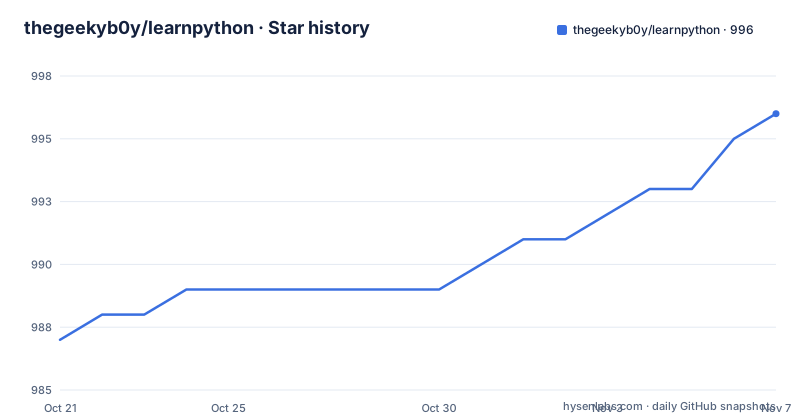
Star history
- thegeekyb0y/learnpython996 ★ · +9
| Repository | 2026-10-21 | 2026-11-07 |
|---|---|---|
| thegeekyb0y/learnpython | 987 | 996 |
9 Stars in the last 17 days, measured from the daily GitHub snapshot. Compare with other projects
Editorial analysis
This repository is a README with links, not a package you install
The project description is blunt about what this is: Python Resources for Everyone. The repository layout confirms it. There is a README.md, a README_es.md, a roadmap.md, a CODE_OF_CONDUCT.md, a CONTRIBUTING.md, a LICENSE, and a PDF called Python Notes (goalkicker).pdf. No source directory, no package manifest, no test suite. The primary language field is listed as unknown, which is another way of saying the deliverable is prose and links rather than code. That framing matters for the adoption decision. You cannot add this to your dependencies, there is no API to call, and nothing here will break your build. What you get is a well organised index that tells a beginner where to look, and the value is entirely in the curation rather than in the artefact.
The index starts with the official sources and the tool choices
The General section at the top is the part most worth keeping in a browser tab. It links the official site at Python.org, the official documentation at docs.python.org, and a quick start guide from python.org. It then names the tools: Sublime Text or VS Code as the suggested code editor, and Pycharm or Pydev as the suggested IDE. That is a small piece of advice, but it removes the first real decision a newcomer faces, which is what to type into and what to run it with. The Basic Resources section that follows points at a basic roadmap in the repository's own roadmap.md file, a complete set of Python Notes hosted on goalkicker, the Awesome Python collection of libraries and frameworks, and an interactive beginner course at futurecoder.io. Between the roadmap and the notes, the repository has already assembled the two things a beginner most often lacks: an order and a reference.
Video dominates the resource list, and it is curated by language
The longest section by volume is Python Playlists on Youtube, with fourteen entries, followed by a separate table of Top Youtube Creators. The playlists include Telusko, Chai aur Code, Edureka, Code with Harry, Geeky Shows, Corey Schafer, Freecodecamp, Krish Naik, Programming With Mosh, Clever Programmer, Bro Code, thenewboston, and CS50. One entry is language specific, Brototype in Malayalam, which is a fair signal that the collection is not aimed only at English first learners. The index also lists Top Blogs, Cheatsheets, Top Twitter Creators, and Top Podcasts, so the same breadth applies outside video. For a learner deciding between a structured university style course such as CS50 and a longer project oriented channel, having them in one table is genuinely useful. The trade is that none of it is annotated. You get a list of names and links with no indication of difficulty, length, or whether the content is still current.
The largest part of the index is AI and machine learning, not core Python
Look at the index entries and the shape of the resource becomes clear. Under Python for Different Fields and Other Useful GitHub Repositories, there is a full AI and Machine Learning with Python block with seven sub sections: Generative AI and Large Language Models, Modern ML Frameworks, Vector Databases and RAG, AI/ML YouTube Playlists, Books and Documentation, AI/ML Blogs and Communities, and then four narrower ones on AI coding agents for Python development, building AI agents in Python, Model Context Protocol with Python, evaluating and testing LLM apps in Python, building an LLM from scratch in Python, and fine tuning LLMs with PEFT, LoRA, and QLoRA. The repository topics confirm the direction, listing agentic-ai, ai, python, python3, and resources. Read the index as a career signal about who maintains it: the interest is in applied AI work with Python, and the foundational material is there but it is the shortest section in the file.
How to start with the collection: open the roadmap, not the link table
There is nothing to install here, and the documentation does not give an install command, because there is nothing to install. The practical first step is to open the README and read the Index section, which links to every heading within the document, and then to go straight to the basic roadmap linked from the Basic Resources table. The roadmap points at the roadmap.md file inside the repository, so you can follow it in order rather than picking from the tables. From there, the Python Notes PDF at the top level of the repository gives you the reference text to keep beside you while you work through the roadmap, and the video playlists are there for whichever topic you feel least comfortable with. If you read English more slowly, README_es.md carries the same structure, and the two files that matter most, the roadmap and the notes, are language independent. A sensible working pattern is one topic from the roadmap, the matching notes pages, and one playlist for the parts the text does not click for.
The roadmap and the notes PDF are the two things you actually download
Almost every other entry in this repository is a link outward, which means its usefulness depends on links that rot. Two artefacts are self contained. The first is roadmap.md, linked from the Basic Resources table as the basic roadmap, and it is the piece that gives the collection its spine: a path you can follow rather than a menu you have to choose from. The second is the PDF at the top of the repository, a copy of the Python Notes from goalkicker, which is the same notes the Basic Resources table links to online. Having both the roadmap and the notes stored in the repository means the essential part of the learning path survives link rot and works offline. That is a deliberate design choice and it is the strongest argument for the repository over a plain list of bookmarks.
A Spanish translation and a contribution guide point at who it serves
The repository includes README_es.md, a Spanish version of the main README, alongside CODE_OF_CONDUCT.md and CONTRIBUTING.md. A translated README matters more here than in a code project, because the content itself is almost entirely English titles and links, and a Spanish speaker who cannot read the English resource titles gains less from the collection. The presence of a second language is a reasonable signal about the audience the maintainer has in mind. The project is MIT licensed, with the LICENSE file at the top level, so the text and the link list can be reused in a course, a company wiki, or an internal onboarding page without licence friction, provided the notice is kept. The README also includes an Index section that links to each heading within the document, so a reader can jump straight to the AI and machine learning material if that is what they came for.
Where the collection falls short: it is an undated list of undated links
The failure mode of a resource repository is well known and this one has it. Every entry is a link to content the project does not control, so nothing guarantees that a playlist still exists, that a blog is still publishing, or that the code in a tutorial still runs on the current Python release. There is no version pinning anywhere, no dates on the entries, and no automated link checking, so the quality decays quietly and there is nothing in the file that tells you when it last decayed. The README does not document a review cycle or a policy for removing dead entries. The maintenance picture is thin in the same way: the last push to the repository was on 2026-08-18, there are no tagged releases, and with no versioning there is no changelog to check what changed between two states of the list. Treat it as a starting point with a recent mtime, not as a maintained curriculum.
Editorial conclusion
Adopt learnpython when you are choosing between Python courses, editors, and tutorials and want one page that points at options across video, text, and community, with a roadmap file you can follow in order. It does not fit as a curriculum substitute, a team onboarding document, or a reference you can quote, because almost every entry is a link to somebody else's material and the repository contains no Python code. Before you rely on it, open roadmap.md to see how the path is ordered and confirm the entries still resolve, and note that the last push to the repository was on 2026-08-18 with no tagged releases, so freshness depends on the individual links rather than on the project.
Frequently asked questions
What is the learnpython repository?
It is a curated index of Python learning resources. The repository contains a README with linked sections for official documentation, a roadmap, notes, YouTube playlists and creators, blogs, podcasts, and AI and machine learning material, plus a roadmap.md and a Python Notes PDF.
Which code editor and IDE does learnpython recommend?
The General table suggests Sublime Text or VS Code as the code editor, and Pycharm or Pydev as the IDE. It also links Python.org, the official documentation, and a quick start guide.
Does learnpython contain Python code or an installable package?
No. The repository layout is a README, a Spanish README, a roadmap file, a PDF of Python notes, a licence, and contributing and conduct files, with no source directory or package manifest.
Is there a Spanish version of the learnpython README?
Yes. The repository includes README_es.md next to the main README.md, and the project is MIT licensed with a LICENSE file at the top level.
Official sources
Add this badge to your README
If you maintain this project, the badge below links readers to this analysis and shows its maintenance status from the daily GitHub snapshot. Paste the markdown into your README; add ?metric=license or ?metric=stars to the image URL for a different field.

[](https://hysenlabs.com/projects/thegeekyb0y-learnpython)Star history chart for your README
[](https://hysenlabs.com/projects/thegeekyb0y-learnpython)Was this useful?