The single-cell best practices book is a set of Jupyter Book notebooks with a per-chapter environment
https://www.sc-best-practices.org
At a glance
- What is it?
- A community maintained tutorial for single-cell analysis built on Jupyter Book, with notebooks for each step, minimal Conda environments per chapter and a postbuild step that injects interactive dropdowns into the rendered HTML. The interesting engineering is in the rendering pipeline rather than in the analysis.
- Who is it for?
- Adopt this book as the starting point for a single-cell analysis project, since it sequences the steps and encodes the community's judgement about where the pitfalls are. Do not adopt it as a pipeline you can automate unchanged, because the artefact is a book of notebooks rather than a tool with a command line interface.
- Can I use it commercially?
- Check first. The repository uses a licence we do not classify automatically, so read its LICENSE file before any commercial use.
- Is it still maintained?
- Yes. The repository last received commits 4 days ago.
- What is it written in?
- Mainly Jupyter Notebook, according to GitHub's language statistics.
Answers come from the project's GitHub data, last synced on November 7, 2026, and from our analysis. They are not legal advice.
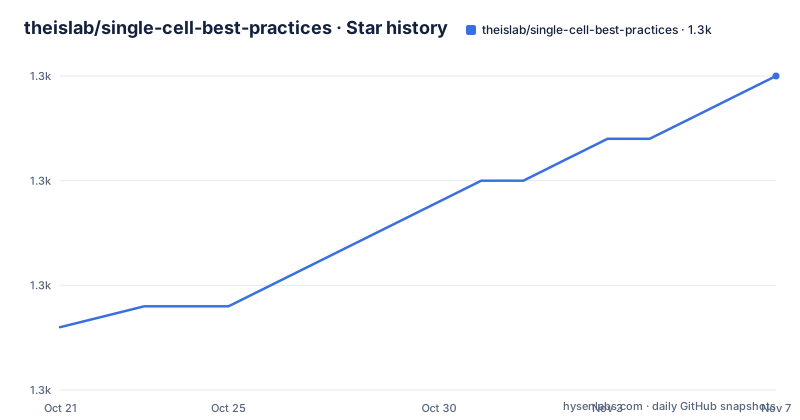
Star history
- theislab/single-cell-best-practices1,300 ★ · +12
| Repository | 2026-10-21 | 2026-11-07 |
|---|---|---|
| theislab/single-cell-best-practices | 1.3k | 1.3k |
12 Stars in the last 17 days, measured from the daily GitHub snapshot. Compare with other projects
Editorial analysis
The book builds on a peer reviewed expert recommendation
The single-cell best practices book is a tutorial from the Theislab, and the README is short because the artefact is the rendered book rather than the repository.
The most recent version of the book is rendered at sc-best-practices.org, and the repository holds the sources. The project describes itself as a book, and the topic list confirms it with book, rna-seq, single-cell and tutorial. The primary language in the metadata is Jupyter Notebook, which is accurate.
What the book builds upon is the expert recommendation Best practices for single-cell analysis across modalities, published in Nature Reviews Genetics in 2023, and the README asks that you cite it if you found the expert recommendation or the book helpful for your research article. The BibTeX entry is provided in full, with the journal, the volume, the issue, the page range and the DOI.
The distinction between the book and the recommendation matters for how you should use them. The recommendation is a review article, an argument about what the field should do, written by a large group of authors. The book is the teaching material, the worked version of the same advice, and it is what you can run.
The project is explicitly looking for help. There are lots of open tasks for both newcomers and seasoned analysts, and the README invites the community to further improve the tutorial and the teaching material, with a CONTRIBUTING file for the instructions and issues for questions. The acknowledgements note that the tutorial would not be possible without the input of all Theislab members and the community's reviews of various single-cell tools.
The licence is reported by the metadata as one GitHub could not classify, so the LICENSE file at the root is the authoritative text, and there is a single release, 0.1.0, from 2023-11-14, with the last push to the repository on 2026-10-10 and the repository not archived.
Each chapter ships with a minimal Conda environment
The section on adapting the notebooks to other datasets is the operationally important one, and it says two things.
First, all notebooks for the various steps can be found in the jupyter-book folder together with minimal Conda environments. Second, the notebooks can be downloaded directly from the rendered version.
The per chapter environment is the detail that makes the book usable as a workshop material. A single environment for a book covering an entire analysis pipeline has to contain every tool, and the version conflicts between them are the reason a reader's first attempt at a notebook often fails on an import rather than on the analysis. Splitting the environments per step means a reader only installs what the current chapter needs.
The second route, downloading the notebooks from the rendered version, matters for a different reason. It lets someone use the material with a different dataset without forking the repository, which is exactly what the section title promises, adapting the notebooks to other datasets.
The repository root shows the supporting files for that. There is an `environment.yml` at the top level and the `jupyter-book/` directory holds the book source, with `scripts/` for the tooling, `changelog.d/` for the changelog fragments, a `pyproject.toml` for the lint and format configuration, a `netlify.toml` for the hosting, a `Makefile` for the build, and a `.pre-commit-config.yaml`.
The `changelog.d/` directory is a detail worth noting. A changelog split into per change fragments, the way towncrier style tooling expects, is how a project with many small contributions records what changed without every contributor editing the same file and creating conflicts.
The build injects dropdowns into the rendered HTML
The Makefile shows the rendering pipeline, and it is more than a call to Jupyter Book.
serve:
	cd $(JUPYTER_BOOK_DIR) && jupyter book start

build:
	cd $(JUPYTER_BOOK_DIR) && jupyter book build --html
	python3 scripts/postbuild/reload_on_back.py $(JUPYTER_BOOK_DIR)/_build/html
	python3 scripts/postbuild/legacy_redirects.py $(JUPYTER_BOOK_DIR)/_build/html

dropdown:
	python3 scripts/dropdowns/insert_dropdowns.py
The HTML build runs two postbuild scripts after Jupyter Book has produced the output. `reload_on_back.py` implements the back button behaviour, so that going back in the browser returns to the right place in a book that is a single long page, which otherwise is the classic failure of a rendered notebook. `legacy_redirects.py` handles the old URLs, so that links published before the current structure still resolve.
The dropdown step is separate, and that separation is the point. The dropdowns are inserted into the source rather than into the output, so they are part of the book and survive a rebuild. Whatever the dropdowns are for, doing them as a source transformation rather than a postbuild one means they cannot be lost by a rebuild.
There is also a PDF target, `jupyter book build --pdf`, and a clean target that calls `jupyter book clean --all`. The `JUPYTER_KERNEL := python3` variable at the top of the Makefile pins the kernel, so the notebooks run against a known Python rather than whatever the environment happens to have.
The `netlify.toml` at the root is the deployment configuration, which matches the fact that the book is served as static HTML.
The lint configuration reads like a lab's house rules
The `pyproject.toml` in this repository is mostly a Ruff configuration, and the rule selection tells you what the project cares about.
The selected rules are F for errors detected by Pyflakes, E and W for Pycodestyle errors and warnings, I for isort, D for pydocstyle, B for flake8-bugbear, TID for flake8-tidy-imports, C4 for flake8-comprehensions, BLE for flake8-blind-except, UP for pyupgrade, RUF100 for unused noqa directives, TCH for typing imports, NPY for the NumPy specific rules, and PTH to use pathlib. The security rules are present but commented out, with a note that they are not enabled.
The ignore list is where the project's actual conventions live, and the comments explain each one. BLE001 is ignored because a blind `Exception` is deliberately caught. B008 is ignored because the errors from function calls in argument defaults are fine when the result is immutable. E501 is ignored because long comment lines are accepted and black handles the long code lines. E731 allows assigning a lambda expression because those assignments are convenient. E741 allows I, O and l as variable names, because I is the identity matrix.
The largest group is the docstring rules, and the reasoning is consistent. D100 through D107 are all missing docstring rules, ignored with the explanation that they would be needed in public module, class, method, function, package, nested class, initialiser and magic method positions. D105 is ignored because magic methods are often self-explanatory. D203 and D204 are a mutually incompatible pair, and the comment says to disable one in each pair, with D203 chosen because they do not want a blank line before a class docstring.
A configuration like this is documentation. Every ignored rule is a decision the maintainers made, and the comment next to it explains the reason, so a contributor can see why the rule is not enforced rather than guessing.
What a book like this is for, and when to use it instead
It is worth being clear about what this project is and is not, because the name suggests a package and the content is a curriculum.
It is a teaching resource, and its value is the ordering. Single-cell analysis has more ways to go subtly wrong than most data tasks, and the ways are procedural: filtering before normalisation, using the wrong integration method, treating ambient RNA as signal, double dipping between selection and testing. A book that walks the steps in an order the field has agreed on is teaching something a parameter list cannot.
The Theislab name carries weight here. Fabian Theis's group has been central to single-cell methods, and the environment the book is built on, the Scanpy family of tools, comes out of that lineage. The expert recommendation with forty authors is a consensus document, and the book is the worked version of it.
What it is not is a pipeline you can hand to a colleague and forget. The artefact is notebooks, and notebooks are read, run, adapted and then diverged from. That is the design, not a limitation, and the section on adapting the notebooks to other datasets exists because that is the expected way to use it.
The maintenance question is the one to weigh. The last push was on 2026-10-10, so the repository is being worked on, and the single release tag from 2023 suggests the version history is not where the activity is tracked. The changelog.d directory suggests changes are recorded in fragments, which is where you would look to see what a given chapter now recommends.
For a team starting a single-cell project, the practical sequence is to read the relevant chapters against the expert recommendation, run the notebooks on your own data to see where they fail, and pin the environment for the chapter you are using. The per chapter environments are what make that last step possible, and the fact that the book builds a PDF target means it can be handed to people who will never install a notebook kernel.
Editorial conclusion
Adopt this book as the starting point for a single-cell analysis project, since it sequences the steps and encodes the community's judgement about where the pitfalls are. Do not adopt it as a pipeline you can automate unchanged, because the artefact is a book of notebooks rather than a tool with a command line interface. Verify first that the chapters match the assay modality and the tool versions you are using, since the content is versioned with the book and the software moves quickly, and that the per chapter Conda environments install on your platform before you plan a workshop around them.
Frequently asked questions
What is the single-cell best practices book?
It is a tutorial from the Theislab for single-cell analysis, built on Jupyter Book and published as a rendered book at sc-best-practices.org. It builds upon the peer reviewed expert recommendation on best practices for single-cell analysis across modalities published in Nature Reviews Genetics in 2023.
How do I run the notebooks with my own dataset?
All notebooks for the various steps are in the jupyter-book folder together with minimal Conda environments, or they can be downloaded directly from the rendered version. The Makefile serves the book with jupyter book start, builds the HTML with jupyter book build --html, and there is also a PDF target.
What do the postbuild scripts do?
After the HTML build, reload_on_back.py implements the browser back button behaviour for the long rendered page, and legacy_redirects.py keeps the old URLs working. A separate dropdown step inserts dropdowns into the source with scripts/dropdowns/insert_dropdowns.py so they survive a rebuild.
How can I contribute to the single-cell best practices book?
The project is looking for maintainers and says there are lots of open tasks for both newcomers and seasoned analysts. Contributions are invited through the CONTRIBUTING file, and questions can be posted as issues in the repository.
What lint rules does the single-cell best practices project enforce?
Ruff is configured with the Pyflakes, Pycodestyle, isort, pydocstyle, bugbear, tidy-imports, comprehensions, blind-except, pyupgrade, typing imports, NumPy and pathlib rules, with the security rules commented out. The ignore list is documented rule by rule, and it allows blind Exception catches, long comment lines, lambda assignments and missing docstrings on public and magic members.
Official sources
Add this badge to your README
If you maintain this project, the badge below links readers to this analysis and shows its maintenance status from the daily GitHub snapshot. Paste the markdown into your README; add ?metric=license or ?metric=stars to the image URL for a different field.

[](https://hysenlabs.com/projects/theislab-single-cell-best-practices)Star history chart for your README
[](https://hysenlabs.com/projects/theislab-single-cell-best-practices)Was this useful?