Where The Odin Project keeps its lessons: files in one repo, app in another
The open curriculum for learning web development
At a glance
- What is it?
- TheOdinProject/curriculum holds the markdown lesson files theodinproject.com serves, split into parallel course folders, with lint tooling and no application code. It is the content half of a two-repository setup, aimed at self-directed learners and contributors, not at anyone expecting a runnable site or a grader.
- Who is it for?
- Self-directed learners who want the prose and the project briefs will find both here, and contributors get a low-friction way in through broken links and typos. Teams that need autograded exercises, a hosted progress record or a licensed corporate course should look elsewhere, and anyone copying these lessons into paid material needs to read license.md and legal_terms_of_use.md first.
- Can I use it commercially?
- Check first. The repository uses a licence we do not classify automatically, so read its LICENSE file before any commercial use.
- Is it still maintained?
- Yes. The repository received new commits within the last day.
- What is it written in?
- Mainly JavaScript, according to GitHub's language statistics.
Answers come from the project's GitHub data, last synced on November 14, 2026, and from our analysis. They are not legal advice.
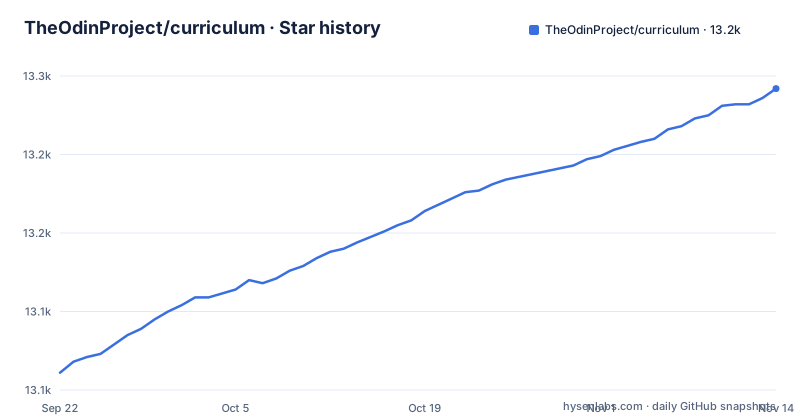
Star history
- TheOdinProject/curriculum13,242 ★ · +181
| Repository | 2026-09-22 | 2026-11-14 |
|---|---|---|
| TheOdinProject/curriculum | 13.1k | 13.2k |
181 Stars in the last 53 days, measured from the daily GitHub snapshot. Compare with other projects
Editorial analysis
The lesson files are here, the application that serves them is not
This repository holds the actual lesson files used on the website. The code that pulls in that lesson content, the front end and the back end, sits in the main TOP repo that the README links to as a separate project. The practical consequence is concrete: a local copy of curriculum is a tree of markdown and JSON, not a running copy of theodinproject.com. There is no command here that starts a preview server and no build step that assembles one.
That split also decides who owns a broken page. If a lesson path is renamed here, the URL that a student bookmarked can stop resolving, and no test in this repository would notice, because the routing that turns a path into a response lives in the other codebase. Contributors therefore have two places to check when a lesson behaves oddly, and a maintainer reviewing a pull request here can only judge the file, not the rendered page.
Course folders sit side by side instead of forming one ladder
The top level is a set of parallel tracks rather than a numbered sequence: foundations/, git/, ruby/, ruby_on_rails/, javascript/, nodeJS/, databases/, intermediate_html_css/, advanced_html_css/, react/ and getting_hired/. A reader who assumes the directory order is a path will read it wrong, because javascript/, nodeJS/ and react/ sit beside the Ruby pair instead of following it. Which track to enter is a choice the layout delegates to the student, and the site, not the folder names, is what settles it.
Then there are the folders that are not courses at all. archive/ sits alongside the live material, so retired lessons have somewhere to go, yet nothing in package.json or the top-level listing tells you which files inside it are still linked from a current lesson. Search hits in archive/ can therefore point at content no learner is sent to. shared/ and templates/ hold cross-cutting files whose purpose has to be read from their contents, and markdownlint/ is repository tooling sitting in the same directory listing as the courses, which is enough to make a naive listing of this repo look like course catalog.
The lesson prose is versioned, the links inside a lesson are not
Lessons are built from a mix of original written content and a compilation of curated resources from the web. The repository owns the first half and does not own the second. That division is the largest structural fact about the curriculum, and it explains the contribution list, which includes fixing broken links as a first-class task: the external targets do fail.
For a learner this means a fork that tracks main has prose that moves with the maintainers and references that move with other people's websites. A cohort frozen on an older commit inherits whatever those sites have done since, including moved pages, changed titles and content behind a login. There is no manifest of the external URLs in package.json or in the top-level listing, so you cannot audit which outside resources a lesson depends on without reading the lesson files themselves. Plan for that before promising a class that every link will still resolve.
New lessons need approval, typo fixes do not
The README lists what a contribution can be: correcting typos and grammar errors, rewriting parts of existing lessons to make them clearer, fixing broken links, adding resource links, and working on entirely new lessons after getting approval. The gate is attached to the last item alone. In practice the cheapest first contribution is mechanical and needs no sign-off, while anything that introduces a lesson waits for a maintainer decision, which is a much longer feedback loop for the person who did the most work.
The formatting contract sits at the top level too: CONTRIBUTING.md for the workflow, LAYOUT_STYLE_GUIDE.md for structure, and .markdownlint-cli2.jsonc, .prettierignore and .codespellignore for the checks that run against your text. A rewrite written in ordinary text-editor habits can fail the lint stage even though no human rejected the content. Read LAYOUT_STYLE_GUIDE.md before you rewrite a lesson, not after the first failed run.
Three npm scripts, and what a green run actually proves
There is no install guide for the curriculum content. The lesson files are what you get, and the working site is at theodinproject.com. If your interest is contributing, the tooling is three scripts declared in package.json, whose underlying commands are:
markdownlint-cli2
markdownlint-cli2 --fix
node --test
They are exposed as the npm scripts lint, fix and test, and markdownlint-cli2 ^0.24.0 is the only devDependency, so the setup is a Node install plus one dependency tree. The fix run rewrites the formatting problems it can before you review the diff.
Know what the green result covers. The lint pass checks markdown structure, not whether a lesson teaches the right thing. The test script is node --test, the Node built-in runner, and no test directory appears among the top-level entries beside the course folders, so that script targets the repository tooling rather than anything a learner submits. The devEngines block names linux and darwin with onFail set to warn, and Windows is not named at all; every engine check is advisory, so npm proceeds on any platform instead of stopping you.
No releases means no curriculum version to pin
The repository publishes no GitHub releases, and the version field in package.json is 1.0.0. That number describes the npm package wrapper, not an edition of the syllabus, and it does not change when lessons are rewritten. The repository is not archived and the last push was on 2026-11-01, so the content is moving; what is missing is any curated marker of a state worth teaching from.
For an instructor this is the awkward part. There is no tag to say that a term followed the June version, and every clone of the default branch is whatever main points at that moment. Two learners starting the same course a week apart can receive different instructions for the same lesson title. If you need a stable reference for a cohort, you have to create your own tag, keep a fork, or record commit identifiers yourself, and then accept the maintenance that comes with checking whether upstream rewrote the exercise you pinned.
CC BY-NC-SA 4.0 blocks the paid course remix
package.json declares the license as CC BY-NC-SA 4.0, the repository's own license field reports NOASSERTION, and usage questions are directed to license.md. A separate legal_terms_of_use.md sits in the top-level listing.
Non-commercial means the lesson text cannot simply be folded into a paid course or a client training programme without checking those terms first, and share-alike means a curriculum derived by copying lessons carries the same obligations onward, so building it in house does not sidestep the question. This is a boundary to confirm, not a ruling to guess at: the package.json field and the repository metadata do not agree on the identifier, which is exactly why license.md and legal_terms_of_use.md are the files to read before any commercial use. Reading and forking are free, which is the intent of the project.
Nothing here grades a project or records progress
The projects are described as practice that reinforces what the lessons teach, with finished work going into the learner's portfolio. There is no grader, no submission endpoint, no completion record and no account system anywhere in the top-level listing, and the single test script belongs to the repository tooling. The README points learners to the TOP Discord server for community help.
So the feedback loop is entirely outside the repository. A learner whose project satisfies the spec and one whose project quietly misses it look identical from here, and the portfolio claim depends on self-assessment. If you need verified completion, you build that layer yourself. If you need a course that ships with automated checks, the lesson files are the wrong starting point, and you would need to confirm what the main TOP repo does contain before assuming either side exists.
Editorial conclusion
Self-directed learners who want the prose and the project briefs will find both here, and contributors get a low-friction way in through broken links and typos. Teams that need autograded exercises, a hosted progress record or a licensed corporate course should look elsewhere, and anyone copying these lessons into paid material needs to read license.md and legal_terms_of_use.md first. Verify the current course layout in the folders listed above before pointing students at a path, since the last push was on 2026-11-01 and there is no tagged release to pin.
Frequently asked questions
Does The Odin Project's curriculum repository contain a runnable website?
No. It holds the actual lesson files used on the website, and the front-end and back-end code that pulls in that lesson content lives in the main TOP repo at github.com/TheOdinProject/theodinproject.
How do I lint and fix the markdown in The Odin Project's curriculum repo?
package.json wires three scripts: lint runs markdownlint-cli2, fix runs markdownlint-cli2 --fix, and test runs node --test. CONTRIBUTING.md holds the contribution workflow and LAYOUT_STYLE_GUIDE.md the formatting rules.
Can I reuse The Odin Project's lessons inside a paid course?
Confirm the terms before copying anything. package.json declares CC BY-NC-SA 4.0, the repository license field reports NOASSERTION, and the README directs usage questions to license.md, with legal_terms_of_use.md also in the repository.
Which language tracks does The Odin Project's curriculum cover?
The top level holds foundations, git, ruby, ruby_on_rails, javascript, nodeJS, react, databases, intermediate_html_css and advanced_html_css, plus getting_hired, shared, templates, archive and markdownlint.
How current is The Odin Project's curriculum, and can I pin a version?
The repository is not archived and its last push was on 2026-11-01, but it publishes no GitHub releases, so there is no tagged curriculum edition to pin. The 1.0.0 in package.json belongs to the package wrapper.
Official sources
Add this badge to your README
If you maintain this project, the badge below links readers to this analysis and shows its maintenance status from the daily GitHub snapshot. Paste the markdown into your README; add ?metric=license or ?metric=stars to the image URL for a different field.

[](https://hysenlabs.com/projects/theodinproject-curriculum)Star history chart for your README
[](https://hysenlabs.com/projects/theodinproject-curriculum)Was this useful?