league/color-extractor: a palette, then the colours a person would pick
Extract colors from an image like a human would do.
At a glance
- What is it?
- The League colour-extractor package turns an image into a palette of colours counted by pixel, and then into a short list of the most representative colours, with a transparent-pixel rule that matches how the eye actually sees a PNG. It is MIT licensed, PHP, and its current line is still 0.x.
- Who is it for?
- Adopt league/color-extractor if you need a small set of usable colours from an image, such as for a theme, a chart palette or a generated stylesheet, and you want the transparency behaviour to match what the eye sees. Do not adopt it for colour science, for perceptual difference metrics, or for images with subtle gradients, because the model is a pixel histogram with a representative-colour selection on top.
- Can I use it commercially?
- Yes. MIT is a permissive licence: you can use, modify and sell software built on it, as long as you keep its copyright and licence notices.
- Is it still maintained?
- Yes. The repository last received commits 68 days ago.
- What is it written in?
- Mainly PHP, according to GitHub's language statistics.
Answers come from the project's GitHub data, last synced on November 6, 2026, and from our analysis. They are not legal advice.
Star history
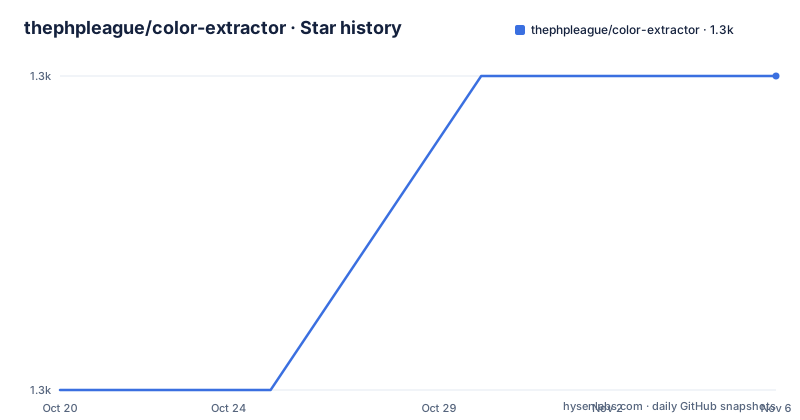
- thephpleague/color-extractor1,325 ★ · +1
| Repository | 2026-10-20 | 2026-11-06 |
|---|---|---|
| thephpleague/color-extractor | 1.3k | 1.3k |
1 Stars in the last 17 days, measured from the daily GitHub snapshot. Compare with other projects
Editorial analysis
Two objects, two different questions
The package name is league/color-extractor and the description is a single claim: extract colors from an image like a human would do. The implementation shows that claim as two distinct objects with two distinct jobs. The first is a Palette, which is an iterator over the colors in the image sorted by pixel count, so the most common color comes first, and it also answers counting questions such as how many distinct colors there are and how many pixels a given color occupies. The second is the ColorExtractor, which is built from a palette and exposes an extract method returning the most representative colors, and a palette also offers getMostUsedColors for the simpler case. The split matters because the two questions are not the same. Pixel frequency tells you what dominates the image, which is what a human notices, while a representative set has to avoid returning five near-identical shades of the same background, and the selection step is where that judgement lives. The documented usage shows both, with the palette iterated for counts and the extractor asked for five colours.
Loading an image, and the two image backends
A palette is built from an image file, and there are two ways in. The default is through GD, with Palette::fromFilename taking a path such as ./some/image.png, and if you prefer Imagick there is a parallel constructor that takes an Imagick instance, shown in the documentation as a commented alternative, Palette::fromImagick with a new \Imagick on the same file. The choice is worth a moment because it decides which extension you need on the server, and GD is the one most PHP installations already have. Colours are represented as integers internally, which is what the iteration keys are, and the conversion helpers convert in both directions, with Color::fromIntToHex on the way out and Color::fromHexToInt on the way in, so you can talk about #000000 in your code and let the library count it. That integer representation is the quiet design choice underneath the package, and it is also what makes the counting fast, because no colour object is allocated per pixel.
Transparency is discarded by default, on purpose
The section on handling transparency is the most interesting part of the documentation, because the default is a decision rather than an omission. By default any pixel with an alpha value greater than zero will be discarded, and the reason given is perceptual: transparent colors are not perceived as is, since fully transparent black would be seen as white on a white background. If you want transparency taken into account when building a palette, you have to specify the background colour, which you pass as the second argument of the Palette constructors. Its default value is null, meaning a color will not be added to the palette if its alpha component exists and is greater than zero. Set it as an integer representing the colour and transparent colors are blended before being added to the palette:
// we set a white background so fully transparent colors will be added as white in the palette
// pure red #FF0000 at 50% opacity will be stored as #FF8080 as it would be perceived
$palette = Palette::fromFilename('./some/image.png', Color::fromHexToInt('#FFFFFF'));
That comment is the whole feature in two lines. A 50 percent red becomes #FF8080, which is the red you would actually see, and the choice of background changes the resulting palette, so a transparent logo extracted onto a dark card will produce a different palette from the same file on a light one.
Using it, in the shape the documentation shows
The usage example is short enough to read as a template, which is a good sign for a small library. You load the autoloader, import Color, ColorExtractor and Palette, build a palette from a filename, iterate it, and use the helpers:
require 'vendor/autoload.php';

use League\ColorExtractor\Color;
use League\ColorExtractor\ColorExtractor;
use League\ColorExtractor\Palette;

// this will load the image using GD
$palette = Palette::fromFilename('./some/image.png');

// $palette is an iterator on colors sorted by pixel count
foreach($palette as $color => $count) {
    echo Color::fromIntToHex($color), ': ', $count, "\n";
}

// it offers some helpers too
$topFive = $palette->getMostUsedColors(5);
The count of distinct colours comes from count($palette) and the number of pixels of a specific colour from getColorCount with a hex value converted to an integer, which is how you would assert in a test that an image produced the palette you expected. The extractor is then built from the palette, and its extract method takes the number of colours you want back.
The package, the tooling and the version line
The package is installed with Composer under the name league/color-extractor, and it is part of The League of Packages, which is worth knowing because that group maintains a consistent house style across its libraries. The repository is small and well equipped for a library of its size: a src/ directory, a tests/ directory, a tools/ directory, a composer.json, a phpunit.xml.dist for the test configuration, a phpstan.neon for static analysis, and a .php-cs-fixer.php for code style, so the quality gates are all declared in the tree. The credits name Mathieu Lechat, known as MatTheCat, and the contributors. The version history is where the interesting detail sits. The recent releases are 0.6.0 from 2026-08-28, 0.5.0 from 2026-08-21, and before that 0.4.0 from 2022-09-24, so the package sat at the same minor version for close to four years and then moved twice in a week, and the last push to the repository was on 2026-08-31. The 0.x line means the API is not frozen, and for a library that is only a few hundred lines that is a reasonable place to be, but it is a thing to know before you depend on it.
Where color-extractor is the wrong tool
Four limits are clear. The first is that this is a histogram with a selection step, not colour science. There is no perceptual difference metric, no colour space conversion beyond the integer representation, and no notion of contrast, harmony or accessibility, so if you are building a design system that has to be legible for everyone, this gives you candidate colours and not a palette you can defend. The second is the interaction between the two phases. The representative-colour selection is a judgement about which of the most common colours to keep, and that judgement is only as good as its heuristics, so a photograph with a large smooth gradient, a sky or skin tones will produce a set that looks reasonable in aggregate and is not what a designer would have picked. The third is the transparency default, which discards every partially transparent pixel unless you supply a background, and forgetting that argument quietly changes the result of every palette you build from a logo. The fourth is the scope: it reads images and counts colours, and it does not generate themes, check contrast, or do anything with the colours afterwards.
Editorial conclusion
Adopt league/color-extractor if you need a small set of usable colours from an image, such as for a theme, a chart palette or a generated stylesheet, and you want the transparency behaviour to match what the eye sees. Do not adopt it for colour science, for perceptual difference metrics, or for images with subtle gradients, because the model is a pixel histogram with a representative-colour selection on top. Before you use it, decide how you will handle transparency, since the default discards any pixel with an alpha above zero, and note the release line is 0.6.0 from 2026-08-28, so the API is not yet frozen.
Frequently asked questions
What does league/color-extractor do?
It extracts colours from an image like a human would do. A Palette is an iterator over the image's colours sorted by pixel count, and a ColorExtractor built from that palette returns the most representative colours, with getMostUsedColors for the simpler most-common case.
How do I install the color-extractor package?
With Composer, using `composer require league/color-extractor`. The package then exposes the Color, ColorExtractor and Palette classes under the League\ColorExtractor namespace.
How does color-extractor handle transparent pixels?
By default any pixel with an alpha value greater than zero is discarded, because transparent colours are not perceived as they are. You can pass a background colour as the second argument of the Palette constructors, and transparent colours are then blended before being added to the palette.
Can I load images with Imagick instead of GD?
Yes. The default constructor loads the image using GD with Palette::fromFilename, and there is a parallel constructor that takes an Imagick instance, shown in the documentation as Palette::fromImagick with a new \Imagick on the same file.
How mature is the color-extractor package?
It is published under the MIT License, ships with phpunit, phpstan and php-cs-fixer configuration, and its current release is 0.6.0 from 2026-08-28 after 0.5.0 from 2026-08-21 and 0.4.0 from 2022-09-24, so the API is still on a 0.x line.
Official sources
Add this badge to your README
If you maintain this project, the badge below links readers to this analysis and shows its maintenance status from the daily GitHub snapshot. Paste the markdown into your README; add ?metric=license or ?metric=stars to the image URL for a different field.

[](https://hysenlabs.com/projects/thephpleague-color-extractor)Star history chart for your README
[](https://hysenlabs.com/projects/thephpleague-color-extractor)Was this useful?