Glide's compose file starts three build containers and no server
Wonderfully easy on-demand image manipulation library with an HTTP based API.
At a glance
- What is it?
- thephpleague/glide is an on-demand image manipulation library for PHP whose HTTP interface returns adjusted, resized and filtered images from signed URLs, cached with far future expiry headers, over three image back ends. Its repository ships a compose file whose three services run tests, static analysis and a style fixer and never start a web server, a container image that promotes a development configuration file and installs a debugger, and a testing instruction on the page that runs a global test runner rather than the vendored one the containers use.
- Who is it for?
- Use Glide when you want image transformation as a URL rather than as a background job, because the whole design is a signed request that returns an image, and the caching headers mean the work happens once per distinct request. Three things to know.
- Can I use it commercially?
- Yes. MIT is a permissive licence: you can use, modify and sell software built on it, as long as you keep its copyright and licence notices.
- Is it still maintained?
- Yes. The repository last received commits 35 days ago.
- What is it written in?
- Mainly PHP, according to GitHub's language statistics.
Answers come from the project's GitHub data, last synced on November 14, 2026, and from our analysis. They are not legal advice.
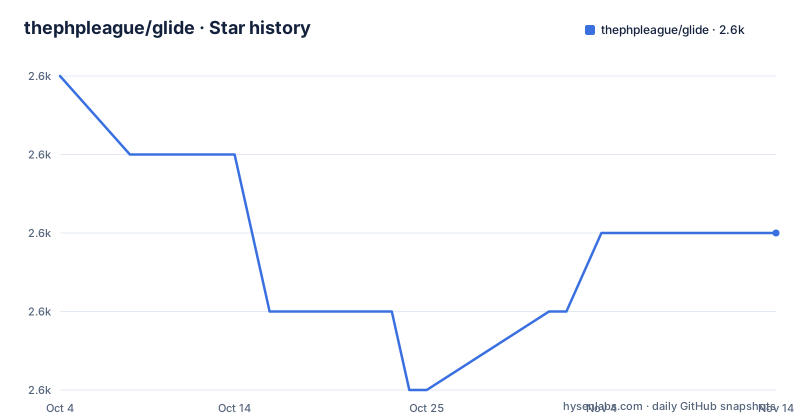
Star history
- thephpleague/glide2,630 ★ · -2
| Repository | 2026-10-04 | 2026-11-14 |
|---|---|---|
| thephpleague/glide | 2.6k | 2.6k |
-2 Stars in the last 41 days, measured from the daily GitHub snapshot. Compare with other projects
Editorial analysis
A compose file that starts three build containers and no server
There is a compose file at the root and not one of its services serves anything. The first runs the test suite, the second runs static analysis with a memory limit set on the command line, and the third runs the code style fixer with a flag that permits its riskier rules. All three build from the same Docker file, all three mount the project into the same working directory, and all three begin by installing the project's dependencies. So the file is a continuous integration harness written as three containers rather than one service with three commands, which is more isolation than a single box needs and rather more setup. It is worth knowing what the file is for, because its name invites the assumption that running it gives you a working image service, and it does not.
The page says one thing and the containers do another about testing
The testing section tells you to run a command called phpunit, with no path and no vendor directory in front of it. The repository ships a distribution-style test configuration file at the root, and the compose file runs the copy that lives inside the project's installed dependencies rather than a global one. Those are different programs: the global one is whatever version your machine has, or nothing at all if you do not have it, while the vendored one is the version the project's own dependency set resolved. The page also does not mention the compose file, which is the mechanism that makes the test run reproducible on a machine with no global tooling. This is a small inconsistency that costs a newcomer one confusing afternoon, and it is a good illustration of why the repository is often more trustworthy than the page for anything operational.
The image promotes a development configuration file
The container starts from the command line PHP image and then moves the development configuration file over the production one before doing anything else. That single line is the most consequential thing in the file, because the development configuration is the one with error reporting turned up, notices displayed and stricter runtime behaviour, and it is exactly what you do not want in something that serves requests. For the three compose services it is the right call, since they exist to fail loudly. It becomes a problem the moment somebody treats the image as a deployment artefact, because nothing in the file marks the setting as a development choice. The rest of the image is ordinary: a metadata library development package, version control, and the two archive tools the dependency installer needs. The extension install is one line, and it is worth reading as a list of what the test containers need at runtime:
RUN install-php-extensions zip gd imagick exif xdebugThe image installs a debugger and two compressors for nothing else
Extensions are installed with a helper script copied in from a separate image, and the list includes image processing, the metadata extension, compression and a debugger. Three of those four are what a test container needs. The fourth is a profiler that has no business being present in anything you would run against traffic, because it changes the performance characteristics of the very code you are benchmarking and can expose internals. Again the context saves it: this image exists to run three command line tools in a compose file. The composition is also quietly neat, since the dependency installer, the composer binary and the PHP runtime each come from a different purpose-built image rather than being installed by hand, which is the pattern that makes the base layers small.
URL signing is the security feature the page gives one line
The highlight list has ten items and one of them is the ability to secure image URLs using HTTP signatures. That single line is the entire security model of a library whose URLs describe transformations, because without it a visitor can edit a parameter and ask for a different image: a different crop, a different size, a different filter, or a source they were not meant to see. With signing, the URL carries a signature computed over the parameters, so an edited URL stops verifying. The page does not explain how the signature is computed, does not say where the key lives, and does not discuss rotation or what happens when a key leaks, which puts all of that in the documentation site rather than here. For a feature whose absence would make the library unsafe to expose, that is the first thing worth reading up on.
The style standard is declared while the enforcement is a tool
The highlights say the library is composer ready and compliant with a named coding standard, which is the traditional way of stating a style. The repository enforces style with a dedicated fixer configuration at the root, and the compose file runs that fixer with its riskier rules allowed. So there are two style systems: a standard named in prose and a tool named in configuration, and they can drift without anything noticing, because the tool decides and the prose is not checked. The same pattern shows up in the analysis side, where a static analysis configuration sits beside the fixer one and the compose service passes it a memory limit on the command line rather than recording it in the file. None of this is wrong. It is just three places where style is expressed and only one of them runs.
The newest release and the newest commit share a timestamp
The last commit to the repository and the newest release are one second apart, which tells you the release was cut from the tip of the branch rather than from a release branch, a maintenance branch or a curated snapshot. For a library that a Composer file resolves to a tagged version, that is a reasonable choice, since it means the tagged code is exactly what was on the branch. It also means the two preceding releases matter for reading the history: a four point release in May and a beta of that same release in April. So the version line is short and recent, which is worth knowing if you are pinning, because the difference between the beta and the final is likely to include exactly the kind of change the changelog exists to tell you about.
Editorial conclusion
Use Glide when you want image transformation as a URL rather than as a background job, because the whole design is a signed request that returns an image, and the caching headers mean the work happens once per distinct request. Three things to know. Signing is what makes that safe, so turn it on rather than leaving URLs editable by hand. The three back ends are not interchangeable in quality, since one of them is a system extension installed at the image level and the page does not rank them. And the page's own operational instructions are the least reliable part of it, because the testing command it gives and the containers the repository actually uses are different, which is a good signal to read the containers instead of the readme.
Frequently asked questions
What is Glide for PHP?
An on-demand image manipulation library with an HTTP interface. You request an image with parameters, and it returns the adjusted, resized or filtered result, cached automatically and served with far future expiry headers.
Which image libraries does Glide support?
Three back ends: the GD library, the Imagick extension and the libvips extension. It is built on two other libraries from the same family, one for image handling and manipulation and one for file system abstraction, which is what lets it read from different storage backends.
How do I secure Glide image URLs?
The library supports signing image URLs with an HTTP signature, so a visitor cannot edit the parameters by hand to request a different transformation. The page does not describe how the signature is computed or where the key lives.
How do I install and test Glide?
Composer installs it under the league vendor prefix. For testing, the page tells you to run a test runner by name, while the repository's own container setup runs the vendored copy from inside the project instead.
How do I report a security issue in Glide?
By email to the maintainer's personal address rather than through the issue tracker, and that address on the page is the only place it is published.
Is Glide free?
The library is MIT licensed and installed from a public package registry, so it carries no licence cost. The page does not discuss hosting cost, which is where an on-demand image service actually spends money.
Official sources
Add this badge to your README
If you maintain this project, the badge below links readers to this analysis and shows its maintenance status from the daily GitHub snapshot. Paste the markdown into your README; add ?metric=license or ?metric=stars to the image URL for a different field.

[](https://hysenlabs.com/projects/thephpleague-glide)Star history chart for your README
[](https://hysenlabs.com/projects/thephpleague-glide)Was this useful?