Shadows: a D3D11 sample where seven shadow mapping techniques sit in one codebase
A sample app that demonstrates several techniques for rendering real-time shadow maps
At a glance
- What is it?
- TheRealMJP's Shadows is a D3D11 sample application that implements cascaded shadow maps, their stabilized variant, automatic cascade fitting and several filtering approaches including variance and moment shadow maps. It is teaching code with a 2015 Visual Studio project, not a library to depend on.
- Who is it for?
- Adopt this sample as a reference when you are implementing shadow mapping in Direct3D 11 and want working code for cascade splitting, stabilized cascades, depth buffer based fitting, percentage closer filtering, variance shadow maps, exponential variance shadow maps and moment shadow maps side by side in one project.
- Can I use it commercially?
- Yes. MIT is a permissive licence: you can use, modify and sell software built on it, as long as you keep its copyright and licence notices.
- Is it still maintained?
- Yes. The repository last received commits 153 days ago.
- What is it written in?
- Mainly C++, according to GitHub's language statistics.
Answers come from the project's GitHub data, last synced on November 7, 2026, and from our analysis. They are not legal advice.
Star history
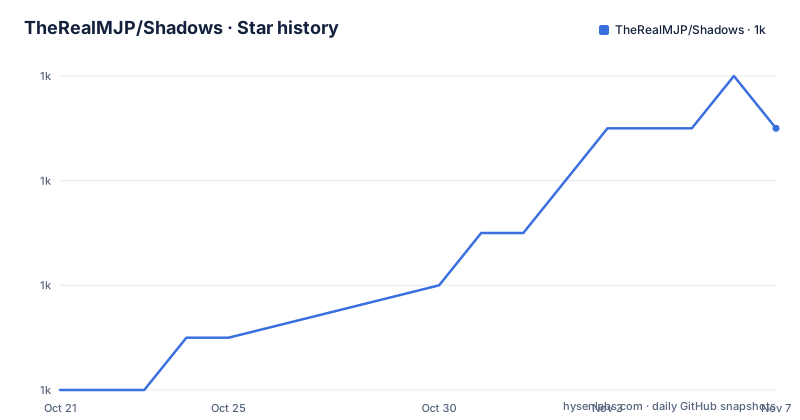
- TheRealMJP/Shadows1,047 ★ · +5
| Repository | 2026-10-21 | 2026-11-07 |
|---|---|---|
| TheRealMJP/Shadows | 1k | 1k |
5 Stars in the last 17 days, measured from the daily GitHub snapshot. Compare with other projects
Editorial analysis
This is a sample app, so judge it by what it teaches
The repository is a D3D11 sample application that demonstrates several techniques for rendering real-time shadow maps. That framing decides how to evaluate it. There is no library API, no package to add, and no versioned interface to code against. The value is in reading the implementation and porting the parts that match your problem.
The repository layout is small and says what it is made of: a `Shadows/` directory for the sample's own source, an `Externals/` directory for third-party code, and a `Content/` directory for assets. All external dependencies are included in the repository, which is stated explicitly in the build instructions, and that is why `Externals/` is there.
The techniques listed in the README are the curriculum. There are three cascade techniques: cascaded shadow maps, stabilized cascaded shadow maps, and automatic cascade fitting based on depth buffer analysis, which the README attributes to a Sample Distribution Shadow Maps article from Intel. There are four filtering approaches: various forms of percentage closer filtering, variance shadow maps, exponential variance shadow maps and moment shadow maps.
That is a substantial spread for one codebase. Most engine codebases ship one shadow implementation and a debug visualisation, and the rest of the list is folklore. Here the alternatives sit next to each other, which is the only practical way to compare them.
Three ways to split the view frustum, and one way to choose the splits automatically
Cascaded shadow maps address the classic problem that a single shadow map covering the whole view frustum has to spend its resolution on distant geometry. The technique splits the frustum into slices along the depth axis and renders one shadow map per slice, each with its own projection.
Stabilized cascaded shadow maps address a different problem: the cascades themselves swim as the camera moves, because the split boundaries are recomputed in world space, so the shadow edges shimmer. The stabilized version constrains the cascade extents so they do not shift every frame, which is the difference between a shimmering edge and a steady one. Having both in the same project is the point, because the trade-off is in the code.
Automatic cascade fitting is the third layer. Instead of splitting by a fixed rule, the application analyses the depth buffer to work out where the geometry actually is, and fits the cascades to that distribution. The README cites Intel's Sample Distribution Shadow Maps article for the approach, and the cited idea is that a uniform split of the frustum wastes most of its cascades on empty space.
What the README does not do is describe the parameters, the number of cascades, or the projection maths. Those live in the sample source, and the accompanying blog articles are the natural companion reading, because a shadow technique that depends on a specific set of tuning constants is hard to copy from a diff.
Four filtering approaches trade bias for light bleeding
The filtering half of the list spans the main options for softening shadow edges. Percentage closer filtering compares the depth in the shadow map against the stored depth over a neighbourhood of samples, which keeps hard shadow edges and produces a small amount of bias. The README lists various forms of it, so multiple neighbourhood sizes or sample patterns are implemented.
Variance shadow maps take a different route: they store the mean and the variance of the depth distribution rather than a single depth, and the shadow test becomes a probability calculation. That removes the aliasing artefacts that plague single-sample comparison, at the cost of introducing light bleeding, where shadow appears to leak into areas that are actually lit. The README links the original variance shadow map paper.
Exponential variance shadow maps push that further by warping depth with an exponential function before computing the moments, which reduces bleeding in the near range at the price of a parameter that has to be tuned. The README links the ACM publication for EVSM.
Moment shadow maps generalise the idea by storing a higher order moment of the depth distribution, and the README links the Moment Shadow Maps project page. The whole family trades one artefact for another, and the reason to have all of them in one repository is that the artefact you care about depends on your scene, your light configuration and your camera, and only measurement settles it.
The two blog posts are the real documentation
The README states that the code sample was produced as part of two articles on the author's blog, and links both. The first is a post on shadow maps in general, and the second is a post on an update to the shadow sample.
This is the shape of the project: a blog post is the explanation and the repository is the artefact, and the two are versioned together. The second link matters in particular, because it means the sample was revised after the first publication, and the repository's release history suggests it has been revised more than once.
For a reader deciding whether to spend an afternoon in this code, the practical sequence is to read the first post for the concepts, then the second for what changed, then open the source for the implementation. The README itself is a list, not a guide: it names the techniques and stops.
The author also publishes the API reference for the sample in the same blog, and the repository carries a `Content/` directory for the scene assets, which is where the two releases with model files come in.
The build is a Visual Studio 2015 solution for Windows 7, 8 or 10
The build instructions are short and specific. The repository contains a Visual Studio 2015 project and solution file that is ready to build and run on Windows 7, 8 or 10, and all external dependencies are included in the repository.
There is no cross-platform build path described, no CMake configuration, and no mention of a toolchain other than Visual Studio. That is consistent with the project being a D3D11 sample: Direct3D is the Windows graphics API, so the constraint is the API, not a choice by the author.
The practical consequence for a reader in 2026 is that the toolchain is old. Visual Studio 2015 is a specific version, and while newer Visual Studio releases can usually open older solutions, the project file format and the toolset settings are those of 2015, and the README does not claim compatibility with anything newer. A reader with only a current Visual Studio will most likely open the solution and let the tool offer to retarget it.
The instruction that dependencies are vendored is worth pausing on. It means the project builds without network access, and it also means the versions of the third-party libraries are frozen at whatever was current when they were copied in. For a teaching sample that is the right trade, because the dependency is not the subject of the lesson.
The release tags carry scene models, and the last tag is old
The release list is unusual. The three recent tags are `Tower_1.00` from 2024-04-07, `Powerplant_1.00` from 2023-10-09 and `v1.00` from 2016-01-24, and two of the release names are accompanied by an object file in the listing, `Tower.obj` and `Powerplant.obj`.
Those names are scene assets. A tower and a power plant are test scenes, and a good shadow test needs geometry at a range of scales and distances, which is exactly what a tall thin tower and a large industrial structure provide. The tags are not releases of a library version; they are checkpoints that include new content for the sample.
The dates tell the story of how the project is worked on. There is a ten-year gap between the 2016 release and the 2023 one, with the last push on 2026-06-07. So the sample is not dead, but it is worked on in bursts, and the most recent release predates the most recent commit by more than two years. Anyone planning to build on this code should treat the default branch as the current state and the tags as scenery checkpoints.
The licence is MIT, with the `LICENSE` file at the repository root, which makes the code usable in a commercial engine with attribution, unlike the algorithm papers it implements.
Where this sample is the wrong tool
The first wrong case is anything that is not Direct3D 11 on Windows. There is no Vulkan, Metal or OpenGL version described, no cross-platform build, and no engine integration layer. Porting the ideas to another API is a rewrite of the rendering code, not a configuration change.
The second is production use. This is a sample application: a project and a solution, a scene viewer, and no engine interface, no asset pipeline, no editor integration and no performance framework. The techniques are worth porting; the application is not a foundation to build a game on.
The third is a team that needs a maintained shadow implementation. There is no issue tracker promise, no release cadence, and a ten-year gap in the tag history. If a bug in the cascade fitting code affects your game, you are reading the code and fixing it yourself. The blog posts are written by the author as a demonstration of his own technique, and the repository may not be maintained as a general purpose sample.
The fourth is a team that wants to evaluate a shadow technique quickly. Seven techniques in one codebase is an invitation to a long comparison, and each one has parameters that need tuning against your own content. For a quick decision, a single implementation in your own engine with a debug visualisation is likely to be faster.
Editorial conclusion
Adopt this sample as a reference when you are implementing shadow mapping in Direct3D 11 and want working code for cascade splitting, stabilized cascades, depth buffer based fitting, percentage closer filtering, variance shadow maps, exponential variance shadow maps and moment shadow maps side by side in one project. Do not adopt it as a dependency, because it is a sample application with a Visual Studio 2015 solution rather than a reusable library, and it targets Direct3D 11 on Windows only. Before you build it, check that you have Visual Studio 2015 or a compatible toolchain, and read the two blog articles the README links, since they carry the reasoning the code comments cannot.
Frequently asked questions
Which shadow mapping techniques does TheRealMJP's Shadows sample implement?
The README lists cascaded shadow maps, stabilized cascaded shadow maps, automatic cascade fitting based on depth buffer analysis, various forms of percentage closer filtering, variance shadow maps, exponential variance shadow maps and moment shadow maps.
How do I build the Shadows sample?
The repository contains a Visual Studio 2015 project and solution file that is ready to build and run on Windows 7, 8 or 10, and all external dependencies are included in the repository, so no additional downloads are needed.
Does the Shadows sample work on Linux or macOS?
The README describes a D3D11 sample with a Visual Studio solution for Windows, and it does not describe a cross-platform build or any other toolchain. Direct3D is the Windows graphics API, so the constraint comes from the API itself.
Is there an article explaining the shadow techniques in the sample?
Yes. The README says the code sample was done as part of two blog articles, and links a post on shadow maps and a second post on a shadow sample update, with the API reference for the sample published on the same blog.
Official sources
Add this badge to your README
If you maintain this project, the badge below links readers to this analysis and shows its maintenance status from the daily GitHub snapshot. Paste the markdown into your README; add ?metric=license or ?metric=stars to the image URL for a different field.

[](https://hysenlabs.com/projects/therealmjp-shadows)Star history chart for your README
[](https://hysenlabs.com/projects/therealmjp-shadows)Was this useful?