The compose file ships with the admin API enabled and a guessable admin password
A Docker Container to easily run a Palworld dedicated server.
At a glance
- What is it?
- palworld-server-docker runs a game's dedicated server in a container and turns the game's configuration into environment variables. Its default compose file leaves the admin interface on, sets the admin password to a placeholder, comments out the port that protects it with a warning not to forward it, and its standalone run example ends half way through a flag. It also compiles its admin client from checksummed source, pins only one of its two base images, and schedules backups, reboots and mod updates for the same minute.
- Who is it for?
- palworld-server-docker is a well-built answer to running this particular game's server yourself, and the operational surface it exposes, scheduled updates, backups with retention, reboot warnings, idle pausing and per-player logging, is well beyond a thin image wrapper. Three things to fix before you run it.
- Can I use it commercially?
- Yes. MIT is a permissive licence: you can use, modify and sell software built on it, as long as you keep its copyright and licence notices.
- Is it still maintained?
- Yes. The repository last received commits 11 days ago.
- What is it written in?
- Mainly Shell, according to GitHub's language statistics.
Answers come from the project's GitHub data, last synced on November 15, 2026, and from our analysis. They are not legal advice.
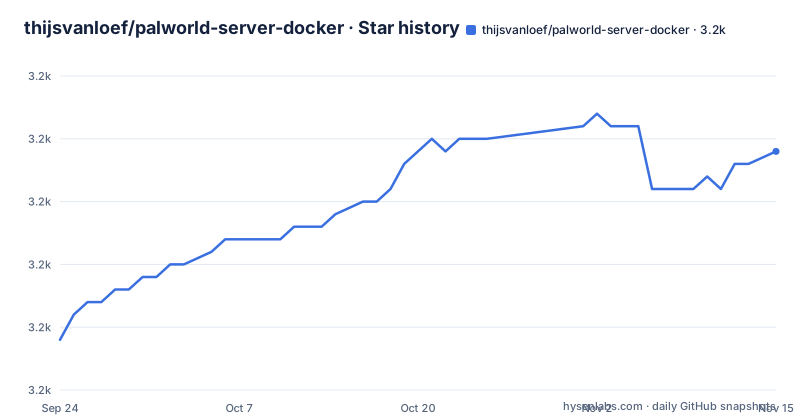
Star history
- thijsvanloef/palworld-server-docker3,219 ★ · +15
| Repository | 2026-09-24 | 2026-11-15 |
|---|---|---|
| thijsvanloef/palworld-server-docker | 3.2k | 3.2k |
15 Stars in the last 52 days, measured from the daily GitHub snapshot. Compare with other projects
Editorial analysis
The default configuration exposes an admin interface behind a comment
Read the compose file that ships in the repository root as if it were the configuration you are about to publish, because that is what most people do.
Three lines matter. The admin interface is switched on, with its own port. The admin password is set to a placeholder string that reads like a documentation example. And the port mapping for that interface is commented out, with a note in capitals telling you not to forward it.
So the protection on an admin endpoint is a comment. The port is not published by default, which is the right default, but the service is listening inside the container and the password is a known string. Anyone who changes one line, or copies this file into a hosting panel that publishes all ports, has published an admin interface authenticated with a password that appears in a public repository.
The community listing setting has the same shape: it is off by default, and the comment next to it says to use it only with a server password set. So the file is full of these paired defaults and warnings, which is careful work, and it is also a configuration where the difference between safe and exposed is one character of commenting.
The standalone run example ends in the middle of a flag
There are two ways to run this and one of them does not work as printed.
The compose file at the repository root is complete. The long single-command example further down the page sets about a dozen environment variables, mounts a directory, publishes two ports and ends with a restart policy.
The restart policy ends with the word unless, followed by a hyphen, and then the code block closes. The full value is one word longer than what is printed.
docker run -d \
    --name palworld-server \
    -p 8211:8211/udp \
    -v ./palworld:/palworld/ \
    -e PUID=1000 \
    -e ADMIN_PASSWORD="adminPasswordHere" \
    --restart unless-
So the command a user copies when they would rather not write a compose file is syntactically invalid at its last flag, and the error the container runtime produces will be about the restart policy rather than about anything recognisable as the project's configuration.
Both compose examples in the same document get it right, which means this is one line in one block rather than a misunderstanding of the option. It is worth knowing because the run example is also the only place the readme shows every environment variable at once, including the two passwords and the cross-play platform list.
The debug log level writes every command argument, including secrets
One comment in the environment configuration is the most useful warning in this repository.
The log level setting accepts four values, and next to it the comment says that the debug level will log all command arguments, including secrets, to the logs, and to share with caution.
That is a small, specific, honest warning about a real operational hazard. A game server is administered by copying log output into an issue, and the level that makes diagnosis easy is the level that makes the file dangerous to attach to a public tracker.
The rest of the logging configuration shows how much thought went into it: player logging can be enabled independently, with its own poll period, there is a log filter switch, and the output format is configurable. So the project has a real observability story, and it documents the sharp edge of it in the same place as the setting.
It is also the setting most likely to be turned on by someone new, which is why the warning sits next to the value rather than in a section about troubleshooting.
Two architectures, two third-party base images, only one pinned by date
The image has four stages, and the third and fourth are where the multi-architecture promise is either kept or not.
The amd64 base comes from one maintainer's image, tagged by suite name. The arm64 base comes from a different maintainer's image, tagged with a suite name and a date.
Then a single line selects between them by target architecture, with a comment explaining that the platform flag is deliberately ignored on amd64 hosts so the multi-architecture build keeps working.
So the two halves of a multi-architecture image are not the same base. One is pinned to a date, which means a rebuild months later produces something reproducible. The other is pinned to a moving tag, which means it produces whatever the maintainer last pushed. Your arm64 host and your amd64 host are running different operating systems under the same image name.
There is also a first stage that has nothing to do with the game: it compiles the remote administration client from source, and the next section is about why that matters more than it looks.
The admin client is compiled from checksummed source rather than downloaded
The first build stage does something that is easy to miss and worth crediting.
It takes a version number and a checksum as build arguments, downloads a release archive from a tagged version, verifies the archive against the pinned checksum, unpacks it, and compiles the command line client from the source it just verified, with the C library disabled.
The alternative would be to download a compiled binary and check its hash. This project checks the hash of a source archive and builds the binary itself instead.
That is a stronger position, because a checksum on a source archive plus a from-source build removes one step from the trust chain: there is no pre-built artefact to trust, and the compiler runs inside the image build where you can read what it was given. The cost is a slower build and a required build toolchain in the first stage.
The same file carries three separate notices about editing the pinned checksums when the admin client, the cron runner or the download tool are updated, which is a maintainer telling future maintainers exactly which lines to touch.
Midnight is the default hour for backups, reboots and mod updates
The environment file is a list of about eighty settings, and the ones worth reading first are the ones with schedules attached.
Backups are enabled by default, with retention of thirty days and deletion of old ones switched off, and they run at midnight. Scheduled updates exist, are switched off by default, and default to running every hour with a thirty minute warning. Scheduled reboots exist, are switched off by default, refuse to run if players are online unless you override that, warn five minutes ahead, and default to midnight.
Then the mod section, which is marked as Windows-only, enables mods by default, updates them on boot, and schedules that update at midnight as well.
So three independent jobs default to the same minute of the day. As shipped, two of them are off and only backups run, so nothing collides. The moment a server owner turns on automatic reboots, midnight becomes both the backup and the reboot, and if mods are enabled on that runtime it is three jobs in the same minute on a machine that is also about to be unavailable.
That is a configuration design question rather than a bug, and it is exactly the kind of thing that is invisible until it is a problem.
The server pauses itself and waits for a port knock
One feature in this environment file is unlike anything else in a game server container.
There is a switch to pause the server automatically, a flag for how long it waits, two logging switches for it, and a setting whose value is auto.
That setting names a port-knocking daemon. The behaviour it implies is that the container can detect whether that daemon is present, and when it is, an idle server suspends itself and waits for a network knock before waking.
For a dedicated server that is idle most of the day, suspending rather than running a game process on an idle machine is a sensible power and cost decision, and integrating it with port knocking means it wakes when you ask it to rather than on a timer. The `auto` value means detect the daemon rather than require it, so the feature degrades to a timeout-based resume where knocking is not set up.
The estimate for how long it waits is in seconds and is named as an estimate, which is the right name for it: a game server cannot know how long you will be away.
Every gameplay rate is an environment variable, beside a hardware minimum
The long tail of that environment file is the actual answer to what this container does beyond starting a process.
There is difficulty, a randomiser type and a randomiser seed, and then multipliers for day and night speed, experience rate, capture rate, how many creatures spawn, attack and defence damage for creatures and for players, the rate at which a player's stamina falls, and automatic health regeneration. All of them are strings with a value of one.
That is what makes this more than an image: the game's difficulty curve and economy are configuration, which means a server owner can run a harder or faster variant without touching code, and can keep those settings in version control next to the compose file.
Set against that is the resource table near the top of the readme: four CPU cores minimum, sixteen gigabytes of memory with a recommendation to go above thirty-two for stable operation, and eight gigabytes of storage rising to twenty.
And in the supported-platform list, alongside desktop operating systems and three generations of Apple hardware, there is a single-board computer in its fourth and fifth generation. Nothing on the page reconciles a sixteen gigabyte memory minimum with that board, and it is worth working out which list applies to you before you pick a machine.
Editorial conclusion
palworld-server-docker is a well-built answer to running this particular game's server yourself, and the operational surface it exposes, scheduled updates, backups with retention, reboot warnings, idle pausing and per-player logging, is well beyond a thin image wrapper. Three things to fix before you run it. Replace the admin password and the server password, and either turn off the admin interface or change its port, because the default configuration has it enabled and relies on a comment telling you not to forward the port. Read the debug logging warning before you share any log, since that level writes every command argument, secrets included, into the file. And if you enable the scheduled jobs, move the backup off midnight, because backup, reboot and mod update all default to the same minute.
Frequently asked questions
Is there a way to host a Palworld server?
This repository is one: a container image that runs the dedicated server, published for two processor architectures, with an example compose file and around eighty environment variables covering ports, passwords, scheduled updates, backups, restarts, logging, idle pausing and the game's own difficulty and rate multipliers.
how to update palworld server docker
Two mechanisms, both in the example environment file. Updating when the container starts is switched on by default. A scheduled update is available but switched off, defaulting to hourly, with a warning period so players are told before it happens. Backups and scheduled restarts are separate settings on their own cron expressions.
Can Docker be used as a server?
This repository does not answer that in general. It uses a container image as the distribution mechanism for a game server, including a variant that runs the Windows build through a compatibility layer, which is the closest thing here to an answer.
How to install Docker in server?
Not covered here. The documentation assumes the container runtime is already installed and shows how to run the image, or a compose file, against it, including a second compose file for the compatibility-layer variant.
how to play palworld server without host
This repository does not address client-side play. It covers hosting the server side, and it lists community server visibility as one of the reasons a second port is published alongside the game port.
Official sources
Add this badge to your README
If you maintain this project, the badge below links readers to this analysis and shows its maintenance status from the daily GitHub snapshot. Paste the markdown into your README; add ?metric=license or ?metric=stars to the image URL for a different field.

[](https://hysenlabs.com/projects/thijsvanloef-palworld-server-docker)Star history chart for your README
[](https://hysenlabs.com/projects/thijsvanloef-palworld-server-docker)Was this useful?