The radar's fourth ring was renamed, and its example data still mixes capitalisation
A library that generates an interactive radar, inspired by https://thoughtworks.com/radar/.
At a glance
- What is it?
- A radar generator whose no-friction input path is a world-readable spreadsheet, whose ring rename broke existing datasets, and whose runtime container ships fifteen GUI test libraries and a build toolchain it no longer needs.
- Who is it for?
- The renderer is good and the data format is four columns, so the cost of adopting it is low. Two things to plan for.
- Can I use it commercially?
- Yes, with strict conditions. AGPL-3.0 is a network copyleft licence: if people use a modified version over a network, for example as a hosted service, you must offer them its source code under the same licence.
- Is it still maintained?
- Activity is slowing. The repository last received commits 6 months ago.
- What is it written in?
- Mainly CSS, according to GitHub's language statistics.
Answers come from the project's GitHub data, last synced on November 15, 2026, and from our analysis. They are not legal advice.
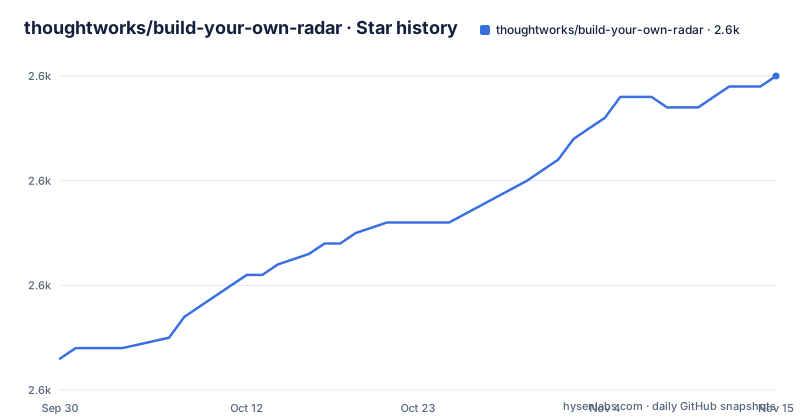
Star history
- thoughtworks/build-your-own-radar2,600 ★ · +27
| Repository | 2026-09-30 | 2026-11-15 |
|---|---|---|
| thoughtworks/build-your-own-radar | 2.6k | 2.6k |
27 Stars in the last 46 days, measured from the daily GitHub snapshot. Compare with other projects
Editorial analysis
The fourth ring was renamed and the example data shows it
At the bottom of the readme there is a disclaimer, and it is the most consequential paragraph on the page.
It says the fourth ring's name was changed in the recent release, and the example data at the top of the page still shows the damage. Three rows use a lowercase ring value: adopt, trial, assess. The fourth row uses a capitalised one. The disclaimer says the old name has been replaced, which means every dataset written against the previous name now fails to place its outermost ring, and the page's own sample is inconsistent about whether ring values are case-sensitive.
There is a hint about the answer. The documentation for the optional movement column says its four accepted values are matched without regard to case. Nothing says the same about ring and quadrant names, which is where the inconsistency actually bites.
So a dataset migration is required, and the readme does not tell you what the four accepted values are in a form you can copy. It points you at the example table, and the example table is inconsistent. That is the single most annoying thing about an otherwise very small data format.
The fix on your side is trivial: normalise ring names to the four the disclaimer names, in whichever case the renderer turns out to want. Finding out which is the part the page should have told you.
The easy path requires a world-readable spreadsheet
The setup instructions are direct about this. You need to make your data public in a form the app can digest.
The mechanism is specific: create a spreadsheet with the required column headers, then in the sharing dialog set general access to anyone with the link, at viewer permission, and use the sheet's address. The readme even points out that only the portion of the address between two path segments is actually needed, though the whole address works.
There are two alternatives, and both exist because that request is uncomfortable for some data.
A private sheet is supported, and then you get a Google sign-in popup, you authorise the hosted app to read that sheet, and the radar renders. So the hosted instance is an OAuth client against Google Sheets, and the private path is a real integration rather than a workaround.
The third option is to stop sending your data to somebody else's instance. The readme says twice, once for the spreadsheet format and once for each of the two file formats, that if you do not want to host the file publicly you can follow a set of steps to host it locally on your own container.
That is the right advice for the data it applies to. A technology radar is a document that names what an organisation has adopted, is trialling, is watching and has decided against. Publishing that as a link-readable spreadsheet is a decision about disclosure, and the tool's default is to ask you to make it.
Two file formats are parsed by a data visualisation library, and the notes are copies
The readme documents three input formats and two of them share an oddity.
The first is a spreadsheet, read through the hosted app. The second is a comma-separated file behind a public address, with a full example and a link to a raw file in this repository's own test resources. The third is a JSON array of objects with the same five fields, with a longer example that includes the same four entries.
name,ring,quadrant,isNew,description
Composer,adopt,tools,TRUE,"Although the idea of dependency management ..."
JSF,Caution,languages & frameworks,FALSE,"We continue to see teams run into trouble using JSF ..."
Now the note under each file format. The comma-separated one says the parsing uses a data visualisation library and points at that library's documentation for the format details, linking a documentation section about comma-separated files. The JSON note says exactly the same thing and links the documentation section about JSON in the same library.
So a JSON array is parsed by a loader whose documented speciality is delimited text, and both notes send you to the same project's readme for the rules. Two consequences. Your JSON has to satisfy a text loader's expectations, which is why the example wraps descriptions in quotes and why a description containing a comma would need care. And neither note tells you what happens on a parse error.
That last point is worth chasing in the source, because a data tool whose failure mode is a blank canvas is the hardest kind to debug. The readme promises a radar and never says what a malformed row looks like.
The movement column is the one piece of the format that is properly specified, with four accepted values and a statement that they are matched without regard to case.
The hosted app enforces the canonical ring names and your own container does not
There is a constraint that appears only after the usage instructions, and it is the difference between trying this and adopting it.
When you use the app on the hosted instance, the ring and quadrant names in your data should be among the values in the example table. When you self-host, there is no such condition on the names, and the documentation has a section on specifying custom names.
So the same file is valid in one place and invalid in the other, and the reason is that the hosted instance shares a vocabulary with the company radar it was built to render. A self-hosted instance has four rings too, but you get to name them.
That is a sensible design, and it is also a subtle lock-in. If your radar is only valid on somebody else's instance, your data carries an assumption about their vocabulary, and when that vocabulary changes, which it just did, you find out at render time.
The self-hosted path is the one to prefer for anything that matters, and the readme supports it in two ways beyond the naming: the local file option, and the explicit statement that custom names are supported.
The readme also points at a step-by-step guidance page on the company's own site for using the hosted app, which is the last piece of the picture: the hosted instance is a product, with documentation, and this repository is the renderer behind it.
The runtime image ships fifteen GUI libraries and a build toolchain it does not need
The container file is where the interesting engineering is, and it is a build image that never stopped being one.
It starts from a web server image at a pinned version. It updates and upgrades the system packages, which unpins them at build time. Then it installs Node by piping a distribution's setup script into a shell, and then it installs a list of fifteen packages: two generations of a desktop toolkit, a graphics buffer library, a notification library, a settings library, three cryptography and audio libraries, a testing library, an authentication agent, a virtual frame buffer, and a compiler with make.
Almost none of that is needed to serve a radar. The compiler is for the build step that follows. The virtual frame buffer and the desktop libraries are for driving a headless browser, which is what the end-to-end tests need, not what the application needs.
Then the application itself is built: the dependency files are copied, dependencies are installed from the lock file, the source is copied over the top, and the entrypoint is cleared, with a comment explaining that the base image's entrypoint would otherwise try to run the command as a Node command. The container's command is a shell script that builds and starts the web server.
So the published image is a web server carrying a Node installation, a compiler and fifteen GUI packages it will never load. It works, and it is about twice the size it needs to be. Splitting the build stage from the runtime stage would fix it, and the file already has the comment showing the author knew exactly how the base image behaves.
Three test systems, one of which cannot run in a pipeline
The test story is broader than most projects of this size, and one entry in it cannot be automated.
There is a unit runner with a CSS-modules transform and a browser-like environment configured, so component tests can import stylesheets. There is an end-to-end runner with two scripts, one interactive and one headless, and the interactive one opens a window and waits for a person. There is also a shell script at the repository root for running the end-to-end tests, plus a configuration file for the end-to-end runner and a report generator in the dependency list.
The interactive script takes a host address from the environment and opens a window against it. In a pipeline that hangs rather than fails, which is why the headless variant exists and why the quality gate does not include either.
The gate itself runs the lint and formatting check, then the unit tests with coverage. So the automated contract is lint plus unit tests, and the end-to-end suites are opt-in. For a project whose entire output is a rendered page, that is a light automated contract, and the interesting failure, a radar that renders empty because a data row did not parse, is exactly the kind the unit tests will not catch.
That makes the missing error message from the data loader more consequential, since nothing in the automated suite stands between a malformed row and an empty canvas.
The manifest is one patch ahead of the newest release and its own description is empty
Small packaging facts, all of them checkable in two files.
The manifest declares version 1.2.1. The newest release tag is 1.2.0, published about a week before the last commit to the default branch. So the tree is one patch ahead of anything a user can install, which is normal and harmless.
The release history is the interesting part. Two patch releases in April and June 2024, then nothing until April 2026. A two-year gap and a single feature release, with the fourth ring rename in it. Whatever happened in between, the visible record is dormancy followed by one release and one week of commits.
The manifest also has an empty description string, and it names an entry point file at the root of the repository that is not in the root listing. Both are the kind of thing nobody looks at in a project whose real entry point is a build script, and both are the kind of thing that makes a package listing look unfinished to someone who lands on it from a registry rather than from the documentation.
The header carries a badge for a particular formatting toolchain, and the manifest contains that formatter, a separate linter with plugins for two of the test frameworks and one for the formatting rules, and separate ignore files for each of them. Two tools, three ignore files, and a badge that advertises a third naming convention.
Editorial conclusion
The renderer is good and the data format is four columns, so the cost of adopting it is low. Two things to plan for. The fourth ring was renamed, so any existing dataset needs migrating before it renders, and the hosted instance additionally enforces the canonical ring and quadrant names while your own container does not. And the default input path requires a publicly readable spreadsheet, which for a document that records which technologies your organisation has rejected is the decision to think about first.
Frequently asked questions
What does build-your-own-radar do?
It renders an interactive technology radar from a simple data file. Each entry needs a name, a ring, a quadrant, a flag for whether it is new, and a description, and an optional status column shows movement in or out between rings. It can also generate a dashboard of the radar's state.
What data formats does build-your-own-radar accept?
A Google Sheet, a comma-separated file behind a public address, or a JSON array of objects, all with the same five fields. Both file formats are parsed with a data visualisation library and the readme points at that library's documentation for the format details.
Do I have to publish my spreadsheet to use build-your-own-radar?
For the frictionless path, yes: the instructions say to set general access to anyone with the link at viewer permission. A private sheet works instead through a Google sign-in popup that authorises the hosted app, and the self-hosted container can read a file from your own machine, which the readme points out for both file formats.
Why did my radar entries disappear after an update?
The fourth ring was renamed in a recent release, so datasets using the previous name no longer match. The readme carries a disclaimer about the change, and its own example data mixes capitalisation between ring values, so normalise the ring names yourself.
Can I use custom ring and quadrant names with build-your-own-radar?
Not on the hosted instance, which expects the ring and quadrant names from the example table. On your own container there is no such restriction, and the documentation has a section on specifying custom names.
Official sources
Add this badge to your README
If you maintain this project, the badge below links readers to this analysis and shows its maintenance status from the daily GitHub snapshot. Paste the markdown into your README; add ?metric=license or ?metric=stars to the image URL for a different field.

[](https://hysenlabs.com/projects/thoughtworks-build-your-own-radar)Star history chart for your README
[](https://hysenlabs.com/projects/thoughtworks-build-your-own-radar)Was this useful?