urlwatch: a diff based webpage watcher that tells you what actually moved
Watch (parts of) webpages and get notified when something changes via e-mail, on your phone or via other means. Highly configurable.
At a glance
- What is it?
- A Python command line tool that stores a copy of the pages you care about, compares them on a schedule and notifies you with a unified diff, packaged as a library with YAML config and pluggable reporters.
- Who is it for?
- urlwatch is a good fit when you want a diff you can read in a terminal or an email, rather than a screenshot you have to compare by eye, and when the list of pages is small enough to edit as text. Filters are the part that determines whether it stays useful, since a page that changes its build timestamp on every request needs either a filter or removal from the list.
- Can I use it commercially?
- Check first. The repository uses a licence we do not classify automatically, so read its LICENSE file before any commercial use.
- Is it still maintained?
- Yes. The repository last received commits 121 days ago.
- What is it written in?
- Mainly Python, according to GitHub's language statistics.
Answers come from the project's GitHub data, last synced on November 7, 2026, and from our analysis. They are not legal advice.
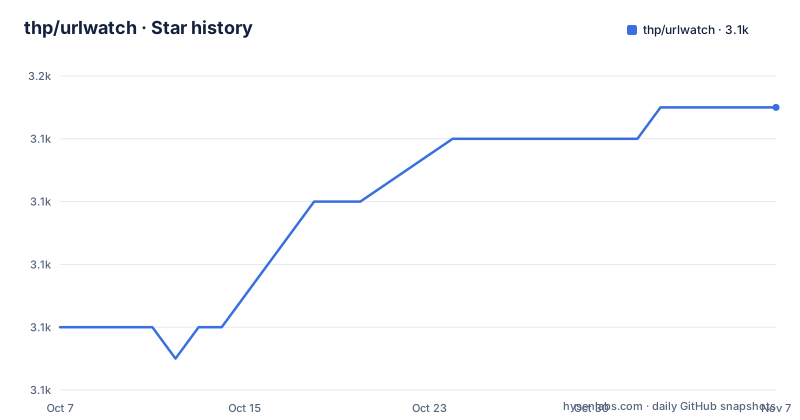
Star history
- thp/urlwatch3,149 ★ · +7
| Repository | 2026-10-07 | 2026-11-07 |
|---|---|---|
| thp/urlwatch | 3.1k | 3.1k |
7 Stars in the last 31 days, measured from the daily GitHub snapshot. Compare with other projects
Editorial analysis
What it watches and what it reports back
urlwatch keeps a stored copy of each page you register and compares the current version against it on a schedule. The repository description and the README agree on the shape of the output: a notification that includes the URL that changed together with a unified diff of what changed.
That diff is the product. A screenshot diff tells you something moved and leaves you to work out what. A unified diff of the page tells you the price changed, the release notes gained a paragraph, or the job posting closed. For the common case of watching a competitor's page, a version announcement or a status page, that difference decides whether the notification is worth reading.
The README is short, and deliberately so: it describes what the tool does and then points at the documentation on readthedocs.io, the project website at thp.io, and an email address. Documentation is where the configuration lives, not the README. The project is not archived and the last push was on 2026-07-10, with no GitHub releases published, so the PyPI version is the version marker to track.
The command line entry point is declared in the packaging metadata as `urlwatch = urlwatch.cli:main`, so the installed binary is `urlwatch` and the module is `urlwatch.cli`.
Filters and jobs are where the real configuration lives
The packaging metadata describes a project with real manual page coverage, and the file list gives away the architecture. Man pages are shipped for sections 1, 5 and 7: `urlwatch.1` for the command, then `urlwatch-config.5`, `urlwatch-filters.5` and `urlwatch-jobs.5` as separate section 5 pages, and a section 7 set covering the cookbook, an introduction and a page explicitly named for deprecated behaviour.
Having filters as their own manual page says filters are a first class concept rather than a regex field. A filter is what you attach to a URL to reduce it to the part you care about before comparison, so a page with a rotating timestamp or an advertisement block does not produce a notification every run. The related searches people type for this project include `urlwatch filter`, which fits that picture.
Jobs are the other half. The `urlwatch-jobs.5` page and the dependency on the `step` style chaining library in the wider TileMill lineage aside, what matters here is that urlwatch has a notion of a scheduled task separate from the comparison itself. That is how the same saved page list can be checked on a schedule without a system cron entry of your own.
Two example files ship in the package's shared data directory: `hooks.py.example` and `urls.yaml.example`. The hooks example is the interesting one, because it implies Python can be dropped into the notification path for site specific filtering that CSS selectors cannot express.
Install paths, from pip to the Alpine container
The project builds with hatchling. The `pyproject.toml` names the build backend, requires Python 3.9 or newer, and reads the version dynamically from `lib/urlwatch/__init__.py`. The runtime dependencies are a short, ordinary list:
dependencies = [
  "minidb>=2.0.8",
  "PyYAML",
  "requests",
  "keyring",
  "platformdirs",
  "lxml>=5.0.0",
  "cssselect",
  "colorama; platform_system == 'Windows'",
]
`cssselect` next to `lxml` is the filter engine, and `colorama` is gated on Windows for terminal colour. `platformdirs` means the database and configuration location follows each operating system's convention rather than living in a fixed path.
There is also a legacy `setup.py` sitting in the repository root that repeats the dependency list and the same Python 3.9 floor, using setuptools instead. Both files coexist, which is a mild packaging inconsistency: the hatchling build is what `pyproject.toml` declares, so the setuptools file is a leftover for anyone still building the old way.
Optional extras are grouped by purpose in the metadata: `browser` pulls in playwright, `extras` adds jq, pdftotext, pytesseract with Pillow, and the HTML beautifiers, and `reporters` adds chump, pushbullet, matrix_client, markdown2 and aioxmpp. That grouping is a compact map of what the tool can do beyond plain page diffing: OCR on image changes, text extraction from PDF changes, and delivery to Matrix or XMPP.
Running it in a container, and the PostgreSQL free storage model
A `Dockerfile` at the repository root builds on `python:3.12.12-alpine3.23`, which is worth noting against the Python 3.9 floor in the metadata. The image creates an unprivileged user, copies the checkout to `$HOME/urlwatch`, installs it, and then deletes the source directory:
FROM python:3.12.12-alpine3.23
ARG OPT_PYPKGS="beautifulsoup4 jsbeautifier cssbeautifier aioxmpp"
ENV HOME="/home/user"
RUN adduser -D user
USER user
WORKDIR $HOME
COPY --chown=user . $HOME/urlwatch
RUN pip install \
  --no-cache-dir \
  ./urlwatch \
  $OPT_PYPKGS \
  && rm -rf urlwatch
ENV PATH="$HOME/.local/bin:$PATH"
ENTRYPOINT ["/home/user/.local/bin/urlwatch"]
The `OPT_PYPKGS` build argument is the mechanism for adding the optional extras without editing the file, and the `ENTRYPOINT` sets the binary as the image's command so the container is invoked as `urlwatch` with your arguments.
Storage is `minidb`, a local embedded database, held under a `platformdirs` path. That is the main architectural difference from a hosted change detection service: nothing leaves your machine unless a reporter sends it, and there is no account, no dashboard and no browser extension. The tradeoff is that scheduling is your problem, either through the jobs feature or your own scheduler.
The `share/` directory in the tree holds example configuration, and there is a `Dockerfile`, `MANIFEST.in`, `setup.cfg` and `update-manpages.sh` at the root, so the manuals are generated rather than written by hand.
Against changedetection.io and the browser based alternatives
The most common comparison is changedetection.io, which solves the same problem with a web interface, a browser based renderer and optional AI powered change summaries. The difference is architectural rather than incremental: changedetection gives you a UI to click through and a rendering engine that can execute JavaScript on the page, while urlwatch gives you a text interface, a diff in your terminal or inbox, and CSS selector filters.
That difference matters in two directions. If you need to see a page that only renders its content after JavaScript runs, the playwright extra is urlwatch's answer to that, and it exists precisely because the base fetcher will not execute scripts. If you would rather have structured, machine readable output you can grep or pipe into something else, the unified diff on stdout is exactly that, and there is no UI in the way.
There is also a licensing wrinkle worth knowing. GitHub reports the license as NOASSERTION rather than a named identifier, while the tree contains a `COPYING` file and the packaging metadata points at it as the license file. Read `COPYING` for the actual terms rather than trusting the repository license field.
The practical failure mode is not that urlwatch misses a change, it is the opposite: a page that changes something irrelevant on every request. That is what the filter documentation is for, and it is the first thing to read before registering more than a handful of URLs.
Editorial conclusion
urlwatch is a good fit when you want a diff you can read in a terminal or an email, rather than a screenshot you have to compare by eye, and when the list of pages is small enough to edit as text. Filters are the part that determines whether it stays useful, since a page that changes its build timestamp on every request needs either a filter or removal from the list. Start with `urlwatch --add`, read the filter documentation on readthedocs before adding many URLs, and note that the packaging has moved to hatchling with a legacy setup.py still present in the repository.
Frequently asked questions
What is urlwatch?
urlwatch is a command line tool that monitors webpages and notifies you when they change. It keeps a stored copy of each page, compares it on a schedule, and the notification includes the URL that changed plus a unified diff of what changed.
How do I install urlwatch?
The project builds with hatchling and requires Python 3.9 or newer, so installing from the repository or from PyPI gives you the urlwatch command. A Dockerfile is included as well, built on python:3.12.12-alpine3.23, which sets urlwatch as the container entry point.
How do I stop urlwatch reporting irrelevant changes on a busy page?
Attach a filter to the URL so only the part you care about is compared. Filters have their own manual page, urlwatch-filters.5, and example configuration ships in share/urlwatch/examples. Pages that only render through JavaScript are a different case and need the playwright extra.
Can urlwatch send notifications somewhere other than email?
Yes. The reporters extra installs chump, pushbullet.py, matrix_client, markdown2 and aioxmpp, so notifications can go to Matrix or XMPP as well as email. The project description also mentions your phone as a delivery target.
Official sources
Add this badge to your README
If you maintain this project, the badge below links readers to this analysis and shows its maintenance status from the daily GitHub snapshot. Paste the markdown into your README; add ?metric=license or ?metric=stars to the image URL for a different field.

[](https://hysenlabs.com/projects/thp-urlwatch)Star history chart for your README
[](https://hysenlabs.com/projects/thp-urlwatch)Was this useful?