3b1b/videos: the manim scene code behind 3Blue1Brown, and how to run it
Code for the manim-generated scenes used in 3blue1brown videos
At a glance
- What is it?
- This repository holds the Python scenes Grant Sanderson uses to render 3Blue1Brown videos, plus the Sublime Text plugins that drive his live editing loop. It is a working archive, not a library, and the licence is not the one manim ships under.
- Who is it for?
- Adopt this repository if you already write manimgl scenes and want to see how a long-running production codebase organises them, or if you intend to reuse the checkpoint_paste workflow in your own editor. Do not adopt it if you need a supported library, an MIT-licensed asset set, or scenes that run on the current manimgl release without edits: the README warns that older projects may not run out of the box, and the non-commercial licence rules out most product work.
- Can I use it commercially?
- Check first. The repository uses a licence we do not classify automatically, so read its LICENSE file before any commercial use.
- Is it still maintained?
- Yes. The repository last received commits 5 days ago.
- What is it written in?
- Mainly Python, according to GitHub's language statistics.
Answers come from the project's GitHub data, last synced on November 15, 2026, and from our analysis. They are not legal advice.
Star history
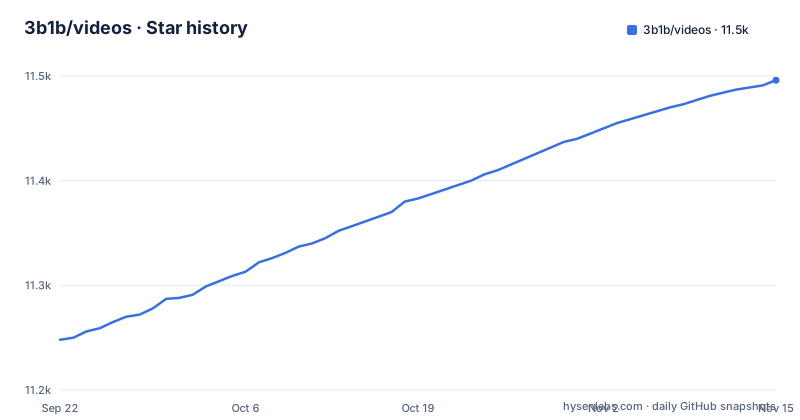
- 3b1b/videos11,496 ★ · +248
| Repository | 2026-09-22 | 2026-11-15 |
|---|---|---|
| 3b1b/videos | 11.2k | 11.5k |
248 Stars in the last 54 days, measured from the daily GitHub snapshot. Compare with other projects
Editorial analysis
What 3b1b/videos actually contains, and who it is for
The README is blunt about the scope: the repository holds the code used to generate the explanatory math videos on 3Blue1Brown, and it almost entirely consists of scenes built with the manim library. That makes it a production archive rather than a reusable package. There is no published module to import, no versioned API, and no release history in what the repository exposes.
The audience is narrow and specific. You are the right reader if you already animate with 3b1b/manim (the command-line tool is manimgl) and want to study how real scenes are structured, or if you want to copy the interactive editing loop described below into your own setup. You are the wrong reader if you want a dependency to add to a project, or if you are looking for the community fork. The README points to ManimCommunity for that, and notes that some functionality differs between the two editions.
The directory layout tells the same story. Top-level entries run from _2015/ through _2026/, one folder per year of production, alongside custom/, custom_config.yml, manim_imports_ext.py, once_useful_constructs/, outside_videos/, and stage_scenes.py. Year folders are the unit of organisation, not features. If you want the scenes from a particular video, you find the year it was made and look there. A file such as stage_scenes.py and a directory called once_useful_constructs/ both hint at how much of this code was written to be reused internally across videos rather than exported for anyone else, and the naming makes no promise that either will stay stable.
That internal-reuse pattern is the reason the repository is worth reading even if you never render a frame. You can see how a scene that needs a reusable visual element gets factored out, and how the import path trick described later exists precisely because those shared modules sit above the individual video folders.
The checkpoint_paste loop is the real product here
Most of the README is not about the scenes at all. It is about the workflow, and that workflow is the most transferable thing in the repository. It rests on two facts the README states directly.
First, running manimgl with a file name, a scene name, and the -se flag plus a line number drops you into an interactive mode at that line, like a debugger, with an iPython terminal attached to the live scene. Second, inside that terminal, checkpoint_paste() runs whatever code is currently on the clipboard. If the pasted code begins with a comment, the first call saves the scene state at that point, and later calls with the same leading comment revert to that saved state before running. The README documents two arguments: skip runs the pasted code without animating, as if all run times were zero, and record renders the resulting animations to file.
That combination turns a text editor into the animation surface. You keep a scene paused in a terminal, highlight a fragment, and watch it apply. The revert-on-same-comment behaviour is what makes iteration cheap: you are not rebuilding the whole scene each time, only replaying from the last saved checkpoint. The comment is effectively a named snapshot, and reusing the same comment text is how you ask for the same snapshot back. Nothing about this is specific to Sublime Text, and the README says so, though the plugins it ships are.
The trade-off is that the loop is stateful in a way that is easy to lose. The README does not describe any way to persist checkpoints across sessions, so the workflow rewards long editing sessions.
Installing manimgl from source and rendering a first scene
The README's installation section has three steps, and the first one carries a warning worth repeating: install manimgl from source, because the latest published version is not up to date. Step two is LaTeX, with an Ubuntu example. Step three clones this repository.
sudo apt install texlive
sudo apt install texlive-latex-extra
sudo apt install texlive-fonts-extra
sudo apt install texlive-science
Those four packages cover the LaTeX side on Ubuntu. On other systems the README does not give equivalents, so you are on your own for the TeX distribution.
git clone [email protected]:3b1b/videos.git
cd videos
The clone uses the SSH form of the URL, so you need a key registered with GitHub, or you substitute the HTTPS URL yourself.
The running instructions use a 2023 optics scene as the example. The README suggests editing the file to append the current directory and its parents to the import path, since the scenes rely on modules that live above them.
cd _2023/optics_puzzles
vi e_field.pyimport sys
sys.path.append(".")
sys.path.append("..")
sys.path.append("../..")With that in place, you render either the whole file or a named scene. The README gives both invocations, and the second one is what you will normally use once a file holds more than one scene.
manimgl e_field.pymanimgl e_field.py WavesIn3DIf the scene renders, you have a working toolchain. If it fails on an import, the README already told you why: older projects may depend on older versions of manim and may not run out of the box. The three sys.path lines are the README's way of avoiding a change to your path settings.
The Sublime Text plugins, and why they are optional
The repository ships a sublime_custom_commands/ directory. The README's instructions are to install Terminus through package control, then copy the files from that directory into your Sublime Packages/User/ folder, which sits at a path like /wherever/your/sublime/lives/Packages/User/. Terminus is the piece that lets a plugin read editor state such as cursor position and selection and turn it into a command-line invocation.
Key bindings are yours to choose. The README shows the author's own set, including shift+super+r for manim_run_scene, super+r for manim_checkpoint_paste, super+alt+r for the recorded variant, super+ctrl+r for the skipped variant, super+e to exit, and super+option+/ for comment_fold. The behaviour that matters is described rather than shown: with the cursor inside a scene line, manim_run_scene drops you into interactive mode at that point, and with the cursor on the scene definition line it copies the full render command to the clipboard instead.
None of this is required to run a scene. It is a convenience layer for one editor, and the README is explicit that the same functionality can be mimicked elsewhere. If you use VS Code or Neovim, read the two facts about manimgl and checkpoint_paste and build the equivalent yourself. The custom commands directory is also the least portable part of the repository, since it depends on Terminus and on Sublime's plugin API rather than on anything manim provides.
The licence is not manim's licence
This is the detail most likely to catch someone out. Manim itself is open source under the MIT license, and the README links to that file. The contents of this repository are not. They are available under the Creative Commons Attribution-NonCommercial-ShareAlike 4.0 International License, and the README states that plainly.
The practical consequence is that the NonCommercial term applies to the scenes, the custom plugins, and everything else in the tree, even though the library they import is permissively licensed. If you were planning to lift a visualisation into a paid course, a commercial product, or an advertising-supported video, the licence is the first thing to read, and the repository's LICENSE.txt is the file to read rather than the manim one. The ShareAlike term also matters if you redistribute modified scenes: derivatives carry the same licence forward. This is not legal advice, and the licence text governs.
Where this repository is the wrong tool
The clearest failure mode is version drift, and the README names it: older projects may have code dependent on older versions of manim and may not run out of the box. There is no lockfile, no pinned manimgl version, and no release list to tell you which scene expects which library state. A scene from _2017/ and a scene from _2025/ were written against different toolchains, and the repository does not reconcile them. Because manimgl is installed from source, there is also no version number to pin against in the first place.
A second limitation is that there is no supported API surface. Nothing here promises stability across commits, and the top-level manim_imports_ext.py and custom_config.yml are conventions of this codebase, not a documented interface. If you need something to depend on, use manimgl or the community edition directly and write your own scenes. Treating manim_imports_ext.py as a library would be a mistake, since it exists to serve the scenes in this tree.
Third, the workflow assumes a local graphical environment. The interactive mode described in the README is a debugger attached to a live window, and checkpoint_paste reads from the system clipboard. Neither maps cleanly onto a headless CI container, and the README offers no headless path. If your plan is to render scenes as part of an automated pipeline, the repository gives you nothing to build on beyond the scene files themselves.
How it compares to ManimCommunity
The README points to ManimCommunity as the community maintained version, and notes that some functionality differs from 3b1b/manim. The difference in approach is structural rather than cosmetic. This repository is one person's production tree, organised by year, with a custom_config.yml and a manim_imports_ext.py that exist to serve that tree. ManimCommunity is a separate project with its own release process and its own API surface.
That means scene code is not portable between them without work. A scene written against manimgl's imports will not simply run under the community edition, and the README's own note about functionality differences is the warning. If your goal is to learn manim as a library, the community edition has the documentation and the release cadence. If your goal is to see how the 3Blue1Brown scenes are actually written, including the checkpoint_paste loop and the editor plugins, this repository is the only place that exists. Choosing between them is really choosing between a supported library and a working archive.
There is a middle path worth naming. You can read the scenes here for structure and technique, then reimplement the idea against the community edition rather than porting the file. That avoids both the version drift problem and the non-commercial licence question, at the cost of rewriting the animation from scratch.
Maintenance and what to expect from upgrades
The repository is not archived, and the last push was on 2026-09-29. That is recent, and the _2026/ directory in the top-level listing is consistent with ongoing production. The repository has no published GitHub releases, which fits a repository that is consumed by cloning rather than installing.
Upgrade cost is the open question, and nothing in the repository answers it. Because manimgl is installed from source rather than from a published version, every clone of this repository sits on top of a moving library. A scene that renders today may need edits after a manimgl update, and the README's warning about older projects is the only guidance offered. There is no changelog and no migration notes, so the practical upgrade strategy is to keep a working environment and not disturb it.
Editorial conclusion
Adopt this repository if you already write manimgl scenes and want to see how a long-running production codebase organises them, or if you intend to reuse the checkpoint_paste workflow in your own editor. Do not adopt it if you need a supported library, an MIT-licensed asset set, or scenes that run on the current manimgl release without edits: the README warns that older projects may not run out of the box, and the non-commercial licence rules out most product work. Before you invest time, check the year directory closest to the video you care about, confirm its imports against your installed manimgl, and read LICENSE.txt rather than assuming the MIT terms that manim itself carries.
Frequently asked questions
What is the 3b1b/videos repository for?
It contains the code used to generate the explanatory math videos on 3Blue1Brown, almost entirely scenes built with the manim library. It is a production archive rather than a reusable package.
How do I install and run a scene from 3b1b/videos?
Install manimgl from source rather than the published version, install LaTeX, then clone the repository. The README's example changes into _2023/optics_puzzles, appends the current directory and its parents to sys.path, and runs manimgl e_field.py WavesIn3D.
What does checkpoint_paste() do in 3b1b/videos?
Inside the interactive mode started with manimgl's -se flag, checkpoint_paste() runs whatever code is on the clipboard. If the pasted code starts with a comment, the first call saves the scene state and later calls with the same comment revert to it first; skip runs without animating and record renders to file.
What licence applies to 3b1b/videos?
The repository contents are under the Creative Commons Attribution-NonCommercial-ShareAlike 4.0 International License, even though the manim library itself is MIT licensed. The NonCommercial term applies to the scenes and the custom plugins.
Do I need Sublime Text to use 3b1b/videos?
No. The repository ships plugins in sublime_custom_commands/ that depend on the Terminus package, but the README states the same functionality can be mimicked in another editor using the two facts about manimgl and checkpoint_paste.
Official sources
Add this badge to your README
If you maintain this project, the badge below links readers to this analysis and shows its maintenance status from the daily GitHub snapshot. Paste the markdown into your README; add ?metric=license or ?metric=stars to the image URL for a different field.

[](https://hysenlabs.com/projects/3b1b-videos)Star history chart for your README
[](https://hysenlabs.com/projects/3b1b-videos)Was this useful?