TidGi: an Electron shell around a Node.js TiddlyWiki, backed by the git folder it writes to
TidGi is a privacy-minded, automated, auto-git-backup, freely deployable knowledge-management desktop note app based on TiddlyWiki, with a REST API for web clipping and Anki Connect integration. Under active development.
At a glance
- What is it?
- TidGi puts a Node.js TiddlyWiki inside a desktop window and treats the git folder behind that wiki as the backup mechanism. It suits people who already keep notes as files, and it leaves the commit schedule and the promised REST integration undocumented.
- Who is it for?
- TidGi earns its place for anyone who already keeps notes in a git-backed folder and wants TiddlyWiki in a desktop window with automated backup. It does not earn one for someone who needs a signed macOS build, a documented REST endpoint or a stated conflict rule.
- Can I use it commercially?
- Yes, with conditions. MPL-2.0 is a weak copyleft licence: you can use it inside commercial and closed-source software, but if you distribute changes to its own files, you must publish those changes under the same licence.
- Is it still maintained?
- Yes. The repository last received commits 1 day ago.
- What is it written in?
- Mainly TypeScript, according to GitHub's language statistics.
Answers come from the project's GitHub data, last synced on October 22, 2026, and from our analysis. They are not legal advice.
Star history
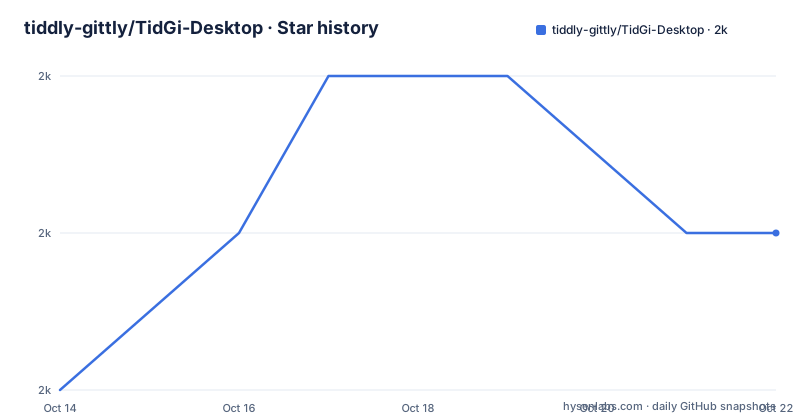
- tiddly-gittly/TidGi-Desktop2,008 ★ · +1
| Repository | 2026-10-14 | 2026-10-22 |
|---|---|---|
| tiddly-gittly/TidGi-Desktop | 2k | 2k |
1 Stars in the last 8 days, measured from the daily GitHub snapshot. Compare with other projects
Editorial analysis
A Node.js TiddlyWiki served inside an Electron shell
TidGi ships as a desktop application that embeds nodejs-TiddlyWiki rather than a single browser page, and it targets people who already think of notes as a folder of files they own. The repository calls it a note-taking and GTD application for fragmented knowledge, and the homepage is `tidgi.fun`.
Its architecture is legible in the file tree. `forge.config.ts`, `vite.main.config.ts`, `vite.preload.config.ts` and `vite.renderer.config.ts` sit side by side, matching the main, preload and renderer processes an Electron app needs, and the primary language is TypeScript. `package.json` pins [email protected] as the package manager and `pnpm-workspace.yaml` declares a monorepo, while the clean step deletes `./wiki-dev` and `./wiki-test`. Development therefore runs against a wiki folder that is created and discarded, not against a packaged one.
TidGi also compiles its own plugin set. The screenshots show a community plugin library, and those plugins come from the TiddlyWiki community while the assembly happens inside this tree. The code is under the licence MPL 2.0, and the `license` field in `package.json` carries the same identifier as the LICENSE file at the root. The last push was on 2026-09-19, later than v0.14.2 dated 2026-08-04, and the manifest already sits at that version.
Git backup is what the old TiddlyGit name recorded
The application was called TiddlyGit until it was shortened to TidGi, and that rename is the clearest statement of the design intent: TiddlyWiki with easy git backup. An earlier alias, `TG-Note`, is still linked from the same page, so search results for one program scatter across three names.
Workspaces arrive in three ways, and the project's own screenshots label each one: creating a local wiki, cloning an online wiki, and loading a NodeJS wiki. Cloning is the path that matters for shared notes, because it is the only one where a remote has to exist before the folder does. Loading takes a wiki directory the user already has and wraps an editor around it, which is the cheapest way in and also the way that silently inherits whatever git state that folder carried beforehand.
Nothing in the README or in `package.json` states how often a commit is made, whether it happens per save or on a timer, or what the application does when the remote branch has moved and the two sides disagree. For a tool whose pitch is automated backup, that cadence is the first thing an engineer will want to pin down.
macOS Gatekeeper blocks the app until quarantine is cleared
On macOS the build is unsigned, and the project's own explanation is that no Apple developer key has been bought yet. Documented order matters more than it looks. The app must be dragged into the Applications folder first, because leaving it in the Downloads folder produces an error. Only then does the user work through the dialog, cancelling the first prompt, choosing Open on the second and confirming with OK. A terminal route exists for anyone who would rather not work through the dialog:
xattr -dr com.apple.quarantine "tidgi.app"That step is repeated in both prose and command form, and the repetition is justified for anyone distributing TidGi inside an organisation: Gatekeeper stops every copy until a person clears it by hand. Windows, macOS, Debian/Ubuntu and RPM-based Linux distributions are the platform families named as officially packaged, and macOS is the one that still needs manual work before the first launch.
The Arch package is built outside the repository that ships it
Installers for Windows, macOS, Debian/Ubuntu and RPM-based Linux distributions come out of this repository's own build workflow, so a Linux user has a path that does not involve a third-party build. Arch users are the exception, and the exception is worth reading before installing:
yay -S tidgi-desktop-binThat AUR package is maintained outside this repository, which means its build inputs and its update cadence belong to somebody else's setup rather than to the workflow under `.github/`. A Repology badge in the download section makes the same point from the other direction. It indexes versions that independent package repositories publish, and it neither publishes nor updates those packages itself, so a version difference between the AUR package and the official assets is a reporting artifact rather than a contradiction.
One more gap sits in the same place. Checksums appear only as a forward-looking promise: stable builds from the updated workflow carry per-platform SHA-256 checksum files, and nothing described for the download covers an installer that has already shipped. No published hash exists to compare a downloaded file against.
Unlimited storage language sits beside privacy language
Two descriptions of the same program live in the same repository, and they do not agree. The repository summary calls TidGi privacy-in-mind and lists `local-first` among its topics, while `package.json` describes a knowledge base with Github as unlimited storage and blogging platform. Unlimited is carrying a lot of weight in that sentence, and nothing in the tree backs it: no storage layer, no account model and no quota code appear among the top-level entries, only a git remote the user supplies.
That gap reaches the advertised integrations. The summary promises a REST API for web-clipping and Anki connect, yet no port number, no route and no configuration key for that API appears in `package.json`, among the top-level entries, or on the preferences screen shown in the screenshots. A new user has to locate those values elsewhere before either feature can be reached.
Plugins and locales compile through zx before the first start
The application is not run straight from a repository checkout. `start:init` chains a clean step, `pnpm run init:git-submodule`, a plugin build and a development start, and the plugin build is a zx script:
zx scripts/compilePlugins.mjsThe root tree explains why that extra step exists. `.gitmodules` is present, and the clean command removes a plugins directory that sits inside the installed TiddlyWiki package rather than inside the source tree:
pnpm run clean:cache && rimraf -- ./out ./logs ./userData-dev ./userData-test ./wiki-dev ./wiki-test ./test-artifacts ./node_modules/tiddlywiki/plugins/linonetwoOne detail rewards a close reading: `start:init` calls `pnpm run init:git-submodule`, and no entry for that script name appears in the `scripts` block of `package.json`, so the chain cannot be followed from the manifest alone. Localization is handled at the same level, with a `localization/` directory at the root and a preferences screen that the screenshots show carrying translation controls.
Unit tests execute inside the Electron binary itself
Test wiring here is unusual enough to be worth reading. The unit suite runs the Electron executable as a Node.js process with an 8192 MB heap ceiling rather than invoking node directly:
cross-env ELECTRON_RUN_AS_NODE=1 ./node_modules/.bin/electron --max-old-space-size=8192 ./node_modules/vitest/vitest.mjs runThe `test` script chains four stages: the unit run, a preparation stage, a calibration stage and an end-to-end stage. Preparation reads `docs/Testing.md` through the `READ_DOC_BEFORE_USING` variable before doing anything, then builds a packaged application under a test environment instead of starting the dev server. Four debug entry points exist for the development loop as well, keyed on `DEBUG_WORKER=true`, `DEBUG_MAIN=true`, `DEBUG_REACT=true` and `DEBUG=electron-forge:*`.
What this arrangement buys is a suite that exercises the same binary users eventually run. What it costs is a heavier local floor, because `vitest.config.ts`, `tsconfig.test.json` and a packaged Electron build all have to exist before the first run can finish.
Without the shell: nodejs-TiddlyWiki on its own
The real alternative here is not a competing product but the layer underneath. nodejs-TiddlyWiki runs the same wiki core on Node.js, and TidGi's own scripts drive it through `electron-forge`, so the difference is the shell rather than the engine. The desktop front end adds a workspace picker for creating, cloning and loading wiki folders, a preferences screen, a translation layer under `localization/`, and installers covering four platform families.
Running nodejs-TiddlyWiki directly gives the wiki and its plugin ecosystem without the Electron download, the packaged assets or the community plugin library screen. What goes with it is the part that makes TidGi distinct in the first place: git backup wired to the wiki folder rather than a manual commit typed into a terminal, plus the automation promised in the repository summary.
An honest comparison is a packaged desktop front end over an upstream wiki engine, set against a bare engine operated by hand. Renaming TiddlyGit to TidGi was the project stating that the front end is the product.
Editorial conclusion
TidGi earns its place for anyone who already keeps notes in a git-backed folder and wants TiddlyWiki in a desktop window with automated backup. It does not earn one for someone who needs a signed macOS build, a documented REST endpoint or a stated conflict rule. Before moving anything in, open the wiki folder you plan to point it at, read the git history already sitting there, and confirm your remote accepts the commits TidGi writes, since nothing in the repository states how often those commits happen.
Frequently asked questions
What does TidGi add on top of nodejs-TiddlyWiki?
TidGi wraps nodejs-TiddlyWiki in an Electron desktop application and adds a workspace picker for creating a local wiki, cloning an online one or loading an existing NodeJS wiki. It also builds and compiles the TiddlyWiki community plugins the wiki ships with, and it treats git backup of the wiki folder as the default rather than an extra step.
How do I install TidGi on macOS when Gatekeeper refuses to open it?
Drag the app into the Applications folder first, because leaving it elsewhere produces an error, then either walk through the dialog choosing Open, or clear the quarantine attribute from a terminal: xattr -dr com.apple.quarantine "tidgi.app". The build is unsigned because no Apple developer key has been obtained yet.
Is the TidGi package for Arch Linux built from this repository?
No. `yay -S tidgi-desktop-bin` installs an AUR package maintained outside this repository, so its build inputs and update cadence are not tied to the project's own workflow. Official packages exist for Windows, macOS, Debian/Ubuntu and RPM-based Linux distributions, and the Repology badge only reports what independent repositories publish.
Are SHA-256 checksums published for TidGi installers?
Not for what has shipped. Checksums appear only as a forward-looking statement: future stable releases built by the updated workflow include per-platform SHA-256 checksum files, and nothing described for the download covers existing assets.
What licence is TidGi published under?
MPL 2.0. The `package.json` `license` field and the LICENSE file at the root of the repository both carry that identifier.
Can I run TidGi from a source checkout with pnpm?
The repository pins [email protected] and defines development entry points that clean the tree, prepare git submodules, compile the plugins and then start Electron Forge under `NODE_ENV=development`. The compiled plugin step is a zx script at `scripts/compilePlugins.mjs`, and the submodule step is referenced by `start:init` without a matching entry in the `scripts` block.
Official sources
Add this badge to your README
If you maintain this project, the badge below links readers to this analysis and shows its maintenance status from the daily GitHub snapshot. Paste the markdown into your README; add ?metric=license or ?metric=stars to the image URL for a different field.

[](https://hysenlabs.com/projects/tiddly-gittly-tidgi-desktop)Star history chart for your README
[](https://hysenlabs.com/projects/tiddly-gittly-tidgi-desktop)Was this useful?