TiddlyWiki: the whole notebook is one file, until you put it on Node.js
A self-contained JavaScript wiki for the browser, Node.js, AWS Lambda etc.
At a glance
- What is it?
- TiddlyWiki stores a wiki as one HTML file or as a wiki folder served by Node.js, and both shapes keep the interface in editable WikiText. That portability is the reason to use it, and keeping two copies in step is the reason to think twice before sharing one.
- Who is it for?
- Adopt TiddlyWiki when one person or a handful of people need a notebook that outlives any company behind it, and accept that sharing means passing files around. Do not adopt it for a multi-author knowledge base that needs concurrent editing or a merge path.
- Can I use it commercially?
- Check first. The repository uses a licence we do not classify automatically, so read its LICENSE file before any commercial use.
- Is it still maintained?
- Yes. The repository last received commits 4 days ago.
- What is it written in?
- Mainly JavaScript, according to GitHub's language statistics.
Answers come from the project's GitHub data, last synced on November 15, 2026, and from our analysis. They are not legal advice.
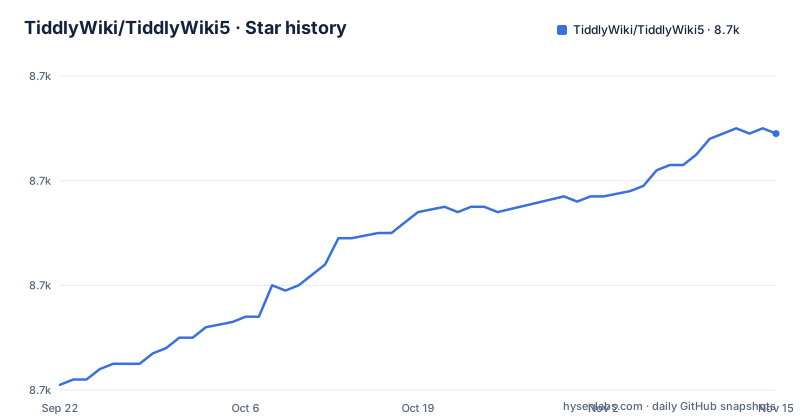
Star history
- TiddlyWiki/TiddlyWiki58,709 ★ · +48
| Repository | 2026-09-22 | 2026-11-15 |
|---|---|---|
| TiddlyWiki/TiddlyWiki5 | 8.7k | 8.7k |
48 Stars in the last 54 days, measured from the daily GitHub snapshot. Compare with other projects
Editorial analysis
One HTML file, or a Node.js client and server over the same code
TiddlyWiki ships in two shapes, and which one you pick decides where your notes live. The browser shape is what the project calls a SingleFileApplication: one HTML file that opens in a browser with nothing behind it. For advanced users and developers there is a Node.js client / server configuration, and that configuration is also what builds the SinglePageApplication, so the Node.js setup doubles as a build step rather than a hosting choice alone.
The repository layout splits along the same line. core/ holds the wiki itself, core-server/ holds the server-side pieces, boot/ is the entry point that package.json names as main (./boot/boot.js), and tiddlywiki.js at the root is what the bin field maps the tiddlywiki command to. package.json also sets preferGlobal to true, so this npm package expects to live on your PATH rather than inside a project's node_modules. Neither shape is optional packaging: the file you email to yourself and the folder a server reads come out of the same code.
The interface is WikiText, so the layout ships inside the notebook
The design choice that separates TiddlyWiki from most wikis is stated plainly: the entire user interface is itself implemented in hackable WikiText. There is no compiled theme to reverse engineer and no settings panel standing between you and the buttons. A layout change is a tiddler edit, and a tiddler edit is the same operation as writing a note.
That cuts both ways. Editing a shipped interface tiddler changes the wiki's own content, so a custom sidebar or a reordered toolbar becomes part of the file you back up and the copy you hand to somebody else. themes/, plugins/ and languages/ at the repository root give those variations a defined home, which is where a site-wide look belongs rather than inside individual notes. But because display and data share one store, a reader who opens your file sees your layout decisions whether or not they wanted them, and undoing one means finding the tiddler that carried it.
npm install -g tiddlywiki, then tiddlywiki --version to confirm
Three steps, and only the middle one installs TiddlyWiki. On Debian or Ubuntu the project lists apt install nodejs, and warns it may need to be followed up by apt install npm. On a Mac the same job is brew install node. Then open a terminal and install the wiki globally:
npm install -g tiddlywikiIf that fails on a permissions error, the project gives the administrator form for Mac and Linux:
sudo npm install -g tiddlywikiAsk the binary what it is, and you should see it report its current version, for example 5.4.1:
tiddlywiki --versionThat last command matters more than it looks, because it tells you which build you are running. preferGlobal is set to true in package.json, so installing into a project folder works mechanically but is not the shape this package targets.
The CLI takes an editions folder before it takes any flag
The npm scripts show how the binary is meant to be invoked, and both of them pass a wiki folder ahead of any option. The dev script runs the site edition as a listening server:
node ./tiddlywiki.js ./editions/tw5.com-server --listenThe test script points at a different folder, asks for verbose output, and ends with --build index:
node ./tiddlywiki.js ./editions/test --verbose --version --build indexApart from --version, tiddlywiki is pointed at a wiki folder (the README's own example is tiddlywiki mynewwiki --init server, then tiddlywiki mynewwiki --listen), and the repository keeps a set of them under editions/, which means your first decision is which wiki to open rather than which command to type. The --build flag is the same read-a-folder, write-files mechanism the Node.js configuration uses to produce the SinglePageApplication, so the build is not a separate toolchain you have to learn.
No sync component sits in the tree, so two copies of one wiki never merge
In the browser shape, saving is the file. TiddlyWiki is described as a SingleFileApplication, and nothing at the repository root reconciles two of them: the top-level entries are boot/, core/, core-server/, editions/, themes/, plugins/, languages/, bin/, community/, the documentation files and the build configuration.
The consequence is sharper for a shared notebook than for a private one. Two people who each keep a copy of that file end up with two wikis, and reconciling them means editing WikiText by hand, one tiddler at a time, with no record of which side won. TiddlyWiki is built for the case where you are the only editor, and the SingleFileApplication shape is what makes that case work everywhere from a USB stick to a phone browser.
v5.4.1 from npm, 5.5.0-prerelease from master
The published release and the default branch are not the same code. The most recent release is v5.4.1, dated 2026-07-10, while package.json on master reads 5.5.0-prerelease, and the last push to that branch was on 2026-11-01.
The install steps in the project take you to npm, which serves a released tag; cloning the repository takes you to the prerelease. tiddlywiki --version is how you tell them apart. Two consequences follow for whoever deploys this. On a clone, engines requires node >=20.0.0, so an older runtime stops you before anything else runs, and the version string still says prerelease rather than a release you can cite. On npm, your wiki folder is being read by a build that predates the branch you read the source from. Version pinning matters more here than usual, because the wiki is data as well as code.
yay -S tiddlywiki tracks node and the wiki together
Arch Linux gets a different install path, and the difference is about who owns the runtime:
yay -S tiddlywikiThe project notes that this installs node and tiddlywiki together, so one package manager owns both and updates arrive with the system. Everywhere else the runtime and the wiki are installed separately, which means two upgrade paths instead of one, and the OS can move Node.js independently of the wiki sitting on top of it. That is a difference in approach, not a preference.
Android is the third case, and the documentation thins out. Rather than giving commands, the project points at Termux for Android and at a page on serving TW5 from Android, which leaves a global npm install to survive inside a Termux environment the install section never walks through.
NOASSERTION on the repository, BSD in package.json
Two licence signals sit at different levels. Repository metadata reports the licence as NOASSERTION, GitHub's label for a file it could not classify. Inside the tree, package.json declares "license": "BSD", the root carries a license file, and a licenses/ directory holds separate texts. Read the license file and the licenses/ directory before redistributing; this is a reading of the tree rather than a view on what the terms permit.
The human side is split four ways. Developer documentation is stated to be in progress at tiddlywiki.com/dev, so the wiki serves as the reference and is not finished. User support runs on Talk TiddlyWiki at talk.tiddlywiki.org, alongside the original Google Group hosted since 2005 and kept going for existing users. Open questions belong in GitHub Discussions; bug reports and specific, actionable proposals belong in GitHub Issues, and pull request previews come from Netlify.
Editorial conclusion
Adopt TiddlyWiki when one person or a handful of people need a notebook that outlives any company behind it, and accept that sharing means passing files around. Do not adopt it for a multi-author knowledge base that needs concurrent editing or a merge path. Before anything else, run tiddlywiki --version and compare it with the wiki folder you already hold, because npm serves v5.4.1 while the default branch reads 5.5.0-prerelease, and those are not the same code.
Frequently asked questions
What is TiddlyWiki used for?
It is described as a non-linear personal web notebook, and as a complete interactive wiki in JavaScript that runs either as a single HTML file in the browser or as a Node.js application. Because the whole user interface is implemented in hackable WikiText, layout and behaviour are edited as wiki content rather than through a settings panel.
Is TiddlyWiki free?
No price appears anywhere in the repository, and the project describes the notebook as something you can keep independently of any corporation. Licence terms are in the license file at the repository root, alongside a licenses/ directory, and package.json declares BSD; check those files for the build you intend to ship.
Can TiddlyWiki run without a server?
Yes, in the shape the project calls a SingleFileApplication, where one HTML file runs in the browser with nothing behind it. The alternative is a Node.js client and server configuration, offered for advanced users and developers, and the same configuration is used to build the SinglePageApplication.
Which Node.js version does TiddlyWiki require?
package.json sets engines.node to >=20.0.0, so that is the floor for running the binary. The install instructions name a package manager per platform, such as apt install nodejs on Debian or Ubuntu and brew install node on a Mac, without naming a version in that section.
Official sources
Add this badge to your README
If you maintain this project, the badge below links readers to this analysis and shows its maintenance status from the daily GitHub snapshot. Paste the markdown into your README; add ?metric=license or ?metric=stars to the image URL for a different field.

[](https://hysenlabs.com/projects/tiddlywiki-tiddlywiki5)Star history chart for your README
[](https://hysenlabs.com/projects/tiddlywiki-tiddlywiki5)Was this useful?