ClawBench scores other harnesses, and its strongest agent finished one task in three
Open-source benchmark for browser AI agents on daily tasks.
At a glance
- What is it?
- ClawBench is a benchmark for browser agents doing everyday online tasks against live websites, with 281 tasks over 163 sites. Its evaluation package drives no browser itself, its two corpora live under two different hosting accounts, and the task counts in the shipped data are two lower than the ones in the paper.
- Who is it for?
- ClawBench is worth taking seriously for one design decision: recording and scoring are separated, so a run captured months ago can be re-graded with a newer rubric, and that is what makes a leaderboard over live websites comparable at all. The scores themselves should be read with the corpus caveat attached, since a benchmark that runs against real sites moves when the sites move.
- Can I use it commercially?
- Yes. Apache-2.0 is a permissive licence: you can use, modify and sell software built on it, as long as you keep its copyright and licence notices.
- Is it still maintained?
- Yes. The repository last received commits 10 days ago.
- What is it written in?
- Mainly Python, according to GitHub's language statistics.
Answers come from the project's GitHub data, last synced on November 15, 2026, and from our analysis. They are not legal advice.
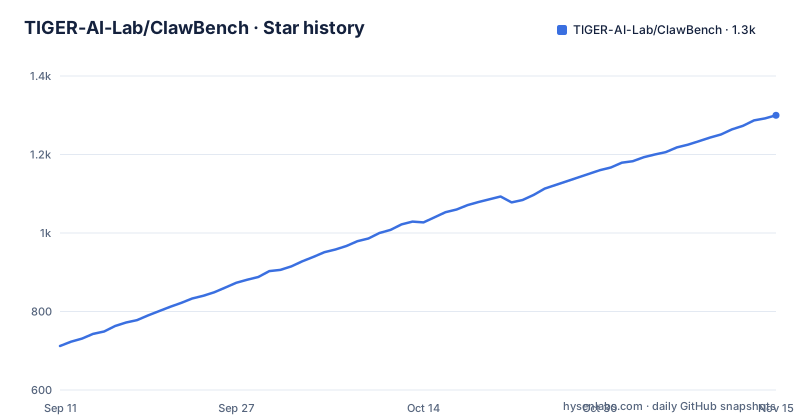
Star history
- TIGER-AI-Lab/ClawBench1,300 ★ · +588
| Repository | 2026-09-11 | 2026-11-15 |
|---|---|---|
| TIGER-AI-Lab/ClawBench | 712 | 1.3k |
588 Stars in the last 65 days, measured from the daily GitHub snapshot. Compare with other projects
Editorial analysis
One task in three, on live websites
The benchmark asks browser agents to do what people do online: order food, book travel, apply for jobs, write reviews, manage projects, handle email. It scores end to end task success against live websites rather than against a simulated environment, and the page reports that in the historical V1 paper evaluation the strongest evaluated agent completed about one task in three.
The scale is stated precisely enough to check. V1 holds 152 tasks across 143 live sites. V2 holds 129 tasks across 63 live sites. Together that is 281 tasks across 163 live websites, in 15 life categories.
Those numbers do not quite add up in a way worth noticing. The per-corpus site counts sum to 206, against a headline of 163 unique websites, which means 43 sites appear in both corpora. That is not a problem, it is how you build a second version, but it does mean the headline site count is deduplicated while the per-corpus counts are not, and a reader comparing effort to coverage should use the larger number.
The word historical attached to the one-in-three result matters too. The live leaderboard reports scores broken down by corpus, by harness and by scoring rubric, so the single figure from the paper is a snapshot of one agent on one harness rather than the current state of the table.
The paper and the shipped corpus differ by two tasks
A footnote under the counts admits a discrepancy, which is the sort of thing most benchmark pages leave out. The paper reports 153 tasks for the first corpus and 130 for the second. The corpus that actually ships has 152 and 129. Two tasks, one from each version, were removed after publication, and they were ASPCA tasks.
The disclosure is small and the effect is not. Anyone comparing their own numbers against a table in the paper is comparing against a slightly different set of tasks, and anyone who reported a percentage from the paper is reporting it over 283 tasks while the code runs 281. The percentage difference is minor, but the traceability problem is the real one: a result cannot be reproduced exactly against the published figure without knowing which two tasks went.
What the page does not say is why they were removed. It names the organisation and stops there, so whether the reason was the site's behaviour, a licensing question or something about the task's validity is not recoverable from the front page and would have to come from the issue history.
The versioning itself is straightforward and worth noting for a user: the two corpora live in separate directories in the repository, and the page points at both, so picking a corpus is a directory choice rather than a flag.
Two corpora, two hosting accounts, and no scores in the repository
The benchmark's artefacts are spread across accounts, and anyone assembling them by hand has to know that. The first corpus and its raw traces are published under one organisation, while the second corpus traces and the leaderboard itself sit under the project's own account. The live leaderboard is a hosted space, not a file in the repository.
That last point has a consequence for anyone trying to reproduce a number. There is no leaderboard table in the source tree. Scores by corpus, harness and scoring rubric live on a hosted page, which means the historical record of who scored what is held by a platform rather than by the project, and a citation file at the repository root is there to point at the paper rather than at the current table.
The trace datasets are the more interesting artefact. Raw traces are published for both versions, described as five layers per task and model combination, and the page offers them specifically for re-grading old runs. That is the part of the design worth understanding.
A five-layer trace is a record of what happened during a run, kept separate from any judgement about whether it succeeded. Publishing those separately from the score means a later rubric can be applied to a run that was captured under an earlier one, which is the only way a leaderboard over changing websites stays comparable. It is also why the package ships re-scoring, analysis and reproduction commands rather than only a runner.
The eval package drives no browser and depends on a PDF library
The dependency list is the fastest way to understand what this project is. Five packages: a PDF generation library, the Hugging Face client, a YAML parser, a library for prompting for answers in a terminal, and a library for formatted terminal output. That is the whole runtime.
There is no browser automation library in it. There is no HTTP client beyond the model hub one, no test framework, and no driver. So ClawBench does not open a browser, does not click anything, and does not capture a run from outside. It reads what a harness produced and judges it.
The install itself is one line:
pip install clawbench-evalThat is a deliberate division of labour and it is the reason the project has a sister. The sister project holds the base model fixed and varies the harness instead, which is the mirror image of what ClawBench does, and the leaderboard reporting scores by harness as well as by corpus is the visible result of that separation.
The cost is that the recording pipeline is a contract with an outside harness rather than a self-contained recorder. An evaluation is only as faithful as the traces its harness emits, and a new agent framework can be scored only if someone writes the adapter. The package already carries two adapters plus a separate judge for a different benchmark family, so this is a cost the project is paying in public.
A committed environment file ships inside the wheel
The build configuration force-includes a file called `.env` into the wheel, placing it inside the installed package as a bundled resource, and the same file is listed for inclusion in the source distribution. There is a file with that name at the repository root, version controlled alongside the source.
Nothing on the page says what is in it. That is the point worth pausing on. A file named for environment configuration, committed to version control and shipped to every installer's site-packages, is the first artefact a reviewer should read, and in a project whose datasets, traces and leaderboard all live on a hosting platform it is exactly the file that would hold a token or an endpoint if one were committed by accident.
The same configuration block is where the corpus is packaged. The test case directory is force-included into the wheel as a bundled resource too, along with a model schema, an example model configuration and the notice file. So the task corpus travels with the package, which is convenient for a user who installs from a package index and means the install is not small.
The models directory and its schema are bundled for a reason: a user is expected to add their own model configuration, and the example file plus the schema are the documentation for it.
Eleven console commands, three aimed at other benchmarks
One package exposes eleven console entry points, and their names describe the project better than any feature list. There is a terminal interface, a runner for a single case, a batch runner, a re-scorer, an analyser, and a reproducer. Then there are four that point outward: two adapters for a different benchmark family, a judge for that same family, and a pair for something else entirely, one that submits and one that is explicitly a mock gateway.
Reading that list, the project is as much a scoring interoperability layer as it is a benchmark. Its own corpus is the reference implementation, but the tooling also accepts runs produced under other benchmarks and can judge them. That is a larger maintenance surface than a single benchmark needs, and it is also the clearest sign of where the authors think the real work lies.
The names also reveal the workflow the package expects. Run a case, run a batch, analyse the results, then re-score or reproduce from stored traces. The mock gateway entry point exists so the submission path can be tested without a server, which is a small detail that tells you the submission flow is expected to be exercised in tests.
The rest of the repository matches that: a development container, a shell script to launch things, a pre-commit configuration, a changelog, a citation file, agent instructions, and a machine-readable text file at the root for tools that read documentation.
Live sites are the benchmark, which is the method and the fragility
Running tasks against 143 and 63 real websites is what makes the benchmark interesting and what makes the numbers move. A site can change its layout, its login flow, its terms, or its rate limiting, and every one of those changes the score of an agent that has not changed. There is no simulator to blame and no fixture to update, which is exactly the property that makes a result hard to argue with and hard to repeat.
The answer the project offers is the separation already described. A five-layer recording pipeline captures what happened, an agentic evaluator compares each run against human references rather than against a rule, and both the raw traces and the rubric are published so a run can be re-judged. The leaderboard is split by rubric for the same reason: a score is only meaningful next to the rubric that produced it.
Two limits follow. First, an evaluator that compares against human references needs those references, and the page does not describe how they were produced, how many there are per task, or how disagreements between references are handled. Second, the 15 life categories are never enumerated on the front page, so a reader cannot tell from it whether the task mix resembles anything they care about.
The rest of the page is distribution: a hosted leaderboard, a task explorer with search and filters, the paper, a Chinese translation of the readme, a dataset download command, a guide for adding a task or a model in JSON plus a rubric, and membership in dozens of curated lists.
Editorial conclusion
ClawBench is worth taking seriously for one design decision: recording and scoring are separated, so a run captured months ago can be re-graded with a newer rubric, and that is what makes a leaderboard over live websites comparable at all. The scores themselves should be read with the corpus caveat attached, since a benchmark that runs against real sites moves when the sites move. Three things to check before using it. Read the committed environment file at the repository root before redistributing anything, because the build configuration bundles it into the distribution. Count the sites yourself: the per-corpus figures sum to more than the headline total, which means sites are shared between versions. And treat the one-in-three result as a property of a historical evaluation of a specific agent on a specific harness, not as a ceiling, since the leaderboard now separates scores by corpus, harness and rubric.
Frequently asked questions
What does ClawBench measure?
It measures end-to-end task success for AI browser agents doing everyday online tasks against live websites, such as booking travel, ordering food, applying for jobs and managing email. The corpora hold 281 tasks across 163 live websites in 15 life categories, split into a 152 task and a 129 task version.
How do I run ClawBench against my own model?
The package installs with pip install clawbench-eval and needs Python 3.11 or newer. It exposes a terminal interface plus separate commands for running, batch running, re-scoring, analysing and reproducing results, and it runs on any Chrome. Its runtime dependencies are a PDF library, the model hub client, a YAML parser and two terminal libraries.
What is the strongest score on ClawBench?
In the historical V1 paper evaluation, the strongest evaluated agent completed about one task in three. The current live leaderboard reports scores broken down by corpus, by harness and by scoring rubric rather than as one figure, and no score table is kept in the repository.
Why do the ClawBench task counts differ from the paper?
The paper reports 153 tasks for the first corpus and 130 for the second. The page states that two ASPCA tasks were removed after publication, so the corpus that ships contains 152 and 129.
Does installing ClawBench download the task corpus?
The build configuration force-includes the test case directory into the installed package, along with a model schema, an example model configuration and the notice file. It also force-includes a file called .env from the repository root as a bundled resource.
Official sources
Add this badge to your README
If you maintain this project, the badge below links readers to this analysis and shows its maintenance status from the daily GitHub snapshot. Paste the markdown into your README; add ?metric=license or ?metric=stars to the image URL for a different field.

[](https://hysenlabs.com/projects/tiger-ai-lab-clawbench)Star history chart for your README
[](https://hysenlabs.com/projects/tiger-ai-lab-clawbench)Was this useful?