react-app-rewired: the two install lines, the one script you must not flip, and where its support boundary sits
Override create-react-app webpack configs without ejecting
At a glance
- What is it?
- react-app-rewired swaps react-scripts for itself in the start, build, and test npm scripts and hands your webpack edits to a config-overrides.js at the project root. It works by owning the config instead of ejecting, which buys you plugin loading and costs you the guarantees create-react-app advertises, along with any support from the project that owns them.
- Who is it for?
- Use react-app-rewired when you are on create-react-app 2.x with Webpack 4, need a loader or a plugin that the no config setup blocks, and are willing to own the webpack configuration from that point on, including the dev server and the Jest side that the webpack field cannot reach.
- Can I use it commercially?
- Yes. MIT is a permissive licence: you can use, modify and sell software built on it, as long as you keep its copyright and licence notices.
- Is it still maintained?
- Yes. The repository last received commits 43 days ago.
- What is it written in?
- Mainly JavaScript, according to GitHub's language statistics.
Answers come from the project's GitHub data, last synced on November 15, 2026, and from our analysis. They are not legal advice.
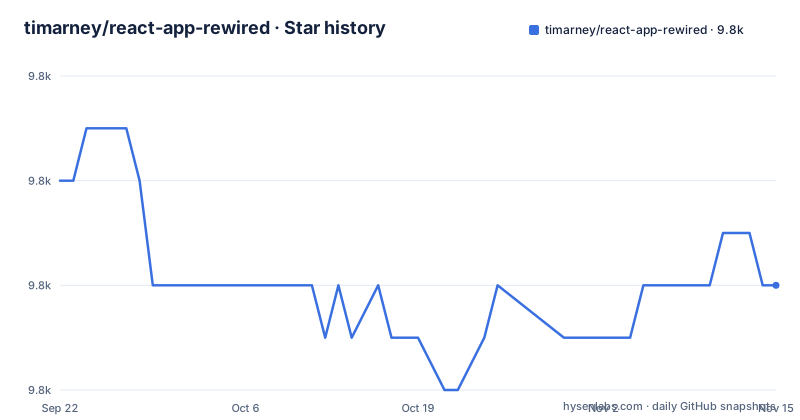
Star history
- timarney/react-app-rewired9,836 ★ · -2
| Repository | 2026-09-22 | 2026-11-15 |
|---|---|---|
| timarney/react-app-rewired | 9.8k | 9.8k |
-2 Stars in the last 54 days, measured from the daily GitHub snapshot. Compare with other projects
Editorial analysis
Two install lines, decided by which webpack major create-react-app built you with
The choice of install command is not a version preference, it is a webpack decision, and the two lines in the documentation map directly onto the two build stacks the project supports. For create-react-app 2.x running Webpack 4:
npm install react-app-rewired --save-devFor create-react-app 1.x, or react-scripts-ts, running Webpack 3:
npm install [email protected] --save-devThe published package declares react-scripts as a peer dependency of >=2.1.3 and carries semver ^5.6.0 as its only runtime dependency.
The consequence for a reader is that the two lines are not interchangeable. The webpack 3 line pins an old release, and version 2.0 of this project removed the rewire helper functions that older tutorials and older config files import. A config-overrides.js written for the 1.x line will reference helpers the 2.x line no longer provides, so pairing the wrong install command with an existing config file goes wrong with the config rather than at install time.
The eject script is the one call the flip must leave alone
Three npm scripts get rewritten in package.json, and one is explicitly excluded:
  /* package.json */

  "scripts": {
-   "start": "react-scripts start",
+   "start": "react-app-rewired start",
-   "build": "react-scripts build",
+   "build": "react-app-rewired build",
-   "test": "react-scripts test",
+   "test": "react-app-rewired test",
    "eject": "react-scripts eject"
}
The note attached to that diff is not a style suggestion. The eject script keeps calling react-scripts, because eject runs once per project and hands you the full webpack configuration directly, after which this package has nothing left to do. There are no configuration options to rewire for the eject script.
The consequence for a reader is a clean boundary. Until you eject, three of your scripts resolve to the react-app-rewired binary and one still resolves to react-scripts. After you eject, the whole mechanism is unnecessary and the remaining script is inert as far as this package is concerned. Flipping eject as well, or expecting config-overrides.js to influence what eject produces, misunderstands the one step where the wrapper deliberately steps aside.
config-overrides.js is a bare function by default, and 2.0 dropped the helpers
The file that does the actual work sits at the project root next to package.json and src:
/* config-overrides.js */

module.exports = function override(config, env) {
  //do stuff with the webpack config...
  return config;
}
That single exported function is the default form, and it is what customises the webpack configuration for compiling in development or production mode. Version 2.0 removed the rewire helper functions, so anything you remember from a pre 2.0 config-overrides.js no longer resolves. You now receive the config object and return the config object.
A second form exists for advanced cases. Instead of a function, the file can export an object with up to three fields, each a function: one for webpack, one for Jest, and one for the Webpack Dev Server. A custom location is also possible, and the path goes in package.json as:
"config-overrides-path": "node_modules/some-preconfigured-rewire"The consequence is that a shared, preconfigured rewire living in node_modules can be pointed at by every project that adopts it, which moves the webpack customisation out of individual repositories and into a dependency.
The webpack field is blind to test mode and to the dev server
Two blind spots are spelled out for the webpack field, and both come from how create-react-app is built rather than from a limitation of this wrapper.
The first is test mode. Webpack is not used to compile the application in test mode, Jest is, so rewires written into your webpack customisation function are not applied to your project when you run tests. Anything you add there, a loader, a resolve alias, an alias for a module path, is present in the dev server and in the production build and absent from the test run, which is where a surprising class of failures comes from.
The second is the Webpack Dev Server. create-react-app generates a separate webpack configuration for the dev server using different functions and defaults, so the webpack field cannot customise it either. The object export form exists partly for this reason, with a field dedicated to the dev server, and the worked example in the documentation uses it to set the https certificates for the development server with filenames named in .env variables.
The consequence for a reader is that if you need an https certificate in development, setting it in the webpack function is the wrong place.
Jest settings merge into the base config instead of replacing it
The jest side is where the wrapper does more than pass a config through. react-app-rewired automatically allows you to customise the Jest configuration in a jest section of your package.json, including setting configuration fields that create-react-app would otherwise block you from setting. It also sets up Jest to compile the project with Babel before running tests, so test files can use the same syntax as your source.
The semantics that surprise people are the merge rule. Configuration arrays and objects are merged rather than overwritten, and two issue numbers, 240 and 241, are cited for the details. If you write a shorter array than the base configuration already has, you have not removed the entries that were there; the merge keeps what the base contributed and adds what you supplied.
Adding Babel plugins or presets for Jest is a separate step, because the webpack customisation does not reach it. Those go in a babel section inside package.json or inside a .babelrc file, and the documentation points at the Jest site for the rest of the option list, which is maintained outside this project.
The consequence for a reader is that package.json becomes the place where you can express things create-react-app normally hides, and that editing those values means adding to the effective config rather than rewriting it.
The root scripts drive a separate create-react-app fixture, not a unit test suite
The package manifest shows how the project tests itself, and the shape is worth reading before you contribute. Its build, start, and test scripts all delegate into a nested project:
"setup": "yarn deps && yarn link && yarn --cwd 'test/react-app' link 'react-app-rewired'"with build, start, and test each prefixed by yarn --cwd 'test/react-app', a teardown script that unlinks and cleans both the package and that nested project, a clean script of rm -rf node_modules, and a deps script that installs in both places. The nested app under test/ is a real create-react-app application, which is the only way to check that a rewire behaves against the react-scripts version it claims to support.
The peer dependency on react-scripts >=2.1.3 and the dev dependency on react-scripts ^2.1.3 mean behaviour against a specific react-scripts release is resolved by whatever version the linked fixture gets.
The consequence for a reader is that running the test command at the root of this repository runs the fixture application's tests, not a suite of assertions about the wrapper itself, and that the package ships its own config-overrides.js plus config/, overrides/, scripts/, bin/, and assets/ directories as the implementation it links into that fixture.
The named alternatives span rewirers, a fork, and a different framework
The project names four other routes, and the difference between them matters more than the count.
customize-cra is offered as a set of create-react-app 2.0 compatible rewirers, so it occupies the same slot as this package rather than replacing the build tool. Rescripts is described as an alternative framework for extending create-react-app configurations and is noted as supporting 2.0 and later. craco is listed as another option without further description in the documentation. react-scripts-rewired is called out differently, as a fork of this project that aims to support create-react-app 2.0, so choosing it means adopting a fork rather than the original.
Above the alternatives there is a different recommendation. The author states that next.js and Razzle are used personally because both support custom webpack out of the box, which removes the need for a wrapper entirely.
The consequence for a reader is that the wrapper is one answer among several, and the answer that removes the indirection is to leave create-react-app for a framework where the configuration is not locked in the first place. The local cost of that move is a project migration; the local benefit is that nobody has to maintain a config-overrides.js.
Support ends at the config boundary, and the release dates show it
The support policy is stated at the top of the documentation and it is unusually explicit. Before submitting an issue, you are asked to check that it is an issue with the code in this repository rather than a question about how to configure webpack, which is redirected to Stack Overflow or Spectrum, on the grounds that it is your config and you own it. The same message appears again in the warning that using this package breaks the guarantees create-react-app provides, that you now own the configs, and that no support will be provided, followed by the instruction to proceed with caution and the line, attributed to Dan Abramov, that stuff can break.
The dates around that policy are worth noting. The repository is not archived and the last push is dated 2026-09-13, while the most recent releases are v2.2.1 and v2.2.0, both dated 2022-02-15, with v2.1.11 before them on 2021-12-30. The documentation also describes the repository as lightly maintained mostly by the community as of create-react-app 2.0, and there is a Chinese version of the README in README_zh.md.
The consequence for a reader is that commits continue to land without releases catching up, so a fix on master is not something you can consume by version number, and a webpack problem in your config-overrides.js is yours by the project's own statement.
Editorial conclusion
Use react-app-rewired when you are on create-react-app 2.x with Webpack 4, need a loader or a plugin that the no config setup blocks, and are willing to own the webpack configuration from that point on, including the dev server and the Jest side that the webpack field cannot reach. Do not use it if you would rather not maintain a config, if you are on create-react-app 1.x or react-scripts-ts with Webpack 3, or if you want the project to answer questions about your webpack settings. Before committing, confirm the version pairing between your create-react-app release and the react-app-rewired line you install, read the alternatives named in the project itself if a supported path matters more than a small config file, and plan your own support path, because a last push on 2026-10-03 sits alongside a most recent release of v2.2.1 dated 2022-02-15.
Frequently asked questions
What is react-app-rewired and what does it replace?
It is a wrapper that tweaks create-react-app webpack configs without using eject and without forking react-scripts. You install it as a dev dependency, add a config-overrides.js at the project root, and flip the start, build, and test npm scripts to call react-app-rewired instead of react-scripts.
How do I install react-app-rewired for my project?
For create-react-app 2.x with Webpack 4 run npm install react-app-rewired --save-dev. For create-react-app 1.x or react-scripts-ts with Webpack 3 run npm install [email protected] --save-dev, and note that version 2.0 removed the rewire helper functions.
What is the difference between react-app-rewired and react-scripts?
react-scripts is the build tool create-react-app generates scripts for, and it is what the eject script keeps calling. react-app-rewired stands in front of it for start, build, and test, giving your config-overrides.js the webpack config, while the eject script is deliberately left on react-scripts.
Which alternatives to react-app-rewired does the project recommend?
It names customize-cra for create-react-app 2.0 compatible rewirers, Rescripts as an alternative framework supporting 2.0 and later, react-scripts-rewired as a fork aiming to support 2.0, and craco. The author also states that next.js and Razzle support custom webpack out of the box.
Why does react-app-rewired come up as not recognized after installing it?
The package registers one binary named react-app-rewired mapped to ./bin/index.js, and it is a dev dependency, so the command only resolves in a project where it is installed and where the npm script has been flipped to call react-app-rewired rather than react-scripts. Running it outside the project directory will not find it.
Is CRA deprecated according to the react-app-rewired documentation?
What the documentation states is that as of create-react-app 2.0 this repository is lightly maintained mostly by the community, and that using it breaks the guarantees create-react-app provides so that you own the configs with no support provided.
Official sources
Add this badge to your README
If you maintain this project, the badge below links readers to this analysis and shows its maintenance status from the daily GitHub snapshot. Paste the markdown into your README; add ?metric=license or ?metric=stars to the image URL for a different field.

[](https://hysenlabs.com/projects/timarney-react-app-rewired)Star history chart for your README
[](https://hysenlabs.com/projects/timarney-react-app-rewired)Was this useful?