tinyobjloader ships two loaders that no release tag contains, and they parse different subsets of the format
Tiny but powerful single file wavefront obj loader
At a glance
- What is it?
- A look at a Wavefront OBJ loader: a single-header C++11 implementation and a from-scratch pure C11 one with its own tessellator, a primitives checklist where the C11 version supports what the C++ one does not, compile-time switches for precision and the bundled float parser, a Makefile lint target pointing at files that are not in the tree, and a Python wheel configuration that skips every aarch64 build.
- Who is it for?
- tinyobjloader fits a renderer or tool that needs to read OBJ and MTL files without taking on a mesh library, and especially a freestanding or C-only project where a header-only C++ library is not an option. It does not fit a pipeline that pins release tags, because the newest tag is from 2019 and the two loaders described in the readme exist only on the branch.
- Can I use it commercially?
- Check first. The repository uses a licence we do not classify automatically, so read its LICENSE file before any commercial use.
- Is it still maintained?
- Yes. The repository received new commits within the last day.
- What is it written in?
- Mainly C++, according to GitHub's language statistics.
Answers come from the project's GitHub data, last synced on November 15, 2026, and from our analysis. They are not legal advice.
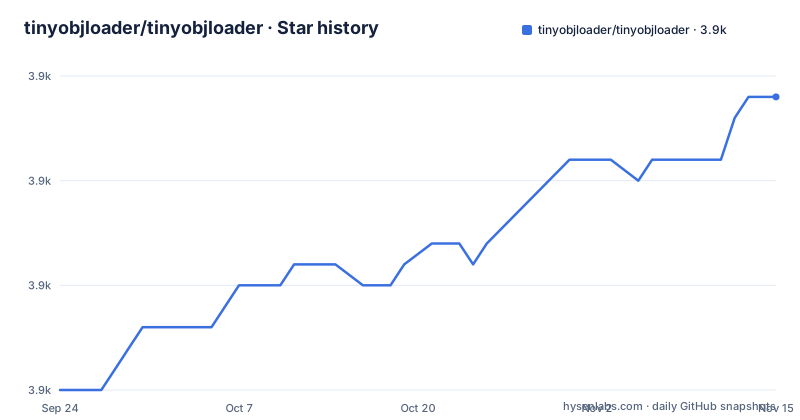
Star history
- tinyobjloader/tinyobjloader3,904 ★ · +14
| Repository | 2026-09-24 | 2026-11-15 |
|---|---|---|
| tinyobjloader/tinyobjloader | 3.9k | 3.9k |
14 Stars in the last 52 days, measured from the daily GitHub snapshot. Compare with other projects
Editorial analysis
Two loaders ship side by side, and neither is in a release tag
The repository describes itself as shipping two co-equal, independently usable implementations, and that word co-equal matters because they are not two backends for the same code.
The C++ implementation is tiny_obj_loader.h, a single-header loader with no dependency except the C++ standard library, described as parsing ten million or more polygons with moderate memory and time. It also exists as a separate .cc file in the tree for people who prefer to compile it rather than include the implementation.
The C11 implementation is tiny_obj_c.c with its headers, plus a bundled tessellation library in tobj_tess.c and tobj_tess.h. It is described as a from-scratch pure C11 loader that is secure, portable, freestanding-capable and dependency-free, and it is explicitly not header-only. There are separate _impl and _pub include files for both, so the implementation and the public declarations are kept apart in each.
Now look at the tags. The newest release is v2.0-rc1, published on 2019-06-19, before v1.0.6 in 2017 and v1.0.5 in 2016. The changelog in the readme, by contrast, has entries dated 19 Jun 2026 for the C11 loader and 22 May 2026 for an optimized in-header loader called LoadObjOpt.
So the recommended branch contains two loaders that no release contains. The version notice says to use the release branch and describes its contents as the v2.0 release candidate whose features are now nearly stable, and the Python build script falls back to a hardcoded version string of 2.0.0rc10 when it cannot read the generated one.
The primitives checklist differs between the C++ and C11 loaders
There is a table in the readme that ticks off which OBJ primitives are supported, and it is the fastest way to see what you are actually getting.
In the C++ loader, faces and lines are checked. Points, curves, 2D curves, surfaces and free-form curves and surfaces are all unticked. So a file containing point clouds or free-form geometry will have those records skipped by the C++ loader.
The pure C11 loader does not share that limitation. The readme states that it additionally supports points and free-form geometry, naming the curv, curv2 and surf records and friends, and the important qualifier is that they are parsed and retained. So the C11 loader keeps the data rather than discarding it, and the difference is not just that it does not crash on those records.
That makes the choice of implementation a format decision as much as a language decision. A C-only project embedding an OBJ loader does not lose format coverage for choosing C, and a C++ project is not obliged to lose it by staying in C++. If your input includes anything beyond faces and lines, that table is the thing to read before you pick.
Beyond the primitives, the feature list includes group parsing for multiple group names, vertex colours as an extension rather than part of the base format, texture coordinates, normals, smoothing groups, a callback API for custom loading, and double precision support for high performance computing work.
Triangulation is on by default, and the alternative is a header you copy yourself
The triangulate flag defaults to enabled, and when it is set in the tinyobj::LoadObj() arguments, polygons with four or more vertices are turned into triangles and every entry in the face-vertex-count array is filled with 3. That single rule is the whole behaviour, and it is worth knowing because the unflagged call leaves arbitrary n-gons in the data for you to handle.
The caveat is stated plainly: the built-in triangulation code may not work well in some polygon shapes. The readme does not hedge on that, and the changelog entry that added the third-party triangulator in July 2021 says as much, noting it also fixes a triangulation bug and that some issue still remains in the built-in algorithm, with an issue number given.
The fix is to define TINYOBJLOADER_USE_MAPBOX_EARCUT, which switches triangulation to the Mapbox earcut header. Two conditions come with it. You need a C++11 compiler, and you need to copy mapbox/earcut.hpp into your own project, because the header is not vendored for you by that define.
There is a third define for the case where you already ship earcut. If your project includes its own copy of mapbox/earcut.hpp, defining TINYOBJLOADER_DONOT_INCLUDE_MAPBOX_EARCUT stops the loader from including its own, which avoids two definitions of the same symbols in one translation unit.
So triangulation support is a three-way choice: the built-in code by default, earcut copied in, or your own earcut kept out of the header.
Four compile-time defines decide precision, the float parser, and where the implementation lives
The loader is configured entirely by preprocessor defines, and there are only a handful you need to know.
TINYOBJLOADER_IMPLEMENTATION is the one that trips people up. The installation note is to copy the header into your project and make sure this define appears exactly once, because the single-header form puts both the declarations and the implementation in the same file. A commented reminder in an example says the same thing: define it in only one .cc file.
TINYOBJLOADER_USE_DOUBLE switches the floating point type. The library uses a typedef called real_t for all floating point data, which defaults to 32-bit float, and defining that macro changes it to 64-bit double. The repository's own Makefile builds its example with double precision on and the language standard pinned to c++11.
TINYOBJLOADER_DISABLE_FAST_FLOAT opts out of the bundled number parser. By default the loader embeds fast_float at version 8.0.2 for roughly three times faster, bit-exact ASCII to float conversion, described as equivalent to strtod but without locale overhead. The reason to turn it off is not usually performance: the note says that if your project already includes fast_float in the fast_float namespace, defining TINYOBJLOADER_DISABLE_FAST_FLOAT avoids a redefinition conflict. The opt-out block is three lines:
#define TINYOBJLOADER_DISABLE_FAST_FLOAT
#define TINYOBJLOADER_IMPLEMENTATION
#include "tiny_obj_loader.h"
attrib_t holds the vertex data and every mesh holds only indices into it
The data model is worth understanding before writing any code against it, because the split is not where newcomers expect it.
attrib_t contains the single, linear arrays of vertex data: positions, normals and texture coordinates, three floats per vertex in each array. All the geometry in a file lives in one place, laid out flat.
Each shape_t::mesh_t then contains no vertex data at all. It contains arrays of indices pointing back into attrib_t: one array of indices into the vertices, and for each index the corresponding array index into the normals and the texture coordinates. A third array records the number of vertices per face, where 3 is a triangle, 4 a quad, and 5 or more an n-gon.
That design is what makes the memory claim possible. Ten million polygons share one vertex buffer, and a mesh that references a vertex many times costs indices rather than copies. The readme points at loader_example.cc for the details, and the whole structure is drawn out in ASCII diagrams in the data format section.
Three parsing features sit on top of that structure. Vertex colours are handled as an extension rather than as part of the base specification. A crease tag on the t record is supported and is called out as specific to OpenSubdiv and not part of the Wavefront OBJ specification. And a callback API exists for custom loading, so you can intercept parsing rather than only receiving the finished arrays.
The Makefile lint target calls a script and a header that are not in the tree
The repository root carries a Makefile, and it is small enough to read in full. There is a lint target, and it is this:
lint:
	./cpplint.py tiny_gltf_loader.h
Neither of those two files exists at the top level of the repository. There is no cpplint.py in the tree, and the loader header is named tiny_obj_loader.h, not tiny_gltf_loader.h. So the lint target is stale: it references a Python lint script and a different loader that both belong to an earlier layout of this project.
The build target does work. It compiles the example loader with g++ using the extra flags variable, double precision enabled, the c++11 standard, and debugging symbols with optimisation off:
g++ $(EXTRA_CXXFLAGS) -DTINYOBJLOADER_USE_DOUBLE=1 -std=c++11 -g -O0 -o loader_example loader_example.ccA clang++ line with -O2 is present but commented out, so switching compilers is a matter of uncommenting rather than writing anything.
The flag variable is empty by default, and two commented-out versions above it show what a stricter build looked like: one enabling address and undefined behaviour sanitizers with -Wall -Werror and -Weverything, and one with the threaded loader define TINYOBJLOADER_ENABLE_THREADED set. A comment notes that fast_float is now bundled so no separate include path is needed. The makefile is a developer convenience rather than the supported build, which is what the several other build systems in the tree suggest.
The Python wheel configuration skips cp38, free-threaded cp314 and every aarch64 build
The Python binding is built with pybind11 through setuptools, and the build configuration carries three comments that explain more than the settings themselves.
The first is about setuptools_scm, which supplies the version dynamically and writes it to python/_version.py. The requirement is pinned below version 8, with the note that version 8 or newer is not supported in the Python 3.6 cibuildwheel environment, so an older one is used for now. A commented-out line shows the newer configuration that would use a version file instead.
The second is about cibuildwheel, which has a skip list of three patterns. cp38 is skipped, most likely for that same older environment, though the file does not say so. cp314t is skipped, which is the free-threaded build of Python 3.14. And every aarch64 pattern is skipped, with the stated reason that it is too slow to build because of Docker and QEMU emulation.
The third comment explains a workaround in the packaging metadata: project URLs in the project table are described as not mature enough, so they are written into setup.py instead.
The result is that the published wheels are narrower than the platform support implies. The readme is explicit that the precompiled binary hosted on PyPI is manylinux1-x86_64 only, so an ARM Mac or an ARM Linux box is building the extension from source. The extension itself is declared with cxx_std=11 and its sources are sorted before being passed to the compiler, with a comment noting that sorting is what makes the build bit-for-bit reproducible.
Four build systems sit in one directory, and two of them are per-platform scripts
The top level of the repository is where the project's history shows. There is CMakeLists.txt with a cmake/ directory, a cmake uninstall template, and two configure templates for the installed artefacts, one for CMake config and one for a pkg-config file. There is BUILD.bazel alongside MODULE.bazel. There is the Makefile. And there is premake4.lua.
Then there is the Python side, with pyproject.toml, setup.py and MANIFEST.in, and two platform scripts whose names tell you what they are for: a shell script for bootstrapping CMake on Linux with Python, which misspells python in its own filename, and vcsetup.bat for Visual Studio.
Some other entries are worth knowing about. A build.ninja file is committed, which is normally a generated artefact. deps/ holds third-party code, mapbox/ holds the earcut header, and there are directories named experimental/, fuzzer/, sandbox/ and tools/, which is a reasonable description of where unfinished work and build tooling live in a library like this.
There is also a .drone.yml at the top level, so continuous integration runs on Drone rather than on a hosted workflow service, and .clang-format for formatting. The examples directory holds five sample programs: an OpenGL viewer, a callback API example, a voxelizer, an obj stitcher and a skin weight example.
The one visible gap in the packaging story is in the readme's own todo list: fix the obj stitcher example, and add more unit test code.
Editorial conclusion
tinyobjloader fits a renderer or tool that needs to read OBJ and MTL files without taking on a mesh library, and especially a freestanding or C-only project where a header-only C++ library is not an option. It does not fit a pipeline that pins release tags, because the newest tag is from 2019 and the two loaders described in the readme exist only on the branch. Before you build on it, decide which implementation you want, since their format coverage differs, and if you use the built-in triangulator on arbitrary polygons read the caveat, because the alternative requires you to copy a third-party header into your own tree.
Frequently asked questions
What is a .OBJ file, and what does tinyobjloader do with one?
It is the Wavefront OBJ geometry format, and tinyobjloader loads OBJ and MTL files through either a single-header C++11 loader or a pure C11 loader. Faces and lines are supported by both, and the project describes itself as good for embedding an OBJ loader into a renderer.
How do I use tinyobjloader in my own project?
Copy the header into your project and make sure TINYOBJLOADER_IMPLEMENTATION is defined exactly once, in a single translation unit. The entry point is tinyobj::LoadObj(), whose triangulate argument is on by default, and an optimized in-header loader named LoadObjOpt is available with optional multithreading and SIMD.
How do I install tinyobjloader?
The C++ side is a single header you copy into your project rather than something to install, and the C11 side is tiny_obj_c.c with its headers plus the bundled tobj_tess tessellation library. There is also a Python binding on PyPI as tinyobjloader, built with pybind11, where the precompiled binary is manylinux1-x86_64 only.
What does tinyobjloader support beyond triangle faces?
Lines and faces are checked off. Points, curves, 2D curves, surfaces and free-form geometry are listed as unsupported in the C++ loader, though the pure C11 loader additionally supports points and free-form geometry such as curv, curv2 and surf, which it parses and retains.
Does tinyobjloader support double precision?
Yes. Floating point data uses a real_t type that defaults to 32-bit float, and defining TINYOBJLOADER_USE_DOUBLE switches it to 64-bit double. Double precision support is listed among the features, described as being for high performance computing applications.
Official sources
Add this badge to your README
If you maintain this project, the badge below links readers to this analysis and shows its maintenance status from the daily GitHub snapshot. Paste the markdown into your README; add ?metric=license or ?metric=stars to the image URL for a different field.

[](https://hysenlabs.com/projects/tinyobjloader-tinyobjloader)Star history chart for your README
[](https://hysenlabs.com/projects/tinyobjloader-tinyobjloader)Was this useful?